
SQL 2026 Rank: #1653
Jam SQL Studio ✓
AI-native SQL IDE for macOS, Windows, and Linux.
Verdict
A quick read before you dig into the full page.
- Best if
- AI-native SQL IDE for macOS, Windows, and Linux
- Skip if
- Lacks mobile support
- Pick this when
- Cross-platform SQL IDE
Considering Text2SQL.ai instead? Compare side by side
Overview
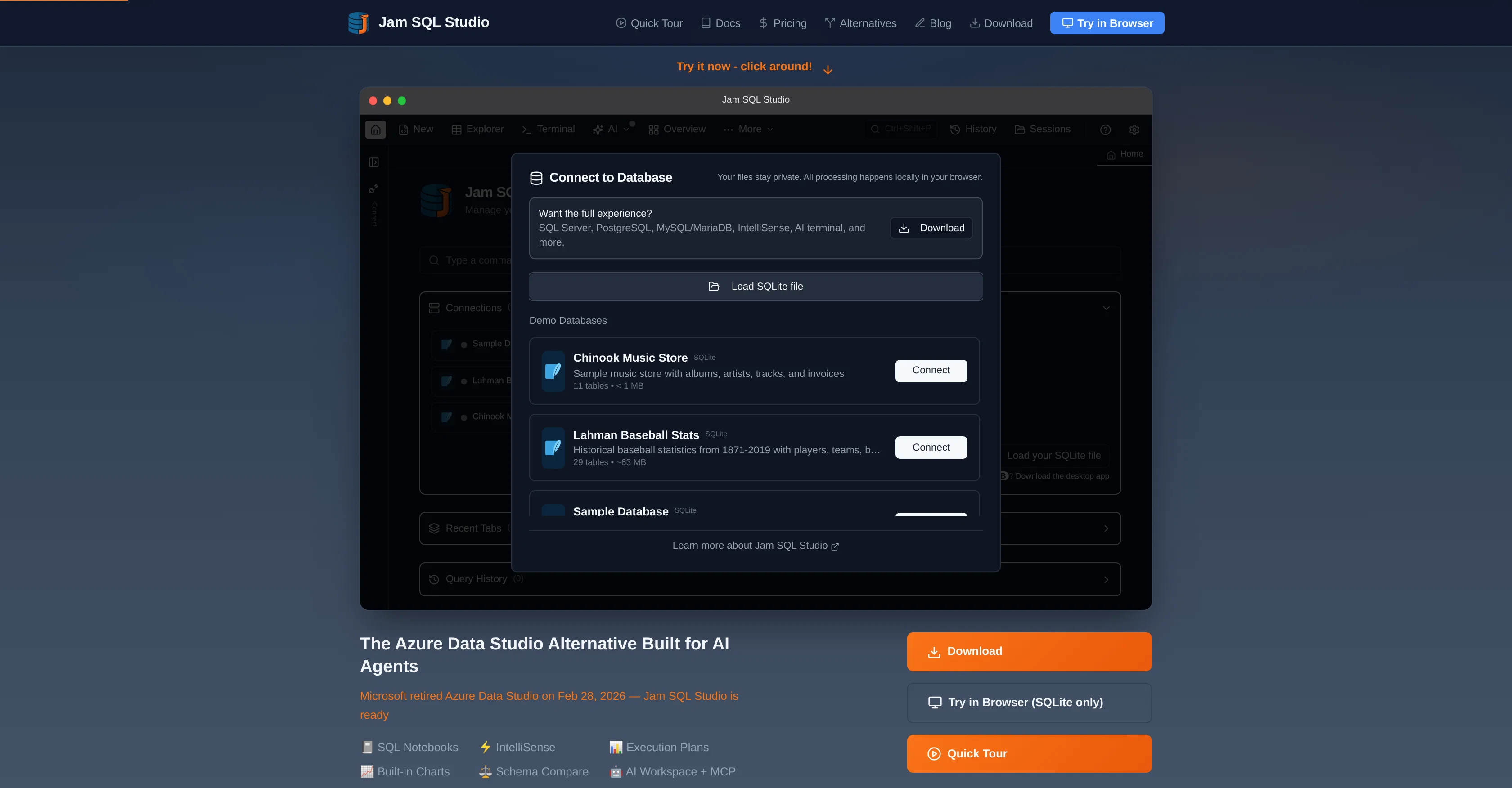
Jam SQL Studio is an artificial intelligence-centric, cross-platform SQL integrated development environment (IDE). Designed as an alternative to the retired Azure Data Studio, it features IntelIiSense, execution plans, schema compare, and safe AI agent tooling via Model Context Protocol (MCP).
This tool supports a variety of database types including SQL Server, PostgreSQL, MySQL, Oracle, SQLite, and Azure SQL. Notable features include SQL notebooks (.ipynb), built-in charting and execution plan visualization, data comparison, and DBA tools (sessions, performance).
Jam SQL Studio also comes equipped with a modern user interface inclusive of classic keyboard shortcuts inherent from SSMS and Azure Data Studio. The tool shows remarkable compatibility with macOS, Windows, and Linux operating systems.
A standout element is its AI workspace integration, which promotes ease of coding for AI agents. It also allows easy transitioning from Azure Data Studio with straightforward migration instructions and features that enable the transfer of SQL scripts and database connection credentials.
Other notable features include context-aware code completion, table explorer for seamless data browsing and editing, visual schema overview, and script generation among others.
Most importantly, Jam SQL Studio requires no account creation for usage and it provides a free trial for new users.
Access & connections
Where you can use Jam SQL Studio, and what it plugs into.
Platforms
Integrations
Capabilities
What this tool accepts, produces, and is strongest at.
Input
- API
- Code
- Tabular
Output
- Code
- Tabular
- API
Highlights
- Agents
- MCP
- Local
Supported features
- IDE
- SQL
- Code Assistant
- Agents
- MCP
- Integrations
- Runs Locally
- Assistant
Pros & cons
Pros
- Cross-platform SQL IDE
- Alternative to Azure Data Studio
- Integrated IntelliSense
- Execution plan feature
- Schema compare function
- Built-in charting capabilities
- Local Model Context Protocol
- Supports variety of databases
Show 41 more
- SQL notebooks feature
- Data comparison tool
- Built-in DBA tools
- Seamless migration from Azure Data Studio
- No account setup requirement
- Visual schema overview
- Table explorer for data management
- Foreign key navigation
- Script generation function
- Free trial available
- Classic keyboard shortcuts integration
- Context-aware code completion
- Modern user interface
- CLI Integrated
- Execution Plan Visualization
- Data Compare feature
- Command Palette
- Session Persistence
- Entra ID Authentication
- SQL Snippets
- Transaction Management
- Data Export
- Backup and Restore function
- Integrated Terminal
- Schema Compare
- Data Compare
- Clone Database and Table feature
- Dependency Viewer
- DBA Dashboard
- Session Browser
- Integrated Claude Code CLI
- No Extra API keys
- Active Connection Info
- Database Schema Info
- Auto-generated context files
- DataGrip Limited Feature
- JavaScript cells with Markdown
- Real-time syntax checks
- Email alert system
- Intuitive interface
- Runs on SQLite
Cons
- Lacks mobile support
- No multi-language programming support
- Lacks real-time collaboration
- Requires downloads
- No live chat support
- No cloud version available
- No community forums
- Doesn't support non-relational databases
Show 2 more
- No API for external integrations
- Doesn't support bulk import/export
Compare alternatives
Similar tools in the catalog — with a clear reason to open each one.

Text2SQL.ai ✓
Free TrialGenerate SQL queries from natural language with AI
Why look Typically cheaper
Full comparison
AI2SQL ✓
Free TrialBuild SQL queries effortlessly with AI assistance.
Free + from $19/mo
Full comparison
SQLAI.ai ✓
Free TrialBuild SQL queries instantly with AI
Why look Typically cheaper
Full comparison
AI Query ✓
FreemiumGenerate error-free SQL queries from English prompts.
Free + from $100/yr
Full comparison
BlazeSQL ✓
Free TrialAI-powered SQL query generator for effortless database queries.
Why look Higher community rating
Full comparisonReleases 1
FAQ 12
What is Jam SQL Studio?
What are the main features of Jam SQL Studio?
Can I use Jam SQL Studio on my operating system?
What databases are compatible with Jam SQL Studio?
What is IntelliSense in Jam SQL Studio?
What is the Local Model Context Protocol (MCP) server in Jam SQL Studio?
What are the built-in charting capabilities in Jam SQL Studio?
Does Jam SQL Studio offer migration from Azure Data Studio?
How does Jam SQL Studio enhance user productivity?
What additional features does Jam SQL Studio provide for database management?
What is the function of AI workspace in Jam SQL Studio?
What kind of advanced features are included in Jam SQL Studio?
Related tools
Recommended

Vertech Academy ✓
Free TrialPre-built AI study workflows that outperform raw ChatGPT prompts.

Pippit AI ✓
FreemiumOne-click AI videos from product links.

SkimNews ✓
FreeThe news. Without the noise.

Framehouse Design ✓
Free TrialAI interior design for any room.

AI Effect.Art ✓
PaidTurn photos into viral AI videos with templates.

Listing Pro AI ✓
Free TrialAI generates property listings in 60 seconds.