
Incredible ✓
Make your team absurdly productive with superintelligence
Verdict
A quick read before you dig into the full page.
- Best if
- You are productivity professionals and need: Automating tasks across hundreds of applications
- Skip if
- Invite-only beta, you can't just sign up and start
- Pick this when
- Voice-first and genuinely fast: hold a key, say the task, keep working
Considering VoicePod instead? Compare side by side
Overview


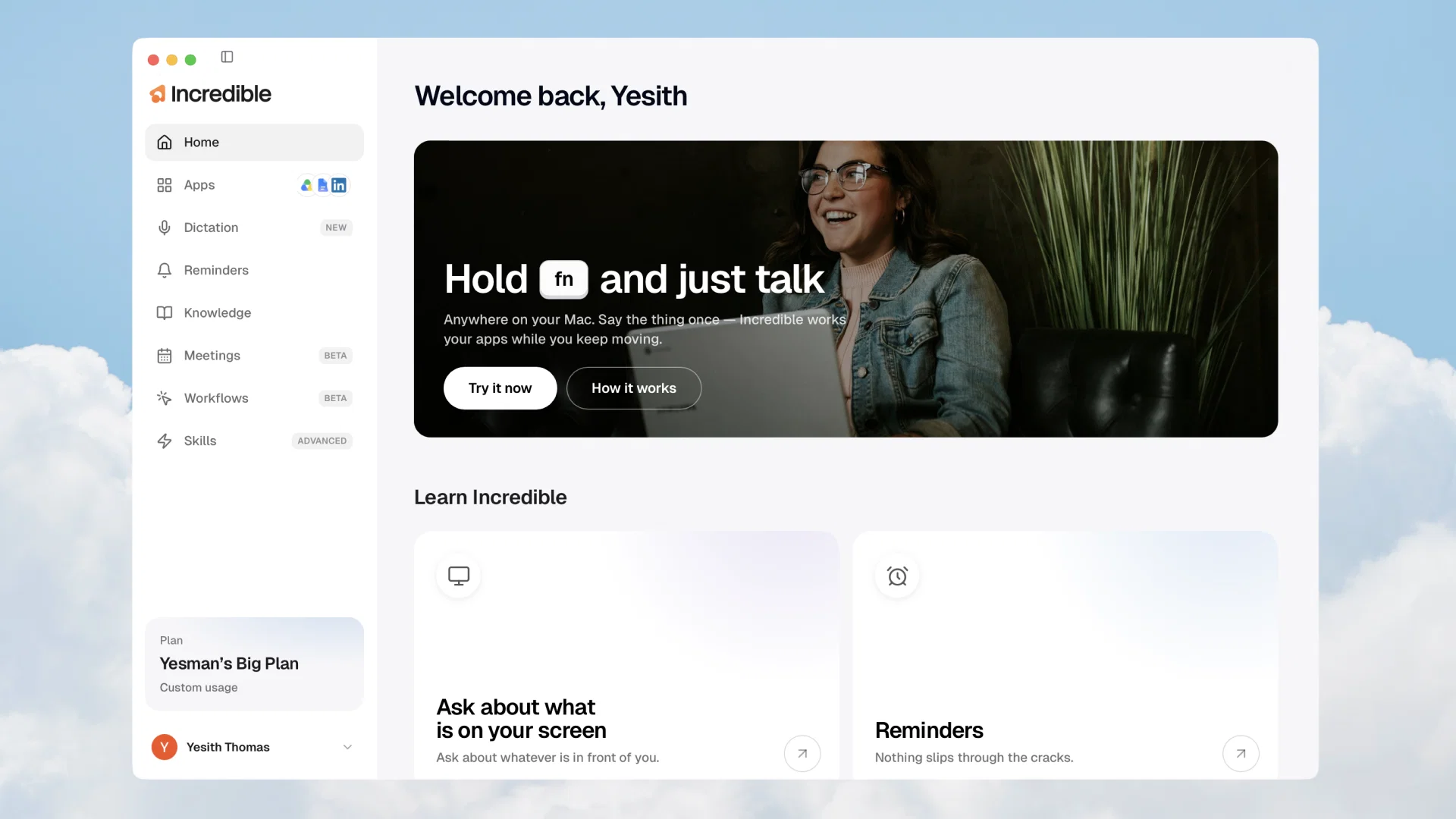
Incredible is an AI voice assistant for Mac and Windows. Hold a hotkey anywhere, talk the way you'd brief a coworker, and it gets the job done across your apps, your files, and whatever's on your screen.
Send the Slack message, book the meeting, update the doc, pull pricing off a website. It works across 3,000+ connected apps like Slack, Gmail, Google Calendar, Notion, Salesforce, and LinkedIn.
Ask about anything on your screen and it reads the context itself, no explaining needed. Dictate into any text field and get clean, punctuated writing with filler words removed.
Record calls on Zoom, Meet, and Teams and get per-speaker transcripts, summaries, and action items you can ask questions about later. Teach it your recurring tasks by recording yourself once, then have it run them on demand.
It works in around 30 languages and switches automatically. And it's private by design: the mic opens only while you hold the key, with no wake word and no always-on listening.
Best for
Short scenarios where Incredible tends to shine.
-
Automating tasks across hundreds of applications
Best for Productivity professionals
-
Brainstorming ideas
Best for Project managers
-
Managing social media content and tasks
Best for Social media managers
-
Organizing and processing files
Best for Data analysts
-
Assisting with project planning
Best for Office administrators
-
Working with spreadsheets for data analysis or entry
Best for Anyone seeking to automate workflows across multiple applications
Example outputs 1
Sample generations and before/after results for Incredible.
Access & connections
Where you can use Incredible, and what it plugs into.
Platforms
Integrations
Capabilities
What this tool accepts, produces, and is strongest at.
Input
- Text
- Audio
Output
- Audio
- Text
- Image
Highlights
- Agents
Supported features
- Automation
- Agents
- Assistant
- Meeting Intelligence
Pros & cons
Pros
- Voice-first and genuinely fast: hold a key, say the task, keep working
- Works across 3,000+ apps including Slack, Gmail, Salesforce, SAP, Notion
- Teach it workflows by showing it once, no setup wizards or form builders
- Sees your screen, so it has context without you explaining anything
- Asks for approval before sending, paying, or deleting anything
- Meeting recorder, reminders, dictation, and knowledge base bundled in one tool
- No technical skill needed, usable by the whole team from day one
- Strong compliance story: SOC 2 Type 2, ISO 27001, GDPR, no training on your data
Show 2 more
- Memory that compounds, it learns your preferences and shortcuts over time
- Runs on both macOS and Windows
Cons
- Invite-only beta, you can't just sign up and start
- Desktop app only, no mobile or web version
- Voice-first interaction takes adjustment if you're used to typing everything
- Workflows feature is still in beta
- Newer product from a small team, less battle-tested than Copilot or ChatGPT
- Full value requires connecting your apps, which needs some initial trust and setup
Compare alternatives
Similar tools in the catalog — with a clear reason to open each one.
VoicePod ✓
Free TrialTransform your business with AI voice automation.
Free + from $119/mo
Full comparison
Alexa ✓
UnknownYour voice assistant everywhere, seamlessly synchronized.
No pricing
Full comparison
Klariqo: AI Voice Assistants ✓
Free TrialAI Voice Agents for Pay per Call Agencies, Call Centers & BPOs
Free + from $150/mo
Full comparison
AI Voice Assistant ✓
PaidYour personal AI voice assistant, smarter than ever.
Why look Typically cheaper
Full comparisonPeople also view
Tools that often show up alongside Incredible in collections and comparisons.
VoicePod ✓
Free TrialTransform your business with AI voice automation.

PolyAI Voice Assistant ✓
UnknownThe world's only customer-led conversational platform for enterprise.

Mia AI ✓
UnknownYour voice AI companion
Klariqo: AI Voice Assistants ✓
Free TrialAI Voice Agents for Pay per Call Agencies, Call Centers & BPOs
Alexa ✓
UnknownYour voice assistant everywhere, seamlessly synchronized.
AI Voice Assistant ✓
PaidYour personal AI voice assistant, smarter than ever.

Voiact ✓
FreemiumThe only AI assistant that runs your Trello through voice and chat

VocaIQ ✓
PaidYour front desk, sales team, and dispatch. Reimagined with AI.
Releases 1
Imported reviews 6
Super easy to get started and the agents just work in the background all on their own! 100% value for buck!
Great automation tool and really easy to use!
super reliable and fast to build agents that automate in the background for me! i like the daily *help me prep for my meetings* agent alot!
Very cool tool. The process of AI Agents creation is very simple and straightforward.
You explain what you want to do, and the system guides you by talking to you. Then you connect your accounts and test the agent.
One of the easiest ways to create agents and set up some automations.
Very reliable, I always have the auto accept feature on for my agents. Connected it to my Notion database where I store my customers and it automatically does follow-ups after meetings for me with actions to the participants :)
Being a automation tool that is functional and at the same time being easy to understand
FAQ 12
What is the Incredible Deep Work AI Agents?
🛠️ 1
tool
wrote:
Incredible Deep Work AI Agents is a sophisticated technology designed to construct AI workers that function incessantly to mechanize regular tasks, powered by an advanced AI engine, Agent MAX. This AI tool positions itself uniquely in the realm of autonomous activity, offering user-centered resolutions.
What does Agent MAX in Incredible Deep Work AI Agents do?
🛠️ 1
tool
wrote:
Agent MAX is the engine that powers the Incredible.one Deep Work AI Agents. It functions to foster an ambiance for independent work making the automation of repetitive tasks feasible, thus rendering the Deep Work AI Agents more beneficial.
How does the Deep Work AI Agents manage 'hallucinations'?
Can Deep Work AI Agents handle large volumes of data without mistakes?
How does Deep Work AI Agents improve work efficiency?
What tasks can be automated using the Deep Work AI Agents?
How does Deep Work AI Agents foster an environment for autonomous work?
What are the integration capabilities of the Deep Work AI Agents?
How does Deep Work AI Agents handle complex tasks?
What does '100x memory' refer to in the context of Deep Work AI Agents?
What does 'user-oriented solutions' imply in the context of Deep Work AI Agents?
How does Deep Work AI Agents reduce errors?
Related tools
Recommended

TheLibrarian.io ✓
Free TrialYour WhatsApp AI assistant for instant productivity.

Tendem ✓
PaidAI + Human Agent to get tasks done

Notis ✓
Free TrialThe first WhatsApp assistant that runs on your ChatGPT and Claude subscriptions

Alice - AI Automation App ✓
Free TrialStop chatting. Start doing.

Raccoon AI ✓
FreemiumThe AI Coworker for Apps, Research, Docs & Everything Else

ChatGPT ✓
FreemiumAsk anything, create anything, and move from idea to action.