

Customer engagement v2.5.0
HitWit ✓
Bring an AI product expert to *every* customer interaction
Free + from $20
Verdict
A quick read before you dig into the full page.
- Best if
- Bring an AI product expert to *every* customer interaction
- Skip if
- Learning app is opinionated, so it is not up to the learner what to do next
- Pick this when
- Easy to convert docs to animated podcasts
Considering nuhello instead? Compare side by side
Overview


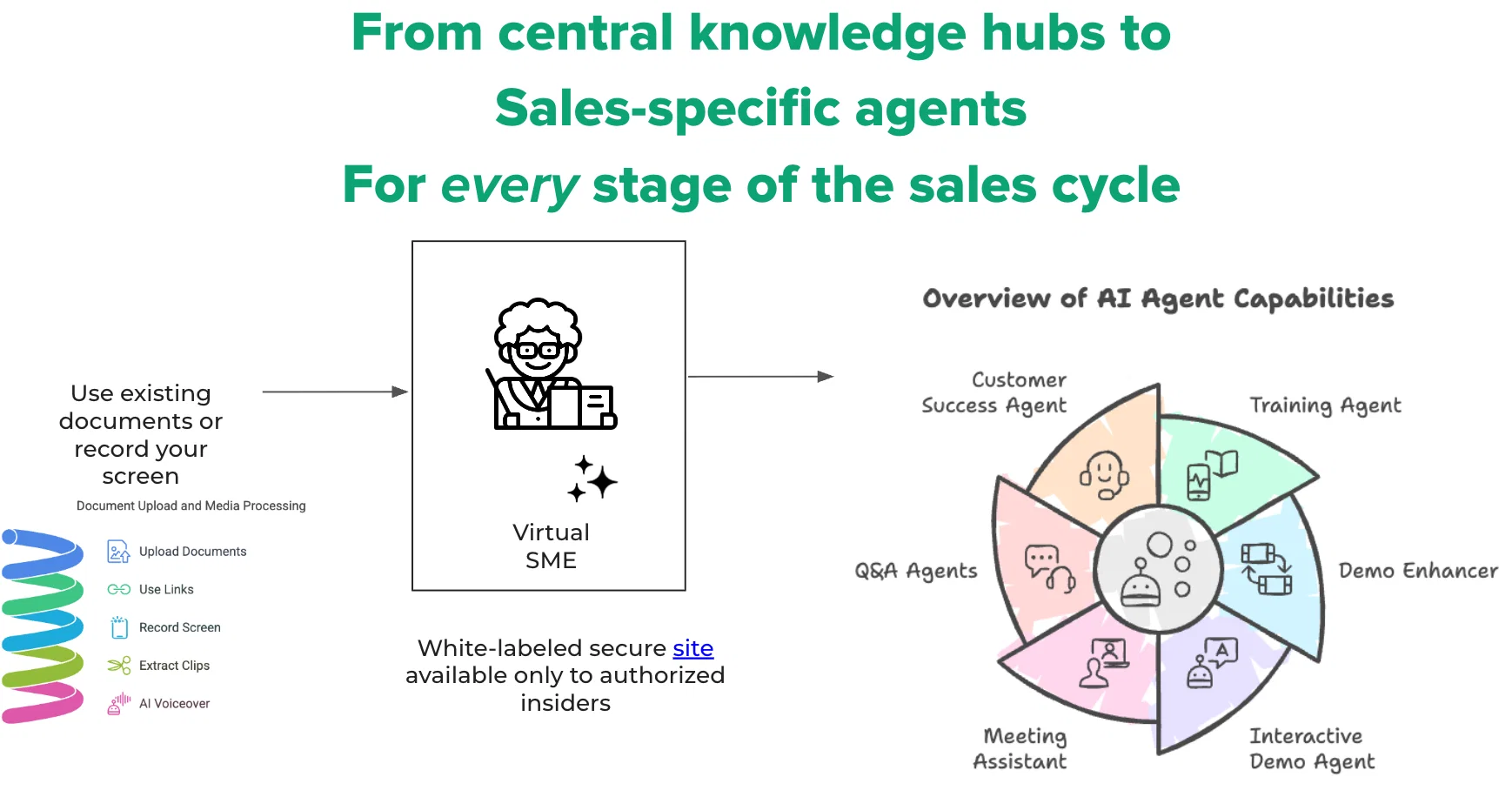
Make each customer interaction count by bringing a product expert to every step of the sales cycle.
Just enter your company email id to try out an embeddable widget, and a Q&A site from your public data.
Talk to sales to get other features including scientifically designed sales training, interactive video demos and enterprise integrations
- Creates A Default Knowledge Base From Your Public Data Including Youtube Videos
- Creates An Embeddable Widget Which Answers Questions And Shows Relevant Video Content, With Timestamps
- Collects Configurable Information From Website Visitors And App Users For You To Retarget Them Later For Conversion / Resolution
- Surfaces Unanswered Questions To Help You Update Your Kb
- Creates Scientifically Designed Interactive Training For Your Sales Reps And Sales Engineers
- Creates Interactive Discovery Demos To Show Off Your Features And Collect Lead-qualifying Information
- Integrates With Slack And Teams For Q&a
- Joins Live Zoom And Teams Meetings To Provide Suggestions Visible Only To The Sales Rep, While Also Taking Notes
Best for
Short scenarios where HitWit tends to shine.
-
Bring an AI product expert to *every* customer interaction
Example outputs 1
Sample generations and before/after results for HitWit.
Access & connections
Where you can use HitWit, and what it plugs into.
Platforms
Capabilities
What this tool accepts, produces, and is strongest at.
Input
- Tabular
- Image
- Text
- Video
- Audio
Output
- Audio
- Video
- Text
- Image
Highlights
- Agents
Supported features
- Agents
Pros & cons
Pros
- Easy to convert docs to animated podcasts
- Easy to record the screen and get an AI-narrated video
- Allows grouping docs to knowledge bases
- Easy to share a Q&A site, and track engagement
- Q&A site doesn't hallucinate, just says "no context found"
- Instead calls out unanswered questions for authors to fill gaps
- Design and release interactive lessons promoting critical thinking and metacognition
- Near full LMS functionality, including course assignment and usage tracking
Show 3 more
- "Role play" assessment allows talking to an AI student and getting instant feedback
- Automatically generates flashcards and repeats them for retention
- Quest-based learning has gamified elements such as coins and awards
Cons
- Free trial is limited to a small number of documents and lessons.
- Upgrade doesn't happen on the app. Needs an email to the team
- Learning app is opinionated, so it is not up to the learner what to do next
- Files require manual upload
- Only supports English language sources and audio
- Video generation is limited to animated mindmap
Compare alternatives
Similar tools in the catalog — with a clear reason to open each one.

nuhello ✓
FreemiumFix customer service and rank higher on Google 8x faster.
Why look Offers a public API
Full comparison
Perspective AI ✓
Free TrialAI conversations that replace forms and surveys.
Free + from $49
Full comparison
Telegram CRM - TGDesk ✓
FreemiumThe ultimate AI-powered Telegram CRM.
Free + from $49.99/mo
Full comparisonPeople also view
Tools that often show up alongside HitWit in collections and comparisons.
Telegram CRM - TGDesk ✓
FreemiumThe ultimate AI-powered Telegram CRM.
Perspective AI ✓
Free TrialAI conversations that replace forms and surveys.

Drift ✓
PaidPersonalize customer conversations across the buyer's journey.

Conversagent ✓
Free TrialAI-powered customer service for ecommerce stores.
nuhello ✓
FreemiumFix customer service and rank higher on Google 8x faster.

SmartTalk ✓
FreemiumAI automates your WhatsApp customer responses.

Sideconvo ✓
PaidAI that makes your website talk to visitors.

Pencil'd ✓
PaidCalls
Releases 3
This version creates AI agents for your company based on public domain data. Just enter your company email id and try customer engagement and internal Q&A agents. Call us to buy, with pay-per-use plans starting at $20
The new version includes the ability to upload and enhance documents, record videos and enhance them, collate sources into knowledge bases and publish them for Q&A by colleagues and customers
Imported reviews 12
This is a great tool! I have a question. The first time I created an Interactive Lesson, the published result had a transcript of the podcast which interacted simultaneously with the mindmap. After navigating out of that window, I can't access this again. Is there a way to access it? Currently it only shows an outline, the podcast and mindmap with no transcript or mindmap interactivity.
unique tool to understand any topic of study, the focus meter is good, mindmaps also are good, only issue is session ends abruptly sometimes and i havent yet tried how to go back to previous sessions
UX was surprisingly good, though did not make use of the flashcards as did not understand how to use the feature. The information given was clear, concise and easy to digest.
Wonderful user experience to learn concepts backed with hard facts! I love that it is supported by learning scientist research and has a well-crafted UX. Creative usage for multimodal generative AI
Used hitwit.ai to learn about differences between CRISPR and traditional GMO technologies. Learning plan it generated was good and lead to right search items leading to a learning session experience as opposed to browsing the topic.
Nicely done! Topics are coherently explained and succinctly summarized.
The 10 minute sessions ensure that heavy topics are broken down into bite-sized chunks for consumption, preventing an information overload.
Also prevents wearing out the learners. Review sessions are also great and help in maintaining continuity between sessions.
Clean UI.
The AI adapts seamlessly, ensuring lessons match your pace and preferences. Whether you're a student, professional, or simply curious, it's a must-try for a captivating and inspiring educational adventure.
HitWit.ai transformed my learning! Adaptive features and a sleek UI supercharged my study sessions. A must for effective studying!
Deep Learn Anything is an exceptional app that serves as a gateway to boundless knowledge. Its user-friendly interface and comprehensive content make learning an enjoyable and enriching experience, empowering users to delve deep into a myriad of subjects with ease.
Really impressed with this AI learning app! It's got a smart way of breaking down topics with targeted questions, making learning a breeze. The 10-minute sessions are convenient, and it's like having a helpful study buddy. Worth checking out if you want a practical approach to understanding complex subjects.
HitWit.ai provides an outstanding learning experience. Its user-friendly interface, bite-sized modules, and adaptive technology make learning accessible and enjoyable. Love learning on the go!!
Very innovative way to learn new concepts, Interesting.
FAQ 12
What is HitWit?
Dashboard: Provides access for admins and authors to manage users and content.
Knowledge Bases: Users can upload documents and group them into knowledge bases, which serve as repositories for Q&A.
Interactive Learning: Users can create lessons from knowledge bases, structured as quests that guide learners through key concepts.
Access Methods: Learners can ask questions via the HitWit web app, Slack channels, or the HitWit Chrome extension, receiving answers based on the most relevant documents in the knowledge base.
User Roles: Admins can manage the platform, while regular users can learn and ask questions. Overall, HitWit aims to enhance organizational learning by making expertise accessible in various formats.
What options are available for adding a document to a knowledge base in HitWit?
Upload Documents: Start by uploading documents directly from your local computer. HitWit supports various file formats, including PDFs, Word documents, and videos.
Link External Content: You can also add links to external content, such as web links or Google Drive files, as long as they are accessible to third-party services.
Select Documents for Knowledge Base: When creating a knowledge base, you can select the documents you want to include from your uploaded files. You can group related documents together to form a cohesive knowledge base.
Add to Pre-Populated Knowledge Base: If you have an existing knowledge base, you can add more source documents to it as needed.
Drag and Drop: For convenience, you can drag and drop files into the upload area to add them to your knowledge base.
What is a concept map?
Guidance: It helps learners ask relevant questions about a topic, especially when they are unfamiliar with it.
Relationship Mapping: It aids in understanding how different concepts are related, which is crucial for critical thinking and deeper learning.
Interactive Learning: In educational settings, concept maps can be used to track progress, where concepts can be marked as 'gold' when fully explored through questions and answers.
Synthesis: After learning, concept maps can assist in synthesizing information, allowing learners to visualize what they have learned and how it connects to other knowledge
How do I upload video files?
Access the Upload Section: Navigate to the document management area in the HitWit admin dashboard.
Select Upload Option: Click on the 'Upload' button to initiate the upload process.
Choose Your File: You can either drag and drop your video file into the designated area or click to browse your local computer for the file.
Supported Formats: Ensure your video file is in a supported format, as the system accepts most common file types.
Upload Multiple Files: If needed, you can upload multiple video files simultaneously.
Wait for Processing: After uploading, the system will process the file, which may take a few seconds.
Confirmation: Once the upload is complete, you will receive a confirmation, and the system may generate additional content related to the video.
Finalize: After processing, you can manage the uploaded video as needed.
Can HitWit create mindmaps and charts to visualize my learning process?
Does HitWit provide quizzes for retention?
What is the interactive, conversational approach in HitWit?
How does HitWit work as a tutor?
Does HitWit support user-guided learning paths?
How does HitWit enable continuous learning?
What are Fit scores in HitWit?
Can HitWit help me understand and engage with AI capabilities?
Related tools
Recommended

Kin - Personal AI Advisors ✓
FreePrivacy-first & designed your for mind, and life at work

Mindsmith ✓
FreemiumPlatform for building and sharing eLearning content

TutorAI ✓
FreemiumInstant knowledge on any topic

VenturusAI ✓
FreemiumBusiness idea analysis and reporting.

LearningStudioAI ✓
Free TrialAI-powered authoring tool for effortless online course creation.

Scisummary ✓
Free TrialCutting-edge scientific articles summarization.