

Verdict
A quick read before you dig into the full page.
- Best if
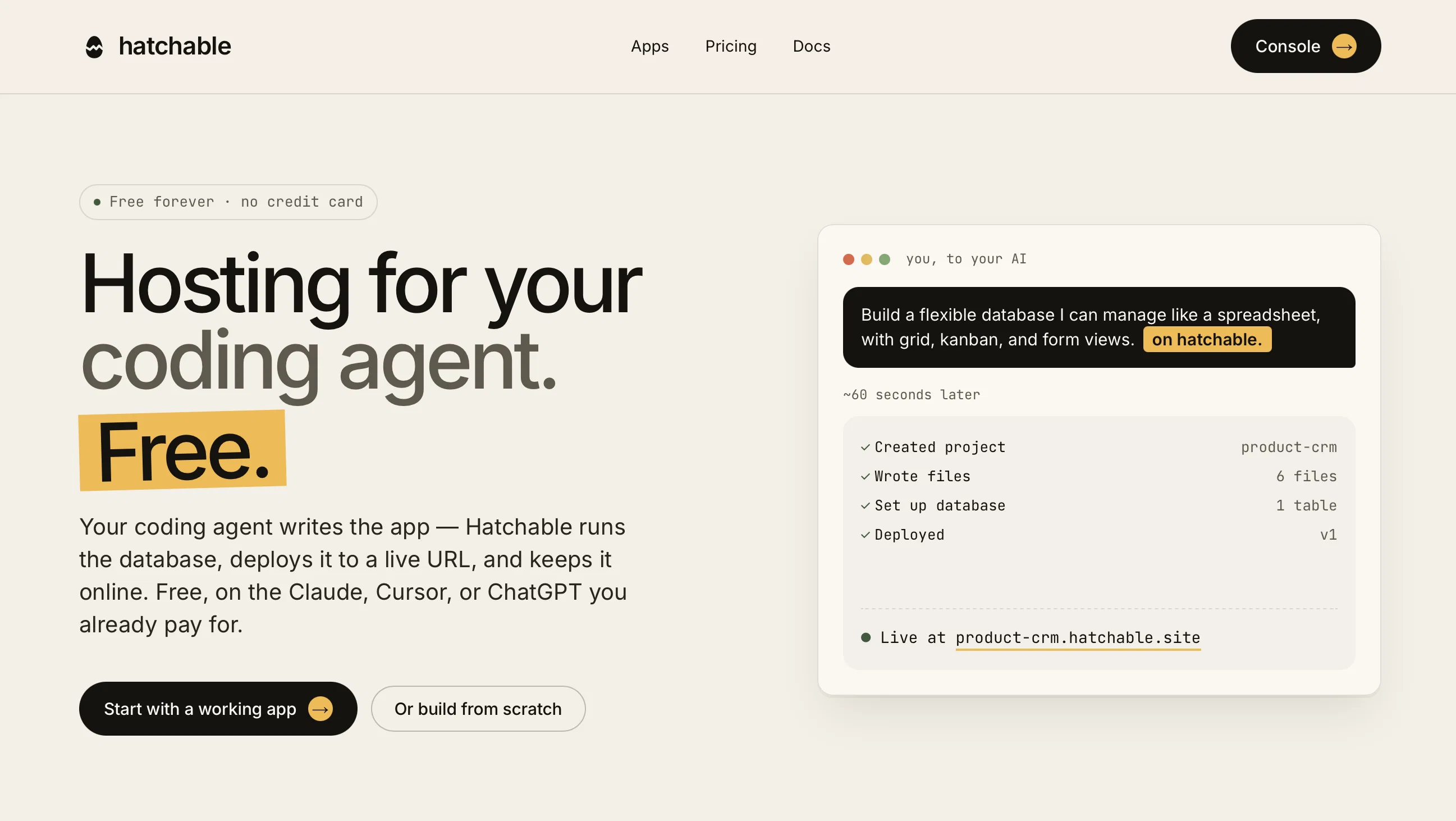
- Hosting for your coding agent. Free
- Skip if
- Limited control on infrastructure
- Pick this when
- Free app hosting
Considering Whacka instead? Compare side by side
Overview
The workflow is dead simple. Connect Hatchable to your AI once (it speaks MCP, so it's a single approval), then describe what you want and add "on Hatchable." Your assistant writes the whole app — and instead of leaving you with code stuck on your laptop, it ships it to a real, shareable URL. A database, user auth, file storage, and scheduled jobs come included and wired up for you. No build step, no Vercel project, no Docker, no servers. Edit a file, it's live.
What makes it different:
Bring your own AI — no per-prompt fees. Use the subscription and model you already have. Hatchable just hosts the result.
It actually deploys. Most AI builders write code and stop. Hatchable closes the gap from "it builds on my machine" to "it's online" — in one prompt.
Your code stays yours. Every project is real, editable source with one-click GitHub export. No lock-in.
Batteries included, free to start. A live URL, database, and auth on the free tier — no credit card.
Start from a finished app. Fork a working app from the marketplace — a CRM, a link-in-bio, a form builder — and tell your AI to make it yours.
Best for
Short scenarios where Hatchable tends to shine.
-
Hosting for your coding agent. Free.
Example outputs 1
Sample generations and before/after results for Hatchable.
Access & connections
Where you can use Hatchable, and what it plugs into.
Platforms
Capabilities
What this tool accepts, produces, and is strongest at.
Input
- Tabular
- Text
Output
- Code
Highlights
- Agents
- API
- MCP
Supported features
- Agents
- API
- MCP
- Instant file search
Pros & cons
Pros
- Free app hosting
- Supports full-stack apps
- Generates real, shareable URL
- No server management
- Integrated database
- User login included
- Transactional email setup
- File storage ready
Show 33 more
- Scheduled jobs functionality
- No additional model fees
- Continuous application modification
- Provides working app templates
- Isolated app database and infrastructure
- custom applications
- High Integration
- Streamlined development
- Supports Claude, ChatGPT, Cursor
- Custom domains for Pro Plan
- Public publishing for Pro Plan
- No setup fees
- Supports semantic search
- Allows for app customization
- No per-prediction fees
- Integrated Email service
- Global CDN file storage
- Real SQL database
- Automatic user scoping
- One-time connector setup
- One bill for all service
- Changeable app functionality
- App marketplace for creators
- Personal, Pro and App tiers
- Unlimited projects for Personal tier
- Auto-SSL for Pro tier
- High-traffic handling for App tier
- Separate app pricing in market place
- No throttle for heavy traffic sites
- Unlimited project forks and remixes
- Pre-built apps for modification
- No individual service integration
- No time requirement for app deployment
Cons
- Possible interoperability issues
- Limited control on infrastructure
- Possible downtime risks
- Non-unique subdomain in free version
- No native mobile app support
- Requires internet connectivity
- May face scalability issues
Compare alternatives
Similar tools in the catalog — with a clear reason to open each one.

Whacka ✓
Free TrialTurn ideas into real apps from your phone.
Why look Typically cheaper
Full comparison
AppDeploy ✓
FreeDeploy real apps directly from ChatGPT or Claude
Why look Fully free option
Full comparison
Anything - AI App Builder ✓
FreemiumTurn your words into apps, sites, and products.
Why look Higher community rating
Full comparison


People also view
Tools that often show up alongside Hatchable in collections and comparisons.

WebsitePublisher AI ✓
FreemiumYour AI builds a full app, right from your phone

Claude ✓
FreemiumBuilding reliable, interpretable AI systems
Whacka ✓
Free TrialTurn ideas into real apps from your phone.

Vtuber Assistant ✓
PaidYour AI VTuber co-host that actually pays attention.

Team Pulse ✓
FreemiumProject management with no PhD required.

cutedyno.com ✓
FreemiumGenerate websites from prompts, keep editing and shipping.

Scavio AI ✓
FreemiumOne API to search every platform.

MiniMax Agent ✓
Free TrialYour AI supercompanion for enhanced creativity and productivity.
Releases 1
FAQ 12
What is Hatchable's primary function?
How does Hatchable's AI co-pilot work?
How is building an app from scratch with Hatchable different from customizing a pre-built one?
Is there a cost for using Hatchable, or is it available for free on Claude, Cursor or ChatGPT?
What features are integrated with Hatchable to ensure efficient project implementation?
What's the process for setting up and deploying an app using Hatchable?
What customization options does Hatchable offer while creating apps?
Can the AI adjust the app's schema even after going live?
How does the continuous AI integration work post-deployment?
What platforms or services can Hatchable so far be used on?
Does Hatchable support real-time app modification?
How diverse is the catalogue of apps developed on Hatchable by real creators?
Related tools
Recommended

Chattee AI App Builder ✓
Free TrialTurn ideas into full-stack apps instantly with GDPR-compliant builder.
Axey ✓
FreemiumYour all-in-one AI partner

Primio ✓
FreemiumBuild Flutter apps from text with AI.
Claude ✓
FreemiumBuilding reliable, interpretable AI systems

Cursor ✓
FreemiumAI-powered IDE for faster coding

Base44 ✓
FreemiumLet’s make your dream a reality. Right now.