

Flashback ✓
Turn course material into AI-powered study sessions.
Free + from $9/mo
Verdict
A quick read before you dig into the full page.
- Best if
- Turn course material into AI-powered study sessions
- Skip if
- Could struggle with complex topics
- Pick this when
- Generates flashcards
Considering Thea instead? Compare side by side
Overview
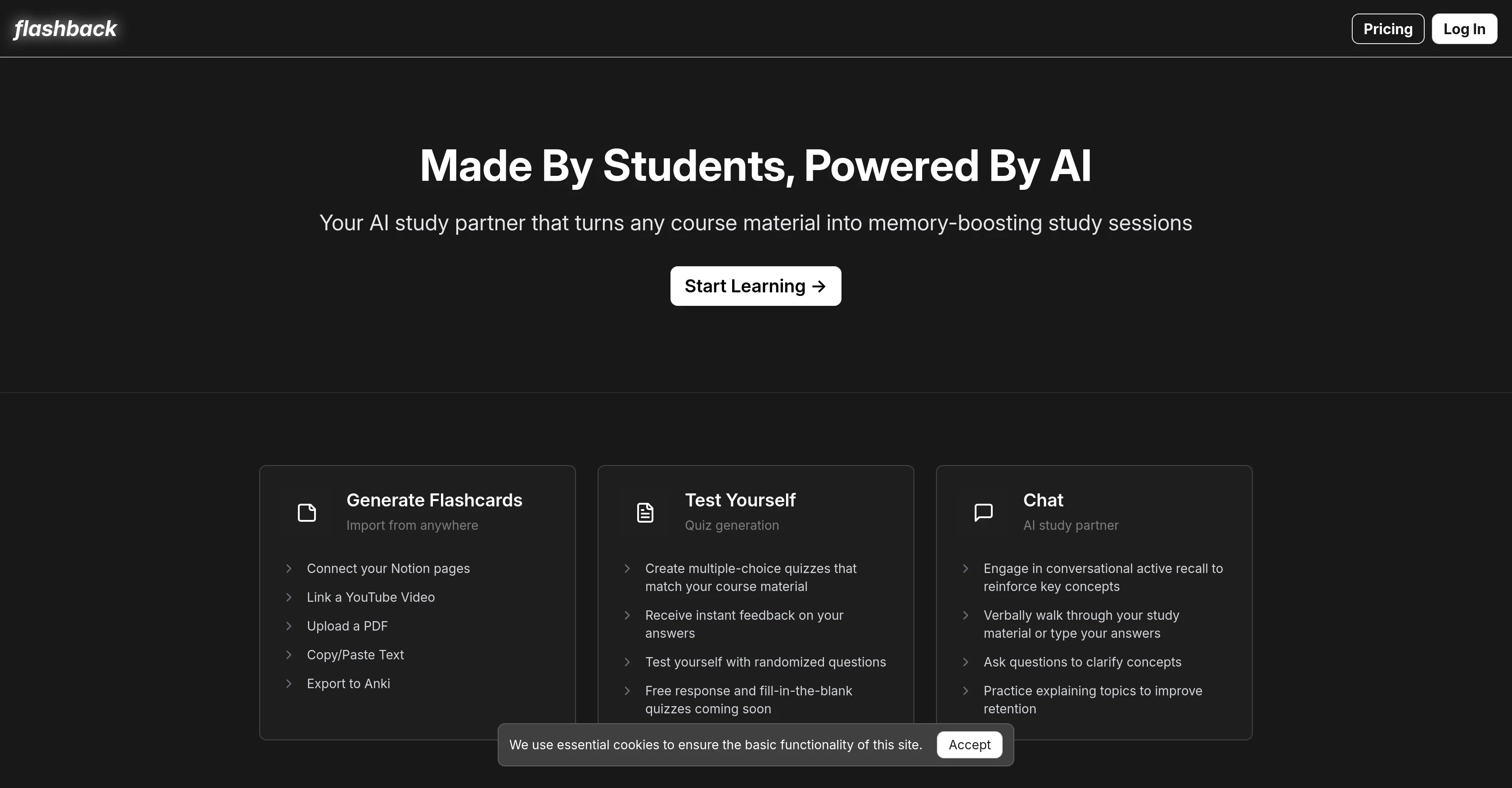
Flashback is an AI-powered study tool designed to enhance learning and long-term retention. Ideal for students, this application is able to turn any course material into powerful study sessions.
It has functionalities that enable it to generate flashcards from multiple sources such as Notion pages, YouTube videos, text or PDF files. Not limited to that, it has another feature which allows the creation of multiple-choice quizzes that adhere to the user's course material.
Additional interactive testing formats, including free response and fill-in-the-blank quizzes, are set to be incorporated into the platform in future updates.One of the core features of Flashback is its AI study partner that indulges users in a conversational active recall exercise, reiterating key concepts to solidify understanding and memory.
The platform also allows users to clarify concepts by asking questions and facilitates practice in explaining topics which boosts content retention.Another key offering of Flashback is that it has system-level integrations with other productivity apps.
This includes exporting the created flashcards to Anki, and importing study materials from Notion, for example. Furthermore, Flashback is grounded in research-backed study methods, underscoring its commitment to fostering productive learning and improving long-term information retention.In conclusion, Flashback aims to transform the traditional study process into an interactive and more efficient one by utilizing the power of artificial intelligence.
Best for
Short scenarios where Flashback tends to shine.
-
Turn course material into AI-powered study sessions.
Example outputs 1
Sample generations and before/after results for Flashback.
Access & connections
Where you can use Flashback, and what it plugs into.
Platforms
Integrations
Capabilities
What this tool accepts, produces, and is strongest at.
Input
- Tabular
- Image
- Text
Output
- Text
Pros & cons
Pros
- Generates flashcards
- Imports from Notion
- Imports from YouTube
- Imports from PDFs
- Multiple-choice quizzes creation
- Active recall feature
- Interactive learning enhancement
- Enables user to clarify concepts
Show 11 more
- Facilitates practice in topic explanation
- Exports to Anki
- Integrates with productivity apps
- Backed by academic research
- Improves long-term retention
- Transforms traditional study process
- Free response quizzes coming soon
- Fill-in-the-blank quizzes coming soon
- Randomized questions testing
- Instant feedback on answers
- Verbal walkthroughs for study material
Cons
- No offline capabilities
- Lacks customization of quizzes
- Limited source integration
- No native mobile app
- Dependant on other platforms
- Limited interactivity
- Could struggle with complex topics
- Doesn't support all file types
Show 1 more
- Future features not yet implemented
Compare alternatives
Similar tools in the catalog — with a clear reason to open each one.

Thea ✓
FreemiumAI study tools to master material, not just memorize it.
Why look Typically cheaper
Full comparison
NotesXP: AI Study Guide Maker ✓
FreemiumBoost grades by studying smarter with AI
Why look Typically cheaper
Full comparison
Learn Place AI Assistant ✓
FreemiumUnderstand Anything - Fast.
Why look Typically cheaper
Full comparison
Mindgrasp ✓
Free TrialConvert lectures, notes, and videos into AI-powered study tools.
Why look Typically cheaper
Full comparison

StudyOrbit ✓
FreemiumTurn any PDF into a complete AI learning experience.
Why look Typically cheaper
Full comparisonPeople also view
Tools that often show up alongside Flashback in collections and comparisons.
Thea ✓
FreemiumAI study tools to master material, not just memorize it.

Thetawave AI ✓
FreemiumTransform lectures into engaging study materials instantly.

SuperStudentAI ✓
Free TrialAI-powered study assistant for smarter learning

OmniSets ✓
FreeEfficient personalized studying with flashcards

AI Flashcards Generator ✓
FreemiumQuickly create personalized flashcards with AI.

Syft ✓
FreeAI-powered news tracking for any topic worldwide

Sidejot ✓
FreeAI-powered task planner for focused productivity.

Scisummary ✓
Free TrialCutting-edge scientific articles summarization.
Releases 1
Imported reviews 2
okay so the timing on when it makes you review is kinda creepy accurate? like it'll pop up right when i'm about to forget something. been using it for bio and actually remembering lecture stuff past the exam for once.
spaced repetition actually works when the app reminds you at the right time. been using this for organic chem and i'm retaining stuff way longer than cramming ever did. wish i found this freshman year honestly
FAQ 12
What is Flashback and how does it facilitate studying?
How does Flashback use AI to enhance learning?
What material sources are compatible with Flashback?
Can Flashback generate flashcards from YouTube videos?
How does the flashcards creation in Flashback work?
Can Flashback create multiple-choice quizzes?
What type of quizzes will Flashback support in future updates?
Can I ask Flashback to clarify certain concepts for me?
What is the role of the AI study partner in Flashback?
How does Flashback assist in content retention?
Are there any other productivity apps that integrate with Flashback?
Can the flashcards created in Flashback be exported to Anki?
Related tools
Recommended
Scisummary ✓
Free TrialCutting-edge scientific articles summarization.

Recall ✓
FreemiumSummarize Anything, Forget Nothing!

Kin - Personal AI Advisors ✓
FreePrivacy-first & designed your for mind, and life at work

NotebookLM ✓
FreemiumAI-powered note-taking and research assistant
Syft ✓
FreeAI-powered news tracking for any topic worldwide
Thetawave AI ✓
FreemiumTransform lectures into engaging study materials instantly.