
Transcription 2026 Rank: #3024
Echoryte ✓
Turn recordings into searchable, editable text.
Verdict
A quick read before you dig into the full page.
- Best if
- Turn recordings into searchable, editable text
- Skip if
- Limited video format support
- Pick this when
- Transcribes any recording
Considering Voicetype AI instead? Compare side by side
Overview
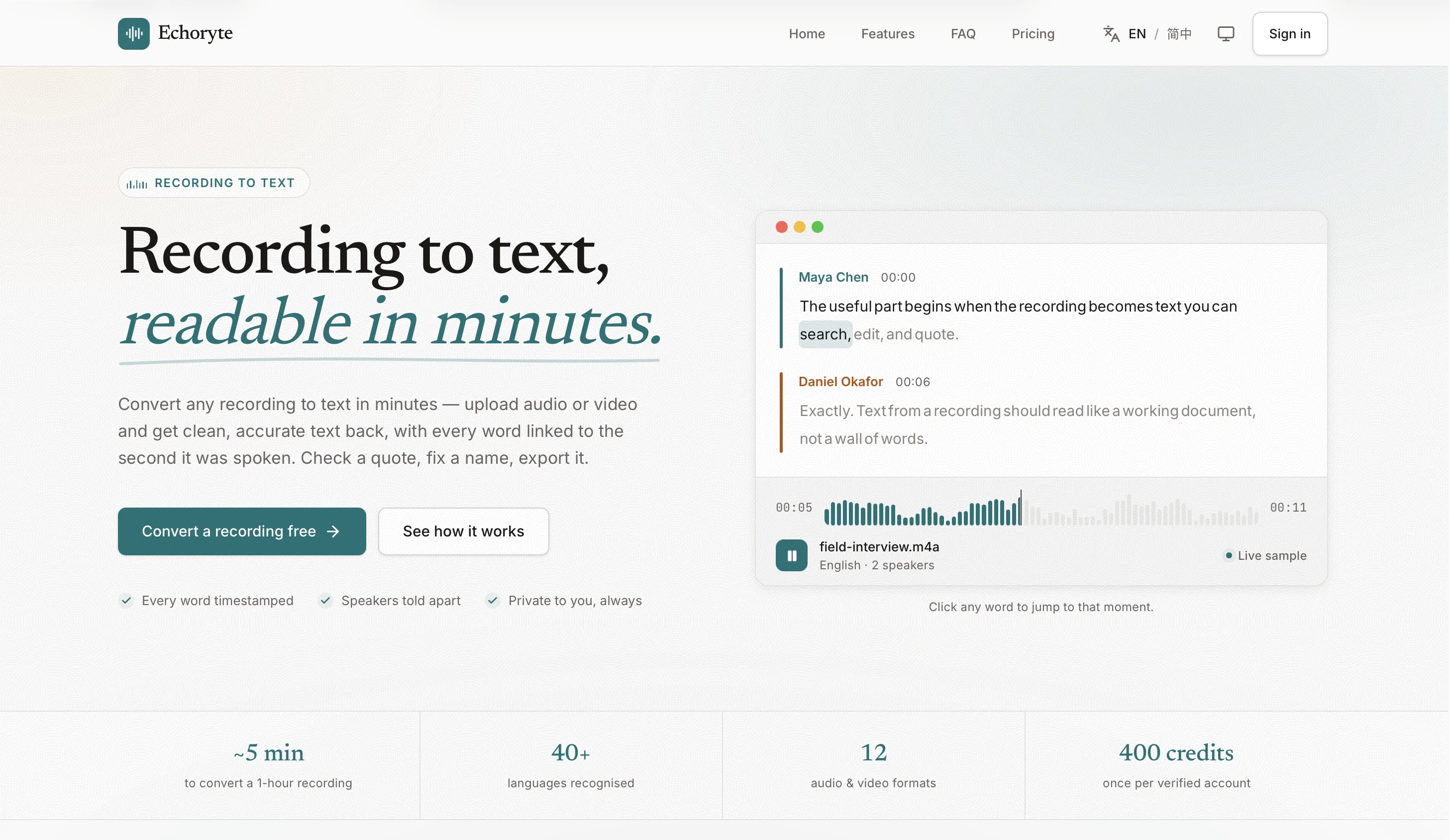
Echoryte is an advanced tool designed to accurately convert any recording to text format effortlessly. It functions by transforming audio and video inputs into clean, editable text, automatically marking each word with the exact timestamp at which it was spoken.
This allows the users to easily navigate through the transcript, making edits where necessary, and quoting specific portions. The tool also identifies and segregates different speakers, enhancing clarity in dialogues or conversations.
Users can upload audio in diverse formats such as MP3, WAV, M4A, and video in MP4 or MOV formats, and the tool converts them to text in a short span. Echoryte also accommodates large file sizes, enabling the process to resume automatically even if an interruption occurs due to dropped connections.
Once the transcription process is completed, users can download the text in various formats (Word, PDF, text, or subtitles), facilitating ease of use.
This tool provides additional features such as translation into different languages and AI summarization of content while maintaining traceability to the original recording.
Echoryte is typically utilized for numerous purposes, including transcribing interviews, meetings, lectures for studying, podcasts, research work, and enhancing accessibility.
Moreover, it prioritizes user privacy, ensuring that the users' data remains private and that no information is used to train AI models. The tool also offers a free trial period, after which users can opt for a subscription model suitable for their usage.
Access & connections
Where you can use Echoryte.
Platforms
Capabilities
What this tool accepts, produces, and is strongest at.
Input
- Audio
- Video
Output
- Text
- API
Supported features
- Transcription
Pros & cons
Pros
- Transcribes any recording
- Timestamps for every word
- Editable transcripts
- Different speaker identification
- Supports various audio formats
- Supports various video formats
- Large file size accommodation
- Automatic process resumption
Show 32 more
- Various output formats
- Translation feature
- Maintains recording traceability
- Data Privacy assured
- Interview transcription capability
- Lecture transcription capability
- Podcast transcription capability
- Research assistance
- Enhances accessibility
- Subscription model available
- Free trial period
- Conversions in short span
- Quoting specific portions capability
- Clear dialogue segregation
- Optimal for diverse purposes
- Affirms user privacy
- Fast transcription
- Compatible with MP4 format
- Compatible with MOV format
- Audio and Video support
- Multilingual recognition
- Easy upload and conversion
- Facility to verify quotes
- Searchability in transcripts
- Provides speaker names
- Original and translated content
- Private by default
- User-initiated data deletion
- Charged by processed seconds
- Accurate captions from recordings
- Linked action items in summaries
- Language auto-detection capabilities
Cons
- No support for live transcription
- Dependent on internet connection
- No offline functionality
- No mention of handling accents
- No mobile app mentioned
- Limited video format support
Compare alternatives
Similar tools in the catalog — with a clear reason to open each one.

Voicetype AI ✓
Free TrialWrite 9x Faster with AI Speech to Text on all Apps
Why look Better for writing
Full comparison
Transcript LOL ✓
FreemiumUnlimited transcripts, summaries, 99.8% accuracy, speaker recognition, superfast
Why look Typically cheaper
Full comparison
TurboScribe ✓
Freemium🎯 3 free transcripts every day. 🔥 Unlimited transcription starting at $10/mo.
Why look Typically cheaper
Full comparison
RambleFix ✓
Paid⚡ Write by thinking aloud - emails, notes, articles, in your style.
Why look Typically cheaper
Full comparison
Paraspeech ✓
Free TrialPrivate dictation, cloud optional
Why look Typically cheaper
Full comparisonReleases 1
FAQ 12
How does Echoryte convert audio and video into text?
Can Echoryte identify different speakers in a conversation?
What file formats does Echoryte support for upload?
Does Echoryte support video formats like MP4 and MOV?
What happens if an interruption occurs while uploading a large file on Echoryte?
What are the different format options for downloading text from Echoryte?
Does Echoryte offer translation and summary functions?
What are the typical use cases for Echoryte?
Does Echoryte guarantee data privacy for its users?
Is my information used to train Echoryte's AI models?
Does Echoryte offer a free trial period?
What are the subscription options available after the free trial period on Echoryte?
Related tools
Recommended

Shotra ✓
Free TrialMulti-model AI video generator for turning images and prompts into short videos.

MagicSlides.app AI PPT Maker ✓
FreemiumCreate Stunning PPTs in Seconds with the AI PPT Maker

GetLogit ✓
FreemiumArtificial intelligence, available for everyone.

ChatGPT ✓
FreemiumAsk anything, create anything, and move from idea to action.

Automateed ✓
Free TrialCreate eBooks effortlessly with Automateed, the AI-powered writing tool.

Kin - Personal AI Advisors ✓
FreePrivacy-first & designed your for mind, and life at work