

Videos 2026 Rank: #1341
Domer ✓
Create videos from text or photos in minutes.
Free + from $8.33/mo
Verdict
A quick read before you dig into the full page.
- Best if
- Create videos from text or photos in minutes
- Skip if
- Dependent on credit system
- Pick this when
- Free to start
Considering freebeat AI instead? Compare side by side
Overview
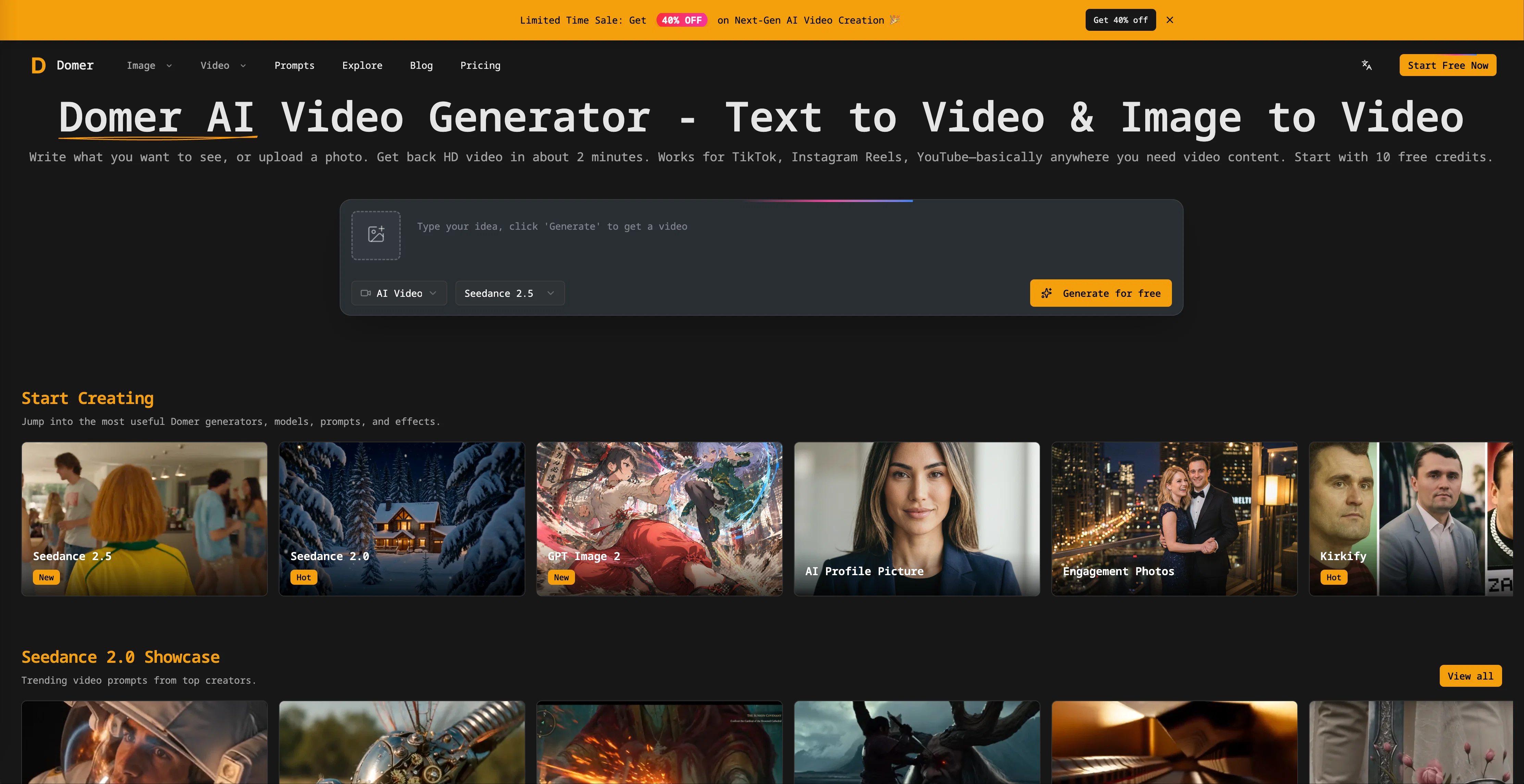
Domer is a free AI video generator that allows creating videos from text or photos, typically in a few minutes. It supports Text-to-Video & Image-to-Video conversions and returns HD video which can be leveraged for social media platforms like TikTok, Instagram Reels, or YouTube.
Domer provides a straightforward process which starts with either writing a desired scene for a text-to-video, or uploading a photo and describing its desired movement for image-to-video.
Domer offers the choice of three video models: Google Veo for quality, Kling for speed, and Wan for longer clips. Each model requires different credits, showing the credit cost before generation.
In addition to video generation, Domer also offers image tools for quick mockups or concept art. The platform does not impose any watermarks on the created videos, permits comprehensive rights on the usage of the content and even offers a few initial free credits to test out the system.
Domer is proven useful for creating product demos, ad concepts, or for testing out ideas prior to actual filming.
Access & connections
Where you can use Domer, and what it plugs into.
Platforms
Integrations
Capabilities
What this tool accepts, produces, and is strongest at.
Input
- Image
- Text
Output
- Video
Highlights
- SOTA
- No Signup
Supported features
- Image Generation
- Video Generation
- Image Edit
- No Signup
Models
Text
Image
Audio
Video
Pros & cons
Pros
- Free to start
- Text-to-video feature
- Image-to-video feature
- HD video output
- Social media content creation
- Supports Veo, Kling, Wan
- Option for camera angles
- Lighting settings
Show 41 more
- Adjustable motion speed
- No watermarks on videos
- Full content ownership
- Credit-based system
- Non-expiring credits
- Can create Video Mockups
- Potential for Ad creation
- Useful for product demos
- Ability to create Concept Art
- Idea testing feature
- Supports PNG, JPG, WebP
- Supports MP4, MOV formats
- Supports audio MP3, WAV
- Beneficial for YouTube, Instagram, TikTok
- Allows for model selection
- Produces watermark-free MP4 files
- Ideal for commercial use
- Allows for style or element changes
- No file size limits
- Unrestricted resolution quality
- Clean exports (HD)
- Yearly and monthly plans
- Unlimited conversation in pro plan
- Ad-free experience
- 16:9 and 9:16 aspect ratios support
- Supports image-to-image conversions
- Supports video-to-video conversions
- Ability to generate static visuals
- Multiple models for selections
- Support in multiple languages
- Interface supports additional features
- Fast video generation (~2min)
- Initial 10 free credits
- Secure payment system
- Supports quick mockups creation
- Supports concept art creation
- Specific credits for each model
- Private video generation
- Unlimited conversions in free plan
- Support multiple payment options
- Online community support
Cons
- No built-in collaboration features
- Inefficient for large-scale projects
- No offline functionality
- Lacks video editing capabilities
- Limited to 15-second clips
- No mobile app availability
- Limited range of video models
- Free plan has queue delay
Show 2 more
- Dependent on credit system
- No live customer support
Compare alternatives
Similar tools in the catalog — with a clear reason to open each one.

freebeat AI ✓
FreemiumTurn Music & Ideas into Viral Videos In One Click
Why look Typically cheaper
Full comparison
MagicLight ✓
FreemiumTransform text into captivating videos instantly.
Free + from $8.4/mo
Full comparison



Seedance ✓
FreemiumMulti-shot video generation from text and image.
Why look Stronger for image work
Full comparisonReleases 1
FAQ 12
What is Domer Domer?
What are the key features of Domer?
How does Domer support Google Veo, Kling, and Wan video models?
Can I set my own camera angles, lighting and motion speed on Domer?
Does Domer add watermarks to the videos generated?
What does Domer mean when it says 'tools for creating two types of videos'?
How can I use Domer's image tools for generating mockups or concept art?
How many free credits does Domer provide initially and do they ever expire?
Can Domer generate videos from just text or photos?
What performance comparison can you give between Google Veo, Kling, and Wan video models?
Is Domer suitable for commercial use or client work?
What does it mean that Domer allows 'creative flexibility'?
Related tools
Recommended
AI Photo Generator ✓
PaidGenerate AI photos from your uploaded pictures.

Virlo ✓
PaidTurn short-form video data into viral content.

MakerSuite ✓
FreemiumFrom idea to launch: professional AI-generated content in one place.

B12 AI Website Builder ✓
FreemiumAI-powered website builder

Papers ✓
Free TrialDiscover, Organize, and Analyze Research with AI-Powered Precision

My AI Tarot - Free Tarot Card Readings ✓
FreeInsightful guidance tailored to your life's questions.