
OCR 2026 Rank: #1690
DeepRead.Tech ✓
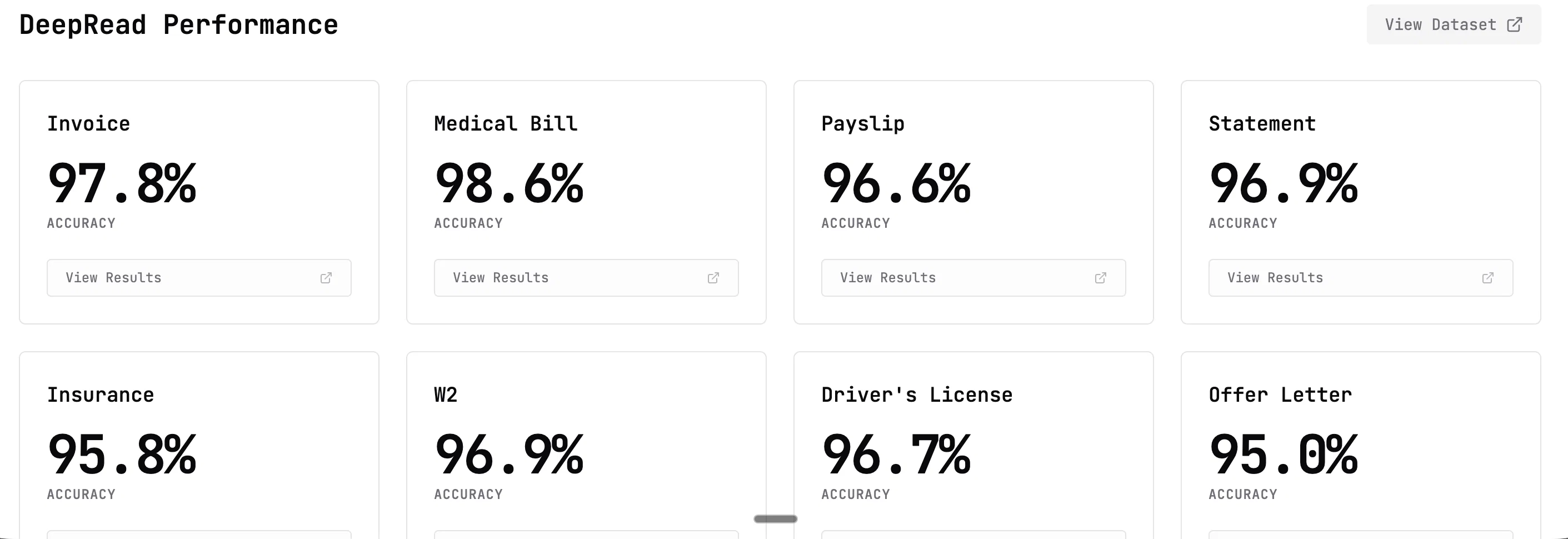
AI-native OCR platform, 95%+ accuracy, zero prompt engineering, flags uncertain fields.
Free + from $99/mo
Verdict
A quick read before you dig into the full page.
- Best if
- AI-native OCR platform, 95%+ accuracy, zero prompt engineering, flags uncertain fields
- Skip if
- Lacks detailed pricing plans
- Pick this when
- Handles a variety of file types
Considering OCR | z.AI instead? Compare side by side
Overview

DeepRead requires zero prompt engineering from users. Traditional AI-based OCR tools require users to write, test, and maintain prompts for each model, then retune those prompts whenever models are updated. DeepRead handles all prompt optimization internally. Users define which fields to extract (like ""invoice_total"" or ""vendor_name""), and the platform automatically generates and optimizes the prompts behind the scenes. When new models release, DeepRead adapts its prompt infrastructure automatically—users benefit from improved accuracy without changing any code or maintaining prompt templates.
The confidence scoring mechanism examines factors like model agreement, character clarity in the source image, field importance, and historical accuracy patterns. Fields scoring above the confidence threshold are automatically accepted. Fields below the threshold are flagged for human review, typically representing 5-10% of total extractions.
Users interact with DeepRead through a REST API. Documents are uploaded via multipart form data with a JSON schema defining fields to extract. The API returns structured data with each field marked as either automatically verified or requiring human review. This enables downstream systems to route flagged documents to review queues while auto-processing the majority.
Access & connections
Where you can use DeepRead.Tech.
Platforms
Capabilities
What this tool accepts, produces, and is strongest at.
Input
- API
- Image
- Text
Output
- API
- Text
Highlights
- API
- Local
Supported features
- API
- Runs Locally
Pros & cons
Pros
- Handles a variety of file types
- Replicates human-like content understanding
- Flagged review system
- Notifies of problematic files
- Supports scalable functionalities
- Allows text extraction
- OCR that never fails silently
- Document conversion capability
Show 16 more
- PDF conversion capability
- Quality assurance
- Review flagging
- Data conversion
- Output as editable text
- Creates searchable text
- Deciphers text
- Suitable for complex documents
- Prevents data missing
- Delivers human-level accuracy
- Works with various formats
- Robust OCR solution
- Free starting option
- Developer-focused
- Optimized for growth enterprises
- Handles simple and complex documents
Cons
- Lacks detailed pricing plans
- No offline functionality
- Accuracy may vary
- Developer knowledge required
- Integration complexity
Compare alternatives
Similar tools in the catalog — with a clear reason to open each one.


Mistral AI - OCR ✓
UnknownTurn documents into structured knowledge with high-accuracy OCR
No pricing
Full comparison
Note This Down ✓
Free TrialTransform handwritten notes into digital text instantly.
Why look Typically cheaper
Full comparison
PDF2EPUB.ai ✓
PaidConvert any PDF into a perfectly readable eBook
Why look Typically cheaper
Full comparison
UAE SmartTaxReceipt ✓
Free TrialTurn scanned or normal PDF invoices into UAE FTA-ready Excel in minutes.
Why look Typically cheaper
Full comparison
Filly AI ✓
FreemiumFill any form instantly from saved client profiles.
Why look Typically cheaper
Full comparisonReleases 1
Imported reviews 1
We are a team of founders who worked before in data extraction, with traditional manual review of each document to check accuracy / errors. We are so excited about AI and the new LLM models because we have created DeepRead using those and the accuracy is 95% and we flag uncertain fields so no one has to manually review entire documents (whew), only the exceptions! We hope you try it out and please share your review, comments and feedback. Looking forward to hearing from users!
FAQ 12
What is DeepRead?
What does the DeepRead OCR API do?
How does the OCR of DeepRead differ from other OCR technologies?
In what file formats does DeepRead support text extraction?
What types of businesses can benefit from DeepRead?
What does it mean when DeepRead says it offers 'human-level precision' in conversions?
What is the flagged review system in DeepRead?
What happens when DeepRead encounters problems in file processing?
Does DeepRead notify users of problematic files?
What are the scalable functionalities offered by DeepRead?
Can DeepRead be used for both small scale and large, growth-oriented operations?
What kinds of documents can I convert to text with DeepRead?
Related tools
Recommended

biela.dev ✓
Free TrialIf you can imagine it, Biela can code it!

GhostPen ✓
Free TrialUndetectable AI writing. Credits never expire. The most affordable humanizer.

Automateed ✓
Free TrialCreate eBooks effortlessly with Automateed, the AI-powered writing tool.

Suno ✓
FreemiumMake music at the speed of your ideas.

Notis ✓
Free TrialThe first WhatsApp assistant that runs on your ChatGPT and Claude subscriptions

Claude ✓
FreemiumBuilding reliable, interpretable AI systems