

Worksheets 2026 Rank: #231
ConnectTheDots Generator ✓
Instantly create custom connect the dots worksheets.
Free + from $4.90
Verdict
A quick read before you dig into the full page.
- Best if
- You are parents and need: Parents creating personalized educational activities for their children
- Skip if
- Limited language options
- Pick this when
- High-quality PDF or PNG downloads
Considering Workbookly instead? Compare side by side
Overview
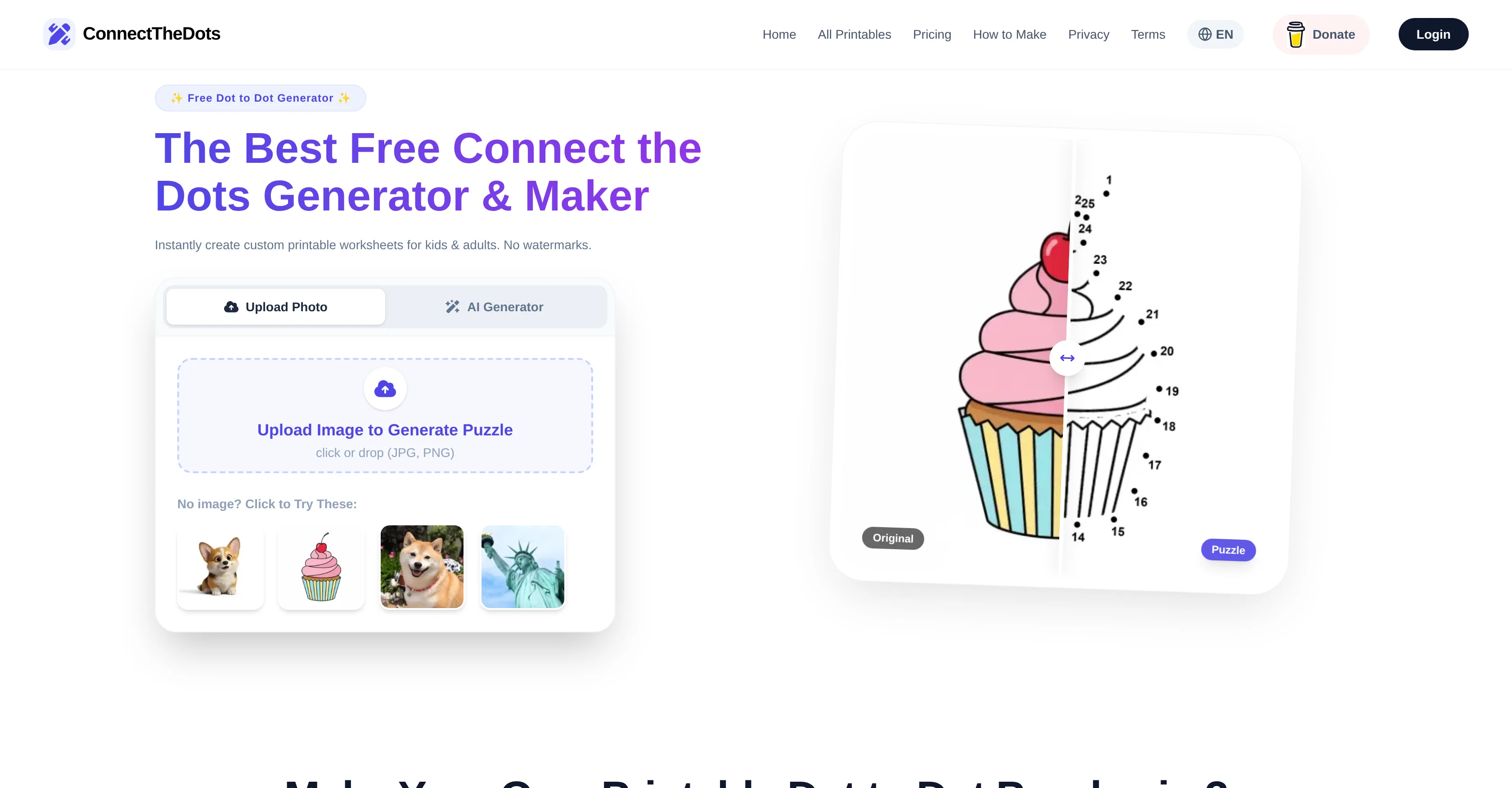
ConnectTheDots is an advanced AI tool designed to generate custom dot-to-dot puzzles. Ideal for educators, parents and puzzle lovers, this tool transforms any photo or drawing into a professionally rendered dot-to-dot worksheet.
By uploading an image, the user can adjust the difficulty level depending on the desired output. The puzzles are generated in a high-resolution ready for printing, rending clean vector-like outlines optimized for dot-to-dot mapping.
It perfectly fits various user needs, catering for easy designs meant for children to intricate and complex ones for adults. Users can also design custom puzzles through an easy-to-use generator.
The tool is readily available in English, Spanish, and German. ConnectTheDots also provides an array of ready-to-print puzzles, categorized based on various themes and difficulty levels.
The tool is also optimized for mobile devices, and the printables are provided in high-resolution PDF or PNG formats, free of watermarks, ensuring a clean, professional output for printing.
Best for
Short scenarios where ConnectTheDots Generator tends to shine.
-
Parents creating personalized educational activities for their children.
Best for Parents
-
Teachers designing custom classroom worksheets for preschool or elementary students.
Best for Teachers
-
Professional puzzle creators making content for Amazon KDP or Etsy digital shops.
Best for Puzzle book authors
-
Adults looking for complex, meditative mandala dot-to-dot activities.
Best for Amazon KDP sellers
Example outputs 1
Sample generations and before/after results for ConnectTheDots Generator.
Access & connections
Where you can use ConnectTheDots Generator.
Platforms
Capabilities
What this tool accepts, produces, and is strongest at.
Input
- Image
- Text
Output
- Text
- Image
Supported features
- Image Edit
- Image Understanding
- Education
- Styling
- Mobile Companion
Pros & cons
Pros
- High-quality PDF or PNG downloads
- Free from watermarks
- Supports multiple languages
- Optimized for mobile devices
- Adjustable puzzle difficulty
- Instant puzzle generation
- Pre-made puzzle collections
- Customizability of puzzles
Show 18 more
- Clean, vector-like puzzle outlines
- Theme-based puzzle categories
- Easy three-step puzzle creation
- Support images for puzzle creation
- Advanced image-to-dot-to-dot conversion
- Templates for various skill levels
- Easy generator interface
- Educational Alphabet Worksheets
- Ready-to-Print puzzles
- Editable Dot count
- Advanced Mandala Puzzles
- Works best with high-contrast images
- High-resolution output for printing
- Real-time hint adjustments
- Automatic background removal
- Print optimization guide
- FAQ for troubleshooting
- Free daily puzzle generation
Cons
- Not for commercial use
- No offline mode
- Can't save progress
- Limited language options
- Only high-contrast images supported
- No batch process
- No API
- No layered modifications
Show 2 more
- No plugin extensions
- No tutorial available
Compare alternatives
Similar tools in the catalog — with a clear reason to open each one.
Workbookly ✓
FreemiumFrom YouTube to PDFs & interactive worksheets in one click
Why look Typically cheaper
Full comparison
GetWorkSheet ✓
FreemiumFuel curiosity with AI-powered worksheets.
Why look Typically cheaper
Full comparisonPeople also view
Tools that often show up alongside ConnectTheDots Generator in collections and comparisons.

MakeMyWorksheet ✓
FreemiumWorksheets personalized to your kid's name and interests.
Workbookly ✓
FreemiumFrom YouTube to PDFs & interactive worksheets in one click

TopWorksheets ✓
UnknownTransform worksheets into auto-graded digital exercises.
GetWorkSheet ✓
FreemiumFuel curiosity with AI-powered worksheets.

My Curriculum Mate Australia ✓
Free TrialAI tool for Australian teachers' curriculum planning.

Figviz ✓
Free TrialFrom a sentence to a science-ready diagram.

ClassMind ✓
FreemiumTeach smarter with AI-powered tools.

Love AI: Relationship Analysis ✓
FreemiumTurn deep conversations into fun, heartwarming experiences
Releases 1
Imported reviews 1
I just published a children's drawing book on Amazon in 2-3 hours of fiddleing with this tool. Really really good!
FAQ 12
What kind of images can I upload to ConnectTheDots Generator?
How can I adjust the difficulty on ConnectTheDots Generator?
In what formats can I download the generated worksheets from ConnectTheDots Generator?
Can I print the worksheets directly from ConnectTheDots Generator?
Why is commercial use not permitted for ConnectTheDots Generator?
How does ConnectTheDots Generator use AI technology?
Does ConnectTheDots Generator support multiple languages?
Can I create a dot-to-dot for any concept using ConnectTheDots Generator?
What makes the puzzles from ConnectTheDots Generator professional?
Does ConnectTheDots Generator offer pre-made worksheets?
Does ConnectTheDots Generator have age-specific or skill-specific puzzles?
Does ConnectTheDots Generator add watermarks to the printable worksheets?
Related tools
Recommended

Thea ✓
FreemiumAI study tools to master material, not just memorize it.

Rocket ✓
FreemiumThink It. Type It. Launch It.
esotericAI ✓
FreemiumAI-powered tarot readings for your spiritual journey.

Automateed ✓
Free TrialCreate eBooks effortlessly with Automateed, the AI-powered writing tool.

DeepSeek ✓
FreeUnravel the mystery of AGI with curiosity

Qonqur ✓
FreemiumAI + Hand Written Math