

Business intelligence vv2.0 2026 Rank: #478
Columns ✓
Automate clear insights from any data
Verdict
A quick read before you dig into the full page.
- Best if
- Automate clear insights from any data
- Skip if
- Potentially steep learning curve
- Pick this when
- Real-time data visualization
Considering Analytify - A GenBI Platform instead? Compare side by side
Overview




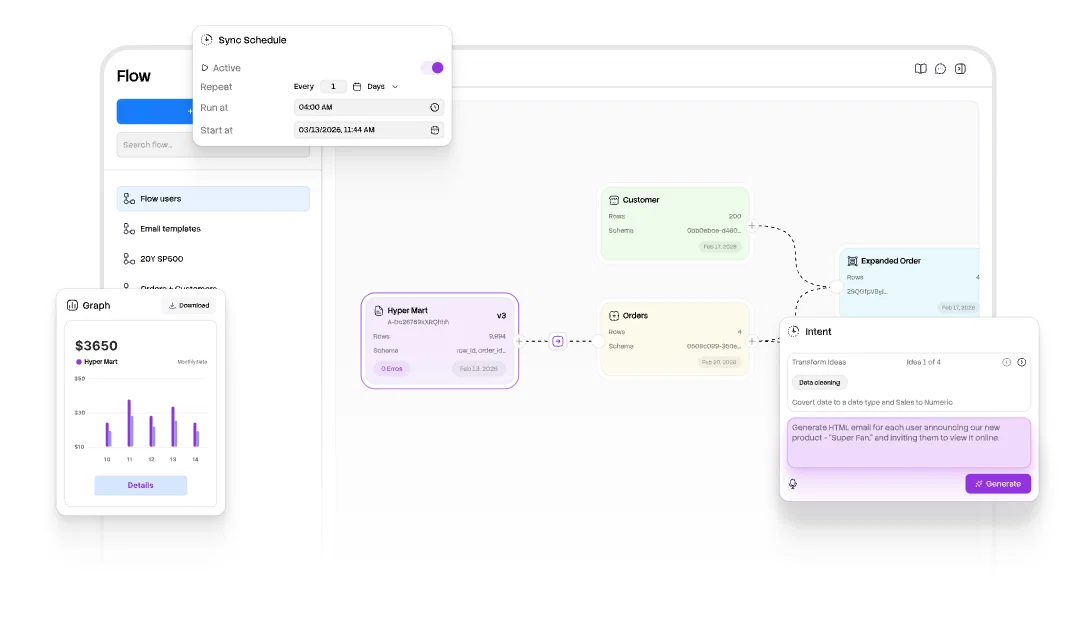
Built to eliminate the manual grind of data prep, Columns replaces complex spreadsheets with an intuitive, AI-driven engine.
Through three core pillars (Drive, Flow, and Graph), we empower users of all technical levels to transform raw files into stunning, branded insights.
- Connect To Many Common Sources Like Google Sheets
- Extract Structured Data From Images And Pdf Files
- Just Speak To Clean And Transform Data
- Support Multiple Dataset Union And Join
Best for
Short scenarios where Columns tends to shine.
-
Automate clear insights from any data
Example outputs 1
Sample generations and before/after results for Columns.
Access & connections
Where you can use Columns, and what it plugs into.
Platforms
Integrations
Capabilities
What this tool accepts, produces, and is strongest at.
Input
- API
- Code
- Tabular
- Image
- Text
Output
- Tabular
- API
- Text
- Image
Supported features
- Spreadsheets
- Image Understanding
- Automation
- Integrations
- STT
- Visual Creation
Pros & cons
Pros
- Real-time data visualization
- Collaboration in real-time
- Natural language inputs
- Fine-grained access controls
- Self-serve data storytelling
- JavaScript based
- Integration capabilities
- Instant data visualizations
Show 26 more
- Wide template range
- Pre-built visualization tools
- Variety of chart types
- Library of design elements
- Slack and Github Integrations
- Facilitates data sharing
- Management of data catalogs
- Speech-based querying
- Flexible data queries
- Automated data interpretation
- Inclusivity of public data
- Offers popular data searches
- Community tips and practices
- Multiple platform visibility
- Communicates data effectively
- Access via website
- Seamless tool integration
- User-friendly interface
- Newsletter for data storytellers
- Flexible data storytelling
- Visualizing vast data types
- Data platform exploration feature
- In-built data research feature
- Supports multiple chart forms
- Tools for data beautification
- Fast data visualization platform
Cons
- Requires Javascript
- Limited integration options
- Relies on GPT-3
- No desktop app
- Real-time collaboration issues
- Limited icon library
- Unclear data management system
- Limited template variety
Show 2 more
- No mentioned multi-language support
- Potentially steep learning curve
Compare alternatives
Similar tools in the catalog — with a clear reason to open each one.

Analytify - A GenBI Platform ✓
Free TrialAI-powered analytics that unlock smarter business insights.
Why look Higher community rating
Full comparison
Springboard ✓
FreeKickstart workshops with instant market insights.
Why look Fully free option
Full comparison
Jeda AI ✓
FreemiumAI workspace canvas for instant productivity.
Free + from $8.5/mo
Full comparisonPeople also view
Tools that often show up alongside Columns in collections and comparisons.

PowerBI AI Lens ✓
FreemiumSupercharge Power BI dashboards with AI-driven insights

Narrative BI ✓
Free TrialAugmented analytics for growth teams

ERBuilder ✓
Free TrialGenerate ER diagrams effortlessly with AI.

Vizologi ✓
Free TrialAI to boost your business strategy.
Springboard ✓
FreeKickstart workshops with instant market insights.

NeuroForge ✓
UnknownAI and BigData solutions for your competitive edge
Jeda AI ✓
FreemiumAI workspace canvas for instant productivity.
Analytify - A GenBI Platform ✓
Free TrialAI-powered analytics that unlock smarter business insights.
Releases 2
Columns Flow: data automation platform built for everyone.
Imported reviews 1
UI Experience is fast & good with free account limited data (100 csv records)
but no 3rd party integrations and limited data connection
and no 3D /funnel many more chart visualizations are missing.
FAQ 12
What is Columns?
🛠️ 3
tools
🙏 9
karma
wrote:
Columns is a data analysis and visualization platform that helps you to create, manage, and share data insights with your audience.
It is a lightweight, AI-powered solution designed for speed, simplicity, and effortless collaboration.
Who are the ideal users of Columns?
🛠️ 3
tools
🙏 9
karma
wrote:
Anyone who loves data storytelling! But it’s especially great for:
• Media professionals – Journalists, editors, and content creators.
• Business leaders – To track KPIs and make data-driven decisions.
• SMB owners – To generate professional insights and seamlessly embed them.
Why should I not just use Excel or Google Sheets instead?
🛠️ 3
tools
🙏 9
karma
wrote:
Think of Columns as a powerful visual layer on top of your data. Here are some benefits:
• It makes sharing clean, professional graphs effortless while keeping them automatically updated.
• Columns processes thousands of rows in sub-seconds, whereas spreadsheets can become cumbersome and slow when handling large datasets.
• It makes a lot more beautiful and visuals than Spreadsheets.
Why not Tableau or Power BI?
🛠️ 3
tools
🙏 9
karma
wrote:
The simple answer: They're overkill.
• Traditional BI tools have a steep learning curve.
• They lack AI-assisted workflows for a seamless experience.
• Sharing and embedding insights is cumbersome.
What kind of data sources can I connect?
🛠️ 3
tools
🙏 9
karma
wrote:
Live connections include Google Sheets, Airtable, Notion Database, HTTP API, SQL database, and Excel/CSV files upload.
What types of charts and graphs can I create?
🛠️ 3
tools
🙏 9
karma
wrote:
Columns supports a wide range of charts, including bar, line, pie, scatter, map, table, gauge, word cloud, and more.
You can also apply transformations and use chart tools to customize your visualizations in ways that are difficult to achieve elsewhere.
More: https://medium.com/data-science-collective/mastering-data-visualization-common-charts-and-their-variants-90d6502711bc
How do I use the AI chat?
🛠️ 3
tools
🙏 9
karma
wrote:
AI chat lives in each creating session, it is a full-context conversation, so you can ask questions or follow up with changes like talking to an assistant.
Here are a few examples to get you started:
• show me some data samples
• what charts can I create?
• could you suggest a minimalistic design?
Demo: https://youtu.be/1cugv1C8Ji0
What templates and tools does Columns offer for creating charts and graphs?
How can I keep my saved story up to date?
🛠️ 3
tools
🙏 9
karma
wrote:
In your workspace, open the story menu, select "Schedule," and set up automatic updates. Columns will sync your story with your data to keep it up to date.
More: https://docs.columns.ai/docs/tutorial/schedule
How does Slack integration work with Columns?
What is the role of icons, images, and shapes in Columns?
Can I customize a Columns chart?
🛠️ 3
tools
🙏 9
karma
wrote:
Yes! A Columns story is a flexible canvas with a main chart and various decorative elements. You can move, edit, and customize them as needed.
Decorative elements include text, images, arrows, widgets, shapes, and more.
Related tools
Recommended

VenturusAI ✓
FreemiumBusiness idea analysis and reporting.

Stratup.ai ✓
FreemiumInnovative idea generation for businesses.

Scisummary ✓
Free TrialCutting-edge scientific articles summarization.

Stunning ✓
PaidBuild AI-powered websites in seconds

Hyperis ✓
FreemiumOrganized task prioritization.

Mindsmith ✓
FreemiumPlatform for building and sharing eLearning content