

Color palettes 2026 Rank: #482
colorfor.ai ✓
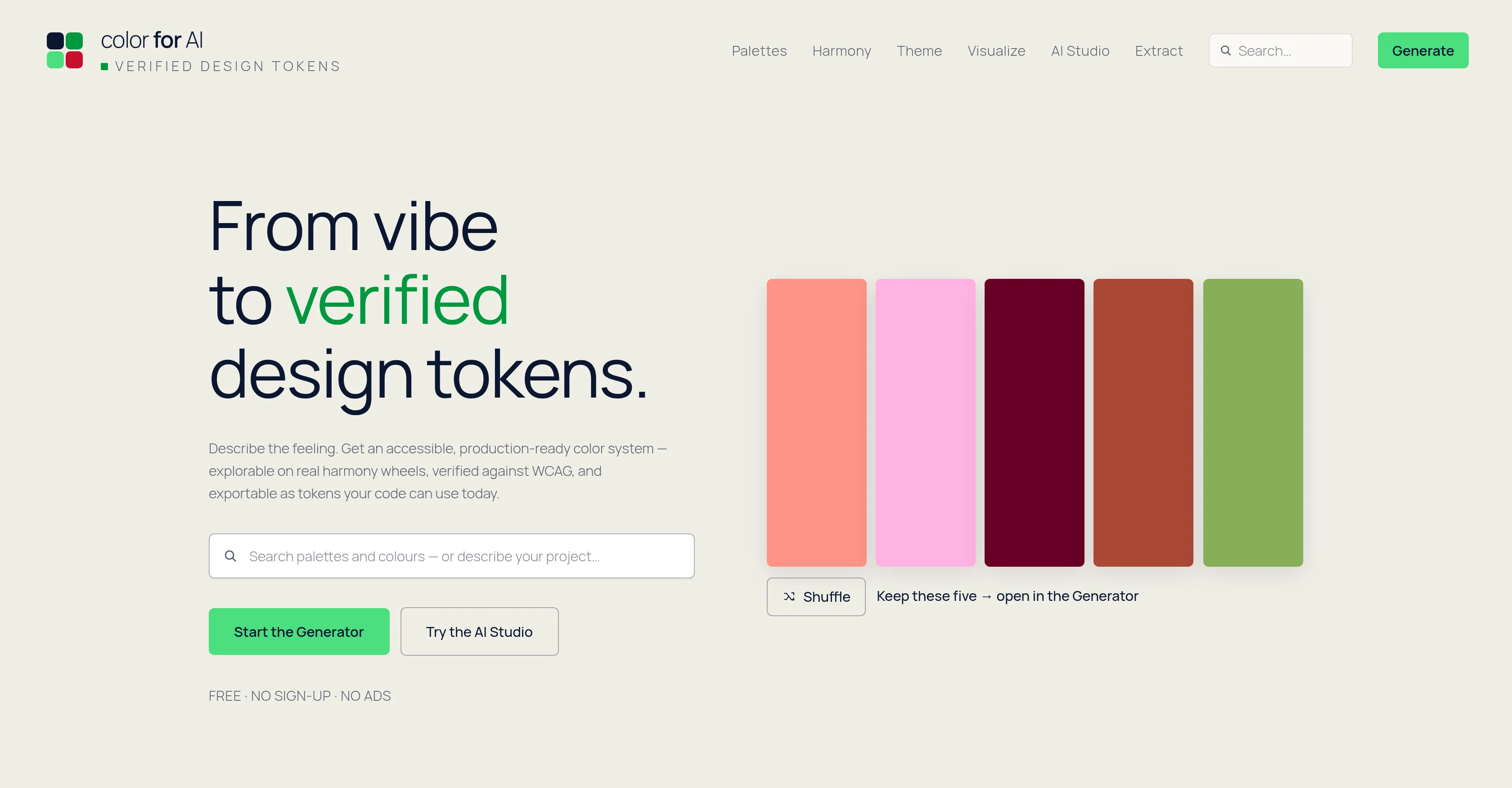
From vibe to verified design tokens — colors your AI can trust.
Verdict
A quick read before you dig into the full page.
- Best if
- From vibe to verified design tokens — colors your AI can trust
- Skip if
- Web-only — no offline desktop or mobile app
- Pick this when
- 100% free — no account, no watermarks, no paywall
Considering ColorMagic instead? Compare side by side
Overview
How it works: describe your project ("calm fintech dashboard", "cozy coffee shop"). AI interprets your words, but it is never allowed to invent the colors — a deterministic color engine proposes three directions (safe, expressive, distinctive), then solves a complete 40-role UI theme in light and dark where every text/background pair is contrast-checked against WCAG 2.2 before you ever see it. Same input, same output, forever.
What's inside: a Palette Generator with locks, spacebar rerolls and zen mode. A Harmony Lab on real color wheels — digital OKLCH and painter's RYB. A Theme Builder with seven one-click exports: CSS variables, Tailwind, shadcn, SCSS, design tokens (DTCG), JSON, and Copy-for-AI. A Contrast & Vision auditor with color-blindness simulations. Site Recolour — paste your website's URL and see it re-skinned in your palette as before/after screenshots, with a DevTools snippet to try it live on your real site. A Colour Extractor that pulls palettes from logos entirely in your browser (images never upload). A library of 1,200+ mood- and industry-tagged palettes, a community shelf with anonymous hearts, and guides whose examples are generated live by the same engine.
Built for the AI era: a free, keyless public REST API; an MCP server your coding agent can connect to in one command (generate_palette, solve_theme, check_contrast); embeddable SVG palette badges for READMEs; and a Copy-for-AI button on everything — hand your exact colors to Cursor, Claude, or ChatGPT together with the contrast rules they must not break.
The colorfor.ai difference: most palette tools hand you five pretty swatches and stop. colorfor.ai hands you the finished system — semantic roles, verified contrast, chart colors, hover/pressed states — as tokens your code can use today. Everything computes on your device or on our engine; your palettes stay in your browser, and there is no account to create. Free for personal and commercial use.
- Wcag 2.2-verified 40-role Ui Themes (light + Dark) From Any 1-3 Brand Colors
- Site Recolour: Paste Your Url, See Your Real Site Re-skinned In The Palette
- Seven Exports: Css, Tailwind, Shadcn, Scss, Design Tokens, Json, Copy-for-ai
- Free Public Api + Mcp Server For Coding Agents — No Keys
- 1,200+ Mood- And Industry-tagged Palette Library Plus Community Shelf
- Real Harmony Wheels: Digital Oklch And Painter's Ryb
- Color-blindness Simulations And Whole-palette Contrast Audits
- Logo Color Extraction That Never Uploads Your Image
- Embeddable Svg Palette Badges For Readmes And Docs
- Deterministic Engine: Same Brief, Same Colors, Forever — Ai Never Invents A Hex
Access & connections
Where you can use colorfor.ai, and what it plugs into.
Platforms
Integrations
Capabilities
What this tool accepts, produces, and is strongest at.
Input
- API
- Code
- Tabular
- Image
- Text
Output
- Code
- Text
- Image
Highlights
- API
- MCP
- No Signup
Supported features
- API
- MCP
- No Signup
Pros & cons
Pros
- 100% free — no account, no watermarks, no paywall
- Every theme is WCAG 2.2 contrast-verified before you see it
- Complete 40-role design systems, not just 5 swatches
- See palettes on your own live website before committing (Site Recolour)
- Seven one-click exports incl. Tailwind, shadcn and design tokens
- Free API + MCP server — your coding agent can use it directly
- Deterministic: identical brief returns identical colors, forever
- Privacy-first: palettes stay in your browser, images never upload
Show 41 more
- 1,200+ searchable palettes with moods and industries
- Copy-for-AI hands exact colors + contrast rules to any coding assistant
- Brand colors to semantic UI outputs
- WCAG verified output
- One-click exporting
- Contrast checks against WCAG 2.2 standards
- Vision checks against WCAG 2.2 standards
- Solutions maintain original hue
- Visualizer to preview palettes
- Variety of product templates
- Offers 'Safe', 'Expressive', 'Distinctive' directions
- Image color extractor
- Gradient builder tool
- Can generate style scales
- Turn palette into product
- Free unlimited tokens
- Accessibility focus
- Accessibility built-in
- Color Extraction tool
- Color Palette Building tool
- Offers color blindness simulations
- Offers interactive color wheels
- Provides palette audit
- Colorfor.ai engine for palette curation
- Semantic UI roles output
- Perceptual OKLCH blending
- CSS with automatic fallbacks
- Editable Tailwind 50950 ramps
- Shadcn variables exportable
- Palette to product transition
- Vibe-to-verified design tokens
- Free, no sign-up
- No ads
- No account needed
- 16,777,216 colors option
- 40 colors in every UI theme
- 0 trackers
- Hand-curated mood-tagged palettes
- Palette extraction tool
- Exact WCAG contrast ratios
- Hue-preserving contrast fixes
Cons
- Web-only — no offline desktop or mobile app
- Live AI brief interpretation has a small daily fair-use quota (the color engine itself is unlimited)
- No user accounts: saved palettes live in your browser — use export/import to move devices
- No Figma plugin yet — exports cover code-side workflows first
- Brief interpretation is English-first
Compare alternatives
Similar tools in the catalog — with a clear reason to open each one.


Color Fuse AI ✓
FreemiumAI-powered color palettes for design projects.
Why look Stronger for image work
Full comparison

Releases 1
Imported reviews 12
Easy to use - Color palettes for website - as per the prompt
Super helpful for solo devs! I always struggle with picking color schemes that are both accessible and look good, but this tool handles the heavy lifting instantly. 10/10
A fantastic tool for designers who want polished color palettes without the hassle
Awesome tool to coordinate an entire color scheme for your websites, highly recommend giving it at least a try. Prior to finding it i struggled with ai's generating pretty basic or sometimes ugly colors, not anymore. Thank you for releasing color for ai!
Very helpful and easy to use for designers!
Best for choosing and creating a brand theme color for my applications
Was looking for such a simple and effective tool. Really save me time 👍
This is my new go-to for picking colors. I just describe the vibe I'm after in plain words and it gives me a palette that actually works together — nothing clashing or random. Super quick, easy to use, and it's saved me a ton of second-guessing.
For me designing and creating the branding of apps is one of the most challenging things to do with AI, but color for AI did quite a good job helping me settle on a proper color palette 😎
super useful tool for everyone. so nice that it’s free
Really liked this! Colour combinations and very well fitted and looks harmonious both for web design and 2D art
Described the mood i wanted, got three solid palette directions, and the Theme Builder turned my brand colors into a full light/dark UI theme with WCAG contrast already verified. Exported straight to Tailwind and shipped it. Free, no signup, runs in the browser. Replaced Coolors for me.
FAQ 12
What is Colorfor.ai?
How does the Palette Generator of Colorfor.ai work?
Can I adjust color palettes in Colorfor.ai?
What is the 'zen mode' in Colorfor.ai?
What are the Starter Palettes in Colorfor.ai?
How does the Harmony Lab function in Colorfor.ai operate?
What are the features of the Theme Builder in Colorfor.ai?
Does Colorfor.ai meet the WCAG digital accessibility standards?
Can I preview color palettes on different product templates in Colorfor.ai?
What is the AI Studio function in Colorfor.ai?
Can I perform image color extraction using Colorfor.ai?
How do I build gradients in Colorfor.ai?
Related tools
Recommended

biela.dev ✓
Free TrialIf you can imagine it, Biela can code it!

GetLogit ✓
FreemiumArtificial intelligence, available for everyone.

CodeRabbit ✓
Free TrialEnhanced code review for improved workflow and quality.

ElevenLabs ✓
FreemiumCreate lifelike AI voices for compelling storytelling.

Claude ✓
FreemiumBuilding reliable, interpretable AI systems

remio: Your Personal ChatGPT ✓
FreemiumGet Tailored Answer with Your Personal ChatGPT