

Buffer AI ✓
Create scroll-stopping social media posts in minutes.
Free + from $5/mo
Verdict
A quick read before you dig into the full page.
- Best if
- Create scroll-stopping social media posts in minutes
- Skip if
- Content tagging could be complex
- Pick this when
- All-in-one content creation
Considering PostPerfect instead? Compare side by side
Overview
Buffer is an all-in-one social media content creation and management tool. Essentially, it enables users to plan, write, refine, and publish social media content across various platforms from a simple, easy-to-use dashboard.
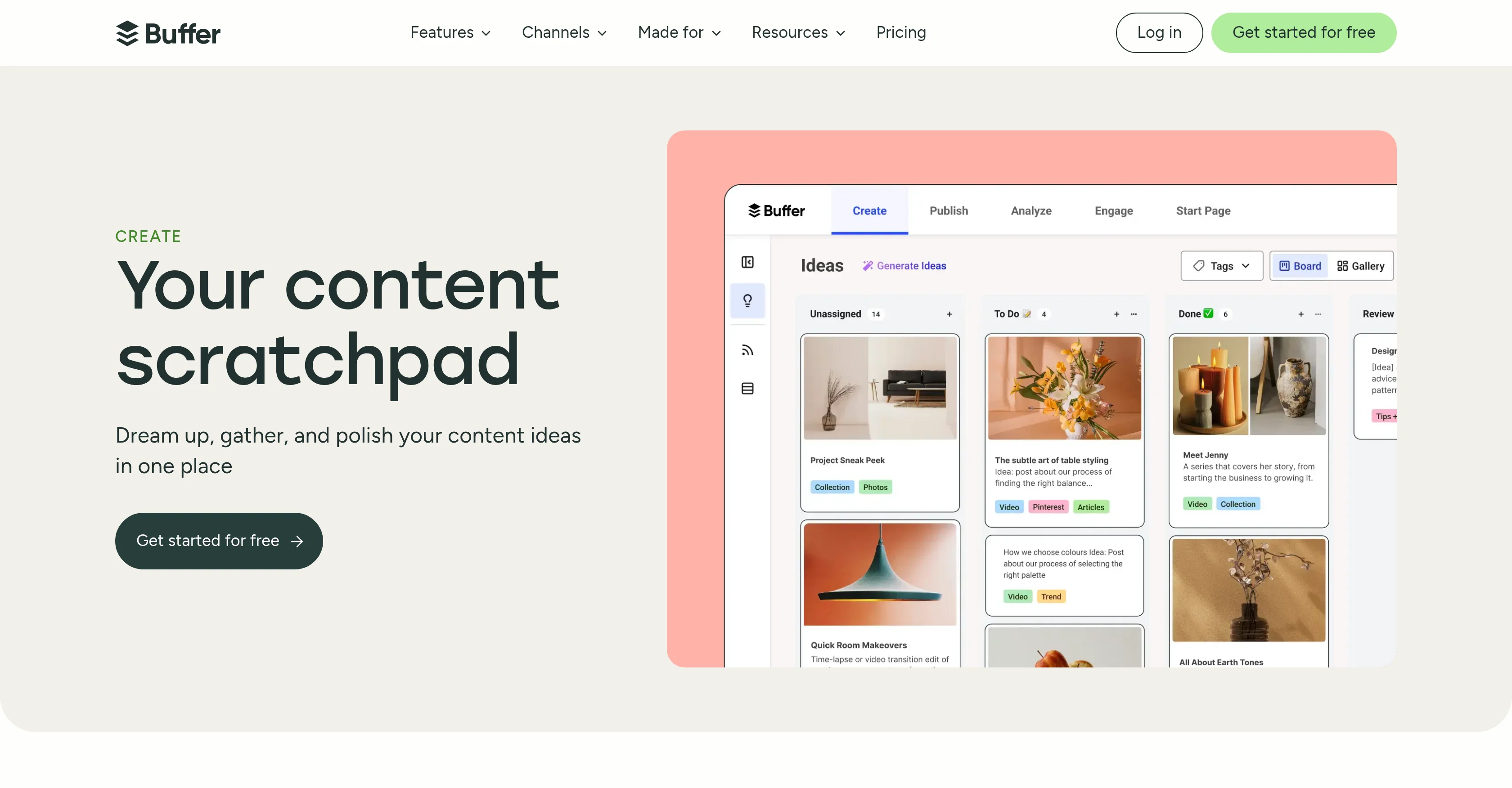
It provides users the comfort of creating a reservoir of content ideas and categorizing these ideas for easy accessibility. Buffer supports collaboration, allowing teams to seamlessly work together throughout the content creation process - from planning to publishing.Buffer integrates with tools like Google, Dropbox, Canva and more to import pictures and video content directly.
It also facilitates connection to RSS feeds to automatically refresh content from favorite sites. Buffer offers templates that save time and provide ready-made ideas for the next social media post.
The tool also incorporates visual aids like a kanban-style board that helps to track content from the idea stage to publishing, and a grid view for a broader perspective on the content.One outstanding feature of Buffer is its AI Assistant.
Buffer's AI assistant provides assistance directly in the writing process. This could be crafting something entirely new, fine-tuning a draft or adapting a post for another platform.
The AI assistant eases this process by generating fresh ideas instantly, adjusting tone and wordings, or even repurposing content to suit different channels.Furthermore, Buffer makes managing content simple with features like content tagging.
This allows users to tag posts by theme, categorizing ideas, and maintaining an organized content backlog. Buffer touts its ability to support a variety of user types from creators, small businesses, agencies, Nonprofits to Higher learning institutions, through its tools and resources.
Access & connections
Where you can use Buffer AI, and what it plugs into.
Platforms
Capabilities
What this tool accepts, produces, and is strongest at.
Input
- Tabular
- Image
- Text
Output
- Tabular
- Text
- Image
Supported features
- Social Media
Pros & cons
Pros
- All-in-one content creation
- Supports multiple platforms
- Reservoir of content ideas
- Easy content categorization
- Collaboration supported
- Integration with Google
- Integration with Dropbox
- Integration with Canva
Show 28 more
- RSS feeds connection
- Time-saving content templates
- Kanban-style visual tracker
- Post customization options
- Content repurposing
- Content tagging feature
- Organized content backlog
- Multiple user types support
- Direct media import
- Automatic content refresh
- Dashboard with grid view
- Adjusting post for different platforms
- Shared content planning
- Easy-to-use dashboard
- Multiple integrations
- Instant idea generation
- Content tone adjustment
- Overall seamless workflow
- Easy-to-find future posts
- Inspiration access via RSS
- Content import from anywhere
- Kanban-style content tracking
- Fast post creation
- Ready-to-use content templates
- Content management via tagging
- Content backlog organization
- Multi-platform content adjustments
- Customizable tagging
Cons
- No offline mode
- Limited RSS feeds
- Limited template variety
- May lack advanced features
- Content tagging could be complex
- Unclear integration with all social platforms
- Collaboration feature unspecified
- No specific copyright-check feature
Show 1 more
- Requires third-party tools for media import
Compare alternatives
Similar tools in the catalog — with a clear reason to open each one.


SocialRails ✓
Free TrialSchedule to 9 platforms and save 20+ hours/month.
Why look Higher community rating
Full comparison
Spira ✓
PaidAI influencers that grow your brand 24/7.
Why look Higher community rating
Full comparison
Ocoya ✓
Free TrialYour AI-powered hub for seamless social media scheduling and content creation.
Why look Better for writing
Full comparison
Made4Founders ✓
Free TrialAll-in-one founder platform. Post to 7 socials. Replaces 6 SaaS tools.
Free + from $49/mo
Full comparison
AI-Powered Post Generator ✓
FreeSocial post creation made easy from media sources.
Why look Fully free option
Full comparisonReleases 1
FAQ 12
What is Buffer's AI Assistant?
How does Buffer enable writing and refining social media content?
Can I collaborate with my team using Buffer?
What types of platforms does Buffer support for publishing?
How does Buffer facilitate content planning?
What kind of integrations does Buffer support?
How does Buffer assist with content categorization?
Can I connect Buffer to my RSS feeds?
What are Buffer's content templates?
Is it possible to repurpose content using Buffer?
What is Buffer's visual content tracker?
Does Buffer support post customization?
Related tools
Recommended

Automateed ✓
Free TrialCreate eBooks effortlessly with Automateed, the AI-powered writing tool.

Notis ✓
Free TrialThe first WhatsApp assistant that runs on your ChatGPT and Claude subscriptions

AI Social Post Generator ✓
Free TrialGenerate AI social media posts effortlessly.

X-Pilot AI ✓
FreemiumTurn Documents into Accurate Video Course Series

BestPhotoAI ✓
FreemiumCreate amazing AI photos instantly

Publer AI ✓
FreemiumAI-powered social media content creation and management