

Game sprites 2026 Rank: #3231
AutoSprite ✓
Turn one sprite into a full animation sheet instantly.
Verdict
A quick read before you dig into the full page.
- Best if
- Turn one sprite into a full animation sheet instantly
- Skip if
- Possible challenges with complex characters
- Pick this when
- Effortless sprite sheet conversion
Considering God Mode AI instead? Compare side by side
Overview
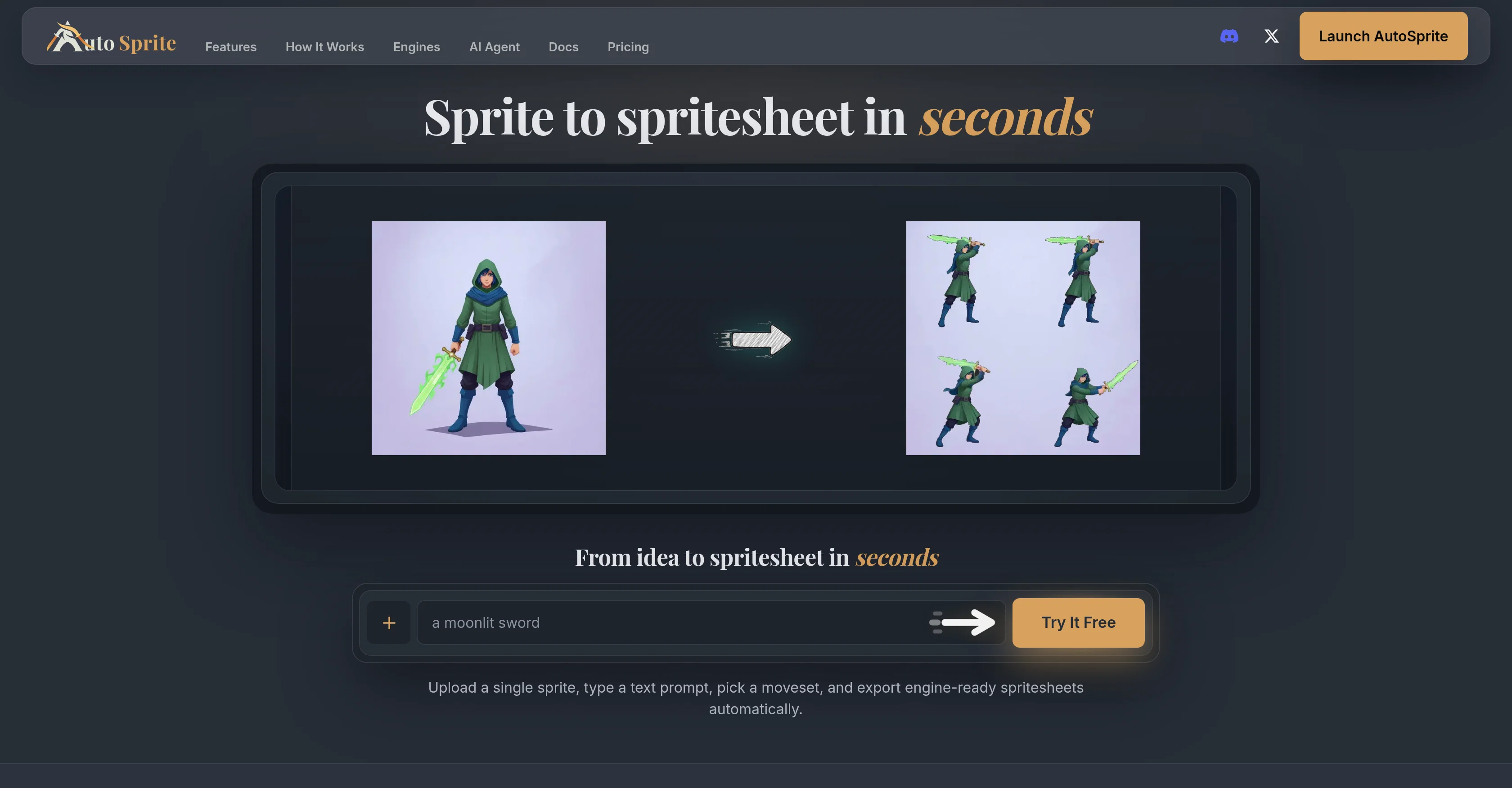
AutoSprite is a sophisticated AI sprite sheet generator designed for game development. It provides users with an effortless platform to convert single sprites into a full sprite sheet, ready to be exported as production-ready spritesheets.
Users can generate idle, walk, and run animations consistently from an individual character image or text prompt. Additionally, AutoSprite allows for guided storyboard keyframe customization for precise character motion syncing with text prompts.
It supports multi-directional isometric animation, preserving character identity consistently through all movements. The platform also extends the feature to create matching game props like icons, weapons etc.
AutoSprite offers character editing, allowing variations in outfits and skins while maintaining character scale and animation consistency. It aims to bring more convenience to game development with its motion transfer feature that applies existing animation movements to any character.
AutoSprite's proficiency extends to 3D modeling and animation, enabling image to 3D animated model generation preserving its visual style intact. Along with spritesheet creation, AutoSprite can produce AI-powered cinematic videos for engaging cutscenes from text prompts.
The platform adapts to any engine, including Unity, Godot, GameMaker, and Phaser, offering seamless integration with production pipelines. It aids with easy review of animations in the browser, timely adjustments, and engine-ready file exporting.
AutoSprite's capabilities are easily accessible through various agents and MCP-compatible editors.
Access & connections
Where you can use AutoSprite, and what it plugs into.
Platforms
Integrations
Capabilities
What this tool accepts, produces, and is strongest at.
Input
- Text
- Image
Output
- Image
- API
Supported features
- Image Generation
Pros & cons
Pros
- Effortless sprite sheet conversion
- Produces idle, walk, run animations
- Storyboard keyframe customization
- Supports multi-directional isometric animation
- Matching game props creation
- Character editing capabilities
- Character scale and animation consistency
- Motion transfer feature
Show 37 more
- Image to 3D animated models
- Cinematic video creation
- Adapts to any engine
- Unity, Godot, GameMaker, Phaser Integration
- Animation review in browser
- Timely animation adjustments
- Engine-ready file exporting
- Accessible through various agents
- MCP-compatible editor support
- Instant full animation sheet generation
- Maintains visual style consistency
- Character Idle Animation
- Character Walk Animation
- Character Run Animation
- Storybook Keyframe Customization
- Text Prompt Animation
- Multi-directional Animation
- Visual Style Preservation
- Text-Prompt based animations
- Supports creation of matching game props
- Animation editing capabilities
- Supports 3D model and animation
- Compatibility with various game engines
- Easy review and adjustments of animations
- Animation generation from text prompts
- Allows new outfits, skins for characters
- Effortless sprite to spritesheet process
- Browser-based animation preview
- Precise character motion syncing
- Consistent 8-direction isometric motion
- Convenient motion transfer feature
- Saves production pipeline rebuilding
- Automated spritesheet export
- Ease of agent workflows
- Game engine-ready exports
- Frame timing and loop control
- Reusable presets for exporting
Cons
- No mobile app available
- Limited to specific engines
- Limited customization options
- No offline version
- No multilanguage support
- Potential high-definition rendering issues
- No social media integration
- Doesn't offer pixel art support
Show 2 more
- Possible challenges with complex characters
- Lack of collaborative feature
Compare alternatives
Similar tools in the catalog — with a clear reason to open each one.
God Mode AI ✓
FreemiumGenerate professional game sprites and animations with AI.
Free + from $19/mo
Full comparison
SpriteCook ✓
FreemiumAI pixel art generator for game developers.
Why look Typically cheaper
Full comparison
SpriteFlow ✓
FreemiumGame-ready sprite animations, no drawing skills needed.
Why look Typically cheaper
Full comparison
AnimGen ✓
Free TrialTurn static images into animated game sprites.
Why look Typically cheaper
Full comparisonReleases 1
FAQ 12
What is AutoSprite?
How does AutoSprite convert a single sprite into a full sprite sheet?
What type of animations can I generate using AutoSprite?
Can I customize the storyboard keyframes using AutoSprite?
Can AutoSprite be used for multi-directional isometric animation?
Can I create game props using AutoSprite?
What character editing features does AutoSprite offer?
How does AutoSprite's motion transfer feature work?
Does AutoSprite support 3D modeling and animation?
Can AutoSprite generate cinematic videos for cutscenes?
Is AutoSprite compatible with Unity, Godot, GameMaker, and Phaser?
Can I review animations in the browser with AutoSprite?
Related tools
Recommended

MagicSlides.app AI PPT Maker ✓
FreemiumCreate Stunning PPTs in Seconds with the AI PPT Maker

GetLogit ✓
FreemiumArtificial intelligence, available for everyone.

ChatGPT ✓
FreemiumAsk anything, create anything, and move from idea to action.

Automateed ✓
Free TrialCreate eBooks effortlessly with Automateed, the AI-powered writing tool.

Kin - Personal AI Advisors ✓
FreePrivacy-first & designed your for mind, and life at work

Aiter.io | Paste a URL. Ship a Campaign That Sounds L... ✓
FreemiumAI marketing that sounds like you, not everyone else.