
Product images 2026 Rank: #2841
AI Product Photography.app ✓
Turn one product upload into complete ecommerce image sets.
Verdict
A quick read before you dig into the full page.
- Best if
- Turn one product upload into complete ecommerce image sets
- Skip if
- Limited file formats supported
- Pick this when
- Transforms single product upload
Considering SellerPic instead? Compare side by side
Overview
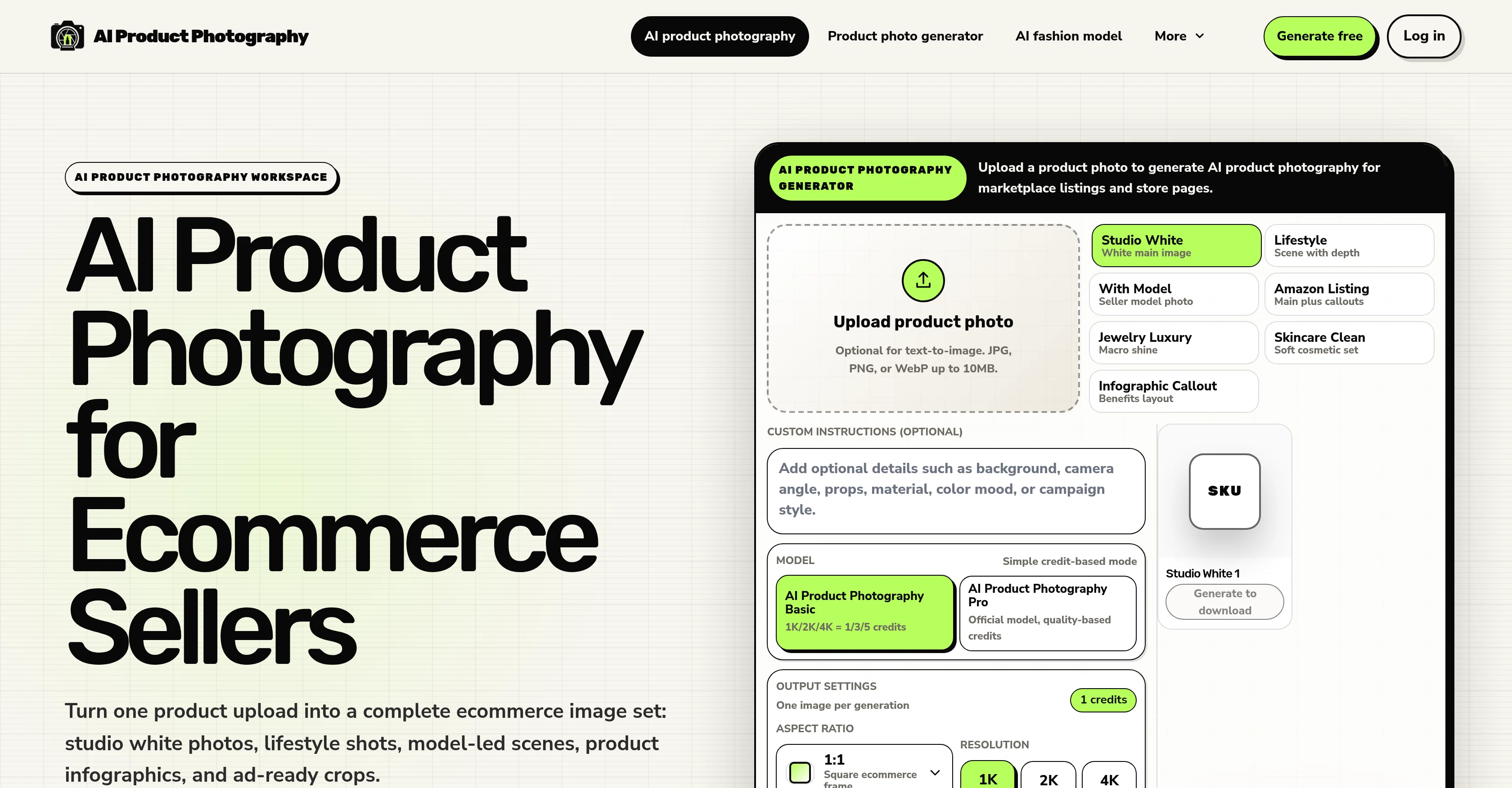
AI Product Photography tool is designed for Ecommerce sellers. The tool utilizes generative artificial intelligence to transform a single product photo input into a variety of complementary Ecommerce images.
These include white main images, lifestyle scenes with model-hosted contexts, product infographics and ad-ready crops. Furthermore, the tool guarantees product fidelity by providing users the option to review artifices like logos, labels, small text, jewelry details, reflective surfaces, and the overall packaging shape prior to publishing the generated images.
Importantly the tool ensures consistency in lighting, framing, color, and crop behavior across SKUs, Shopify collections and seasonal campaigns, a feature which enhances a brands presentation.
It addresses efficiency through its batch-ready catalog workflow that allows users to start with single-image previews, then, at will, scale into repeatable SKU sets for larger Ecommerce catalogs.
There's a focus on workflow-first design, ensuring that the output is practically applicable to seller needs and concerns. This tool offers a straightforward process.
Users upload a product photo, choose a desired image scene type (e.g., studio images, lifestyle photos, model-led shots, infographics, or marketplace crops), review the generated selection, and download their chosen images.
This process can be repeated multiple times to generate a comprehensive image set for Ecommerce use.
Access & connections
Where you can use AI Product Photography.app, and what it plugs into.
Platforms
Integrations
Capabilities
What this tool accepts, produces, and is strongest at.
Input
- Image
Output
- Image
Supported features
- Image Generation
- Image Edit
- Visual Creation
- Styling
- E-Commerce
Pros & cons
Pros
- Transforms single product upload
- Generates varied ecommerce images
- Creates studio white photos
- Generates lifestyle shots
- Generates product infographics
- Produces advertisement-ready crops
- Includes fidelity check feature
- Supports batch catalog workflows
Show 40 more
- Maintains consistent lighting
- Ensures consistent framing
- Offers consistent color
- Maintains consistent crop behavior
- Ideal for Shopify collections
- Great for seasonal campaigns
- Designed for ecommerce
- No design skills needed
- Generates images from single upload
- Creates diverse image set
- Supports large SKU sets
- Generates model-hosted scenes
- Review before publishing option
- Scalable for larger catalogues
- Generated images ready for download
- Features workflow-first design
- Offers single-image previews
- Customizable image scene choice
- Optional text-to-image
- Supports JPG, PNG, WebP
- Offers credible model photos
- Supports image resolution choice
- Built for ecommerce output sets
- Generates Amazon-style infographics
- Maintains product fidelity
- Generates Shopify product visuals
- Suits social ad crops
- Seller-first alternative approach
- Replaces routine studio shoots
- Time-efficient approach
- Efficient product image creation
- Self-contained image generation process
- FAQ section for guidance
- Fidelity check for reflective materials
- Generates macro shine visuals
- Seller model photos available
- Benefits layout for infographics
- Studio white templates available
- Supports high-resolution images
- Credits system for images
Cons
- No API for integration
- Limited to ecommerce imagery
- Inconsistent model-led scene results
- Hard to control output
- Reflection handling inconsistent
- Limited file formats supported
- No design customizability
- Lacks broad photo editing
Show 2 more
- Does not support video
- Difficult to scale content
Compare alternatives
Similar tools in the catalog — with a clear reason to open each one.

SellerPic ✓
FreemiumSupercharge photos with AI, boost sales in minutes.
Free + from $29/mo
Full comparison
SellShots ✓
Free TrialTurn one photo into high-converting product images
Why look Stronger for image work
Full comparison
Merchant Floor | Product Images ✓
Free TrialCreate product listings 10x faster with AI.
Free + from $20
Full comparison

Zawa AI | Brand Kit Generator & Editor ✓
FreemiumCreate logos, videos, and brand assets instantly.
Free + from $4.17 / month
Full comparison
ProductViews ✓
PaidGenerate product images from different angles with one upload.
Why look Typically cheaper
Full comparisonReleases 1
FAQ 12
What is AI Product Photography?
How does AI Product Photography generate ecommerce images?
Can AI Product Photography generate lifestyle shots with model-led scenes?
What does AI Product Photography mean by 'product fidelity'?
How can AI Product Photography support batch catalog workflows?
What does AI Product Photography offer for Shopify collections and seasonal campaigns?
How diverse is the range of images AI Product Photography can create?
How does AI Product Photography differ from generic background generators?
Do I need design skills to use AI Product Photography?
How can AI Product Photography transform a single product upload into multiple images?
Does AI Product Photography maintain consistent lighting, framing, color, and cropping?
What is the process to review and download images from AI Product Photography?
Related tools
Recommended

HeyGen ✓
FreemiumCreate AI spokesperson videos from text

AI Website Builder | Hostinger ✓
FreemiumCreate stunning websites instantly with AI.

Movie Maker Create ✓
FreeGenerate watermark-free AI videos with your xAI key

cutedyno.com ✓
FreemiumGenerate websites from prompts, keep editing and shipping.

Schedly ✓
Free TrialCreate 30 days of social content in 10 minutes.

Automateed ✓
Free TrialCreate eBooks effortlessly with Automateed, the AI-powered writing tool.