
Food Image Enhancer ✓
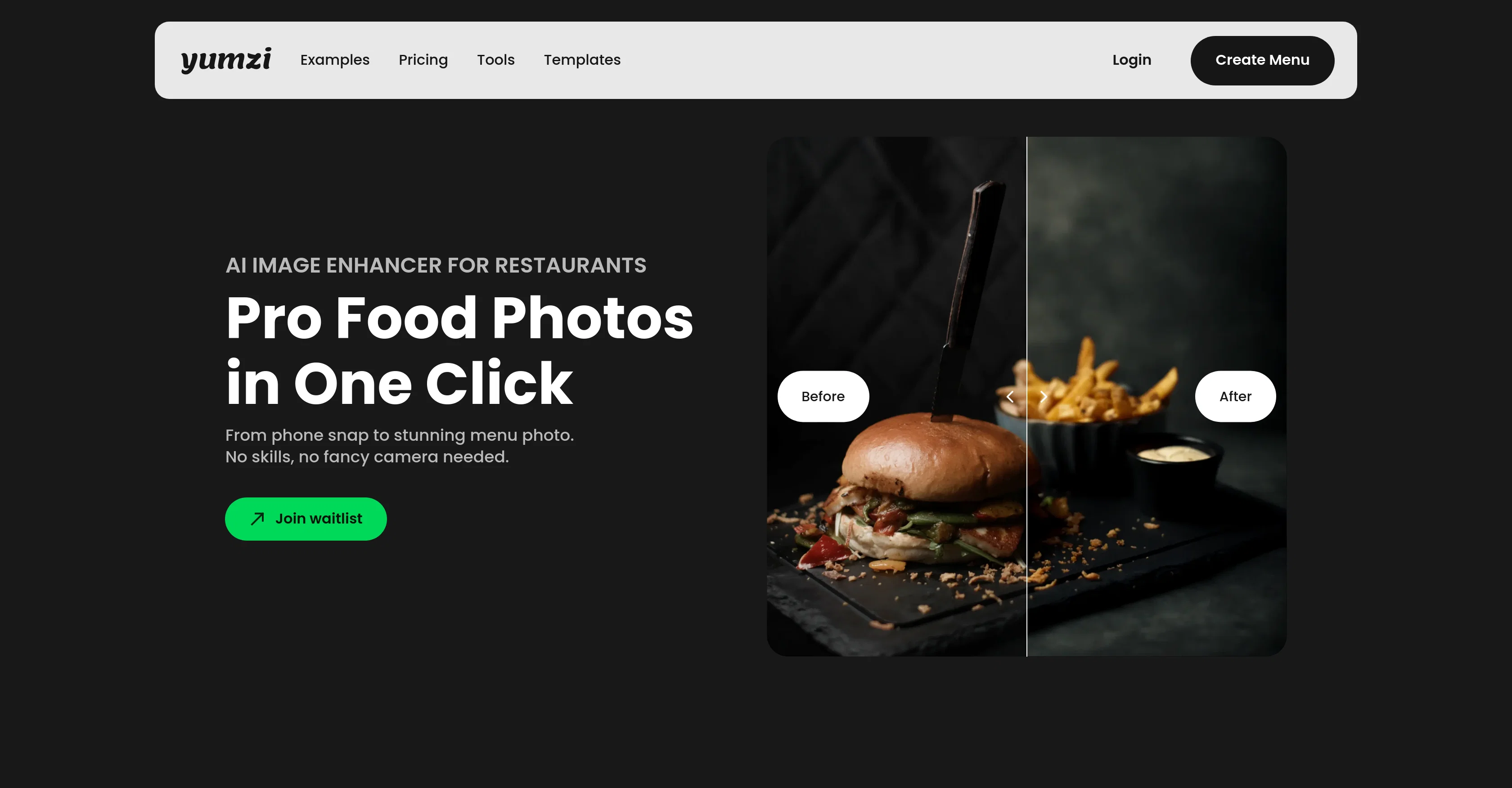
Transform food photos into pro-level images instantly.
Trial; then from $10/mo
Verdict
A quick read before you dig into the full page.
- Best if
- Transform food photos into pro-level images instantly
- Skip if
- Limited to Food Photography
- Pick this when
- Works with smartphone photos
Considering fridgesnap.AI instead? Compare side by side
Overview
The AI Image Enhancer for Food Photography is a tool designed to transform smartphone snaps into professional-quality food photographs. This tool can be particularly useful for restaurants, as it enables them to improve their menu photos rapidly and at a low cost.
No photography skills or specialist equipment are required, as the tool is designed to work effectively with images captured on a typical smartphone camera.The AI Image Enhancer offers a range of photo editing capabilities, all optimised for the unique needs of the hospitality industry.
These include background replacement, which allows users to declutter their images by changing or removing the background; perspective correction, ensuring photos have a balanced and appealing composition; relighting, to correct and enhance the lighting conditions; and color and detail enhancement, to make food colors more vibrant and the small details more distinct.The tool supports a one-click bulk processing mode for editing multiple photos simultaneously.
It is also capable of maintaining a consistent style across a series of images, which ensures that all photographs of a restaurant's dishes have a uniform look and feel.
The edited photos can be exported in high-quality JPG or PNG formats, making them suitable for a wide variety of platforms, such as food delivery apps, social media, digital menus, review platforms, or Google business profiles.
Best for
Short scenarios where Food Image Enhancer tends to shine.
-
Transform food photos into pro-level images instantly.
Example outputs 1
Sample generations and before/after results for Food Image Enhancer.
Access & connections
Where you can use Food Image Enhancer, and what it plugs into.
Platforms
Integrations
Capabilities
What this tool accepts, produces, and is strongest at.
Input
- Image
Output
- Image
Pros & cons
Pros
- Works with smartphone photos
- No photography skills required
- Optimised for hospitality industry
- Background replacement feature
- Perspective correction feature
- Relighting capabilities
- Color and detail enhancement
- One-click bulk processing
Show 16 more
- Maintains consistent style
- High-quality image export
- Supports JPG and PNG
- Suitable for food deliveries
- Good for social media
- Works for digital menus
- Enhances Google Business profiles
- Fast image enhancement
- No need for professional photographers
- Optimised for delivery apps
- Optimised for review platforms
- Results in under 30 seconds
- Multiple enhancement styles
- Natural, appetizing results
- Compatible with existing systems
- Works in any lighting
Cons
- Limited to Food Photography
- Cannot fine-tune adjustments
- No RAW image support
- Dependent on initial image quality
- No Voice-command support
- No metadata editing
- No offline functionality
- No manual controls
Show 2 more
- Not suited for non-restaurant businesses
- No Multi-platform support
Compare alternatives
Similar tools in the catalog.
People also view
Tools that often show up alongside Food Image Enhancer in collections and comparisons.
fridgesnap.AI ✓
Free TrialTurn Your Fridge Into a 5-Star Meal

ReadPartner ✓
Free TrialA media intelligence suite designed for businesses.

PrometAI ✓
FreemiumTurn ideas into viable reality with AI business plan generator.

Mind Map Wizard ✓
FreemiumGenerate mind maps with AI: free, no sign-up, no ads

Image to Prompt Generator ✓
FreemiumConvert images to prompts for AI art generation.

HeyGen ✓
FreemiumCreate AI spokesperson videos from text

FounderPal ✓
Free TrialGenerate a perfect marketing strategy in 5 minutes
FoodiePrep ✓
FreemiumAI-powered recipes and meal planning
Releases 1
Imported reviews 5
The tool looks really perfect!
Cool stuff! Could save a lot of time
I have signed up for the waiting list.. looks nice
Cool idea! If you can actually use it to turn smartphone photos into professional photos, then that's a game changer! Can't wait to try it out! 🚀
The tool looks great! It is very tedious to organize a food photographer every time, make an appointment, prepare the food for the photos and then pay over 100 € / hour processing costs. This tool could make a lot of things easier! I've signed up for the waiting list, I'm very excited!
FAQ 12
What is Yumzi Image Enhancer?
Can I use Yumzi on any smartphone?
What specific edits does Yumzi offer for food photography?
How fast can Yumzi process my food photos?
Can I edit multiple photos at once with Yumzi?
Does Yumzi offer a feature to maintain consistency across all my food photos?
In which formats can I export photos from Yumzi?
Can Yumzi remove or replace the background of my pics?
Can Yumzi help to correct the lighting in my food pics?
Can Yumzi make colors in my food pics more vibrant?
Is Yumzi suitable for restaurant menus?
Can I use photos edited by Yumzi on food delivery apps and social media?
Related tools
Recommended

Automateed ✓
Free TrialCreate eBooks effortlessly with Automateed, the AI-powered writing tool.

Cool Coloring Pages ✓
FreemiumCreate cool AI coloring pages instantly.
ReadPartner ✓
Free TrialA media intelligence suite designed for businesses.
Image to Prompt Generator ✓
FreemiumConvert images to prompts for AI art generation.
FoodiePrep ✓
FreemiumAI-powered recipes and meal planning

Scisummary ✓
Free TrialCutting-edge scientific articles summarization.