

Voiceovers 2026 Rank: #738
VoxSprint ✓
Create natural multilingual voiceovers and translate videos with cloned voices
Trial; then from $1
Verdict
A quick read before you dig into the full page.
- Best if
- Create natural multilingual voiceovers and translate videos with cloned voices
- Skip if
- Limited narration speeds
- Pick this when
- Natural-sounding voiceovers
Considering FineVoice instead? Compare side by side
Overview
🌍 One script, multiple voiceovers
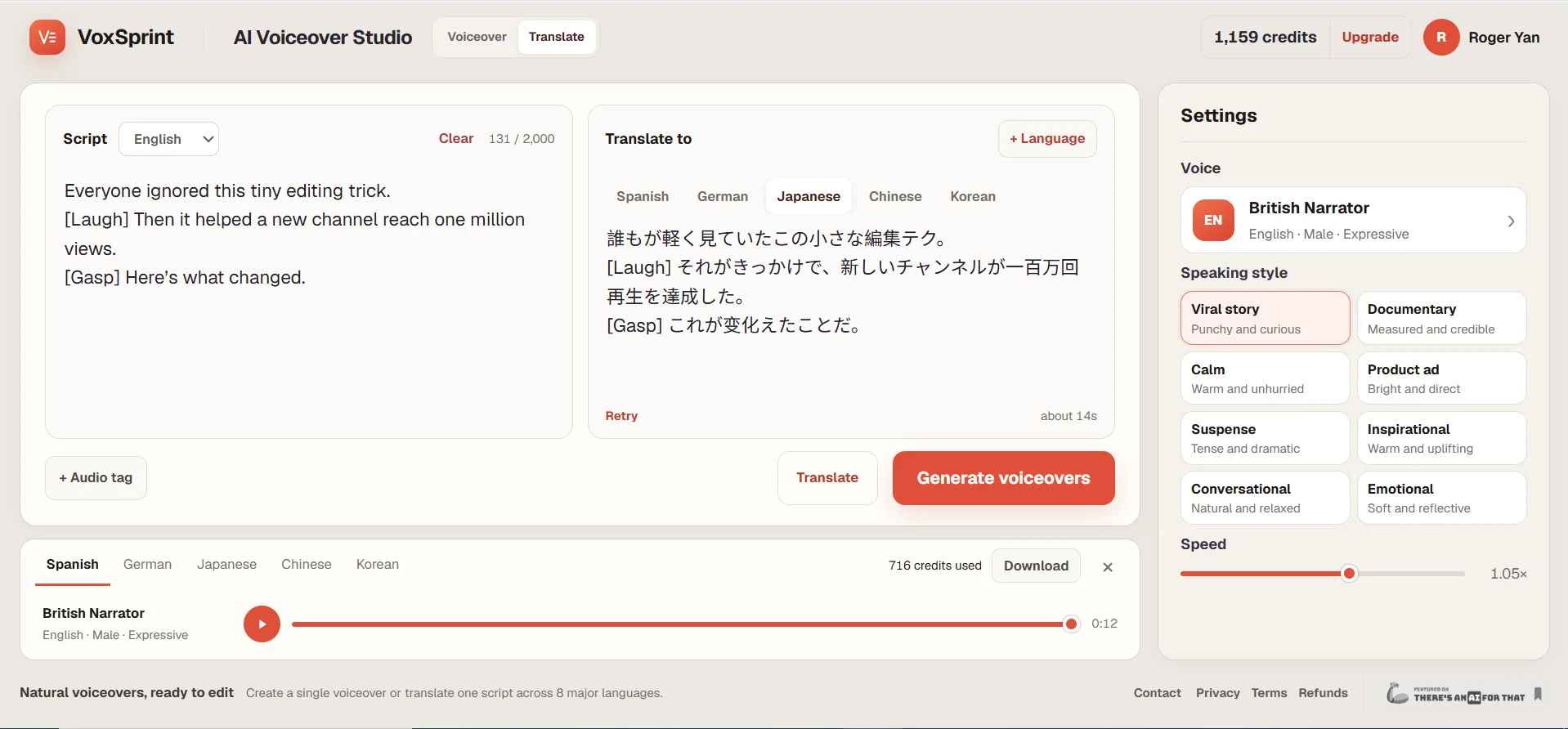
Paste a script, translate it into multiple languages, and review every version before generating audio. Edit the wording directly, choose a different voice for each language, and create only the versions you need.
🎬 Fast video translation with the original voice
Upload a video, choose your target languages, and let VoxSprint translate the speech and recreate it in the original speaker’s cloned voice. Enable lip sync for natural-looking translated videos, then preview and download each language separately.
🗣️ Make every name sound right
Fix names, brands, acronyms, and difficult words by entering how they should sound. Preview the pronunciation before spending credits on the complete voiceover.
🎭 Shape a more natural delivery
Match the voice to stories, ads, tutorials, product demos, podcasts, courses, and social content. Adjust the speaking style and speed, then add breaths, laughs, sighs, gasps, and other natural audio cues where they belong.
🎙️ Control every language independently
Preview voices instantly, assign a different voice to each language, and generate or retry one version without restarting the entire multilingual project.
📥 Get files ready for your editing workflow
Download MP3 voiceovers and timed SRT captions for script projects, or export finished translated videos ready for publishing and further editing.
✅ Spend credits with confidence
Script translation and pronunciation previews are free. Video credit usage is shown before processing, and failed generations do not consume credits.
Sign in for 2,000 free text credits. Buy 10,000 paid credits for $1 with no subscription, or get 100,000 credits per month for $6.99. Paid credits roll over and remain available after cancellation. Standard video translation uses 10,000 credits per generated minute for each target language, with optional lip sync charged separately. Commercial use is included for generated voiceovers and captions.
- Multilingual Voiceovers From One Script
- Video Translation With Original Voice Cloning
- Editable Translations Before Generation
- Optional Lip Sync For Translated Videos
- Pronunciation Control With Instant Previews
- Per-language Voice Selection And Regeneration
- Natural Speaking Styles And Audio Cues
- Mp3, Timed Srt And Translated Video Exports
- Free Translation And Pronunciation Previews
- Pay-as-you-go Credits With Failed-job Protection
Access & connections
Where you can use VoxSprint, and what it plugs into.
Platforms
Integrations
Capabilities
What this tool accepts, produces, and is strongest at.
Input
- Text
- Video
Output
- Audio
- Video
- Text
Pros & cons
Pros
- Natural-sounding voiceovers
- Suits different video platforms
- Multiple expressive styles
- Diverse voice styles
- Adjustable narration speed
- Generates credible voiceovers
- MP3 audio output
- SRT captioning output
Show 10 more
- Initial free credits provided
- Upgrade option available
- Targeted for short videos
- Script to narration conversion
- Offers audio personalisation
- Narration speed customization
- Supports ad production
- Offers Documentary style
- Includes Inspirational tone
- Supports multiple languages
Cons
- Limited voice styles
- No real-time adjustments
- Only outputs MP3/SRT
- Requires signup for free credits
- Lacks API for integrations
- No multi-language support
- Only suited for short videos
- No voice customization
Show 2 more
- Limited narration speeds
- Payment for extra credits
Compare alternatives
Similar tools in the catalog.


Freepik AI Voice Generator ✓
FreemiumNatural AI Voiceovers for Every Project, Effortlessly
Free + from $5/mo
Full comparison
Vocs.ai ✓
FreemiumTransform your voice with AI singers and rappers.
Free + from $5.99/mo
Full comparison
Typecast ✓
FreemiumPower videos with realistic AI voices and avatars.
Free + from $8.99/mo
Full comparison
Crikk ✓
FreemiumAI voiceovers indistinguishable from human speech
Free + from $14 / / monthly
Full comparison
Releases 1
Imported reviews 1
I built VoxSprint because creating the same voiceover in multiple languages usually means switching between translation, text-to-speech, and caption tools. With VoxSprint, you can paste one script, translate it into up to five languages, review every version, fix difficult pronunciations, preserve natural delivery cues such as laughs and breaths, and export finished MP3 voiceovers and timed SRT captions for each language. I’d especially appreciate feedback on translation quality, pronunciation control, voice naturalness, and anything that would make the workflow faster or easier. You can start with 2,000 free credits, buy 10,000 credits for $1 with no subscription, or get 100,000 monthly credits for $6.99.
FAQ 12
What is VoxSprint?
How does VoxSprint work?
What platforms is VoxSprint ideal for?
Can I adjust the speed and rhythm of the voiceover in VoxSprint?
What different voice styles does VoxSprint offer?
Can VoxSprint convert scripts into natural narration?
What output formats does VoxSprint provide?
How can I start using VoxSprint?
Are there any free credits available for VoxSprint?
How can I get more credits in VoxSprint?
Which types of videos can benefit from VoxSprint's features?
What kind of auditory experience does VoxSprint aim to provide?
Related tools
Recommended

Seedeo Video Generator ✓
FreemiumTurn text and images into cinematic AI videos.

AI Effect | AI Video Generator ✓
FreemiumTurn text or images into videos. Pay as you go

Movie Maker Edit ✓
FreeTurn short AI-generated clips into Ads, TV Shows, and Movies in Minutes

Kuca AI ✓
Free TrialOne idea. One cinematic scene. One AI video maker.

Kuvu AI | Video Generator ✓
Free TrialOne platform for all your AI image and video creation.

GetLogit ✓
FreemiumArtificial intelligence, available for everyone.