

Voice cloning 2026 Rank: #1187
Voicebox ✓
Open source voice cloning powered by Qwen3-TTS.
Verdict
A quick read before you dig into the full page.
- Best if
- Open source voice cloning powered by Qwen3-TTS
- Skip if
- Local machine can limit performance
- Pick this when
- Open-source application
Considering KreadoAI instead? Compare side by side
Overview
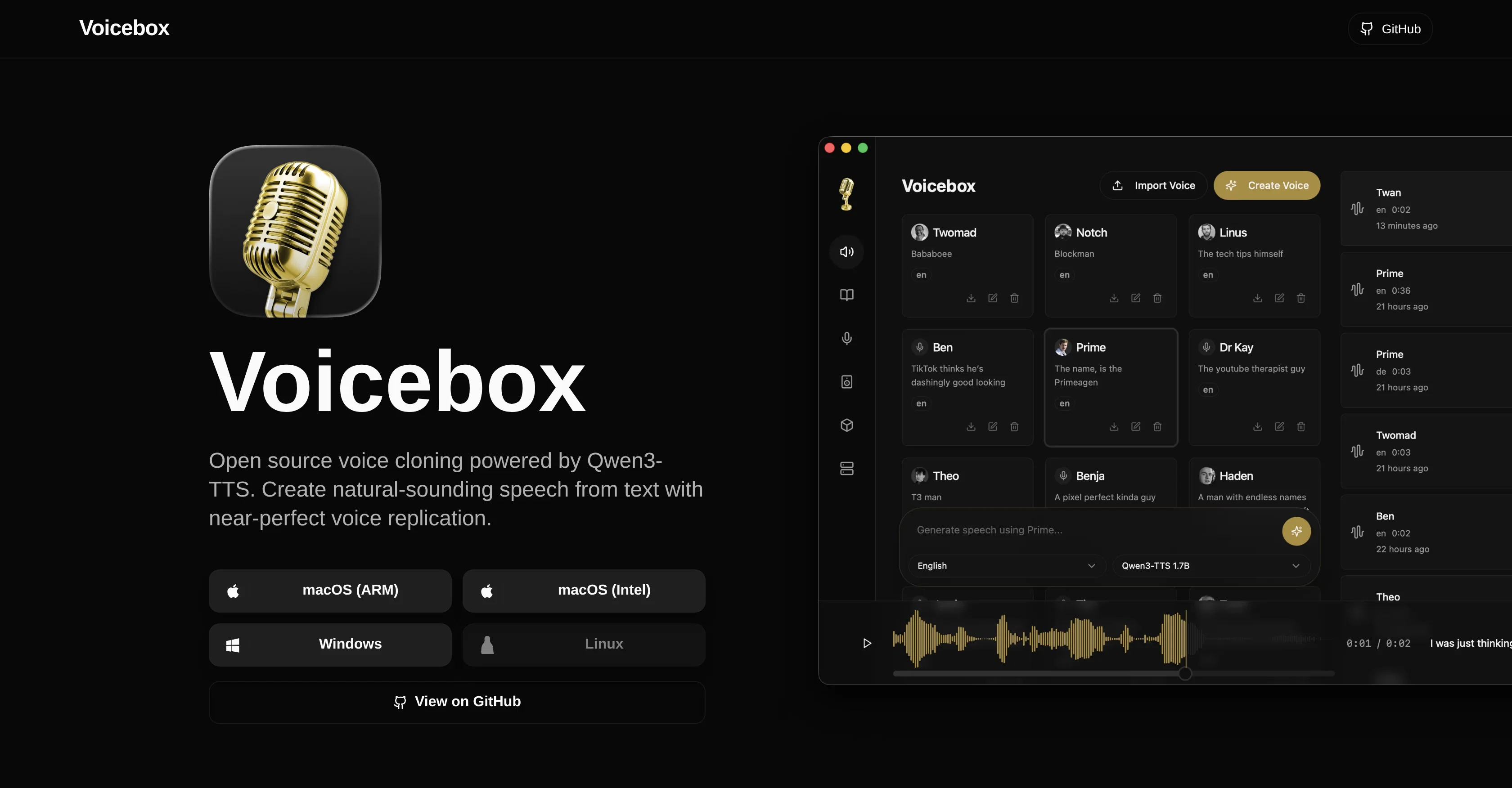
Voicebox is an open-source voice cloning desktop application powered by Qwen3-TTS. It allows users to create natural-sounding speech from text, replicating voices with high precision.
This application is positioned as a local-first voice cloning studio providing professional voice synthesis comparable to commercial-grade software, but with user privacy as a focus.
It requires no cloud services or subscriptions, thus ensuring complete user privacy and native performance. With Voicebox, one can download voice models, clone voices, and generate speech entirely on a local machine.
The application is cross-platform, designed for macOS, Windows, and Linux. It provides multi-sample support to allow for greater quality and natural sounding voice cloning.
The application is designed for optimal performance, leveraging Metal acceleration on Mac and CUDA acceleration on Windows/Linux for speedy, local inference operations.
In addition, it enables users to run GPU inference locally or connect to a remote machine. The software also equips users with a stories editor that permits the created multi-voice narratives with a timeline-based editor, making it possible to arrange tracks, trim clips, and mix conversations.
Moreover, it features an audio transcription system powered by Whisper for accurate speech-to-text, thereby allowing automatic extraction of reference text from voice samples.
Access & connections
Where you can use Voicebox, and what it plugs into.
Platforms
Integrations
Capabilities
What this tool accepts, produces, and is strongest at.
Input
- Audio
Output
- Audio
Highlights
- Open Source
- API
- MCP
- Local
- No Signup
Supported features
- Open Source
- Voice Cloning
- TTS
- Transcription
- API
- MCP
- Runs Locally
- No Signup
- Speech API
Pros & cons
Pros
- Open-source application
- Professional voice synthesis
- User privacy focused
- No cloud services required
- No subscriptions needed
- Allows download of voice models
- Supports voice cloning
- Generates speech on local machine
Show 22 more
- Cross-platform application
- Optimized for macOS, Windows, Linux
- Multi-sample support
- Utilizes Metal acceleration on Mac
- Uses CUDA acceleration on Windows/Linux
- Offers local GPU inference
- Connect to remote machine
- Features a stories editor
- Timeline-based editor for multi-voice narratives
- Audio transcription system
- Powered by Whisper for speech-to-text
- Automatic reference text extraction
- Smart caching
- No Python installation required
- Create natural-sounding speech
- Can clone any voice
- Personal voice data protection
- Studio-grade editing tools
- Fast local inference
- Nearly perfect voice replication
- One-click server setup
- Combine multiple voice samples
Cons
- Requires GPU for optimal performance
- UI possibly overwhelming
- Local machine can limit performance
- Remote machine setup required
- Dependent on Qwen3-TTS
- Whisper needed for transcriptions
- Metal acceleration only on Mac
- CUDA acceleration required on Windows/Linux
Show 2 more
- Sizeable download for voice models
- Possible privacy concerns with cloning voices
Compare alternatives
Similar tools in the catalog.
KreadoAI ✓
Free TrialCreate AI-powered multilingual videos with digital avatars
Free + from $12/mo
Full comparison
Fineshare ✓
FreemiumAn online all-in-one AI voice generator for everyone
Free + from $6.99/mo
Full comparison
Instant Singer ✓
FreemiumClone your voice and sing any song instantly.
Free + from $1.99
Full comparison

Releases 1
FAQ 12
What is Voicebox and how does it work?
Is Voicebox free to use since it is open-source?
How does Voicebox guarantee user privacy?
What operating systems is Voicebox compatible with?
How is the quality of voice cloning ensured in Voicebox?
What is the role of Qwen3-TTS in Voicebox?
How are local inference operations accelerated using Metal and CUDA in Voicebox?
How can I clone voices using Voicebox?
Can Voicebox be used without a cloud service or subscription?
Can Voicebox run GPU inference locally and how does it connect to a remote machine?
What features does the Stories Editor in Voicebox provide?
What roles does audio transcription and Whisper play in Voicebox?
Related tools
Recommended

Z.ai ✓
FreeFree AI that builds, creates, and writes professionally.

MonoDesk ✓
FreeOne workspace for freelance creative professionals.

GetLogit ✓
FreemiumArtificial intelligence, available for everyone.

Free Text-To-Speech ✓
FreeText transformed into customizable spoken output.

ChatGPT ✓
FreemiumAsk anything, create anything, and move from idea to action.

Automateed ✓
Free TrialCreate eBooks effortlessly with Automateed, the AI-powered writing tool.