

Flyers 2026 Rank: #1390
Vismuse | Flyer Maker ✓
Create stunning flyers from a single AI prompt.
Verdict
A quick read before you dig into the full page.
- Best if
- Create stunning flyers from a single AI prompt
- Skip if
- Limited file format support
- Pick this when
- Extensive flyer category options
Considering Layers instead? Compare side by side
Overview
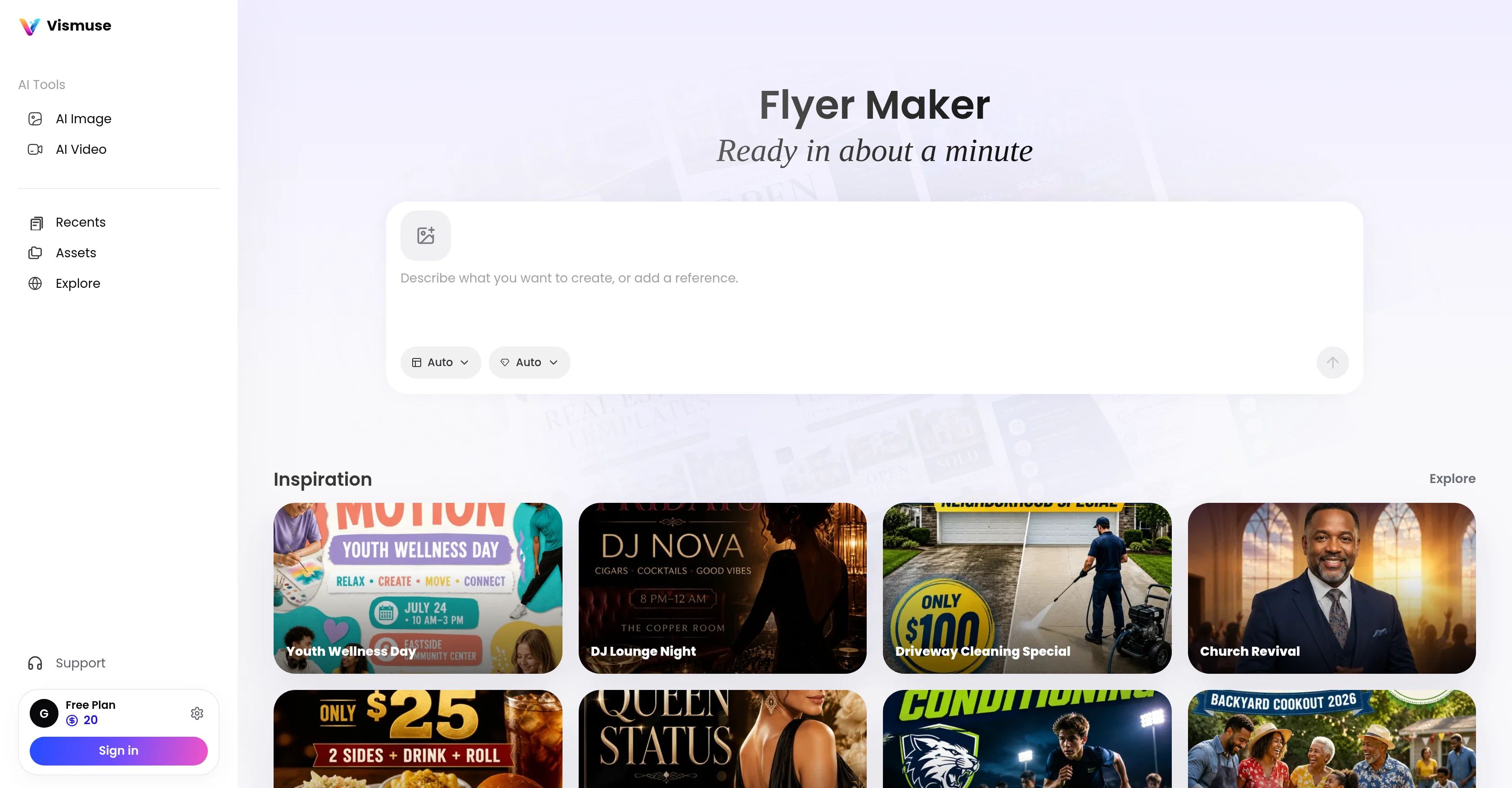
The Vismuse AI Flyer Generator tool is designed to aid in the creation of various types of flyers. It caters to an extensive range of needs across events, sales, local services, real estate, parties, fundraisers and promotions.
This flexible tool turns simple AI prompts into well-designed flyers suitable for many occasions. The options available within this tool span across a diverse range of categories.
It includes the 'Events and offers' workflow for creating flyers in response to specific events or promotional offerings. Other workflows encompass sectors like music, publishing, interior design, and even clothing changes.
A 'Personal Image Maker' feature offers different portrait styles, a notable inclusion that can be useful for individual or business branding. For more professional purposes, there are a series of specialized tools such as 'Business Card Maker', 'Logo Maker', and 'Product Ad Maker', aimed at creating brand-centric promotional content efficiently.
There is also an 'Invitation Maker' for crafting custom invites and cards and a 'Background Remover' for clean cutouts.This tool is user-friendly and designed to deliver creatively constructed flyers in a short span of time.
Using AI, it facilitates a prompt-based workflow where you input your requirements and the tool generates your desired flyer. Its extensive range of options along with its ease of use can make it a practical solution for anyone looking to create tailored flyers without extensive design expertise.
Access & connections
Where you can use Vismuse | Flyer Maker, and what it plugs into.
Platforms
Integrations
Capabilities
What this tool accepts, produces, and is strongest at.
Input
- Image
- Text
Output
- Video
- Image
Highlights
- No Signup
Supported features
- No Signup
Pros & cons
Pros
- Extensive flyer category options
- Events and offers workflow
- Covering multiple industries
- Personal Image Maker feature
- Specialized tools included
- Business Card Maker
- Logo Maker
- Product Ad Maker
Show 32 more
- Invitation Maker
- Background remover
- User-friendly interface
- Time efficient
- No design skills needed
- Prompt-based workflow
- Broad application range
- Creates tailored flyers
- Template availability
- Multiple design options
- Turns ideas into visuals
- Refinement options
- Supports common image inputs
- Downloadable assets
- Tattoo generator
- Targets different user types
- Ecommerce focused features
- Musicians marketing tools
- Marketers focused workflows
- Local business solutions
- 20+ Creative workflows
- Image + video formats
- Ready-to-use visual assets
- Marketing, ecommerce, music workflows
- Supports commercial projects
- Generates personal images
- Generates business cards
- Generates logos
- Generates product ads
- Generates invitations
- Generates background-free images
- Upgradable plan options
Cons
- Lacks advanced editing features
- No integration with social media
- No collaboration functionality
- No data analytics or reports
- Absence of template filtration
- Limited file format support
- No offline working capability
- Lacks version control
Show 2 more
- No API for extendibility
- No multilingual support
Compare alternatives
Similar tools in the catalog — with a clear reason to open each one.

Layers ✓
PaidCode aware agentic marketing that scales.
Why look Offers a public API
Full comparison
Releases 1
FAQ 12
What does the Vismuse AI Flyer Generator do?
Can I use the Vismuse AI Flyer Generator to create flyers for any type of event?
What are some of the specific features of the Vismuse AI Flyer Generator?
How does the 'Events and offers' workflow in the Vismuse AI Flyer Generator work?
Can I design a logo with the Vismuse AI Flyer Generator?
What do I need to input into the Vismuse AI Flyer Generator to get started?
What is the 'Personal Image Maker' feature on the Vismuse AI Flyer Generator tool?
Can Vismuse AI Flyer Generator help with business branding?
Can I create business cards or product ads with the Vismuse AI Flyer Generator?
How can the 'Background Remover' help in designing my flyer?
How efficient is the Vismuse AI Flyer Generator?
What output formats does the Vismuse AI Flyer Generator support?
Related tools
Recommended
AIReel ✓
Free TrialGenerate AI videos & images from image or text prompt.

Domain Name Search | Hostinger ✓
FreeFind, buy, and own your domain in minutes.
Convly AI Image-to-Prompt ✓
FreeTurn any image into an editable AI prompt — free, no signup.

MuseAuthor ✓
FreemiumKDP-ready books in English and Italian — one payment, no subscription

MagicSlides.app AI PPT Maker ✓
FreemiumCreate Stunning PPTs in Seconds with the AI PPT Maker

GetLogit ✓
FreemiumArtificial intelligence, available for everyone.