

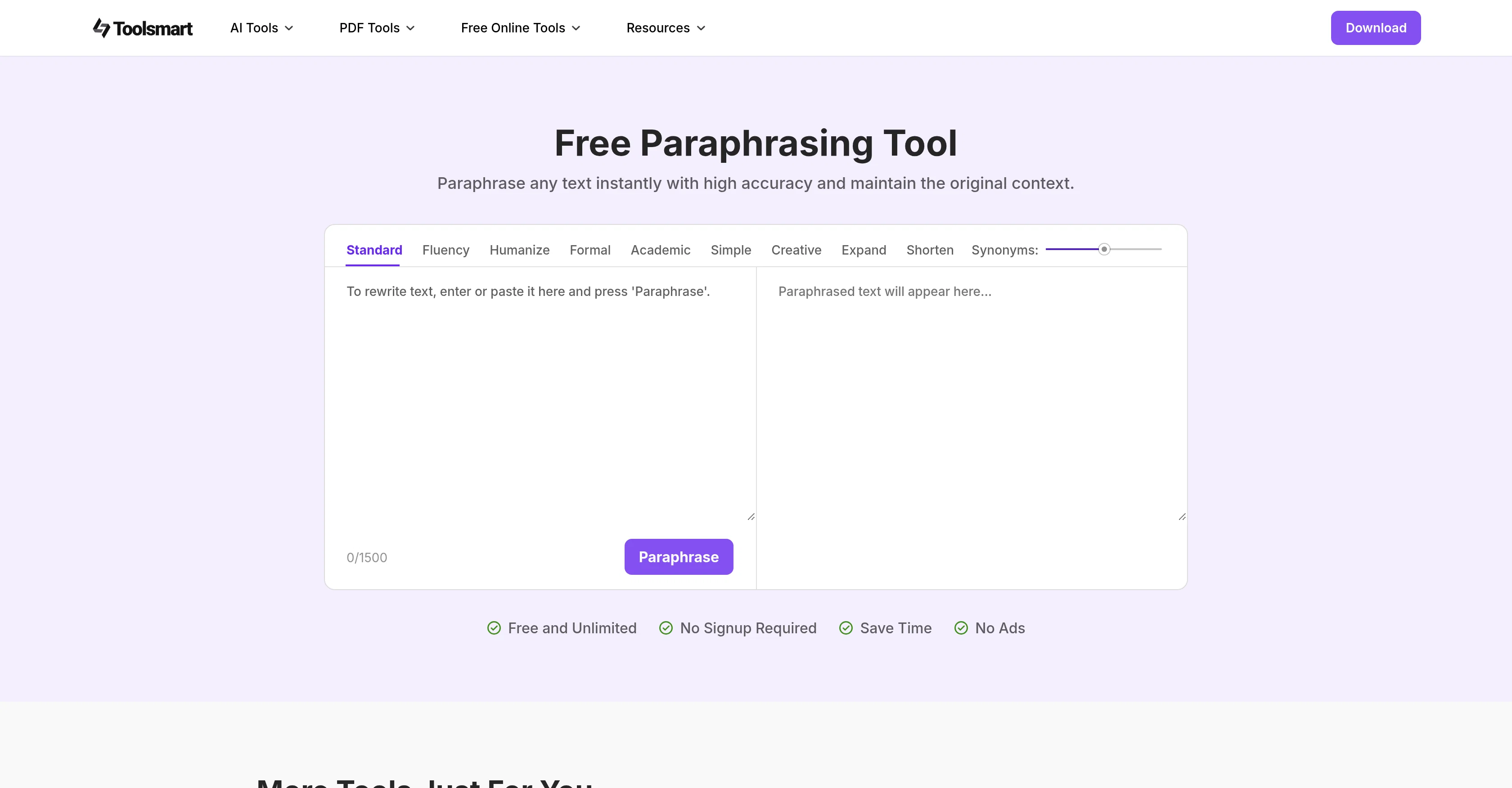
ToolSmart Free Paraphrasing Tool ✓
Instantly paraphrase text with high accuracy.
Verdict
A quick read before you dig into the full page.
- Best if
- You are bloggers and need: Make AI-generated blog posts or video scripts sound authentic and engaging
- Skip if
- Limited paraphrasing modes
- Pick this when
- 9 unique paraphrasing modes
Considering Paraphrase Tool instead? Compare side by side
Overview
This tool is designed to paraphrase text while maintaining the original context and meaning. Conveniently, the tool is online and free, requiring no sign-up.
What sets it apart is its 9 unique paraphrasing modes that help tailor the output to users' specific needs. These modes can assist in making the text more professional, simple, or creative, among other options.
Additionally, it allows control over the degree of change in the text from subtle tweaks to complete rewrites, making it a versatile solution for both minor edits and major overhauls.
This tool is ideal for a variety of writing needs including essays, marketing copy, reports, and creative content. It also offers a high word limit per session, accommodating long-form content.
Notably, the tool is user-friendly, making it easy for users to get clear, well-structured, and refined content without extra effort.
Best for
Short scenarios where ToolSmart Free Paraphrasing Tool tends to shine.
-
Make AI-generated blog posts or video scripts sound authentic and engaging.
Best for Bloggers
-
Polish essays, reports, or summaries that were drafted with AI tools for a more natural academic tone.
Best for Students
-
Humanize product descriptions or ad copy for better audience connection.
Best for Freelance Writers
Example outputs 1
Sample generations and before/after results for ToolSmart Free Paraphrasing Tool.
Access & connections
Where you can use ToolSmart Free Paraphrasing Tool.
Platforms
Capabilities
What this tool accepts, produces, and is strongest at.
Input
- Text
Output
- Text
Pros & cons
Pros
- 9 unique paraphrasing modes
- Online and free
- No sign-up required
- High word limit
- User-friendly interface
- Flexible rewrite degree
- Preserves original meaning
- Variety of writing needs
Show 13 more
- Professional, simple, creative outputs
- Tweaks to complete rewrites
- Clear, well-structured, refined content
- Suitable for academic writing
- Supports long-form content
- Ideal for marketing copy
- Essential for report writing
- No ads
- Great for creative writing
- Testimonials available
- Unlimited usage
- Excels in context preservation
- Aids in plagiarism avoidance
Cons
- No offline version
- No multi-language support
- Limited paraphrasing modes
- No mobile app
- Potential inconsistent paraphrasing
- No API for integration
- No collaboration features
- No user support provided
Show 2 more
- No plagiarism check included
- No secure data policy
Compare alternatives
Similar tools in the catalog — with a clear reason to open each one.

Paraphrase Tool ✓
FreemiumParaphrase text in 15 modes for 100+ languages
Free + from $7.49/mo
Full comparison
Grammar Checker & Proofreader - PowerPen ✓
UnknownAI-powered grammar checker and email writer.
Why look Better for writing
Full comparison
AISEO Free Paraphrasing Tool ✓
PaidRewrite content with one-click uniqueness.
Why look Better for writing
Full comparison
Yaara AI Paraphrasing Tool ✓
PaidAI-powered paraphrasing for unique, high-performing content
Why look Better for writing
Full comparisonPeople also view
Tools that often show up alongside ToolSmart Free Paraphrasing Tool in collections and comparisons.

Rephrasely ✓
PaidRewrite text in 12 free modes across languages
Grammar Checker & Proofreader - PowerPen ✓
UnknownAI-powered grammar checker and email writer.
Yaara AI Paraphrasing Tool ✓
PaidAI-powered paraphrasing for unique, high-performing content
Paraphrase Tool ✓
FreemiumParaphrase text in 15 modes for 100+ languages

NeuralWriter ✓
FreeRewrite and rephrase text in multiple languages.
AISEO Free Paraphrasing Tool ✓
PaidRewrite content with one-click uniqueness.
UltraHumanizer ✓
FreeTurn stiff AI drafts into natural writing.

ProofWrite ✓
FreemiumHumanize AI text and verify it in one click.
Releases 1
Imported reviews 2
Just go to Quillbot itself. It has a lot more features than just paraphrasing, and even if that feature is all you're looking for anyway, it's far from hard to find.
This tool is just rewriting the text, and the limit is 1500 words.
FAQ 12
What is the ToolSmart Free Paraphrasing Tool?
How is it different from other paraphrasing tools?
What are the 9 unique paraphrasing modes in ToolSmart?
How can ToolSmart help make text more professional?
What level of change can I expect when using ToolSmart?
Can ToolSmart help me with major rewrites?
What types of writing is ToolSmart best for?
What is the word limit per session in ToolSmart?
How user-friendly is ToolSmart?
How can ToolSmart help with plagiarism avoidance?
Is the ToolSmart Free Paraphrasing Tool really free to use?
Do I need to sign up to use ToolSmart?
Related tools
Recommended

Mind Map Wizard ✓
FreemiumGenerate mind maps with AI: free, no sign-up, no ads

Thea ✓
FreemiumAI study tools to master material, not just memorize it.

Collate ✓
FreeUnlimited free and private summaries and chat with PDF

The AI Voice Generator ✓
FreemiumCreate Celebrity voices and voiceovers in 120 languages with 800+ AI voices.
Humanize AI Text by Akazila ✓
Free TrialTransform AI-Generated text into content that feels like it's written by human

TutorAI ✓
FreemiumInstant knowledge on any topic