
Tattoos 2026 Rank: #1933
TattooIdeas – AI Tattoo Generator, Stencil & Try-On ✓
Create, refine, and preview custom tattoo designs with AI.
Verdict
A quick read before you dig into the full page.
- Best if
- Create, refine, and preview custom tattoo designs with AI
- Skip if
- Results depend on the detail and quality of prompts or reference images
- Pick this when
- Generates tattoo concepts
Considering TattoosAI instead? Compare side by side
Overview
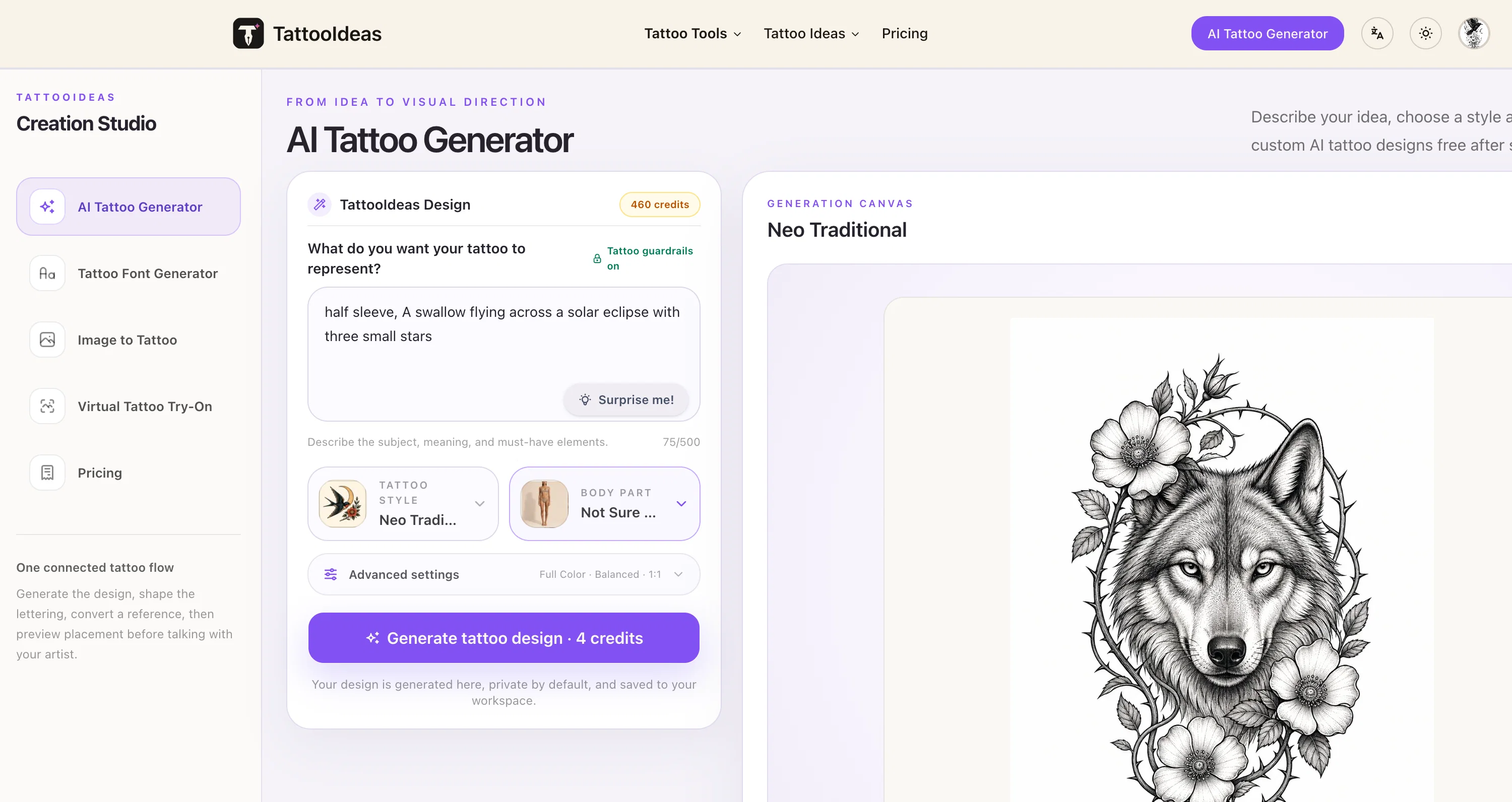
TattooIdeas is an AI-assisted tattoo design and planning platform that helps people turn personal ideas or reference photos into custom tattoo concepts.
Users can explore 20 tattoo styles and 21 body placements, generate variations, create tattoo lettering and stencils, plan cover-ups, convert images into tattoo concepts, and preview placement on standardized body templates.
Unlike a single-purpose image generator, TattooIdeas supports the wider journey from early inspiration to a clearer reference for discussing size, style, and placement with a tattoo artist.
New accounts include two free AI generations, with additional usage available through one-time credit packs rather than a recurring subscription.
- Custom Ai Tattoo Generation From Text
- 20 Tattoo Styles And 21 Body Placements
- Image-to-tattoo Conversion
- Ai Tattoo Cover-up Planning
- Virtual Tattoo Placement Previews
- Tattoo Stencil Generation
- Tattoo Lettering And Font Design
- Private Design History And Downloads
Access & connections
Where you can use TattooIdeas – AI Tattoo Generator, Stencil & Try-On.
Platforms
Capabilities
What this tool accepts, produces, and is strongest at.
Input
- Image
- Text
Output
- Text
- Image
Highlights
- SOTA
Supported features
- Image Generation
- Image Edit
Pros & cons
Pros
- Generates tattoo concepts
- Converts photos into designs
- Designs tattoo lettering
- Plans cover-ups
- Creates stencils
- Virtual try-on feature
- Depth-aware contouring
- Male and female templates
Show 35 more
- Visualizes tattoo on body
- Starts design from idea
- Starts design from phrase
- Starts design from location
- Focused workspace for each tool
- Converts textual inputs to styles
- Explores fine line style
- Explores blackwork style
- Explores realism style
- Explores Japanese style
- Tools for crafting lettering
- Tools for converting images
- Tools for creating stencils
- Tools for planning cover-ups
- Offers various tattoo styles
- Allows style comparisons
- Generates style concepts
- Generates placement concepts
- Offers tattoo font generator
- Describes memories for custom designs
- Generates lettering directions
- Generates detailed directions from idea
- Experience organized by tool
- Allows for style browsing
- Generates organic tattoo designs
- Provides pricing flexibility
- Offers one-time credit packs
- No subscription required
- Includes separate lettering and image tools
- Presents template-based placement previews
- Provides artist communication references
- Saves private design history and downloads
- Browse by style, theme, placement
- Generate another concept for comparison
- Adjust artwork's size, position, rotation, opacity
Cons
- Results depend on the detail and quality of prompts or reference images.
- Placement previews use standardized body templates and are not exact anatomical simulations.
- AI-generated concepts should be reviewed and adapted by a professional tattoo artist.
- Cover-up results vary with the size, density, and colors of the existing tattoo.
Compare alternatives
Similar tools in the catalog — with a clear reason to open each one.

TattoosAI ✓
FreemiumGenerate custom tattoo designs in seconds with AI
Free + from $24.99/mo
Full comparison

Tattoo Canvas ✓
Free TrialCreate your custom tattoo with our AI-powered design tool.
Why look Typically cheaper
Full comparison
Ink Studio AI ✓
PaidGenerate your dream tattoo instantly with AI.
Why look Higher community rating
Full comparison
Tattoo AI Design ✓
Free TrialCreate unique AI-generated tattoo designs.
Free + from $9.9/mo
Full comparison
CreateINK ✓
FreemiumGenerate stunning tattoos with AI.
Why look Higher community rating
Full comparisonReleases 1
FAQ 12
What is TattooIdeas AI Tattoo Design & Planning Tools?
How can I generate tattoo concepts with TattooIdeas?
How does TattooIdeas convert photos into tattoo designs?
How do I design tattoo lettering using TattooIdeas?
How does the TattooIdeas plan tattoo cover-ups?
How can I create tattoo stencils with TattooIdeas?
What is the virtual tattoo try-on feature of TattooIdeas?
How does the depth-aware contouring work on TattooIdeas?
Can TattooIdeas help me visualize the tattoo on my body before I make a final decision?
Do I need to start my tattoo design process on TattooIdeas with a specific idea or phrase?
How does TattooIdeas take textual inputs and convert them into tattoo styles?
What are the different tattoo styles I can explore on TattooIdeas?
Related tools
Recommended

ChatGPT ✓
FreemiumAsk anything, create anything, and move from idea to action.

X-Pilot AI ✓
FreemiumTurn Documents into Accurate Video Course Series

Video to Frames | AI Video Upscaler ✓
FreeUpscale your videos locally with AI free, private, no sign-up.

SVG Maker AI ✓
Free TrialPrompt in. Clean, editable SVG out.

GetLogit ✓
FreemiumArtificial intelligence, available for everyone.

Notis ✓
Free TrialThe first WhatsApp assistant that runs on your ChatGPT and Claude subscriptions