

Swimm ✓
Enhances code doc and team collaboration.
Free + from $16/mo
Verdict
A quick read before you dig into the full page.
- Best if
- Enhances code doc and team collaboration
- Skip if
- Limited ability to customize
- Pick this when
- Streamlines code documentation
Considering DocuWriter.ai instead? Compare side by side
Overview
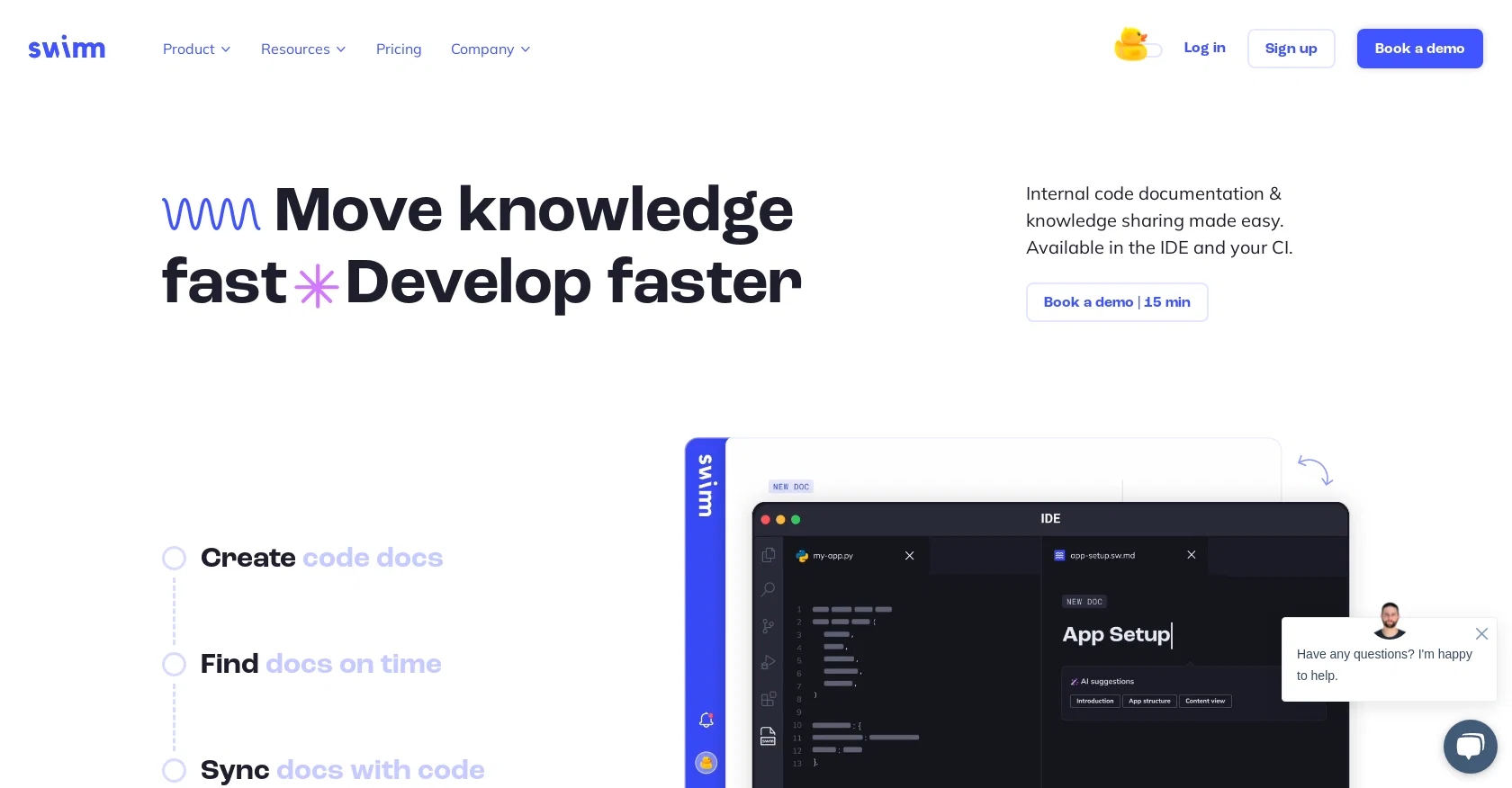
Swimm AI is a code documentation tool that helps streamline the process of documenting code and enhancing understanding and collaboration among team members.
It offers features such as generating code explanations to effortlessly add them to documentation, making documentation a natural part of the team's workflow.One of its key features is the ability to start documenting from a pull request (PR).
Swimm AI analyzes PRs and generates documentation that tells a cohesive story of the changes made to the code. This allows teams to easily track and understand the evolution of their codebase.Swimm AI also eliminates the need for writing in-depth explanations of developer knowledge manually.
It can automatically generate explanations of code snippets, saving time and effort for developers.Security is a priority for Swimm AI, and it ensures that both the documentation and code remain encrypted and secure.
They follow standard security and privacy policies to protect user data.Unlike traditional chatbots, Swimm AI is designed to provide comprehensive knowledge and answers for coding-related queries.
Developers can rely on it to find the knowledge they need without wasting time searching for answers.Overall, Swimm AI is a powerful tool for teams looking to improve their code documentation process, enhance collaboration, and save time by automating the generation of code explanations.
Best for
Short scenarios where Swimm tends to shine.
-
Enhances code doc and team collaboration.
Example outputs 1
Sample generations and before/after results for Swimm.
Access & connections
Where you can use Swimm.
Platforms
Pros & cons
Pros
- Streamlines code documentation
- Enhances team collaboration
- Generates code explanations
- Automates documentation process
- Documents from pull requests
- Cohesive story of changes
- Tracks codebase evolution
- Explanations for code snippets
Show 44 more
- Secure with encryption
- Standard security policies
- Knowledge base for coding
- Improves coder productivity
- IDE integrations
- Integration with Github
- No manual writting required
- Dedicated VS code plugin
- Available JetBrains plugin
- Continuous documentation feature
- Ease of use
- Saves developer time
- No blank canvases
- Handles developer knowledge
- In-depth code explanations
- Tracks code changes effectively
- Protects user data
- Offers Doc Playlists
- Walkthrough documentation support
- Rapid response to queries
- Good for newbies & experts
- Advanced API
- Clean and intuitive interface
- Learning center resources
- Webinar recordings for guidance
- Prompt and useful customer support
- Multiple IDE plugins
- Integrates into current workflow
- Various pricing options
- Access to case studies
- Supports exporting and importing data
- Supports multiple programming languages
- Customizable documentation options
- Active community support
- Accessible from multiple devices
- Easy to get started
- Easy to maintain
- Scalable for large codebases
- Time-coded documentation
- Maintains code clarity
- Interactive learning for developers
- Tutorials and examples available
- Insight into code behavior
- High-quality code visualizations
Cons
- Not open source
- Limited integration options
- Beta version instability
- Possibly inaccurate automatic documentation
- Redundant in small projects
- Dependency on PR for documentation
- Limited ability to customize
Compare alternatives
Similar tools in the catalog — with a clear reason to open each one.

DocuWriter.ai ✓
Free TrialAutomated AI-powered tools to generate Code & Api documentation from your source
Why look Offers a public API
Full comparison
AutoKT ✓
Free TrialCode documentation generation for developers.
Why look Typically cheaper
Full comparison
Stenography ✓
PaidAutomatic code documentation powered by AI.
Why look Typically cheaper
Full comparison
People also view
Tools that often show up alongside Swimm in collections and comparisons.

Sequel ✓
FreemiumAI SQL Generator: Chat with your database

Polymer Runtime Data Security ✓
Free TrialPrevent AI data breaches with real-time risk management.

OnSpace.AI - No Code App Builder ✓
FreemiumBuild Apps with AI, No Code

Emergent ✓
FreemiumUse the code TAAFT for access to vibe coding platform

Alumnium ✓
FreeAI-powered test automation from human instructions

Theneo ✓
FreemiumGenerate Stripe-like API docs in seconds
Stenography ✓
PaidAutomatic code documentation powered by AI.

SolidGPT ✓
FreemiumChat with your code repository, powered by AI.
Releases 1
FAQ 12
What is Swimm AI?
How does Swimm AI enhance code documentation and team collaboration?
What specific features does Swimm AI offer?
How does documenting from a pull request work in Swimm AI?
How does Swimm AI automate the generation of code explanations?
What security measures does Swimm AI have in place to protect documentation and code?
What is the Swimm AI’s standard security and privacy policy?
How is Swimm AI different from traditional chatbots in answering coding-related queries?
How can Swimm AI save time for developers?
How can teams use Swimm AI to improve their code documentation process?
What resources does Swimm AI provide for understanding code documentation better?
How to integrate Swimm AI in my current IDE?
Related tools
Recommended

LearningStudioAI ✓
Free TrialAI-powered authoring tool for effortless online course creation.

SEO Writing AI ✓
Freemium1-click SEO-optimized articles generation

B12 AI Website Builder ✓
FreemiumAI-powered website builder

Mindsmith ✓
FreemiumPlatform for building and sharing eLearning content

IllumiChat ✓
FreemiumFrom Ticket Backlog to Instant Answers Powered by AI

CreateAiCourse ✓
PaidSimplify course creation with the best AI Course Creator.