

Snapshot ✓
Create stunning product photos in seconds with AI
Free + from $19/mo
Verdict
A quick read before you dig into the full page.
- Best if
- Create stunning product photos in seconds with AI
- Skip if
- Limited free plan usage
- Pick this when
- High-quality product photos
Considering SellerPic instead? Compare side by side
Overview
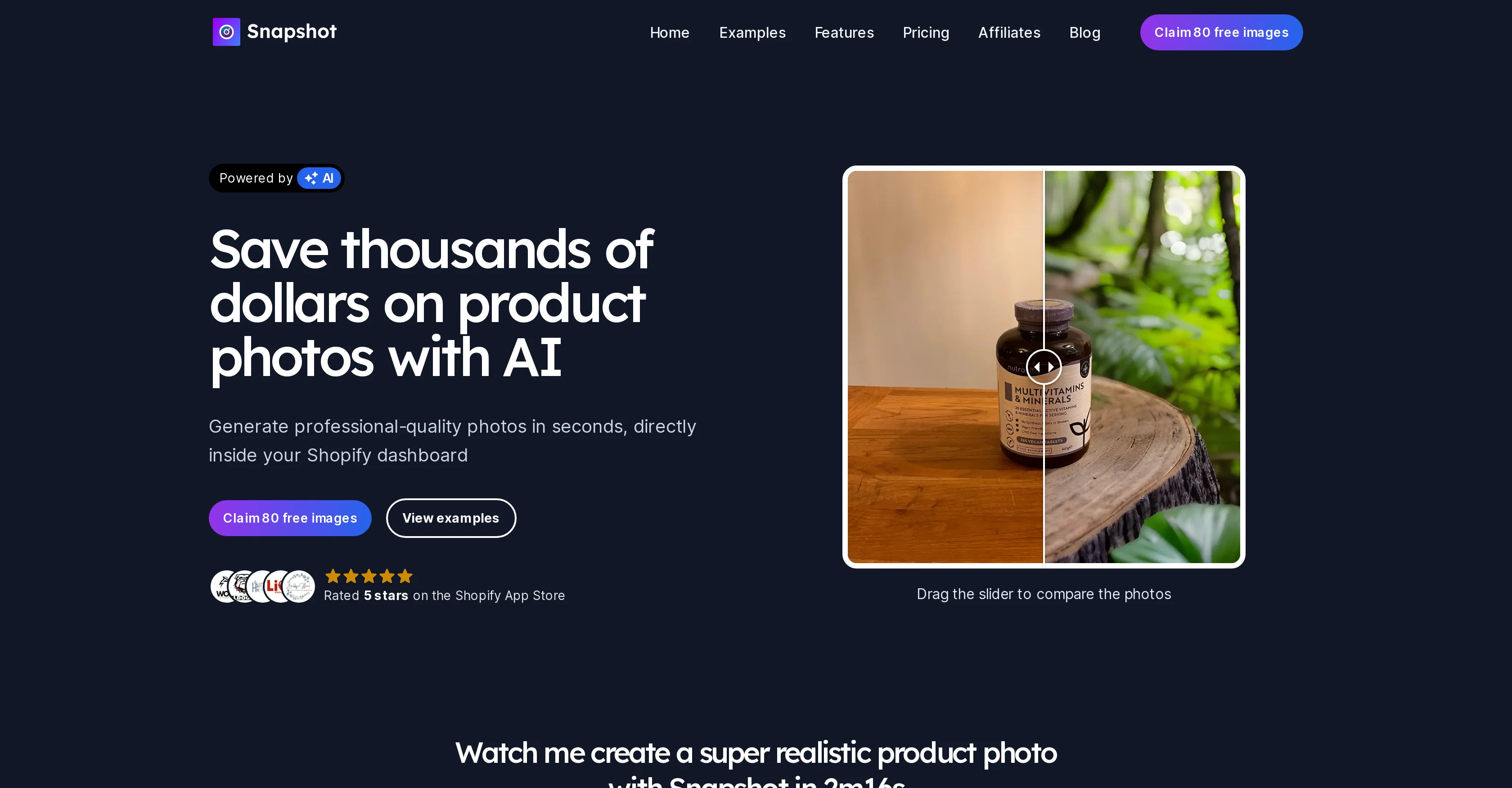
Snapshot is an AI-based tool designed to generate high-quality product photos within the Shopify platform. With Snapshot, merchants can create professional digital photographs of their product listings in seconds.
The tool not only eliminates the need for professional product photographers, reducing costs significantly, but also drastically reduces the time spent on the product photography process.
Snapshot is capable of producing instant modifications if any tweaks are needed to the image. These generated images can then be immediately added to product listings.
Snapshot also offers an innovative feature that allows products to be placed in a range of environments dictated by the user, thus removing any physical boundaries might exist in typical product photography.
The users can also access a library of pre-configured themes designed to assist in generating high-quality images quickly. Furthermore, Snapshot supports custom prompts, enabling users to create any environment they desire by simply writing it in English.
The tool interprets this input to produce the requested image. Despite its professional results, Snapshot is easy to use within a user's Shopify dashboard.
Users can start with a generous free plan to explore the tool's capabilities.
Access & connections
Where you can use Snapshot, and what it plugs into.
Platforms
Integrations
Capabilities
What this tool accepts, produces, and is strongest at.
Input
- Image
- Text
Output
- Image
Pros & cons
Pros
- High-quality product photos
- Integrated with Shopify platform
- Instant image modifications
- Significantly reduces costs
- Increases time efficiency
- Customizable environments
- Pre-configured themes available
- Supports custom prompts
Show 10 more
- User-friendly interface
- Generous free plan
- Instantly add images to listings
- No professional photographer needed
- Product placement in any environment
- Library of environments and themes
- Custom environment creation via English promts
- Direct generation in Shopify dashboard
- No physical boundaries for product placement
- 80 free images to start with
Cons
- Restricted to Shopify platform
- No offline functionality
- Depends on written prompts accuracy
- Limited free plan usage
- No advanced image editing
- Potential inaccuracy in environment generation
- No manual image adjustment
- No multi-platform support
Show 2 more
- Interface strictly in English
- Customization bound to theme library
Compare alternatives
Similar tools in the catalog — with a clear reason to open each one.

SellerPic ✓
FreemiumSupercharge photos with AI, boost sales in minutes.
Free + from $29/mo
Full comparison
SellShots ✓
Free TrialTurn one photo into high-converting product images
Why look Stronger for image work
Full comparison
Merchant Floor | Product Images ✓
Free TrialCreate product listings 10x faster with AI.
Free + from $20
Full comparison

Zawa AI | Brand Kit Generator & Editor ✓
FreemiumCreate logos, videos, and brand assets instantly.
Free + from $4.17 / month
Full comparison
ProductViews ✓
PaidGenerate product images from different angles with one upload.
Why look Typically cheaper
Full comparisonReleases 1
FAQ 12
How does Snapshot generate high-quality product photos?
How does Snapshot integrate with the Shopify platform?
What makes Snapshot different from professional product photographers?
How does Snapshot reduce product photography costs?
In what ways does Snapshot improve time efficiency?
Can Snapshot make instant modifications to images?
How do I add a Snapshot generated image to my product listing?
What are the available environments in Snapshot where I can place my products?
What are the pre-configured themes available in Snapshot?
How do I use the custom prompts feature in Snapshot?
How does Snapshot interpret custom prompts written in English?
How user-friendly is Snapshot?
Related tools
Recommended

Macky ✓
FreemiumAI-executed, consultant-certified engagements for SMEs.
Namify ✓
PaidGenerate unique brand names and free logos instantly

LearningStudioAI ✓
Free TrialAI-powered authoring tool for effortless online course creation.

VenturusAI ✓
FreemiumBusiness idea analysis and reporting.

Scisummary ✓
Free TrialCutting-edge scientific articles summarization.

Automateed ✓
Free TrialCreate eBooks effortlessly with Automateed, the AI-powered writing tool.