

Scholantic ✓
The intelligent research assistant for academic writing.
Free + from $30/mo
Verdict
A quick read before you dig into the full page.
- Best if
- The intelligent research assistant for academic writing
- Skip if
- Paid version required for full features
- Pick this when
- Specifically for academic writing
Considering AcademicGPT instead? Compare side by side
Overview




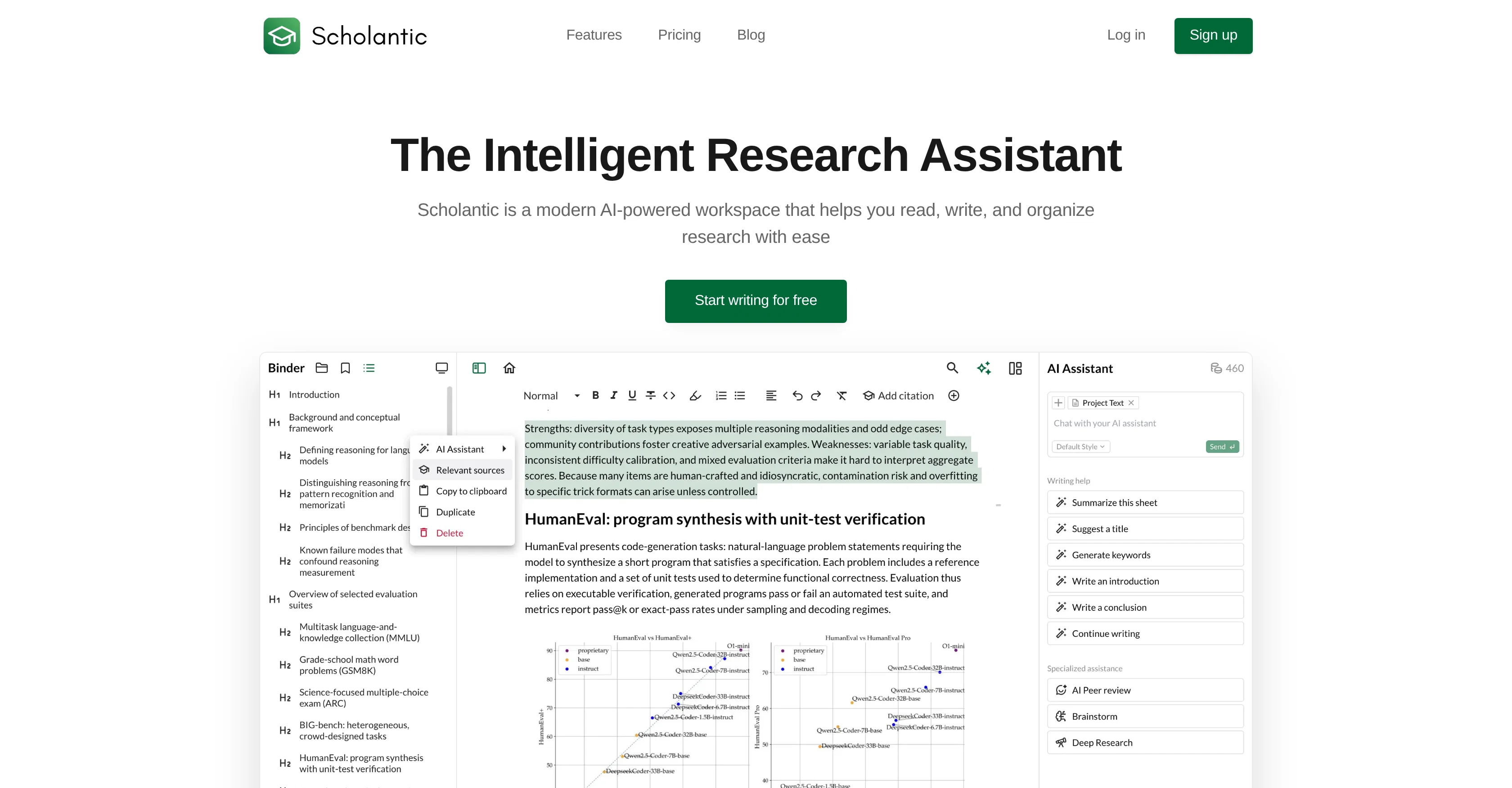
Scholantic is an AI-powered workspace engineered to aid individuals in their research-based activities. This workspace integrates AI-assisted tools for brainstorming, researching, and refining your work with a distraction-free editor.
The platform is designed with students, academics, researchers, and professionals in mind.Scholantic's AI features are designed specifically for academic writing.
The AI understands your research needs and helps you find, synthesize, and cite relevant information effortlessly. There's also provision for summative feedback on your argument's strength, clarity, and structure from the AI, similar to having a colleague go through your work.Beyond assistance with writing, Scholantic has optimized research compilation.
By entering a topic, users receive a comprehensive synthesis of relevant information, eliminating endless scrolling through search results. The platform also enables users to search for academic papers directly within the app with context-aware literature suggestions to strengthen your argument.In terms of writing, Scholantic supports a clean interface with markdown shortcuts tailored for academic writing.
It features smart grammar and spell check, version history, source and citation management, and a dedicated notebook for research notes, rough ideas, and source annotations.
Furthermore, the tool supports customizable themes, which can be helpful during extensive writing sessions.Ease of use is part of this platform's design.
From blank page to polished paper, Scholantic assists users in achieving submission-ready documents using AI-assisted brainstorming sessions and your own unique writing style.
It allows for exporting to PDF, Word, or Markdown with pre-configured formatting for APA, MLA, Chicago, and more. Scholantic is available in both free and paid versions, with the latter providing additional features and improved AI assistance.
Access & connections
Where you can use Scholantic.
Platforms
Capabilities
What this tool accepts, produces, and is strongest at.
Input
- API
- Tabular
- Text
Output
- Tabular
- API
- Text
Supported features
- Assistant
- Citations
- Deep Research
- Docs
- Education
- Writing
- Rewrite
- Search
- Text Generation
Show 1 more
- Translation
Pros & cons
Pros
- Specifically for academic writing
- Context-aware writing tools
- Distraction-free editor
- Automatic snapshots
- Built-in bibliography management
- One-click formatting
- Smart source recommendations
- Auto-generated Cited pages
Show 28 more
- Export presets
- Markdown shortcuts
- Understands academic conventions
- Deep Research feature
- Light/Dark writing themes
- Customizable writing themes
- Guided brainstorming feature
- Thesis writing assistant
- Educational tool for researchers
- Professional writing support
- Integrated literature search
- Version Control
- Integrated notebook for annotations
- Export to PDF/Word/Markdown
- Submission-ready document export
- Free and Pro versions
- Context-aware literature suggestions
- Smart grammar & spell check
- Intelligent research assistance
- Integrated resource annotations
- Built-in source discovery
- Direct in-app academic search
- Supports all citation styles
- Auto bibliography generation
- One-click citation addition
- Built-in research notes section
- Pre-configured for academic formatting
- Adaptable to user's writing style
Cons
- No in-built collaboration feature
- Limited export formats in free version
- No application specified for mobile devices
- Paid version required for full features
- No offline mode
- No voice to text feature
- Requires internet connection
- Single user focus, lacks team-oriented features
Compare alternatives
Similar tools in the catalog — with a clear reason to open each one.

AcademicGPT ✓
FreemiumAI-powered academic writing assistant.
Why look Typically cheaper
Full comparison

Thesify ✓
Free TrialAI tools for students and scientists
Why look Typically cheaper
Full comparison
Paper Generator by Curvedo ✓
Free TrialGenerate Academic Papers with AI
Why look Typically cheaper
Full comparison
Paperpal ✓
FreemiumEnhance academic writing with AI-powered language assistance.
Why look Typically cheaper
Full comparison
Releases 1
Imported reviews 1
Very convenient and easy to use!
FAQ 12
What does Scholantic do?
How does Scholantic help with academic writing?
Can Scholantic assist in generating introductions and rephrasing sentences?
What is the 'AI-assisted brainstorming' feature in Scholantic?
How does Scholantic help manage citations?
Does Scholantic offer a tool to search for academic papers within the app?
Does Scholantic provide any literature suggestions?
Can Scholantic learn my unique writing style?
What is the peer review functionality in Scholantic?
How does Scholantic assist in translating passages?
What is meant by 'context-aware writing tools' in Scholantic?
How can I use Scholantic for efficient citations management?
Related tools
Recommended

Notis ✓
Free TrialThe first WhatsApp assistant that runs on your ChatGPT and Claude subscriptions

DeepSeek ✓
FreeUnravel the mystery of AGI with curiosity

remio: Your Personal ChatGPT ✓
FreemiumGet Tailored Answer with Your Personal ChatGPT

Vicena ✓
FreemiumAI for real scientific research (Vibe Research)

biela.dev ✓
Free TrialIf you can imagine it, Biela can code it!

RowSpeak ✓
FreemiumAI data analysis for messy spreadsheets and business files