

ScanRelief ✓
Convert receipts to Excel and rename files intelligently.
Trial; then from $9.50
Verdict
A quick read before you dig into the full page.
- Best if
- Convert receipts to Excel and rename files intelligently
- Skip if
- Limited scalability on lower tiers
- Pick this when
- Receipts to Excel conversion
Considering Wellybox instead? Compare side by side
Overview
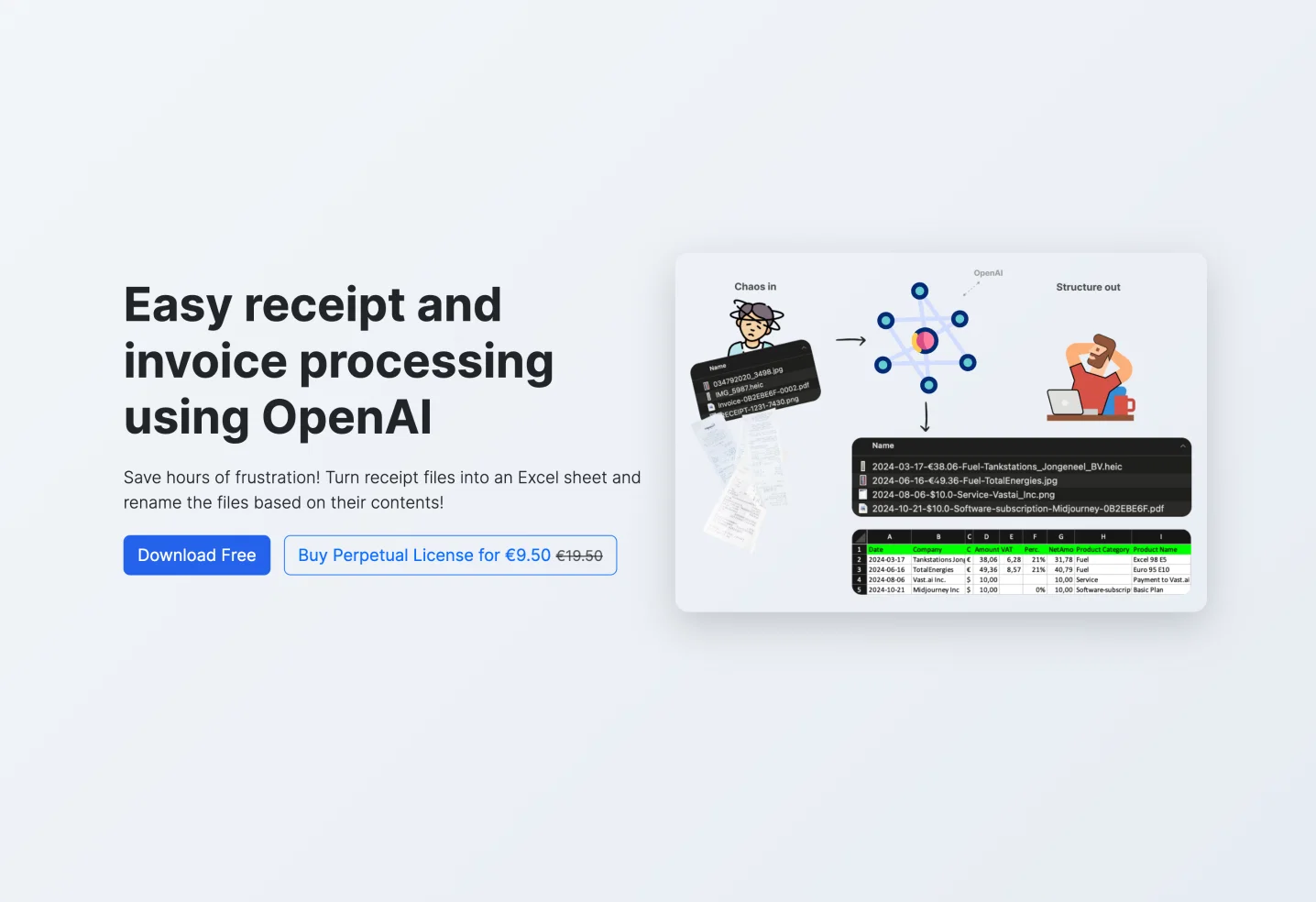
ScanRelief is an AI-powered tool that focuses on simplifying receipt and invoice processing by converting receipt files into an Excel sheet and renaming the files with relevant information from the receipt, providing a detailed and organized account report.
Using OpenAI, ScanRelief scans receipts in a designated folder on a user's hard disk, renaming each file in a format that starts with the date (for chronological sorting), the amount, product type and company name.
This makes the receipts easily recognizable and traces the relationship with bank transactions or accounting records, providing a comprehensive overview in chronological order.ScanRelief generates a regular Excel report with all receipt information, alleviating the need for manual sorting or exhaustive searches.
It supports various file formats such as JPEG, PNG, HEIC and PDF, and is capable of handling multiple receipts simultaneously, offering time and effort efficiency.
Available for both Windows and Mac users, ScanRelief is a cost-effective solution as it operates on a pay-per-use model with OpenAI, taking no additional subscription fees.
Additionally, the software offers significant benefits in organization and cost control, improved convenience through automatic image rotation and conversion, enhanced performance through parallel receipt processing on the local computer and at OpenAI, and improved data security as images and data sent to OpenAI API are not used for model training.
Best for
Short scenarios where ScanRelief tends to shine.
-
Convert receipts to Excel and rename files intelligently.
Example outputs 1
Sample generations and before/after results for ScanRelief.
Access & connections
Where you can use ScanRelief, and what it plugs into.
Platforms
Integrations
Capabilities
What this tool accepts, produces, and is strongest at.
Input
- Image
- Text
Output
- Tabular
Supported features
- Finance & Accounting
Pros & cons
Pros
- Receipts to Excel conversion
- Automatic file renaming
- Supports JPEG, PNG, HEIC, PDF
- Supports multiple receipts processing
- Available for Windows and Mac
- Pay-per-use business model
- Automated image rotation
- Parallel receipt processing
Show 28 more
- Enhanced data security measures
- Traces bank transactions
- Automates tedious data entry
- Time and effort efficiency
- Enhanced organization and cost control
- Automatic image conversion
- Files renamed for easy recognition
- Chronological sorting of files
- Detailed Excel report generation
- No additional subscription fees
- Tax preparation assistance
- Scalable for large volumes
- Transparency on cost after each run
- Efficient transfer by optimizing bandwidth
- User-friendly and intuitive interface
- Compliance with data security standards
- Automated file management
- Capabilities for tracking and analysis
- Encourages financial discipline
- Receipts downsized for efficient transfer
- Supports unlimited usage duration
- Reliable preparation for financial inquiries
- Convenient for audit purposes
- Enhances confidence and stress reduction
- Minimizes mental clutter
- Empowers user control over finances
- Optimized for quick receipt processing
- Prevents data misuse for model training
Cons
- Limited file types supported
- Pay-per-use model
- Slow processing at low-tier
- No built-in OCR capability
- Requires user's API key management
- No indicated offline operation
- Requires manual API key entry
- Limited scalability on lower tiers
Compare alternatives
Similar tools in the catalog — with a clear reason to open each one.

Wellybox ✓
Free TrialOrganize receipts effortlessly from your inbox.
Free + from $9/mo
Full comparison
AI Receipt Tracker ✓
FreeRevolutionizing expense tracking with AI-powered receipt management.
Why look Fully free option
Full comparison
ReceiptsAI ✓
FreemiumSimple receipt management for small businesses.
Free + from $12/mo
Full comparison
WiseOCR ✓
PaidTransform receipts into structured JSON effortlessly.
Why look Typically cheaper
Full comparisonPeople also view
Tools that often show up alongside ScanRelief in collections and comparisons.
WiseOCR ✓
PaidTransform receipts into structured JSON effortlessly.

RivalOut ✓
Free TrialAI-powered competitive and actionable insights for your smarter decisions

Mixo ✓
Free TrialLaunch a website in seconds with AI.

DimeADozen ✓
PaidValidated business ideas in seconds.

Chatbit ✓
FreemiumTrain custom AI Chatbot from your data, add to website.
Wellybox ✓
Free TrialOrganize receipts effortlessly from your inbox.

TaxLens ✓
FreemiumTurn receipts into tax deductions.
ReceiptsAI ✓
FreemiumSimple receipt management for small businesses.
Releases 1
Imported reviews 1
It really does what it says
FAQ 12
What is ScanRelief and how does it use OpenAI?
What file formats does ScanRelief support?
Can ScanRelief handle multiple receipts at once?
Is ScanRelief available for both Mac and Windows users?
Does ScanRelief operate on a subscription model?
How does ScanRelief enhance data security?
How does the automated file renaming feature in ScanRelief work?
Does ScanRelief generate an Excel report for receipt information?
How is ScanRelief cost-effective?
What are the benefits of using ScanRelief?
How does ScanRelief ensure time and effort efficiency?
How does ScanRelief handle receipt images for effective conversion?
Related tools
Recommended

Kick ✓
FreemiumAccounting software that does the work for you

Automateed ✓
Free TrialCreate eBooks effortlessly with Automateed, the AI-powered writing tool.

Thea ✓
FreemiumAI study tools to master material, not just memorize it.

Scisummary ✓
Free TrialCutting-edge scientific articles summarization.

Kin - Personal AI Advisors ✓
FreePrivacy-first & designed your for mind, and life at work

PrometAI ✓
FreemiumTurn ideas into viable reality with AI business plan generator.