

3D design 2026 Rank: #1618
Next3D ✓
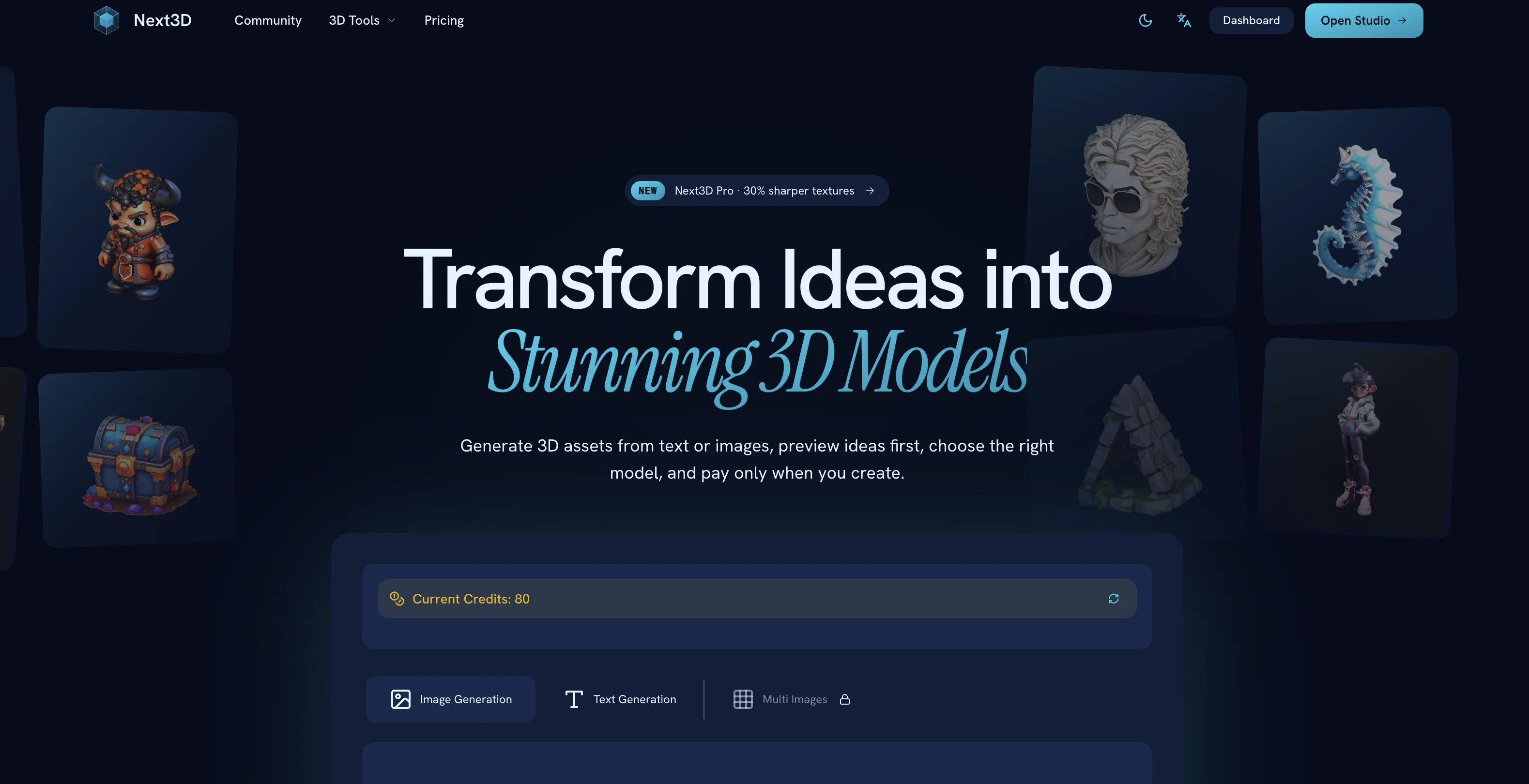
Transform ideas into stunning 3D models
Verdict
A quick read before you dig into the full page.
- Best if
- Transform ideas into stunning 3D models
- Skip if
- Pricing can become expensive
- Pick this when
- Online 3D modeling
Considering BowerBot instead? Compare side by side
Overview
Next3D is an AI-powered online platform that creates professional 3D models from images or text prompts. The tool supports a variety of image formats such as JPG, PNG, and WEBP.
In three simple steps, users can generate and download high-quality 3D models with appropriate geometry and textures for various applications like games or apps.
These models are generated in GLB format with textures, though they can be converted to other formats such as FBX, OBJ, PLY, or STL based on user preference.
Apart from its modeling features, Next3D also includes an online 3D file viewer and a broad array of supported formats. The platform is browser-based and allows users to preview their creations before downloading.
Next3D offers diverse 3D AI models, providing users the flexibility to choose the best model for each asset instead of being locked into one generation style.
The tool also enables an image-to-3D conversion feature, allowing users to upload a reference image and transform it into a functional 3D asset. Importantly, the platform operates on a pay-as-you-go model, enabling users to pay only when a 3D model is created.
Hence, no prior subscription is required before initiating the creation process. Next3D is recognized for its comparative advantages over traditional 3D software, which include instant model generation, cost-effectiveness, and minimal hardware requirements.
Access & connections
Where you can use Next3D.
Platforms
Capabilities
What this tool accepts, produces, and is strongest at.
Input
- Image
- Text
Output
- 3D
Supported features
- 3D Generation
Pros & cons
Pros
- Online 3D modeling
- Text prompts into 3D
- Image-to-3D conversion
- Variety of image format support
- Variety of 3D format support
- Browser-based platform
- Preview before downloading
- Multiple quality modes
Show 38 more
- Real-time progress tracking
- Pay-as-you-go
- No subscription required
- Assets ready for implementation
- 2D to 3D converter
- Online 3D file viewer
- Minimal hardware requirements
- Cost-effective tool
- 3D for game development
- 3D for app development
- Production-ready exports
- Supports JPG, PNG, WEBP
- High-resolution textures
- Text descriptions to 3D conversion
- Multi-view image uploads
- GLB with textures on download
- Downstream format conversion if needed
- 3D modeling in rapid time
- High-quality 3D models
- User-centric flexible model
- Post-generation format conversion
- Direct browser model inspection
- Allows natural language descriptions
- Provides conceptual image previews
- Enables description-based model generation
- Low learning curve
- Non-rigorous hardware requirements
- Consistent professional quality
- Reduced time for model generation
- Significant cost reduction
- Functional for any internet device
- Improves overall 3D workflow
- Seamless integration with engines like Unity
- Useful for rapid prototyping
- Creation and usage without technical expertise
- Eliminates need for advanced workstations
- No obligatory up-front subscription
- Versatility across different asset styles
Cons
- No mobile application
- Possible quality variances
- No collaborative features
- Reliant on internet connection
- Variable download times
- No offline mode
- Pricing can become expensive
- Limited customization options
Show 2 more
- No real-time collaboration feature
- No built-in asset library
Compare alternatives
Similar tools in the catalog — with a clear reason to open each one.

BowerBot ✓
FreeBuild OpenUSD scenes from natural language descriptions.
Why look Fully free option
Full comparison

Bezi AI ✓
FreemiumCraft compelling 3D apps and games faster.
Why look Higher community rating
Full comparison
Releases 1
FAQ 12
How does Next3D convert 2D images to 3D models?
What formats does Next3D support?
How can I track the progress of my 3D model creation in Next3D?
Can I preview my 3D models with Next3D?
What is the 'pay-as-you-go' model of Next3D?
Are 3D assets created with Next3D ready for use in games or apps?
Does Next3D allow conversion downstream to different formats?
What are the key AI capabilities of Next3D?
Can Next3D turn text prompts into 3D models?
How does Next3D ensure high quality of geometry and textures in its 3D models?
Do I need special software to use Next3D or can it operate on any device with internet?
How does Next3D speed up the process of creating 3D models?
Related tools
Recommended

ChatGPT ✓
FreemiumAsk anything, create anything, and move from idea to action.

Claude ✓
FreemiumBuilding reliable, interpretable AI systems

remio: Your Personal ChatGPT ✓
FreemiumGet Tailored Answer with Your Personal ChatGPT

Lyric Remix Studio ✓
FreeAI-powered music generation, transcription, and album art
MeshGPT ✓
FreeTurn text into 3D masterpieces.

VidFlux AI Image Editor ✓
PaidGenerate and edit stunning images with AI.