

Technical drawings 2026 Rank: #2037
ManualFig ✓
Turn product photos into instruction manual illustrations.
Verdict
A quick read before you dig into the full page.
- Best if
- Turn product photos into instruction manual illustrations
- Skip if
- SVG exports limited
- Pick this when
- Converts photos to line drawings
Considering DraftAid instead? Compare side by side
Overview
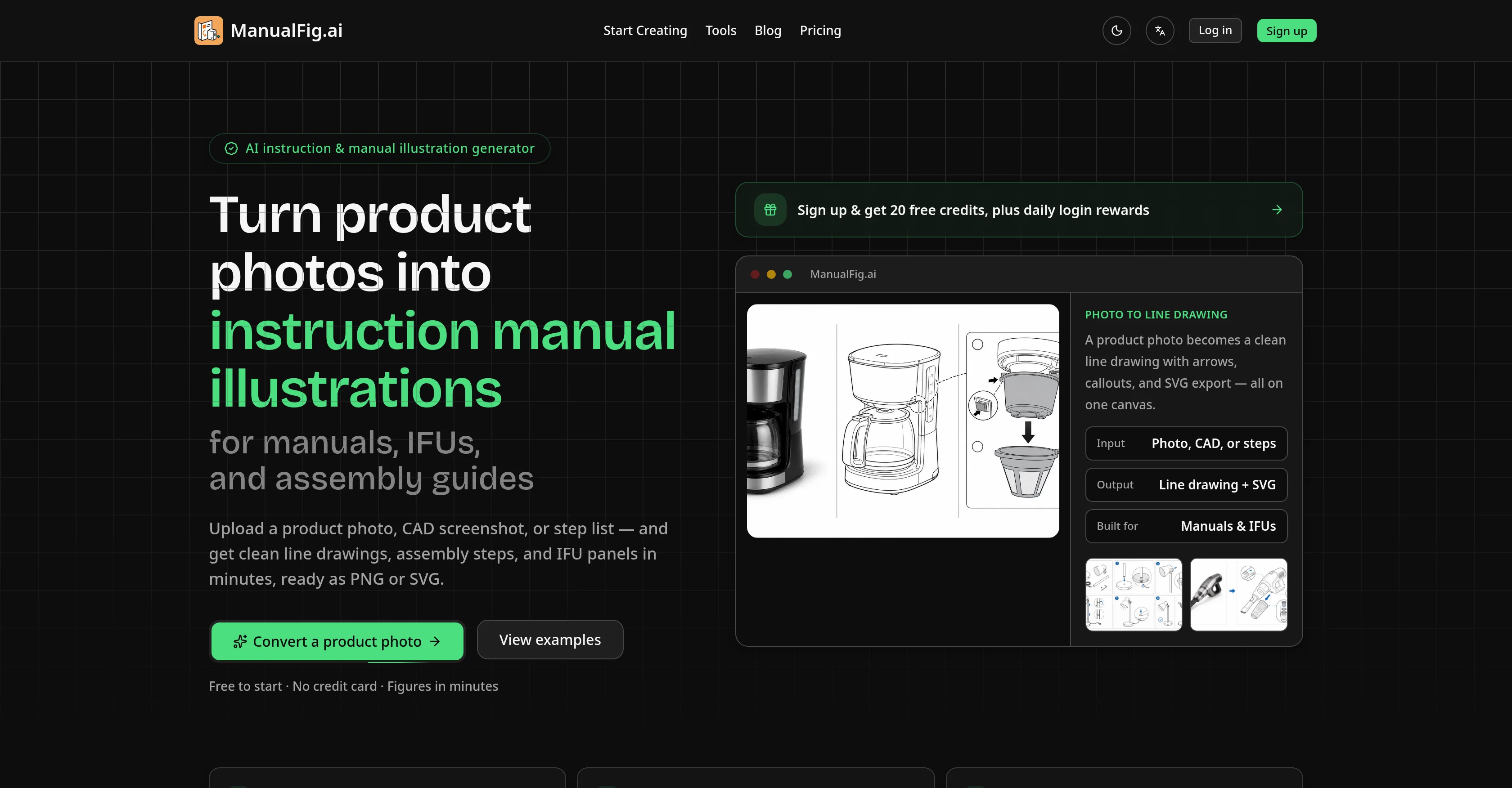
ManualFig is an AI instruction and manual illustration generator. It converts product photos, CAD screenshots, or lists of steps into clean line drawings, numbered assembly steps or IFU panels, ready as PNG or SVG within minutes.
ManualFig enables users to create instructional figures for manuals, IFUs, and assembly guides that clearly depict the part, the action, and the final state.
The process involves uploading a product image or description, generating a line drawing or steps, tweaking the figure and exporting as PNG or SVG directly into your documentation.
ManualFig is designed specifically for creating instructional content, equipped with features that streamline the creation of numbered steps, arrows, part callouts, warnings, and correct/incorrect panels.
It offers a consistent look across different types of documentation like manuals, user guides, packaging inserts, and help articles. Moreover, ManualFig doesnt require design skills, making it accessible to a wide range of users.
Access & connections
Where you can use ManualFig.
Platforms
Capabilities
What this tool accepts, produces, and is strongest at.
Input
- Tabular
- Image
Output
- Image
Supported features
- Docs
- Image Edit
- Visual Creation
- SVG
Pros & cons
Pros
- Converts photos to line drawings
- Quick generation of line drawings
- Creates assembly steps
- Generates IFU panels
- No need for hand-tracing
- No need for illustrators
- Numbered instructions
- Arrows and part callouts
Show 41 more
- Warnings panel feature
- Correct/incorrect indication feature
- Direct integration into manuals
- Uniform documentation look
- Version control feature
- Edit figures within tool
- Compare versions within tool
- Export directly from project
- Supports PNG/SVG export
- CAD screenshot conversion
- Creates step-by-step guides
- Image to SVG conversion
- Image to PNG conversion
- Image editing within tool
- User friendly for non-designers
- Supports educational and training documentation
- Creates packaging inserts
- Help articles production
- Quick line drawings generation
- Converts product photos to illustrations
- Creates visuals of final state
- Automatic generation of direction arrows
- Automatic generation of callouts
- Automatic generation of warning panels
- Consistent style across multiple documents
- Easily usable by non-designers
- Input options: photo, CAD, step list
- Creates figures showing part, action and final state
- Facilitates setting up clear instruction process
- Conversion of product photos to line drawings for manuals
- Supports the creation of Ecommerce product manuals
- Assists with user manuals and guides creation
- Facilitates the creation of assembly instructions
- Helps in consumer electronics quick starts
- Appliance maintenance and troubleshooting guide creation
- Medical device IFUs creation
- Can generate technical illustrations & exploded views
- Allows editing of figures
- Supports keeping versions
- Exports SVG that scales without blurring
- Retain real shape and proportions of product
Cons
- No free unlimited usage
- SVG exports limited
- Standard generation queue
- No customisation options
- No multi language support
- Non-scalable for large projects
- No design skills differentiation
- No integrations with third-party tools
Show 2 more
- Requires initial product image
- No real time drawing
Compare alternatives
Similar tools in the catalog.

Releases 1
FAQ 12
What is ManualFig?
Can ManualFig convert photos into line drawings for instruction manuals?
What image formats can be used with ManualFig?
Does ManualFig generate assembly instructions?
Can ManualFig process CAD screenshots?
Can I edit the drawings generated by ManualFig?
Can I integrate ManualFig's outputs directly into my manuals or instructions?
How does ManualFig maintain a consistent style across different guides and manuals?
What is the version control feature in ManualFig?
How do I export the drawings generated by ManualFig?
Can I use ManualFig if I don't need a hand-tracing or hiring illustrators?
What specific features does ManualFig offer for creating assembly guides and work instructions?
Related tools
Recommended

Pounce ✓
Free TrialGet real followers and engagement in minutes.

GPTExcel ✓
FreemiumGenerate spreadsheet formulas with AI

B12 AI Website Builder ✓
FreemiumAI-powered website builder

Stunning ✓
PaidBuild AI-powered websites in seconds

Stockimg AI ✓
PaidGenerated images and text for design ease.

D-ID ✓
FreemiumCreate AI-generated videos with ease