

Live-Portrait.org ✓
Transform static photos into lifelike animations.
from $7.9
Verdict
A quick read before you dig into the full page.
- Best if
- Transform static photos into lifelike animations
- Skip if
- Limited style options
- Pick this when
- Photo to animation
Considering Wondershare Filmora instead? Compare side by side
Overview
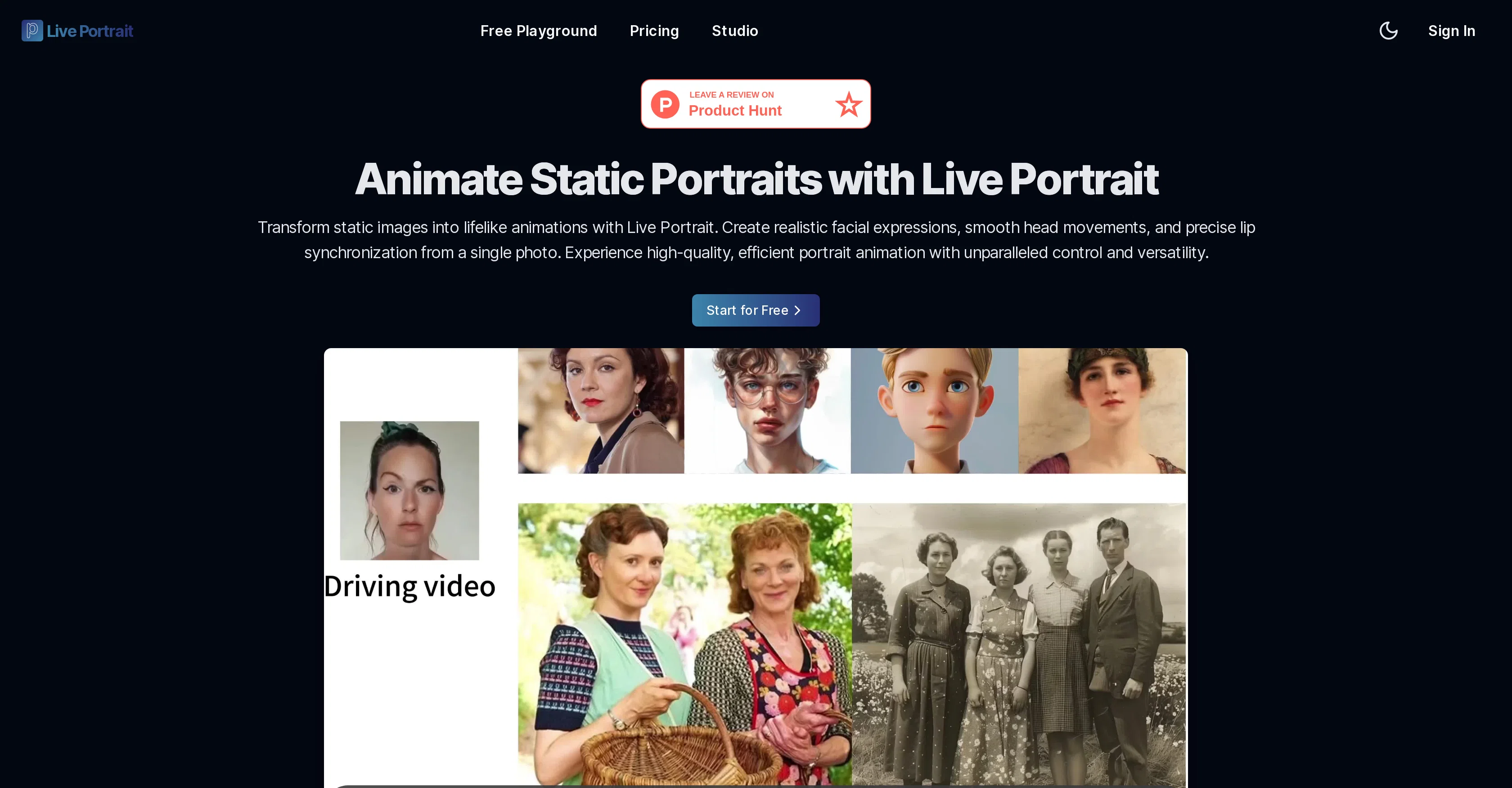
Live Portrait is an AI tool capable of turning static photos into dynamic, expressive animations. This tool provides the flexibility to animate photos across various styles and sizes utilizing stitching technology.
It allows users to generate highly realistic facial expressions, smooth head movements, and accurate lip synchronization from a single photo. Dynamic video-to-video face animation and editing capabilities are also offered.
Control over the animation of eye openness and lip positions are provided for nuanced expression control. The technology behind Live Portrait extends the potential of the implicit-keypoint-based framework to balance computational efficiency and controllability.
This is achieved through a mixed image-video training strategy, an upgraded network architecture, and improved motion transformation and optimization objectives.
Also included are stitching and retargeting modules for enhanced control. The main applications include self or cross re-enactment, portrait animation from still images, portrait video editing, eye and lip retargeting control, and animation across different styles.
Live Portrait also has the potential to be fine-tuned for animal animations. The tool was jointly developed by researchers from Kuaishou Technology, the University of Science and Technology of China, and Fudan University.
Live Portrait can be accessed and tried for free, potentially revolutionizing the way portrait animations are made.
Access & connections
Where you can use Live-Portrait.org.
Platforms
Capabilities
What this tool accepts, produces, and is strongest at.
Input
- Image
- Video
Output
- Video
Pros & cons
Pros
- Photo to animation
- Multi-style animations
- Realistic facial expressions
- Smooth head movements
- Accurate lip synchronization
- Video-to-video face animation
- Editing capabilities
- Control over eye animation
Show 35 more
- Control over lip movements
- Advanced self-reenactment
- Cross-reenactment
- Implicit-keypoint framework
- Computational efficiency
- Mixed image-video training
- Upgraded network architecture
- Improved motion transformation
- Stitching technology
- Retargeting modules
- Fine-tuned for animal animations
- Accessible for free
- High efficiency video synthesis
- Enhanced control over movements
- Supports multiple portrait styles
- Stitching for portrait video editing
- Scalar-based lip adjustment
- Multiple input scenarios handled
- Flexible animation parameters
- Optimized decoder for rapid generation
- Offers detailed process visualization
- Allows upload of driving video
- Facial features extraction for animation
- FAQ section for querying
- Multi-person input accommodation
- Designed for generalization and controllability
- Single source image for animation
- Various animation scenarios supported
- Achieves fast generation speed
- Multi-application capabilities
- Developed by reputable institutions
- Adjustable configuration parameters
- Quick three-step animation process
- Supports realistic, oil painting, sculpture styles
- Text, audio, generation motion sources
Cons
- No offline version
- Lacks batch processing
- Limited style options
- Inaccurate with non-clear photos
- Dependent on quality of input
- No multi-language support
- No mobile app
- Lengthy process time
Show 2 more
- No integration with other platforms
- No collaborative features
Compare alternatives
Similar tools in the catalog — with a clear reason to open each one.

Wondershare Filmora ✓
PaidEdit smarter, faster and easier with Filmora’s powerful AI video tools.
Why look Typically cheaper
Full comparison
Flaq AI | Image to Video ✓
PaidAnimate any image with AI in seconds.
Why look Stronger for image work
Full comparison
Releases 1
FAQ 12
What is Live Portrait?
How does Live Portrait animate photos?
What features does Live Portrait offer to animate facial expressions?
Can Live Portrait animate head movements and lips synchronization?
How does Live Portrait utilize stitching technology?
What is the technology behind Live Portrait's efficient and controllable animations?
Can I adjust the animation of eye openness and lip positions in Live Portrait?
How can Live Portrait be fine-tuned for animal animations?
Who developed the Live Portrait tool?
Is Live Portrait free to use?
Can I generate facial expressions, smooth head movements, and accurate lip synchronization from a single photo with Live Portrait?
How does Live Portrait handle dynamic video-to-video face animation and editing?
Related tools
Recommended
D-ID Creative Reality Studio ✓
UnknownCreate AI-powered videos from still images.

LearningStudioAI ✓
Free TrialAI-powered authoring tool for effortless online course creation.

VenturusAI ✓
FreemiumBusiness idea analysis and reporting.

Eightify
UnknownAI-powered YouTube video summarizer extracting key ideas for quick content assessment.

Limecube ✓
FreemiumTransforming the way websites are created with AI.

Archie ✓
FreemiumThe platform to architect, build, and run production-grade applications.