

Krisp AI Meeting Assistant ✓
AI assistant records, transcribes, and summarizes meetings automatically.
Free + from $8/mo
Verdict
A quick read before you dig into the full page.
- Best if
- AI assistant records, transcribes, and summarizes meetings automatically
- Skip if
- Doesn't specify storage limit
- Pick this when
- Single button noise elimination
Considering Jamy instead? Compare side by side
Overview
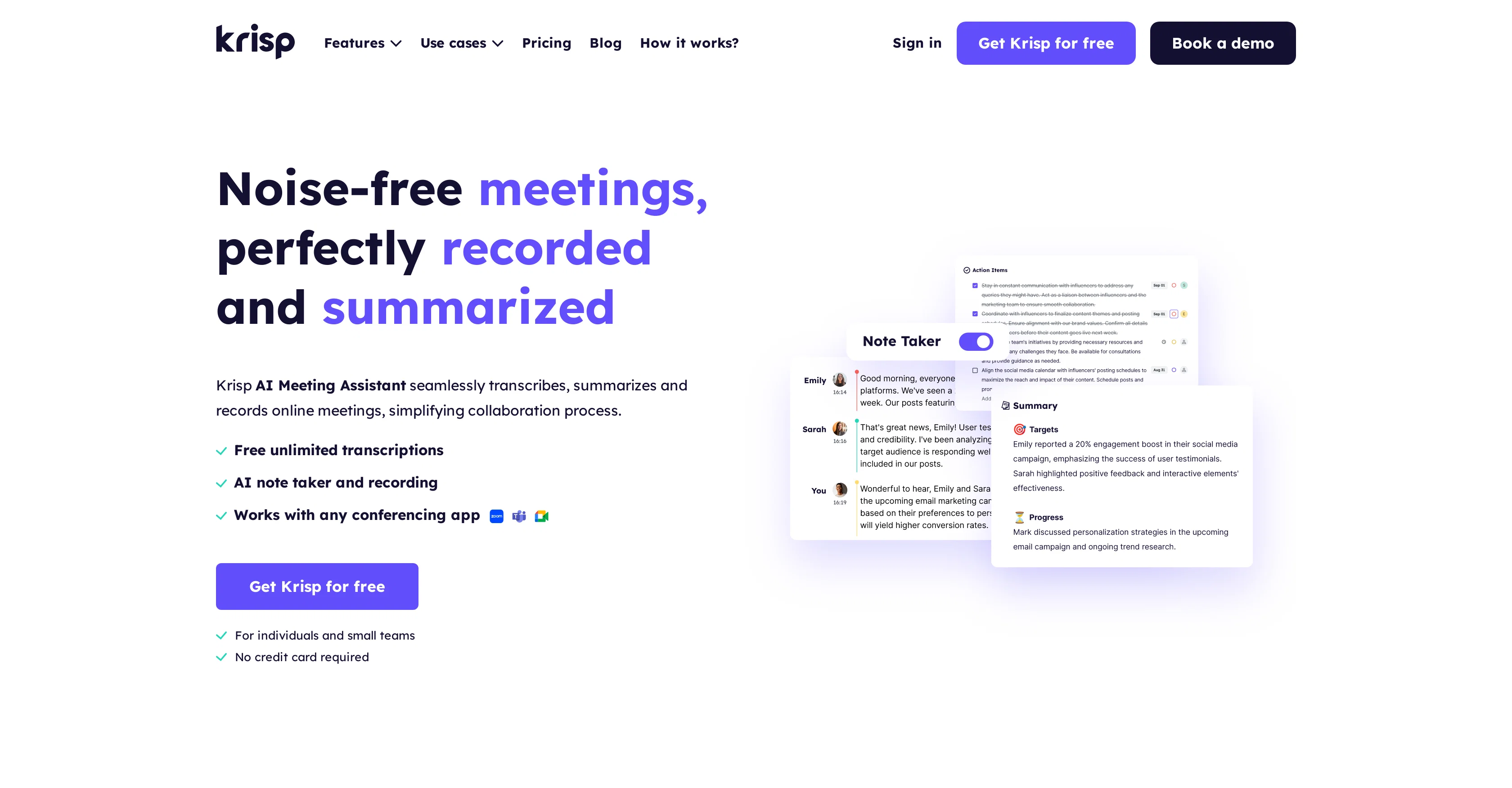
Krisp is a robust AI-powered tool built to assist individuals, teams, enterprises, and call centers with meeting transcription, summaries, and recording.
The tool offers seamless integration across various communication apps, and as such, enhances the flexibility of the user. The functionalities of Krisp range from recording online meetings and transcribing them in real-time to generating comprehensive meeting notes and summaries.The tool also includes an AI Noise Cancellation feature that helps to remove background noises, voices, and echoes from online meetings, fostering a clearer and distraction-free communication environment.
This feature is particularly beneficial for call centers where crystal clear conversations are crucial for a positive customer experience.Another innovative feature of Krisp is the AI Accent Localization which converts agents' accents in real-time to the customer's native accent to enhance understanding in communication.
This is particularly beneficial to global businesses that prioritize seamless communication with customers irrespective of geographical and linguistic differences.
For software developers and organizations aiming to integrate voice AI technologies into their product, Krisp offers an SDK, providing an added convenience.
Through various features, Krisp manages to streamline online communication and noise management during meetings, thereby improving team collaboration and productivity in various work settings.
Access & connections
Where you can use Krisp AI Meeting Assistant.
Platforms
Capabilities
What this tool accepts, produces, and is strongest at.
Input
- Audio
Output
- Audio
- Text
Pros & cons
Pros
- Single button noise elimination
- Transcribes and summarizes meetings
- Generates templates for notes
- Free unlimited transcriptions
- Bot-free experience
- Works with any voice app
- No plugins or extensions required
- Compatible with SDK integration
Show 27 more
- Recognized by Gartner and Forbes
- Secure local data processing
- Real-time transcription
- Automatic recording of meetings
- Accent localization for global communication
- Meeting transcription for call centers
- Summarize and delegate tasks
- Accurate 96% transcription
- Secured meeting summary sharing
- Automated note taking
- Auto-generated action items
- Cloud stored secure recordings
- Real-time on-device transcription for calls
- Supports 17+ dialects for localization
- Female and male voice outputs for localization
- Automated distribution of meeting notes
- Meeting summaries for informed decision making
- Task assignment automation
- Synchronization of playback with transcriptions
- Real-time accent adjustment
- PII redaction in call transcription
- Noise-free online meeting experience
- Meeting transcription for clients' consultation
- Multi-use: for individuals, teams, enterprises, call centers
- Real-time insights from transcriptions
- Meeting follow-ups automation
- Easily editable meeting summaries
Cons
- No multi-language transcription support
- Doesn't specify storage limit
- Dependency on stable Internet connection
- Potential errors in automated summary
- Transcription deletion permanent
- Requires download and installation
- Lack of transcription correction feature
- Requires manual sharing of transcripts
Show 1 more
- Lack of on-screen notification for transcription
Compare alternatives
Similar tools in the catalog — with a clear reason to open each one.

Jamy ✓
FreemiumAutomate meeting notes for seamless productivity.
Why look Higher community rating
Full comparison
Wave AI Note Taker, Transcription and Summary Tool ✓
FreemiumThe Smartest Way to Capture, Transcribe & Summarize Anything
Why look Typically cheaper
Full comparison
Otter.ai ✓
FreemiumAI Meeting Assistant for real-time transcription and notes
Free + from $19.7/mo
Full comparison
Limitless - Personalized & Secure Memory AI ✓
FreemiumRecall anything you've said or heard in meetings or conversations
Free + from $19/mo
Full comparison
Bubbles Notetaker ✓
Freemium⚡️ Supercharge your meeting productivity
Free + from $12/mo
Full comparison
NoteX AI Meeting Agent ✓
FreemiumBest multilingual AI meeting agent for global teams
Why look Higher community rating
Full comparisonReleases 1
FAQ 12
What is the main function of Krisp?
How does Krisp's AI noise cancellation feature work?
Can Krisp be used for transcribing calls in real-time?
How does Krisp handle meeting summaries?
Does Krisp require any special plugins or extensions to use?
How secure is Krisp, especially concerning user data and privacy?
Can Krisp be integrated with any voice app?
What are some of the awards and recognitions that Krisp has received?
How does Krisp's AI Accent Localization feature function?
Does Krisp offer a feature for recording calls and meetings?
Can Krisp be used by developers to integrate noise cancellation into their own applications?
Does Krisp offer support for hybrid work or remote teams?
Related tools
Recommended

Tactiq ✓
FreemiumGet more from your meetings with AI assistance

TutorAI ✓
FreemiumInstant knowledge on any topic

Business Idea Generator AI ✓
FreeGenerate innovative business ideas with AI

Summarist ✓
FreeAI-powered book summaries in seconds

Decisionmentor ✓
FreemiumAI-powered compass for better decision making.

Circleback ✓
PaidAutomated meeting notes that'll blow you away.