
Industrial Render AI ✓
Transform sketches into high-quality AI renderings
Trial; then from $1.5
Verdict
A quick read before you dig into the full page.
- Best if
- Transform sketches into high-quality AI renderings
- Skip if
- Parameter fine-tuning could be complex
- Pick this when
- Transforms sketches to renderings
Considering SuperCraft instead? Compare side by side
Overview
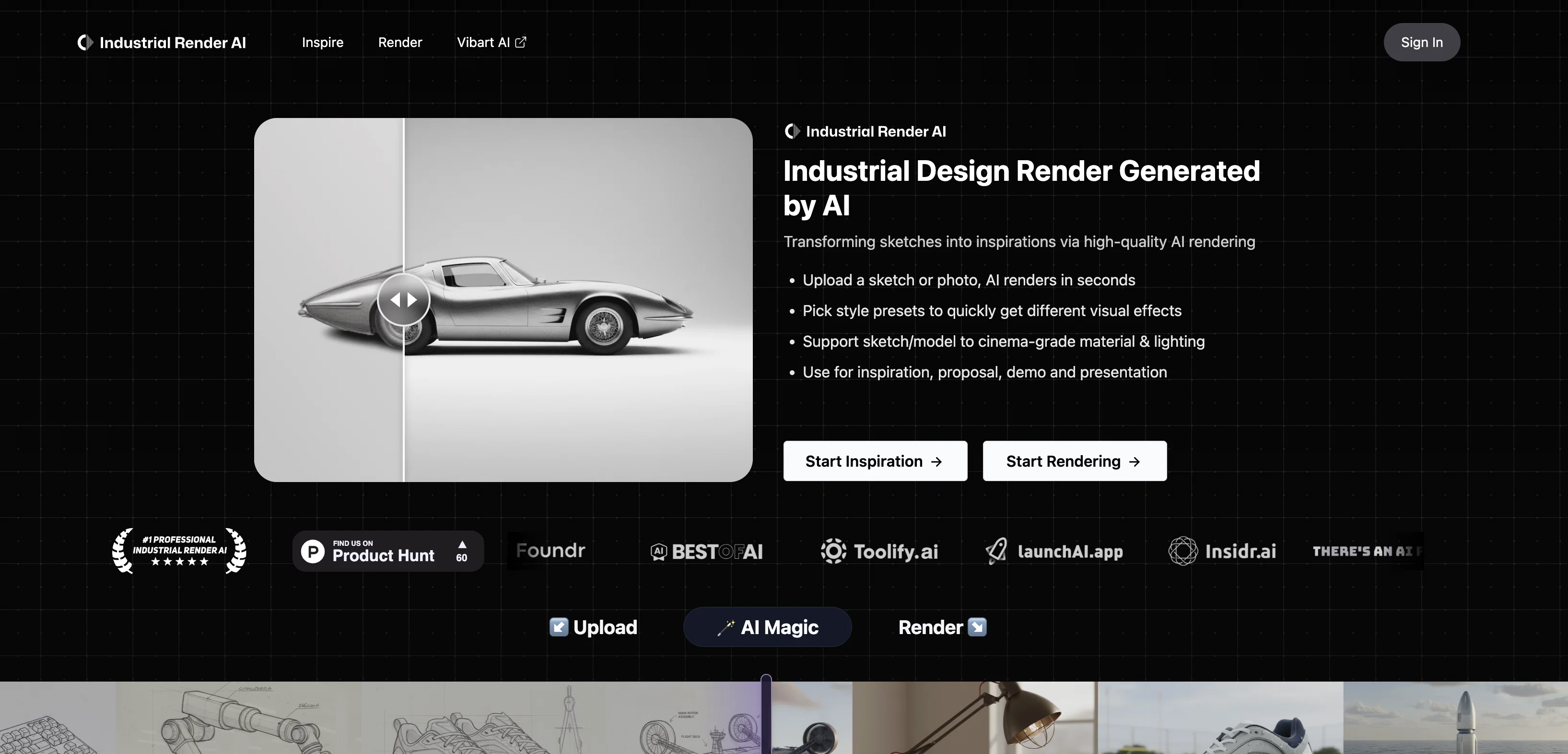
Industrial Render AI is a tool designed for the realm of industrial design. This tool uses technology inspired by GPT (Generative Pretraining Transformer) to transform conceptual product design sketches into high-quality renderings.
Its main goal is to enhance the effectiveness and quality of design processes, as well as facilitate better communication during the design process. Users can upload hand-drawn design drafts, fine-tune parameters to their liking, and then generate various renders.
This allows for the creation of high-quality renderings which can be shown in portfolios. Another feature is the 'describe and draw' functionality, wherein the user can write a brief description of the product they want to design.
The AI then generates a sketch of the described design quickly. This tool extends beyond simple rendering, inspiring creativity by transforming sketches into tangible design inspirations, thus revolutionizing the industrial design process.
Access & connections
Where you can use Industrial Render AI.
Platforms
Capabilities
What this tool accepts, produces, and is strongest at.
Input
- Tabular
- Image
- Text
Output
- Text
- Image
Pros & cons
Pros
- Transforms sketches to renderings
- Facilitates design communication
- Enhances design quality
- Improves design efficiency
- Features 'describe and draw'
- Supports hand-drawn drafts
- Enables parameter fine-tuning
- Generates multiple renders
Show 10 more
- Boosts creativity
- Serves as design inspiration
- Quick design visualisation
- Facilitates portfolio creation
- Based on GPT
- Realizes innovative concepts
- Revolutionizes industrial design
- Aids in marketing and sales
- Helps in product visualization
- Promotes tangible design inspirations
Cons
- Limited to industrial design
- Requires hand-drawn design drafts
- No real-time collaboration features
- Lacks versatility in outputs
- No mention of accessibility
- Parameter fine-tuning could be complex
- Undefined design feedback mechanism
- Potential misinterpretation in 'describe and draw'
Show 1 more
- Quality of generated sketches undisclosed
Compare alternatives
Similar tools in the catalog — with a clear reason to open each one.

Releases 1
FAQ 12
What is Industrial Render AI?
How does Industrial Render AI use GPT technology?
How can I upload my hand-drawn design drafts to Industrial Render AI?
What are the parameters that I can fine-tune in Industrial Render AI?
How exactly does Industrial Render AI transform sketches into renderings?
Can I use Industrial Render AI to create items to include in my portfolio?
How does the 'describe and draw' functionality on Industrial Render AI work?
How does Industrial Render AI facilitate better communication during the design process?
In what ways can Industrial Render AI enhance the effectiveness and quality of design processes?
Why is Industrial Render AI considered a creativity booster?
How does Industrial Render AI revolutionize the industrial design process?
Can I use Industrial Render AI for conceptual design?
Related tools
Recommended

AI Product Design by Pietra ✓
PaidDream, design, and manufacture products for your e-commerce brand

Text to Design ✓
FreemiumTransform text into stunning designs with AI.

Zawa AI | Brand Kit Generator & Editor ✓
FreemiumCreate logos, videos, and brand assets instantly.

Pebblely ✓
FreemiumCreate stunning product photos with AI

Free Text-To-Speech ✓
FreeText transformed into customizable spoken output.

Mindsmith ✓
FreemiumPlatform for building and sharing eLearning content