
Headshot Converter AI ✓
Turn selfies into professional headshots with AI
from $29
Verdict
A quick read before you dig into the full page.
- Best if
- Turn selfies into professional headshots with AI
- Skip if
- Limited photo editing features
- Pick this when
- Customizable styles and backgrounds
Considering MyPicNow instead? Compare side by side
Overview
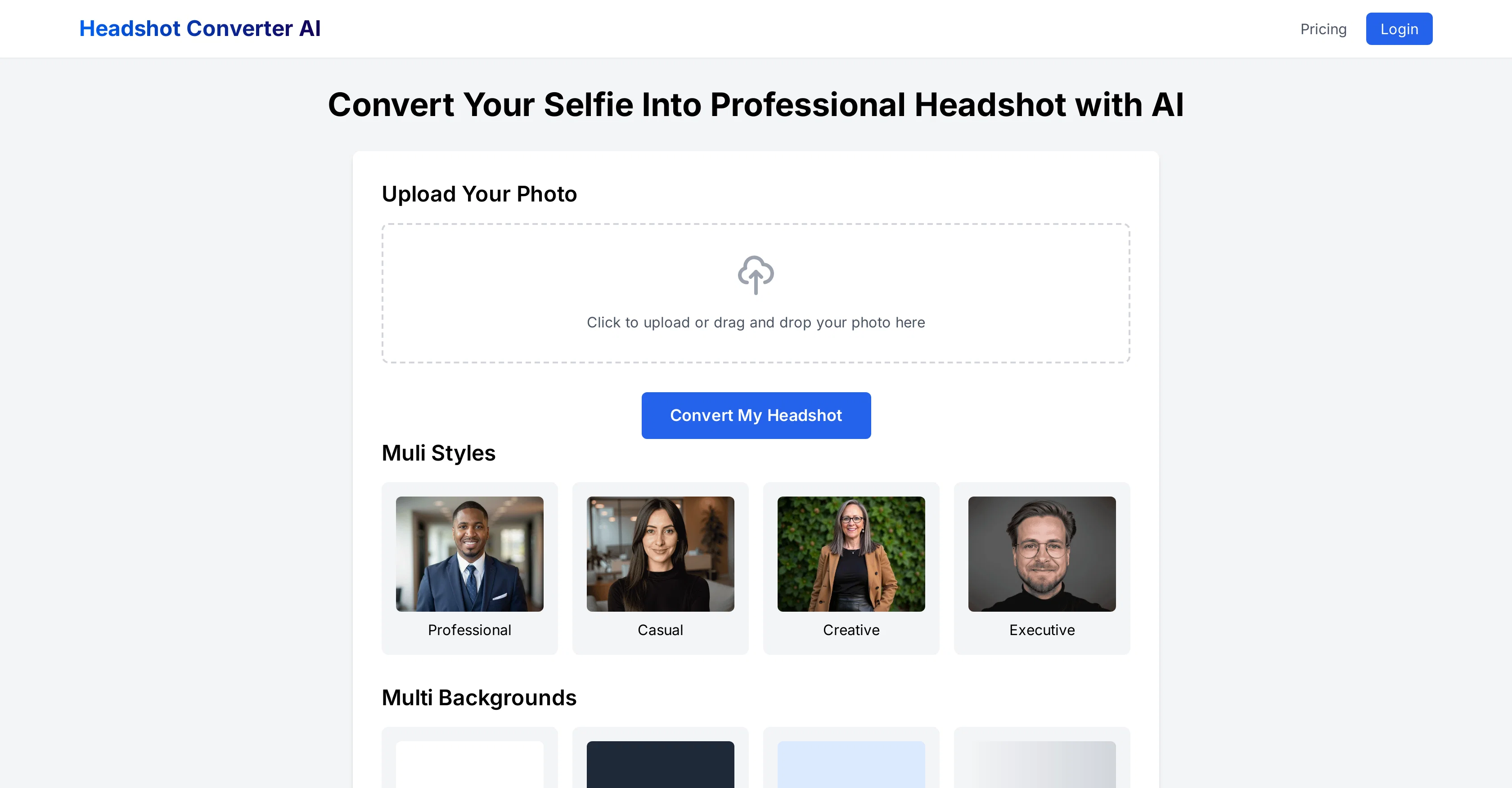
Headshot Converter AI is an online tool that uses artificial intelligence technology to transform selfies or personal photos into professional headshots.
It's designed to cater to diverse needs, providing options to customize styles and backgrounds. Styles offered include Professional, Casual, Creative, and Executive catering to different professional appearances, while backgrounds provide visual context to the headshot with options like White, Dark Gray, Light Blue, and Gradient.
The photo upload process is simple and user-centric, with the tool optimizing for time and ease. After uploading a photo, users choose their style and background preferences, and the AI system will automatically enhance the image to create a professional headshot, with most conversions completed within seconds.
The tool is web-based, meaning it works directly from the users' browser, eliminating software installation requirements. It is optimized for mobile use as well, allowing flexibility for users to upload and edit their headshots from their smartphones or tablets.
Once the AI generates the headshot, users have the option to make further adjustments by choosing different styles and backgrounds before finalizing. Headshot Converter AI prioritizes user privacy and data security, ensuring all uploaded photos are processed with encrypted technology.
This tool is particularly suitable for job seekers, freelancers, entrepreneurs, professionals updating their company profiles, or anyone in need of a polished photo.
Access & connections
Where you can use Headshot Converter AI, and what it plugs into.
Platforms
Integrations
Capabilities
What this tool accepts, produces, and is strongest at.
Input
- Image
Output
- Image
Pros & cons
Pros
- Customizable styles and backgrounds
- Mobile optimized
- Data encrypted for security
- Multiple professional appearances
- User-centric photo upload
- Web-based, no installation
- Suitable for multiple professions
- Instant headshot conversion
Show 7 more
- Preview before finalizing
- User privacy prioritized
- Simple process for use
- Free basic features
- Fast headshot generation
- Further adjustments post-generation
- Transform selfies into headshots
Cons
- Limited style options
- Restricted background selections
- No local software available
- Dependent on internet connection
- No offline operation
- Limited mobile optimization
- No high-resolution for free
- Limited HDR support
Show 2 more
- Limited batch processing
- Limited photo editing features
Compare alternatives
Similar tools in the catalog — with a clear reason to open each one.


PhotoGuruAI ✓
PaidCreate professional AI headshots in seconds
Why look Typically cheaper
Full comparison
BetterPic | AI Headshots ✓
PaidStudio-quality (4K) portfolio, from $35 in under 60 minutes
Why look Higher community rating
Full comparison
AI Headshots ✓
PaidTransform selfies into professional headshots instantly.
Why look Typically cheaper
Full comparison
Eltima AI Headshot Generator ✓
Free TrialGenerate professional headshots with AI templates.
Why look Typically cheaper
Full comparisonReleases 1
FAQ 12
What is Headshot Converter AI?
How does Headshot Converter AI convert my selfies to professional headshots?
How secure is Headshot Converter AI with my uploaded photos?
What styles can I choose from in Headshot Converter AI?
What background choices does Headshot Converter AI offer?
How user friendly is Headshot Converter AI?
How do I preview my converted headshot on Headshot Converter AI?
Can I use Headshot Converter AI on my smartphone or tablet?
Does Headshot Converter AI allow me to make adjustments post conversion?
How long does it take to get my converted headshot on Headshot Converter AI?
Do I need to download any software to use Headshot Converter AI?
What's the cost of using Headshot Converter AI?
Related tools
Recommended

Talking Avatar AI ✓
FreemiumRewrite videos with AI-powered talking avatars

FounderPal ✓
Free TrialGenerate a perfect marketing strategy in 5 minutes

SellerPic ✓
FreemiumSupercharge photos with AI, boost sales in minutes.
RewriteSomething ✓
FreeCreate product descriptions that sell with AI

AI Video API ✓
FreemiumCreate AI videos effortlessly and affordably

MagicSlides.app AI PPT Maker ✓
FreemiumCreate Stunning PPTs in Seconds with the AI PPT Maker