

Grain AI ✓
Grain turns customer conversations into AI-powered insights.
Verdict
A quick read before you dig into the full page.
- Best if
- Grain turns customer conversations into AI-powered insights
- Skip if
- Customisation might be complex
- Pick this when
- Automated meeting summaries
Considering Jamy instead? Compare side by side
Overview




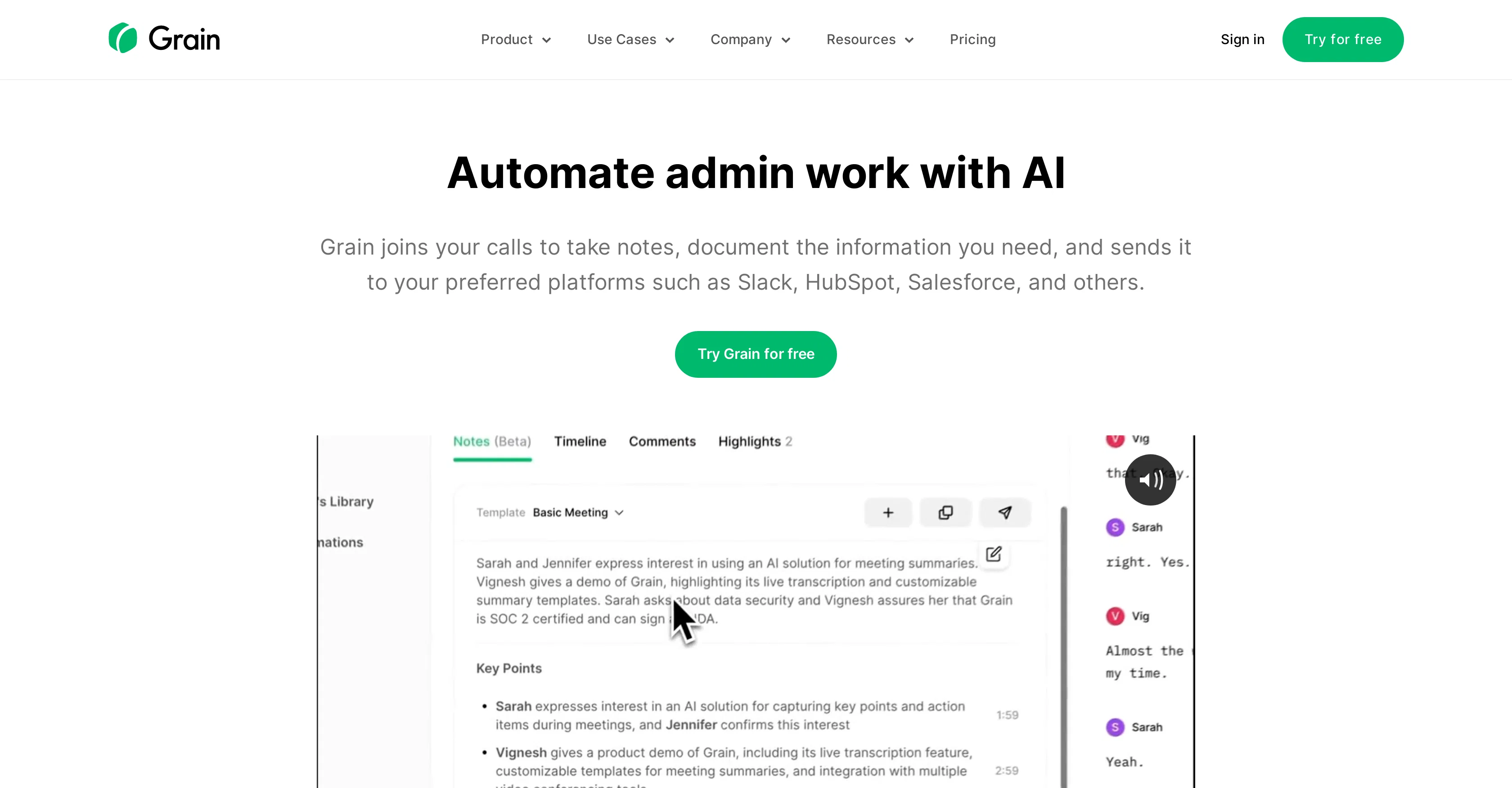
Grain automates note-taking so you can focus on the big picture. With meeting summaries, account insights, and coaching suggestions, Grain allows you to focus most on overviews and less on routine tasks. Over 31,000 teams trust Grain to help alignment and productivity with simple, all-in-one features.
Everything Your Team Needs
Grain has everything your team needs to get more out of every meeting. It’s free to use, simple to set up, and cost-effective for your entire company. Automated Tasks and AI CRM Updates will help you hit targets and boost productivity.
You handle the meeting, Grain handles the note-taking
Grain automatically generates meeting recordings and transcripts with precise, AI-powered notes. Tailor your meeting with custom or prebuilt AI templates, and use Live Notes to perfect your insights during the meeting.
Never miss a follow-up with consistent, accurate next steps
Help your team keep up the momentum with automatically identified action items and owners. Easily create clips and comments, and share playlists and stories to create unified priorities.
Access & connections
Where you can use Grain AI.
Platforms
Capabilities
What this tool accepts, produces, and is strongest at.
Input
- API
- Tabular
- Video
- Audio
Output
- Audio
- Video
- Tabular
- API
- Text
Highlights
- API
Supported features
- API
Pros & cons
Pros
- Automated meeting summaries
- Key moment identification
- Note-taking customization
- Quick sharing through Slack
- Integrated with Notion
- Data extraction from conversations
- GPT functionality for Q&A w/ transcript
- Creation of shareable video clips
Show 21 more
- Library of knowledge
- Searchable transcript
- Administrative task automation
- Flexible for different meetings
- Automated workflows
- Integration with HubSpot
- Integration with Salesforce
- Productivity enhancement in meetings
- Supports team collaboration
- Feedback sharing capabilities
- Video and audio transcript and clip sharing
- Emphasizes customer voice
- Extracts pertinent conversation details
- Conversation organization
- Seamless platform integration
- Notes templates for customization
- User research friendly
- Sales team utility
- Customer success use-case
- Saves post-meeting minutes
- Quality customer interaction focus
Cons
- Dependent on third-party platforms
- No offline functionality
- No on-premise option
- Customisation might be complex
- No mobile version
Compare alternatives
Similar tools in the catalog — with a clear reason to open each one.

Jamy ✓
FreemiumAutomate meeting notes for seamless productivity.
Why look Typically cheaper
Full comparison
Wave AI Note Taker, Transcription and Summary Tool ✓
FreemiumThe Smartest Way to Capture, Transcribe & Summarize Anything
Why look Typically cheaper
Full comparison
Otter.ai ✓
FreemiumAI Meeting Assistant for real-time transcription and notes
Free + from $19.7/mo
Full comparison
Limitless - Personalized & Secure Memory AI ✓
FreemiumRecall anything you've said or heard in meetings or conversations
Free + from $19/mo
Full comparison
Bubbles Notetaker ✓
Freemium⚡️ Supercharge your meeting productivity
Why look Typically cheaper
Full comparison
NoteX AI Meeting Agent ✓
FreemiumBest multilingual AI meeting agent for global teams
Why look Higher community rating
Full comparisonReleases 1
FAQ 12
What is Grain AI?
How can Grain AI enhance productivity during customer meetings?
What are the key features of Grain AI?
How does the AI note-taking feature in Grain AI work?
Can I customize how Grain AI takes notes during meetings?
Does Grain AI offer any integration with other platforms?
What is the ChatGPT functionality in Grain AI?
Can I ask specific questions about my meetings in Grain AI?
How does Grain AI help in organizing and extracting details from conversations?
What is 'key moments' creation in Grain AI?
How can I share meeting summaries created by Grain AI with my team?
Does Grain AI create shareable video clips from meetings?
Related tools
Recommended

Tactiq ✓
FreemiumGet more from your meetings with AI assistance

VenturusAI ✓
FreemiumBusiness idea analysis and reporting.

SummYT - YouTube Summarized ✓
Free TrialInstant YouTube Summary Generator

Jamie ✓
UnknownAI-powered meeting notes across all platforms.

Circleback ✓
PaidAutomated meeting notes that'll blow you away.

Scisummary ✓
Free TrialCutting-edge scientific articles summarization.