

Google Analytics 2026 Rank: #2128
GA4.so ✓
AI agent for Google Analytics 4 & Google Search Console
Verdict
A quick read before you dig into the full page.
- Best if
- AI agent for Google Analytics 4 & Google Search Console
- Skip if
- Limited customization
- Pick this when
- Writes code and extracts data, machine learning, analysis
Considering Litlyx instead? Compare side by side
Overview
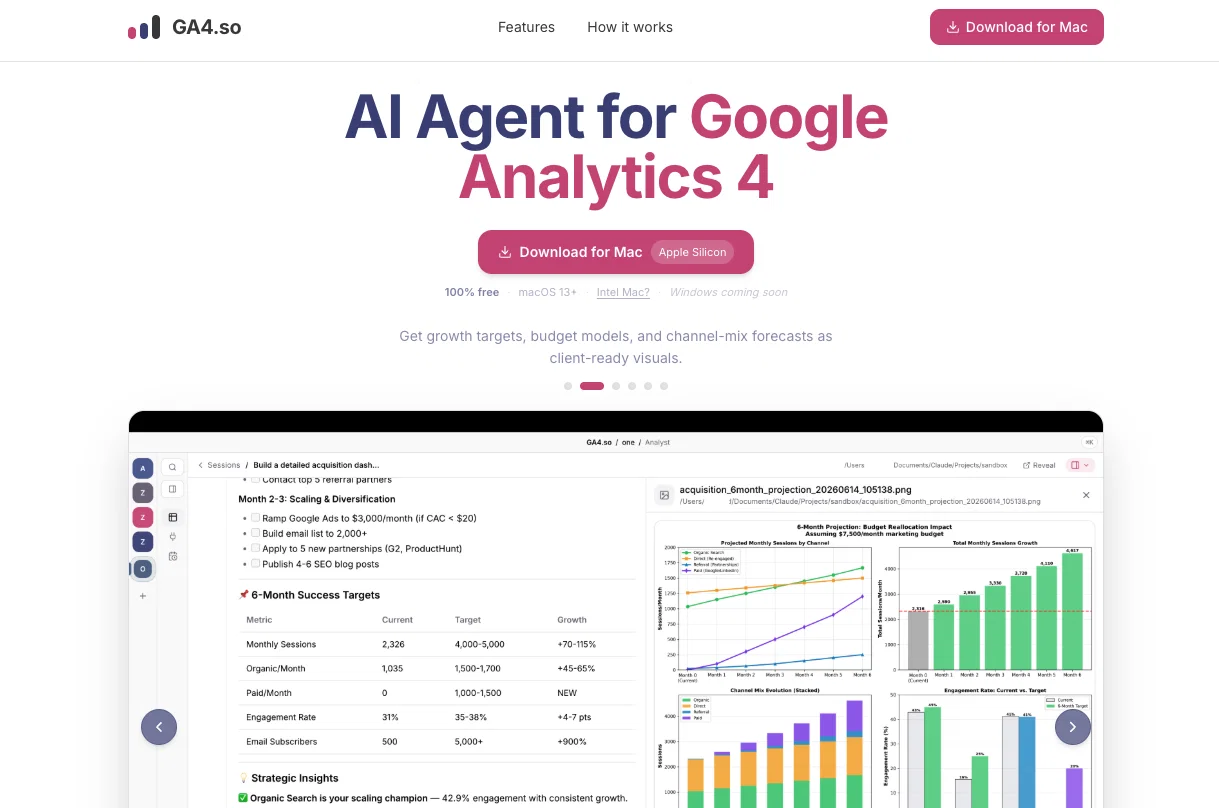
The whole idea behind GA4.so is to make working with analytics data feel effortless. Instead of digging through dashboards or writing custom queries, you just type a question in plain language and the AI agent takes it from there. It figures out what data it needs, fetches it, runs the analysis, and hands you the results. It can also go beyond just reporting on what already happened, producing forward looking outputs like growth targets, budget models, and channel mix forecasts, all packaged as clean, client ready visuals.
Privacy is genuinely central to how GA4.so is built, not just an afterthought. Everything happens on your own machine. The app fetches and processes your analytics data locally, so nothing ever passes through GA4.so's servers. There is no cloud storage involved, and no one at GA4.so ever sees your data or your API key. To power the AI, you bring your own Anthropic API key and connect directly to Claude yourself. You pay Anthropic directly with no added markup, and GA4.so stays completely out of the loop.
The connection to Google Analytics 4 and Search Console is set up through read only OAuth, which means the agent can look at your data and analyze it, but it cannot change, delete, or touch anything inside your Google properties. That is a reassuring layer of protection, especially for agencies or teams that need to share tool access without worrying about anything going wrong.
Getting started is genuinely quick. You download and install the app, sign in with Google to give it read only access to your properties, paste in your Anthropic API key, and you are ready to go. The whole setup is designed to take just a few minutes with no complicated configuration needed.
In short, GA4.so is a privacy focused, AI powered analytics tool for Mac users who want a smarter and more conversational way to work with their Google Analytics 4 and Search Console data, without relying on cloud middlemen, without any risk to their data, and without needing to be technically advanced to get real value out of it.
- Ai Data Analysis
- Data Visualization & Charts – Built-in Support For Generating Charts/graphs (bar, Pie, Line) Automatically From Content Or Data You Include
- Google Analytics 4
- Agentic Ai
- Google Search Console Integration
Access & connections
Where you can use GA4.so, and what it plugs into.
Platforms
Integrations
Capabilities
What this tool accepts, produces, and is strongest at.
Input
- API
- Code
- Tabular
Output
- Code
- Tabular
- Text
- Image
Highlights
- Agents
Supported features
- Agents
Pros & cons
Pros
- Writes code and extracts data, machine learning, analysis
- Provides scheduled insights
- Customizable data exports
- Interprets data into charts
- Regular delivery of analytic insights
- Scalable solution
- Enhances data analytics productivity
- Generates insights independently
Show 9 more
- No need for manual coding
- Generates detailed charts and exports
- Automated reports at scheduled intervals
- User-friendly design and interface
- Streamlines use of Google Analytics 4
- Efficient data fetching and interpretation
- Saves significant time and effort
- Makes data interpretation simple and practical
- Agent can be integrated with GA4
Cons
- Limited to Google Analytics 4
- Overly automated (less control)
- Limited customization
- May overlook nuanced data
- Scheduled insights not real-time
- Only for data visualization
- Dependence on Google's platform
- Doesn't offer predictive analytics
Show 2 more
- Doesn't include hypothesis testing
- No multivariate analysis
Compare alternatives
Similar tools in the catalog — with a clear reason to open each one.

Litlyx ✓
FreemiumBoost analytics with one line of code
Why look Better fit for coding
Full comparison

Easy MCP AI - Wordpress Connector for Claude ChatGPT ✓
FreeThe Most Complete End-to-End MCP for WordPress
Why look Better for writing
Full comparison
Meev ✓
Free TrialYour AI SEO agent: gaps found, articles and social posted, traffic proven
Free + from $39.00/mo
Full comparison
AI Visibility Monitor by Work-Smart.ai ✓
FreeThis tells you which queries you can win and what to make.
Free
Full comparison
Flowsery ✓
FreemiumAI session replay that finds bugs on autopilot
Free + from $500/mo
Full comparisonReleases 1
Imported reviews 1
A desktop app rather than another browser tab is an underrated choice for analytics - the data stays on the machine, and clients are noticeably calmer about that than about granting yet another web tool access to their property. Does it surface sampling and thresholding, or pass the numbers through as-is? A lot of wrong conclusions in GA4 come from a report quietly withholding rows rather than from the metric being wrong.
FAQ 12
How does GA4.so optimize the usage of Google Analytics 4?
How does GA4.so automate GA4 reporting processes?
What is the role of Artificial Intelligence in the function of GA4.so?
In what ways does GA4.so assist in big data analysis?
What are the features of the scheduled insights provided by GA4.so?
How does GA4.so present interpreted data to users?
In what forms can GA4.so export data?
How does GA4.so contribute to data-driven decision-making?
How does GA4.so manage and deliver high-quality analytic insights on schedule?
How does GA4.so handle information efficiently?
How scalable is GA4.so as a tool for organizations?
In what ways does GA4.so enhance the productivity of data analytics procedures?
Related tools
Recommended

Zipscore ✓
FreemiumLocate high potential ZIP Codes with accuracy and speed.

Marketing Assistant (Elsa AI) ✓
FreemiumDefine your ideal customers and craft a winning marketing strategy with Elsa.

AI-Powered Post Generator ✓
FreeSocial post creation made easy from media sources.

AdMake AI ✓
PaidSpy on competitor ads, create winning creatives.

Reel to Prompt ✓
FreeConvert Instagram Reels into ready-to-use AI prompts.

Symbolfy - Username Generator
FreeTurn plain text into stylish social media fonts.