

Flownote ✓
Effortlessly turn meeting audio into concise summaries.
Free + from $19.99/mo
Verdict
A quick read before you dig into the full page.
- Best if
- Effortlessly turn meeting audio into concise summaries
- Skip if
- Limited languages for transcription
- Pick this when
- Transcribes meeting audio
Considering Jamy instead? Compare side by side
Overview
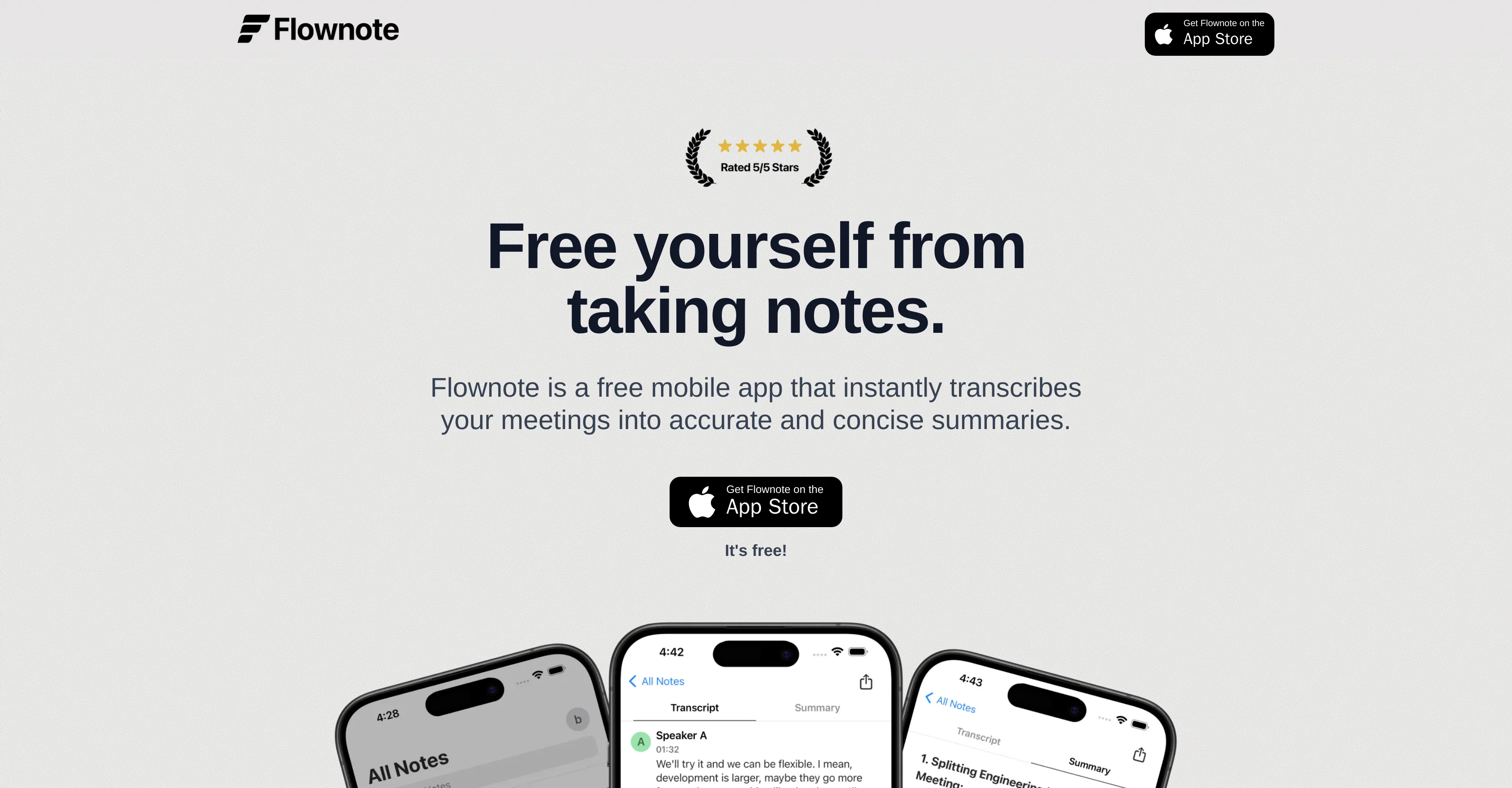
Flownote is a mobile application that transcribes and summarizes meeting audio. It leverages machine learning technology, delivering automatic and highly accurate transcriptions (over 99% accuracy claimed) in several languages.
To use Flownote, you simply record or upload the meeting audio, and the application generates detailed, concise summaries of your meetings. Key elements of a summary can include important points discussed, dates, and action items, all intended to make recalling critical details easier without the user needing to revisit lengthy audio recordings.
Speaker labels and timestamps are included in the transcriptions, helping identify who said what and when. Furthermore, Flownote offers the ability to export the notes as a PDF or text file.
This feature allows users to share their notes more easily with team members or clients, potentially improving clarity and avoiding misunderstandings.
The application aims to lessen the time spent on manual note-taking, increasing the overall efficiency in handling meetings. As for security, Flownote's transcriptions, summaries, and meeting recordings are stored privately and securely in a cloud storage system.
The app can be used freely with a quota of minutes for recording, with the option to upgrade for unlimited recording time. Also, it can run in the background or with a locked phone screen.
It offers different usage plans to cater to varying user needs.
Access & connections
Where you can use Flownote, and what it plugs into.
Platforms
Integrations
Capabilities
What this tool accepts, produces, and is strongest at.
Input
- Audio
Output
- Text
Pros & cons
Pros
- Transcribes meeting audio
- Summarizes recorded content
- Highly accurate transcriptions
- Multiple language support
- Timestamps in transcriptions
- Speakers identification
- Export notes as PDF
- Export notes as text
Show 12 more
- Efficient meeting handling
- Secure cloud storage
- Free usage with quota
- Upgrade for unlimited recording
- Works in background
- Works with locked screen
- Multiple usage plans
- Automatic key points identification
- Highlights important dates and actions
- Notes sharing possibility
- App for meeting management
- Saves manual note-taking time
Cons
- Limitations on free usage
- No Android version mentioned
- Limited export formats
- Dependent on internet connection
- Storage tied to cloud
- Potential privacy concerns
- No offline recording
- Paid version is mandatory for extensive usage
Show 2 more
- No real-time transcription
- Limited languages for transcription
Compare alternatives
Similar tools in the catalog — with a clear reason to open each one.

Jamy ✓
FreemiumAutomate meeting notes for seamless productivity.
Why look Typically cheaper
Full comparison
Wave AI Note Taker, Transcription and Summary Tool ✓
FreemiumThe Smartest Way to Capture, Transcribe & Summarize Anything
Why look Typically cheaper
Full comparison
Otter.ai ✓
FreemiumAI Meeting Assistant for real-time transcription and notes
Free + from $19.7/mo
Full comparison
Limitless - Personalized & Secure Memory AI ✓
FreemiumRecall anything you've said or heard in meetings or conversations
Free + from $19/mo
Full comparison
Bubbles Notetaker ✓
Freemium⚡️ Supercharge your meeting productivity
Why look Typically cheaper
Full comparison
NoteX AI Meeting Agent ✓
FreemiumBest multilingual AI meeting agent for global teams
Why look Typically cheaper
Full comparisonReleases 1
FAQ 12
What languages does Flownote support for transcription?
How accurate is the transcription process of Flownote?
What elements are included in the summary generated by Flownote?
How can I share the transcriptions and summaries generated by Flownote?
Can Flownote run with a locked phone screen?
What are the different usage plans offered by Flownote?
Where does Flownote store my transcriptions and summaries?
What level of security does Flownote offer for my data?
How can I upgrade to unlimited recording time with Flownote?
Does Flownote provide timestamps and speaker labels in the transcriptions?
How does Flownote help increase efficiency in handling meetings?
What is the accuracy rate claimed by Flownote?
Related tools
Recommended

B12 AI Website Builder ✓
FreemiumAI-powered website builder

Automateed ✓
Free TrialCreate eBooks effortlessly with Automateed, the AI-powered writing tool.

Beeyond AI ✓
Free TrialBeeyond AI: Unlock 50+ AI tools under one subscription

Writefull Academizer ✓
PaidTransform informal text into academic prose

Spellbook ✓
UnknownContract Drafting and Review for legal professionals.

Magickpen ✓
FreemiumWrite anything in seconds, just like magic.