

Whiteboard videos 2026 Rank: #1227
explain.ink ✓
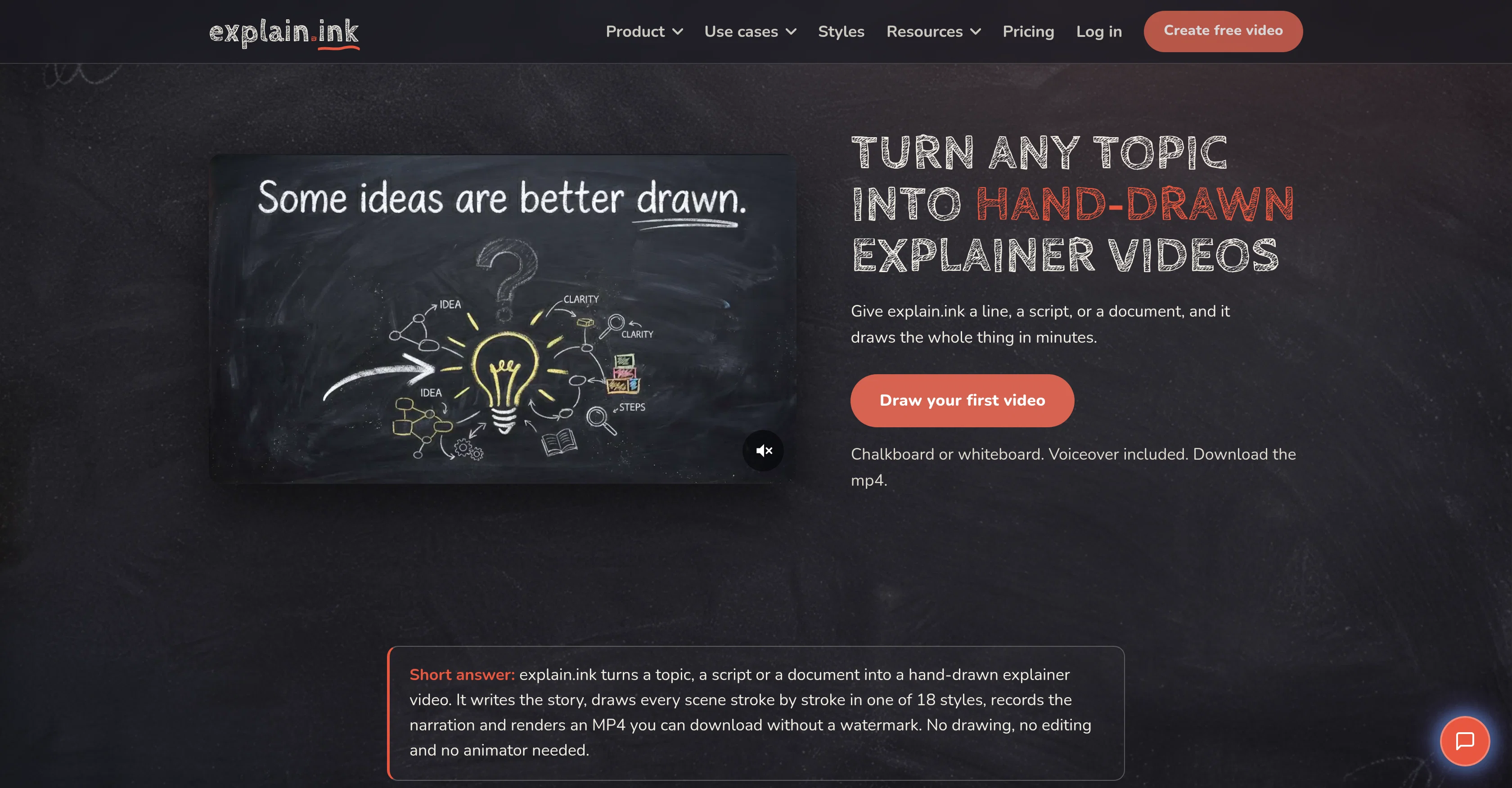
Turn any topic into hand-drawn explainer videos.
Trial; then from $5.00
Verdict
A quick read before you dig into the full page.
- Best if
- Turn any topic into hand-drawn explainer videos
- Skip if
- May oversimplify complex subjects
- Pick this when
- Creates hand-drawn explainer videos
Considering Ankon AI instead? Compare side by side
Overview




explain.ink is an AI-powered tool designed to create hand-drawn explainer videos from a wide range of sources such as a topic, written script or document.
By giving the tool a single line, a complete script or a document, explain.ink autonomously writes the narrative, hand-draws every scene, records a voiceover, and renders the explainer video into an MP4 that users can download without a watermark.
The tool provides a range of video styles for users to choose from for their explainer video.With functionality to convert any text be it topic, document, PDF, or script into an explainer video, this tool can be used for various use cases including education, course creation, marketing, onboarding and training.
The main selling point of explain.ink appears to be its simplicity and flexibility users only need to select the input and style for their video, the script, the artwork, the narrative and the technical production are all handled by the AI.
This efficiency enables the quick turnaround of explainer videos potentially even on the same day a script is completed.
Access & connections
Where you can use explain.ink, and what it plugs into.
Platforms
Integrations
Capabilities
What this tool accepts, produces, and is strongest at.
Input
- Tabular
- Text
Output
- Video
Highlights
- MCP
- API
Supported features
- MCP
- API
Pros & cons
Pros
- Creates hand-drawn explainer videos
- Writes narrative autonomously
- Records voiceover
- Renders video to MP4
- Watermark-free downloads
- Offers various video styles
- Converts text to video
- Turns scripts into videos
Show 39 more
- Processes documents into videos
- Offers multiple use-cases
- Useful for education
- Effective in course creation
- Applies in marketing
- Simplifies onboarding
- Effective training tool
- Simplifies video creation
- Promises quick turnarounds
- Transforms topic into videos
- Provides different art styles
- Adjusts automatically for style
- Preserves original wording
- Turns PDFs into videos
- Utilizes whiteboard animation
- One input suffices
- Offers a range of styles
- Allows input style selection
- Offers multiple input formats
- Multiple hand-drawn styles
- Produces HD videos
- Turns documents nobody reads to videos
- Translates one-liners to videos
- Generates visuals from scripts
- Create videos from PDFs
- No need for drawing skills
- No need for editing skills
- No separate recording session
- Retains full commercial rights
- Videos follow same day of script
- Voiceover matches script
- Allows uploading of reference
- Automatically summarizes and draws documents
- Scenes rendered stroke by stroke
- Allows video length selection
- Provides subtitles with video
- Flexible pricing options
- Commercial rights to all assets
- SRT and separate MP3 outputs
Cons
- No offline functionality
- Limited style options
- No real-time collaboration
- No video editing options
- Lack of customization
- Only renders to MP4
- Voiceover may lack personality
- May oversimplify complex subjects
Show 2 more
- No user-defined drawing patterns
- Limited document input formats
Compare alternatives
Similar tools in the catalog — with a clear reason to open each one.

Ankon AI ✓
Free TrialCreate AI whiteboard explainer videos from any content
Why look Better for writing
Full comparison
Whiteboard Video Maker ✓
FreemiumTurn any idea into a whiteboard video instantly.
Why look Higher community rating
Full comparison

PersonWise ✓
FreemiumCreate AI courses learners can talk to and embed anywhere
Free + from $49.00/mo
Full comparison
EduViz ✓
Free TrialTurn one math idea into a reusable animation clip.
Free + from $23.25/mo
Full comparison
Releases 1
FAQ 12
What is explain.ink?
How does explain.ink use AI to create explainer videos?
What types of text sources can be used with explain.ink?
How does explain.ink work with a one-line input?
How does explain.ink handle voiceover for videos?
What video styles does explain.ink offer?
How does explain.ink convert PDF files into explainer videos?
Can explain.ink create videos from a written script?
What is the maximum length of a video that explain.ink can produce?
Does explain.ink leave a watermark on the finished videos?
What narrative capabilities does explain.ink have?
What use cases does explain.ink cater to?
Related tools
Recommended

CPages ✓
FreemiumTurn any text or photo into printable coloring pages.

My Dream Colors ✓
PaidYour child is the hero of every page.
Videnly ✓
PaidCreate & Publish AI Videos Automatically

LumiMusic ✓
Free TrialCreate any music you can imagine.

FindOutMy | Rate My Body ✓
FreeHonest AI rating of how your body looks from one photo.

Creativly Agent ✓
FreeThe AI agent that works on your canvas.