DocTranslate ✓
Translate documents in any language instantly
Trial; then from $4.99
Verdict
A quick read before you dig into the full page.
- Best if
- Translate documents in any language instantly
- Skip if
- 50MB max file size limit
- Pick this when
- Supports diverse document formats
Considering Pairaphrase instead? Compare side by side
Overview
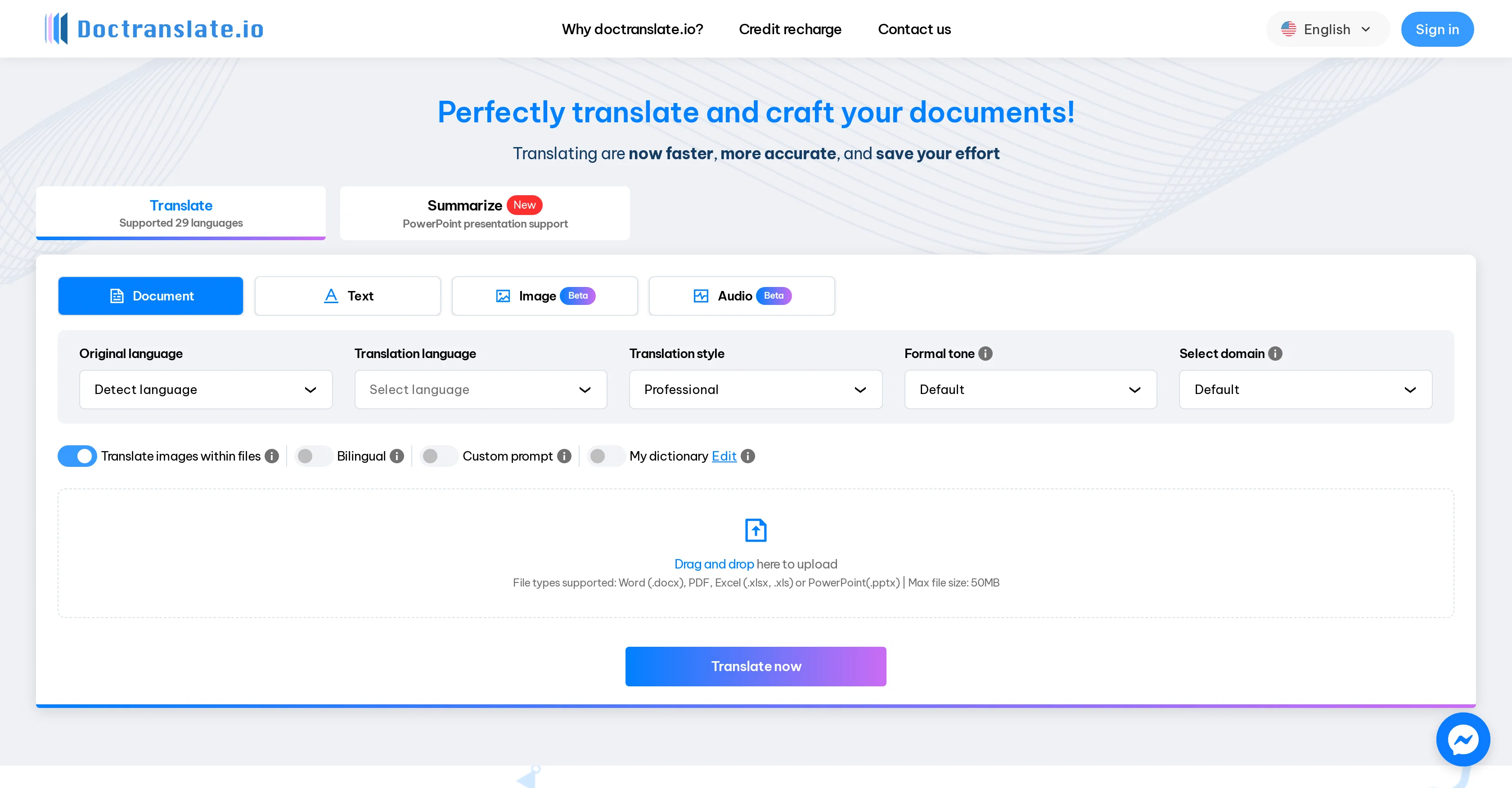
Doctranslate.io is an AI-powered document translation tool. This tool proficiently translates diverse types of documents, including Word (.docx), PDF, Excel (.xlsx, .xls), and PowerPoint (.pptx) files, in a swift and precise manner.
Beyond basic translation, it also comes equipped with features to detect the original language, select the translation language, and establish a formal or professional tone.
Users can select a specific domain, which assists the tool in understanding the context and applying the appropriate vocabulary. The bilingual format option enables the creation of documents that contain both the original and target languages.
Additionally, it offers a customizable 'My dictionary' feature to facilitate future reference and management. Doctranslate.io takes file security seriously and optimizes the effectiveness of work by enhancing global communication.
It provides an efficient procedure: Simply import your file, select your translation preferences, and download your translated file. Doctrine.io also offers support for translating text from images, and even supports audio translation.
Access & connections
Where you can use DocTranslate, and what it plugs into.
Platforms
Integrations
Capabilities
What this tool accepts, produces, and is strongest at.
Input
- Tabular
- Image
- Text
- Audio
Output
- Text
- Image
Supported features
- Translation
Pros & cons
Pros
- Supports diverse document formats
- Detects original language
- Control over translation language
- Can establish tone
- Domain selection for context
- Bilingual format option
- Customizable 'My dictionary' feature
- High file security
Show 19 more
- Text-from-images translation
- Audio translation
- Efficiency in file processing
- Custom instructions input
- Font customization for images
- Supported 29 languages
- Tailored translation styles
- Easy drag and drop uploads
- Flexibility of selecting domain
- Supports large file size
- Effortless document translation
- Retains document format
- Fast translation
- Guarantees data privacy
- Complex translation support
- Pages limit for PowerPoint
- Presentation template application
- Cost saving
- Improved work effectiveness
Cons
- No real-time translation feature
- Limited to 29 languages
- No mobile app version
- 50MB max file size limit
- Doesn't support all file types
- Beta feature reliability issues
- No collaboration features
- Lack of API for integrations
Show 2 more
- Dependency on 'My dictionary'
- No offline capability
Compare alternatives
Similar tools in the catalog — with a clear reason to open each one.

Pairaphrase ✓
PaidAI Translation Management Software for Secure Workflows
Why look Offers a public API
Full comparison
O.Translator ✓
FreemiumAI-powered document translation with perfect formatting
Why look Typically cheaper
Full comparison
Office Translator ✓
PaidIntelligent AI document translation, preserving format.
Why look Higher community rating
Full comparison
Alexa Translations A.I. ✓
UnknownBreaking the Language Barrier
Why look Higher community rating
Full comparison

Releases 1
Imported reviews 2
I run an e-commerce store with customers worldwide. This tool helps me translate product descriptions into multiple languages while keeping them natural and engaging. Sales have increased thanks to localized content!
It kept all my PowerPoint slides looking exactly the same after translation - no more fixing weird formatting issues!