

Multi-model deliberation v2.0.0 2026 Rank: #855
AI Council Chat ✓
Debating AI models, tireless agents, and workspaces. Unlocked, pay-as-you-go.
Verdict
A quick read before you dig into the full page.
- Best if
- Debating AI models, tireless agents, and workspaces. Unlocked, pay-as-you-go
- Skip if
- Multi-model usage can become expensive with heavy usage
- Pick this when
- Multi-model collaboration with multiple AI models
Considering Triall instead? Compare side by side
Overview


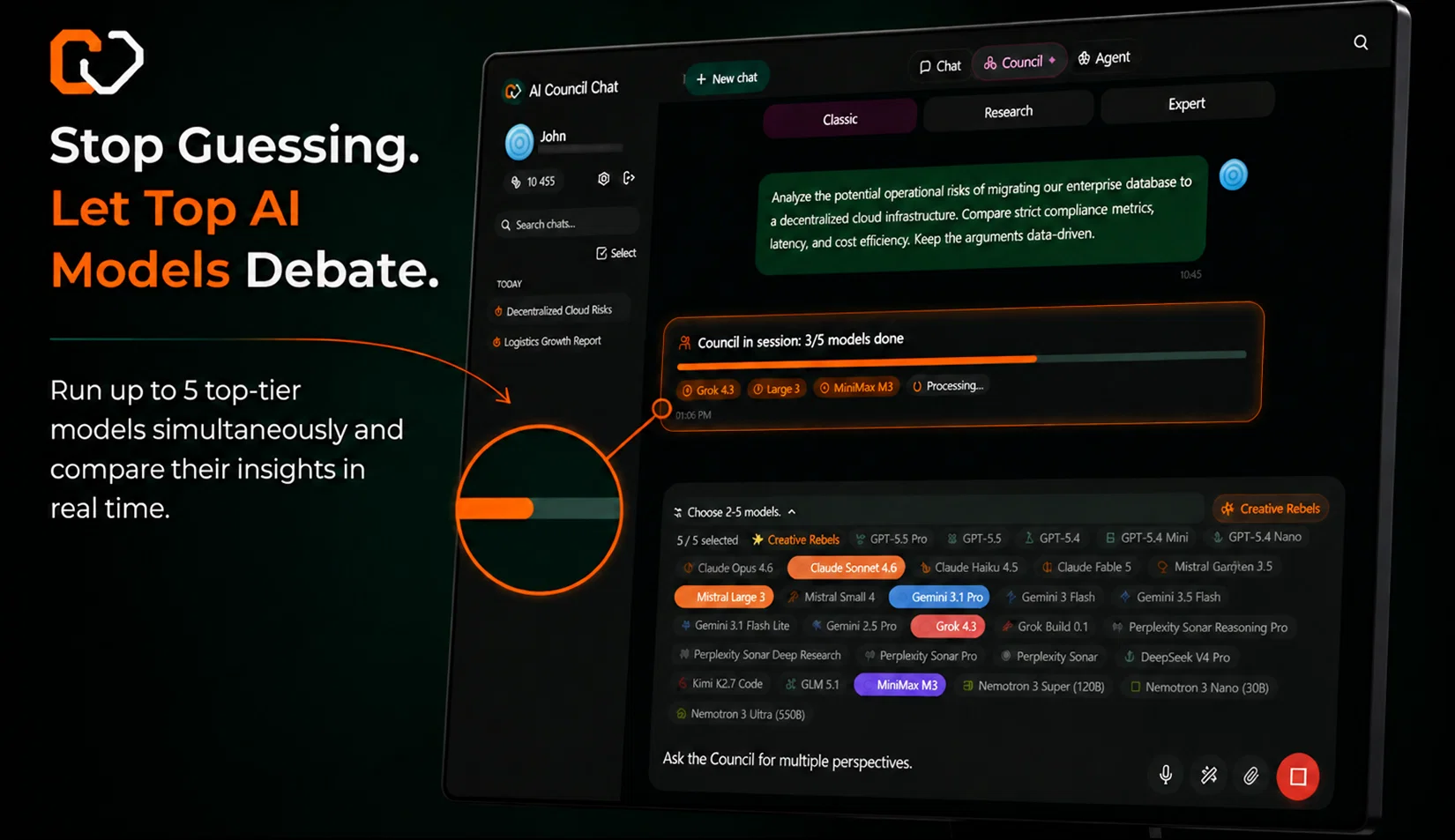
At the heart of the platform is the AI Council module. Instead of chatting with a single, biased model, you trigger a structured debate among multiple leading AI models. They challenge each other's reasoning, synthesize their knowledge, and deliver a single, highly accurate consensus output. This is collaborative intelligence at its finest.
To supercharge your productivity, AI Council also features Tireless Agents—autonomous, persistent AI assistants built to run complex, long-running tasks in the background—and organized Workspaces to manage all your projects, contexts, and files seamlessly. Stop paying for idle subscriptions and harness the power of a debating AI brain trust today.
- Multi-model Collaboration
- Consensus Finding
- Expert Councils
- Autonomous Agent
- Creative Studio
- Smart Data Workspace
- Presentations & Portals
Best for
Short scenarios where AI Council Chat tends to shine.
-
Debating AI models, tireless agents, and workspaces. Unlocked, pay-as-you-go.
Example outputs 1
Sample generations and before/after results for AI Council Chat.
Access & connections
Where you can use AI Council Chat, and what it plugs into.
Platforms
Integrations
Capabilities
What this tool accepts, produces, and is strongest at.
Input
- Code
- Tabular
- Image
- Text
- Audio
Output
- Code
- Audio
- Video
- Tabular
- Text
- Image
Highlights
- SOTA
- Agents
- API
- MCP
Supported features
- Agents
- API
- MCP
Models
Text
Image
Audio
Video
Coding
Pros & cons
Pros
- Multi-model collaboration with multiple AI models
- Synthesizes responses into a single, high-quality answer
- Allows direct chat witDirect access to premium models (Claude, GPT, Gemini, etc.)h models
- Autonomous Agent for complex, multi-step tasks
- Smart Data Workspace for PDFs, spreadsheets and documents
- Creative Studio (image, music and voice generation)
- Context extraction from documents
- Creative Studio for media generation
Show 11 more
- No personal API keys required
- Credit-based pricing – pay only for what you use
- Multiple subscription plans
- EU-based data
- Data processing
- No personal API keys needed
- Inbuilt Council feature
- Plans steps for tasks
- Premium text models
- Pay for real usage
- Ability to top up credits
Cons
- Can produce information overload from multiple responses
- Multi-model usage can become expensive with heavy usage
- Some creative generation features lack fine-grained control
- May encourage over-reliance on AI for decision making
- Requires a learning curve to fully utilize all features
- EU data hosting may limit certain global compliance needs
Compare alternatives
Similar tools in the catalog — with a clear reason to open each one.

Triall ✓
Free TrialThe AI Hallucination Fix: three models, one verdict.
Free + from $11/mo
Full comparison
Suprmind ✓
Free TrialYou ask hard questions, five expert AIs debate, you win breakthrough answers
Free + from $19/mo
Full comparison
LLM Council ✓
FreemiumMultiple AI models deliberate to deliver unbiased answers.
Free + from $25/mo
Full comparison
ParliAI ✓
PaidShip confident decisions with a multi-agent council.
Why look Typically cheaper
Full comparison
Solyvane ✓
FreemiumAI Councils of history's sharpest minds for your hardest decisions
Free + from $9/mo
Full comparison
Gadaa /Ask ✓
Free TrialKnow when AI agrees. Know when it doesn't.
Free + from $24.99/mo
Full comparisonPeople also view
Tools that often show up alongside AI Council Chat in collections and comparisons.
Triall ✓
Free TrialThe AI Hallucination Fix: three models, one verdict.
Suprmind ✓
Free TrialYou ask hard questions, five expert AIs debate, you win breakthrough answers
Solyvane ✓
FreemiumAI Councils of history's sharpest minds for your hardest decisions
ParliAI ✓
PaidShip confident decisions with a multi-agent council.
Gadaa /Ask ✓
Free TrialKnow when AI agrees. Know when it doesn't.
LLM Council ✓
FreemiumMultiple AI models deliberate to deliver unbiased answers.

DeepSeek ✓
FreeUnravel the mystery of AGI with curiosity

CodeRabbit ✓
Free TrialEnhanced code review for improved workflow and quality.
Releases 2
- Added instant integration of the newest AI models (including Claude Fable 5, Claude 3.5 Sonnet, and Gemini Flash) immediately upon their release.
- Upgraded the autonomous AI Agent with a built-in Virtual Desktop and Python execution to search the web and complete real-world tasks.
- Enhanced Council Mode to seamlessly switch between multiple AI experts, delivering comprehensive multi-perspective analysis.
- Unlocked all premium tools and expert features for everyone using a flexible Pay-As-You-Go credit system with no rigid subscription walls.
- Redesigned the interface for instant loading, buttery-smooth mobile scrolling, and a beautiful premium Amber theme.
FAQ 12
What is Council Chat?
How does Council Chat integrate various AI models?
What is the 'Council' feature in Council Chat?
How does the autonomous 'Agent' feature in Council Chat work?
What is the 'Smart Data Workspace' in Council Chat?
What can I do with the 'Creative Studio' in Council Chat?
How does the 'Presentations & Client Portals' feature in Council Chat work?
What subscription plans does Council Chat offer?
Can Council Chat be used as a standalone chatbot?
Which AI models are integrated into Council Chat?
How does Council Chat process data?
What output options does Council Chat give me?
Related tools
Recommended

Denovo ✓
FreemiumTurn your idea into a real business in minutes.
CodeRabbit ✓
Free TrialEnhanced code review for improved workflow and quality.

remio: Your Personal ChatGPT ✓
FreemiumGet Tailored Answer with Your Personal ChatGPT

Automateed ✓
Free TrialCreate eBooks effortlessly with Automateed, the AI-powered writing tool.

Notis ✓
Free TrialThe first WhatsApp assistant that runs on your ChatGPT and Claude subscriptions

Serno ✓
FreemiumCustom AI experts that map what one AI can't