

YouTube summaries 2026 Rank: #3014
Claras ✓
Summaries, transcripts, and answers on every video.
Verdict
A quick read before you dig into the full page.
- Best if
- Summaries, transcripts, and answers on every video
- Skip if
- Limited export options
- Pick this when
- Transcribes YouTube content
Considering Eightify instead? Compare side by side
Overview
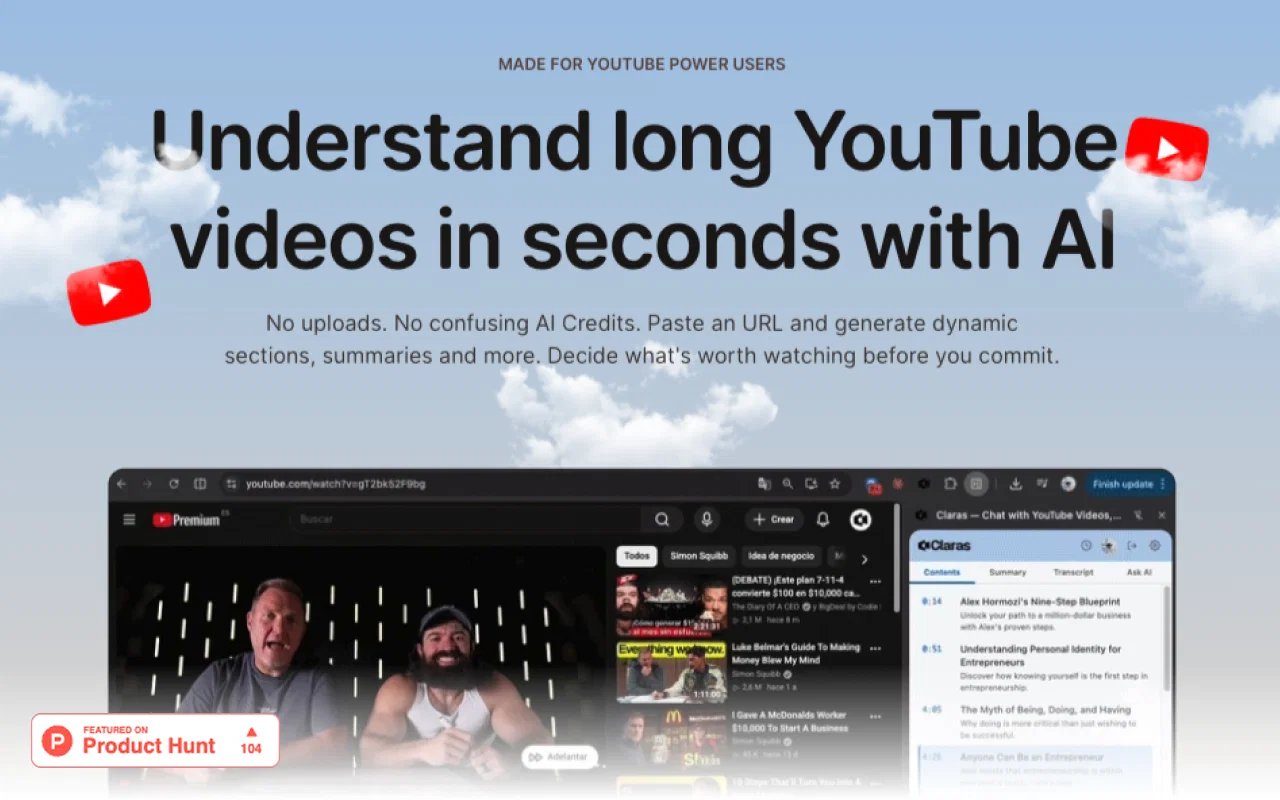
Its main feature is converting YouTube video content into searchable sections, transcripts, summaries, and actionable insights that can be repurposed as needed.
This functionality offers a solution for users who want to understand and manage large quantities of video content rapidly. Users can ask specific questions about any YouTube video, with Claras providing responses using the full video transcript, thus saving on search and rewatch time.
In addition, Claras provides:
(1) Summaries of main ideas in a video, allowing users to ascertain if a video is worth watching in full.
(2) Breakdowns of videos into AI-created interest sections with timestamps provide an efficient means of navigation and replayability.
(3) Tools that allow for seamless content repurposing.
(4) It can export entire transcripts that users can use to build AI agents, generate new knowledge bases, or develop content.
This functionality also makes Claras a useful tool for content creators who require fresh ideas and content not found on regular blogs. Furthermore, Claras supports multiple languages, promising high transcription accuracy.
In summary, Claras is a robust tool providing a comprehensive array of features for understanding, managing, and repurposing YouTube video content.
Best for
Short scenarios where Claras tends to shine.
-
Summaries, transcripts, and answers on every video.
Example outputs 1
Sample generations and before/after results for Claras.
Access & connections
Where you can use Claras, and what it plugs into.
Platforms
Integrations
Capabilities
What this tool accepts, produces, and is strongest at.
Input
- Tabular
- Text
- Video
- Audio
Output
- Tabular
- Text
Highlights
- Local
- Use code TAAFT
- 10% OFF
Supported features
- Transcription
- Translation
- STT
- Video Understanding
- Search
- Assistant
- Text Generation
- Docs
- Integrations
- Web browsing
Show 2 more
- Runs Locally
- Teaching Humans
Pros & cons
Pros
- Transcribes YouTube content
- Supports multiple languages
- Searchable video sections
- Interactive Q&A functionality
- Create video summaries
- Transcript export for repurposing
- Tag and organise insights
- Helps generate fresh content
Show 36 more
- Optimised for content creators
- High transcription accuracy
- Interactive learning tool
- Export all insights easily
- Understand videos 10x faster
- Context-aware responses
- Reduces rewatching time
- Generates interest sections
- Compatible with all YouTube videos
- Enables content discovery
- Speeds up content navigation
- Improves research efficiency
- Aids video content management
- Creates searchable knowledge base
- Highlights key video moments
- Integration for content creation
- Export transcripts to build skills
- Useful in idea generation
- Creates custom agents
- ChatGPT ready
- Video timestamp navigation
- Export data options
- Real-time video interaction
- Contextual search within videos
- Helps skip irrelevant sections
- Replay interesting video parts
- Generates content table of contents
- Useful in research tasks
- Currency in data exploration
- 98% transcription accuracy
- Export in TXT, SRT, PDF, VTT
- Supports team collaboration
- Instant knowledge base creation
- Filter key video insights
- Handle multiple languages
- Availability of free version
Cons
- Limited to YouTube content
- Unconfirmed multilingual accuracy
- Limited insight customization
- Generalized video summaries
- No offline functionality
- No mobile app
- No user-generated tagging
- Output format limitations
Show 2 more
- No collaborative features
- Limited export options
Compare alternatives
Similar tools in the catalog — with a clear reason to open each one.

Eightify
UnknownAI-powered YouTube video summarizer extracting key ideas for quick content assessment.
Why look Better for writing
Full comparison
SummYT - YouTube Summarized ✓
Free TrialInstant YouTube Summary Generator
Free + from $7.99/mo
Full comparison
InfoCaptor ✓
FreemiumTurn YouTube videos into visual knowledge graphs.
Why look Higher community rating
Full comparison
SnapSummary ✓
FreemiumAI-powered YouTube video summaries in a snap.
Free + from $5/mo
Full comparisonPeople also view
Tools that often show up alongside Claras in collections and comparisons.
InfoCaptor ✓
FreemiumTurn YouTube videos into visual knowledge graphs.

Youtube Transcript AI Summary ✓
FreemiumAI summaries for Youtube video transcripts.
SummYT - YouTube Summarized ✓
Free TrialInstant YouTube Summary Generator

AI YouTube & Web Summarizer + Instant Translator | TL... ✓
FreeInstantly summarize and translate any YouTube video or website with AI
SnapSummary ✓
FreemiumAI-powered YouTube video summaries in a snap.
Eightify
UnknownAI-powered YouTube video summarizer extracting key ideas for quick content assessment.

Summarize Video to Text ✓
FreemiumTurn any video into text instantly.

SenseFeed ✓
PaidAI summaries delivered to your inbox daily.
Releases 1
FAQ 12
What languages does Claras support for transcriptions?
How does Claras generate summaries from YouTube videos?
How accurate are Claras' transcriptions?
Can I use Claras to ask specific questions about a YouTube video?
What export formats does Claras support for transcripts?
Does Claras have a feature to create AI agents with exported transcripts?
Can Claras help with content creation?
How does Claras handle content management and organisation?
Does Claras provide timestamps for different sections of a video?
What types of insights does Claras provide from a YouTube video?
Can Claras assist with research and learning through its features?
Can I use Claras for content navigation within a YouTube video?
Related tools
Recommended

Rundown ✓
FreemiumYour content sources, distilled into a daily knowledge feed

MurmurCast ✓
FreemiumYour media, distilled

YouTube Summarizer by Gistilo ✓
FreemiumTurn any YouTube link into clear summary.

YTShortsdl ✓
FreemiumDownload HD Shorts and transform videos into viral scripts.

YT Chats ✓
FreeTurn YouTube videos into searchable notes.

Wize Up ✓
PaidPersonalized AI summaries of YouTube channels