

Bible study vv2.0 2026 Rank: #1046
CiteVerse ✓
Real-time AI-powered Scripture display and note taker that responds to voice.
Verdict
A quick read before you dig into the full page.
- Best if
- Real-time AI-powered Scripture display and note taker that responds to voice
- Skip if
- Limited user interface customization
- Pick this when
- Voice recognition for Scripture
Considering Jude | Interactive Bible Study AI instead? Compare side by side
Overview




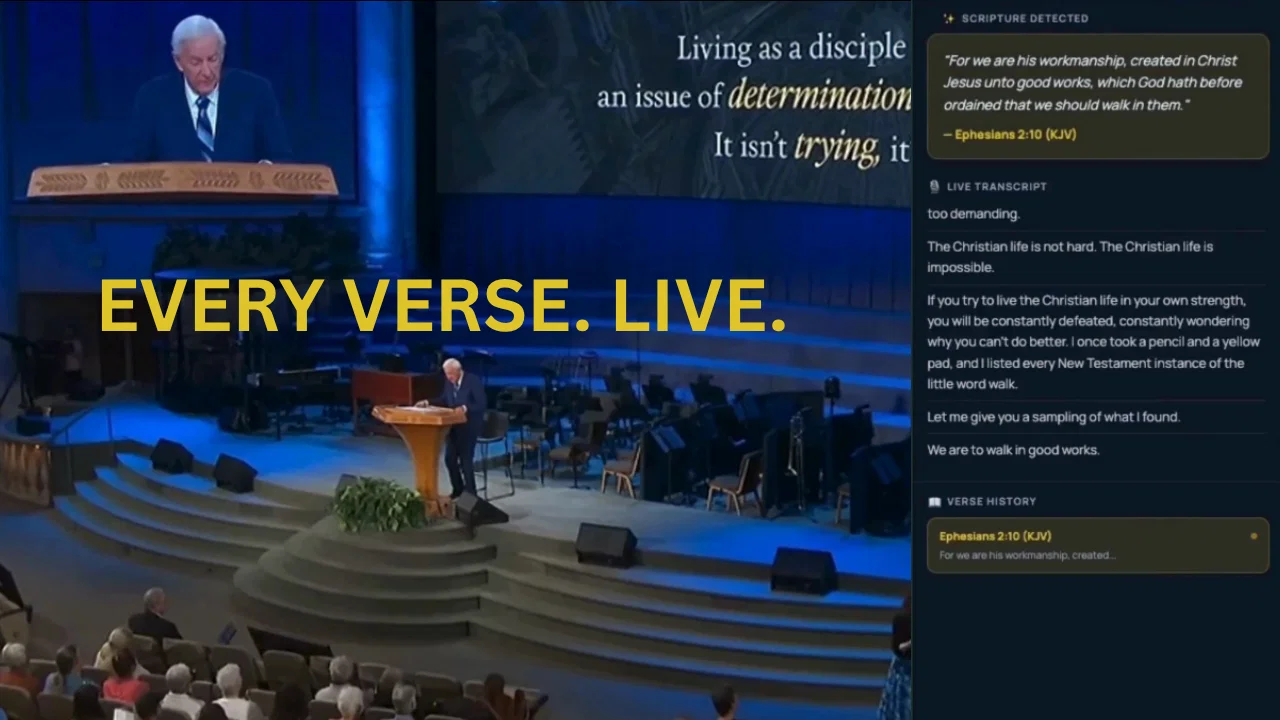
A key feature of CiteVerse is its AI-powered verse detection which instantly shows the verse references mentioned in speech. Not only useful for live sermons, but the tool can also be used for personal Bible study. The AI listens as users speak naturally, recognizing the verses referenced and automatically showing them on the screen, facilitating hands-free scripture lookup.
With the Presenter mode, it supports professional presentations by displaying Bible verses live as the sermon progresses. It also comes with a two-screen setup, allowing the control from a device, while the verse is displayed on a projector or a TV. Moreover, there is an additional countdown timer included.
The software also has a Chrome Extension, which captures a tab's audio and displays the verses in real time.
Once any session ends (Chrome Extension, AI Assistant, Presenter mode), CiteVerse automatically turns the audio into beautiful notes with AI-generated Title, Summary text and 3 summary points. The raw transcripts are also cleaned up without AI editing it, and all these can be exported as plain text, markdown, PDF (light and dark theme) and a summary social card.
Offering various subscription plans, CiteVerse caters to different user needs from individuals to churches and teams. The features and services included in the subscriptions vary, with the most comprehensive option providing unlimited concurrent sessions and priority support. A free trial is also offered.
A comprehensive summary of the subscriptions are:
There are 3 monthly subscription plans for flexibility:
A) INDIVIDUAL (US$22.50/month)
- 6 hours of audio sessions per month,
- Up to 5 concurrent sessions,
- Personal study & sermon prep,
- AI Assistant, Chrome Extension,
- Auto-saved, exportable Journeys,
- Live Sessions (connect & follow), 5 concurrent sessions,
- Export notes as plain text, markdown text, PDF or Summary card
B) PRO (US$79/month)
- Everything in Individual,
- 20 hours of audio sessions per month,
- Up to 20 concurrent sessions,
- Presenter Mode (voice-controlled display),
- Two-screen setup: verse on projector/TV,
For teachers & small teams
c) MAX (US$149)
- Everything in Pro,
- 50 hours of audio sessions per month,
- Unlimited concurrent sessions
- For groups, churches & teams,
- Priority support (24hr),
- Countdown timer
Best for
Short scenarios where CiteVerse tends to shine.
-
Real-time AI-powered Scripture display and note taker that responds to voice.
Example outputs 1
Sample generations and before/after results for CiteVerse.
Access & connections
Where you can use CiteVerse, and what it plugs into.
Platforms
Integrations
Capabilities
What this tool accepts, produces, and is strongest at.
Input
- Audio
Output
- Text
- Image
Highlights
- Use code TAAFT
- 25% OFF
Supported features
- STT
- Transcription
- Assistant
- Text Generation
- Team Collaboration
Pros & cons
Pros
- Voice recognition for Scripture
- Real-time verse display
- Seamless hands-free lookup
- Presenter Mode for projection
- Projects on multiple screens
- Chrome extension for real-time verses
- Records and saves sermons
- Session broadcasting
Show 19 more
- Subscription packages variety
- Intuitive interface
- Easy setup
- Commitment-free start
- Two-screen setup
- Included countdown timer
- Live sermon support
- Personal Bible study enhancement
- Professional presentation support
- Session exporting feature
- Support for team collaboration
- Real-time audio transcription
- Various modes for usage
- Concurrent sessions allowance
- In-app follow-up
- High contrast display
- Automatic sermon curation
- Option for priority support
- Exportable 'Journeys'
Cons
- Subscription-based
- No offline functionality
- Chrome-dependent
- Limited to English language
- No support for other religions
- Exclusively tied to voice recognition
- Problematic with strong accents
- No version control for 'Journeys'
Show 2 more
- Limited user interface customization
- Restricted to two-screen setup
Compare alternatives
Similar tools in the catalog — with a clear reason to open each one.

Jude | Interactive Bible Study AI ✓
FreemiumUnderstand the Bible like never before.
Why look Higher community rating
Full comparison
Lumenology ✓
Free TrialDeep Bible study. Without the library.
Why look Typically cheaper
Full comparison
Ask Bishop ✓
FreemiumYour AI-powered faith companion for Bible study.
Why look Typically cheaper
Full comparisonPeople also view
Tools that often show up alongside CiteVerse in collections and comparisons.
Lumenology ✓
Free TrialDeep Bible study. Without the library.
Ask Bishop ✓
FreemiumYour AI-powered faith companion for Bible study.
Jude | Interactive Bible Study AI ✓
FreemiumUnderstand the Bible like never before.

BibleSpark ✓
UnknownDiscover God's Word like never before.

ReProof AI ✓
FreemiumAI biblical apologetics engine built to end debates.

Psalmlog ✓
Free TrialGet biblical answers to any life challenge - instant Scripture-based guidance

Koinonos ✓
FreemiumA companion for exploring Christ's words in context.

1-Click OpenClaw | Hostinger ✓
PaidYour 24/7 AI assistant with 1-click setup.
Releases 2
What’s changed in this release
CiteVerse has grown from a voice-driven Bible presentation tool into a fuller AI-powered Study-to-Stage platform for individuals, Bible study groups, teachers, pastors, churches, and media teams.
Here’s what’s new and improved:
-
Major platform expansion
CiteVerse is no longer only about displaying scripture during live preaching. It now supports the full workflow from study and sermon prep to live follow-along, presentation, post-session curation, export, and reuse. -
6 supported languages
CiteVerse now supports live engagement in:
- English
- Spanish
- German
- French
- Italian
- Portuguese
This makes the platform useful for a wider global audience, multilingual ministries, and cross-language scripture workflows.
- 11 supported Bible versions
CiteVerse now supports 11 Bible versions across supported languages:
- English: KJV, KJV (Noted), ASV, BBE, BSB, WEBU
- French: LSG
- Spanish: RV (1909)
- Portuguese: BPM
- Italian: RIV
- German: LUT
This is a major step up from the older product story, which was far more limited in how Bible text was presented across languages and versions.
-
Cross-language transcription
CiteVerse now supports cross-language transcription workflows, allowing users to speak in one supported language and follow the transcript in another. This makes the platform more useful for multilingual study, teaching, follow-along, and ministry use cases. -
Stronger AI Assistant workflow
The AI Assistant is now a much clearer product pillar for:
- personal Bible study
- sermon prep
- live teaching support
It helps users speak naturally, get real-time transcription, detect scripture references, and keep useful session content for later.
- Chrome Extension + Live Sessions work together
CiteVerse now offers a better live workflow between:
- Chrome Extension session capture
- in-app Live Sessions follow-along
This means one device can capture live audio from a browser tab while another device follows the transcript and scripture inside the app in real time.
-
Better Presenter Mode story
Presenter Mode is now positioned more clearly as a hands-free live scripture presentation tool for churches, teachers, and live ministry settings, including two-screen workflows and countdown timing support. -
Journeys are now a much bigger value layer
Journeys have become a more important part of the platform. Sessions do not just end and disappear. They can become reusable, searchable content that users can revisit later.
This includes export options such as:
- plain text
- Markdown
- summary / social card style outputs
-
Better “study now, use later” value
One of the biggest product improvements is that CiteVerse now does more than help in the live moment. It helps preserve and reuse that moment afterward. This makes the platform valuable not only for presentation, but also for reflection, archiving, teaching follow-up, and team collaboration. -
Broader audience positioning
The older story focused mainly on pastors and church media booths. The new CiteVerse supports:
- individuals
- Bible study groups
- teachers
- pastors
- churches
- ministry teams
This makes the platform more flexible and easier to understand as more than a niche presentation utility.
- Clearer product positioning
CiteVerse is now better described as an AI-powered Bible study and live scripture presentation platform, not only a scripture display tool. It is built to reduce friction between the spoken Word and the written Word while also making every session more useful after it ends.
In short:
CiteVerse now delivers more languages, more Bible versions, cross-language transcription, stronger prep tools, stronger live follow-along, stronger presentation workflows, and much better post-session reuse.
It has evolved from a voice-driven scripture display tool into a fuller platform for studying, teaching, presenting, following live, and revisiting later.
FAQ 12
What is Cite Verse?
How does Cite Verse use AI technology?
What is the role of voice recognition in Cite Verse?
What features does Cite Verse offer for sermon preparation?
How does the Presenter Mode function in Cite Verse?
What is the Chrome extension of Cite Verse used for?
What are 'Journeys' in Cite Verse?
Can Cite Verse be used for group or church-wide Bible study sessions?
How does the real-time verse display feature work in Cite Verse?
How is Cite Verse subscription-based?
Does Cite Verse offer package options designed around the user's requirements?
How user-friendly is Cite Verse's interface?
Related tools
Recommended

Notis ✓
Free TrialThe first WhatsApp assistant that runs on your ChatGPT and Claude subscriptions

remio: Your Personal ChatGPT ✓
FreemiumGet Tailored Answer with Your Personal ChatGPT

Rocket ✓
FreemiumThink It. Type It. Launch It.

Pounce ✓
Free TrialGet real followers and engagement in minutes.

Whacka ✓
Free TrialTurn ideas into real apps from your phone.

Reply ✓
Free TrialGenerate leads, convert website traffic, or hire sales AI SDRs.