

ChatChit AI ✓
Your personal AI assistant on WhatsApp.
Free + from $9/mo
Verdict
A quick read before you dig into the full page.
- Best if
- Your personal AI assistant on WhatsApp
- Skip if
- Potentially expensive premium plans
- Pick this when
- WhatsApp Integration
Considering MobileGPT instead? Compare side by side
Overview
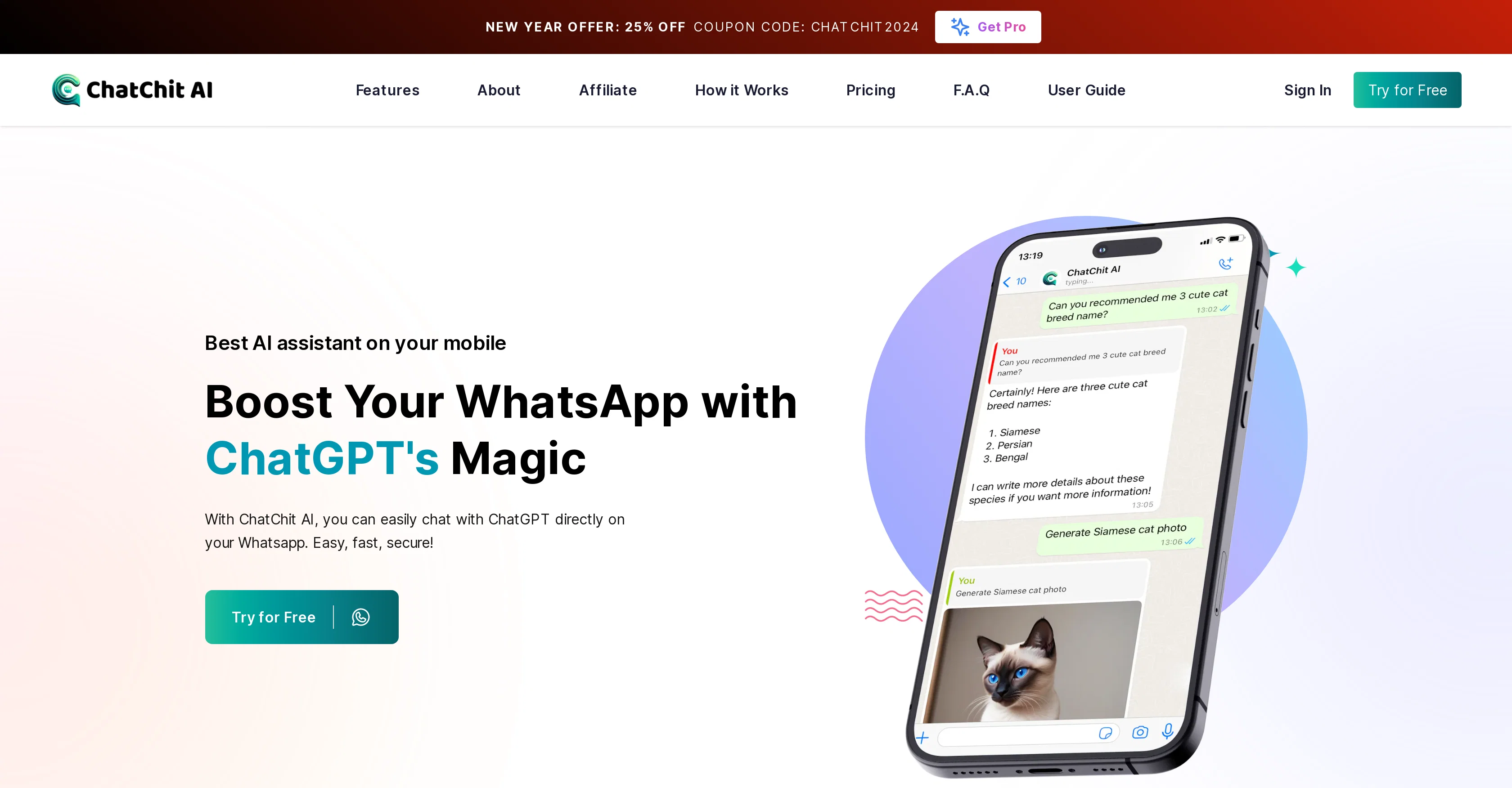
ChatChit AI is an AI-based chatbot designed to bring the capabilities of ChatGPT to WhatsApp, acting as a personal artificial intelligence assistant. Utilizing the advanced capabilities of GPT-3.5 and GPT-4, it can respond to user queries 24/7 in over 100 supported languages, making it a highly accessible tool for diverse users.
What sets ChatChit AI apart is its capability to generate AI images and stickers in response to a brief written request; for instance, users can describe an image and the bot generates it.
It can also decipher voice messages, making interactions more dynamic and personalized. To use the service, users simply create an account with ChatChit AI, connect their chat assistant to WhatsApp, and can begin chatting.
The tool provides different plans to cater to varying user needs, free and premium, the latter offering unlimited messages and more advanced features.
It also caters to business needs with its enterprise offerings that include chatbots trained specifically for group chats, and customizable automation systems.
While pricing and offers may vary, this tool strives to make AI technology readily available at affordable costs.
Access & connections
Where you can use ChatChit AI, and what it plugs into.
Platforms
Pros & cons
Pros
- WhatsApp Integration
- 24/7 Assistance
- Supports 100+ languages
- Voice Message Deciphering
- Variety of usage plans
- Enterprise features
- Group chatbots
- Customizable automation
Show 15 more
- Affordable pricing
- User Account Creation
- GPT-3.5 and GPT-4 usage
- Unlimited messages (Premium)
- Download Instagram YouTube videos
- Multifunction WhatsApp bot
- Secure Usage
- Dynamic personalized interactions
- Fast customer information access
- Voice communication feature
- Voice to text transcription
- File-media conversion
- Free trial available
- User Guide available
- Social media links
Cons
- Limited to WhatsApp
- Account creation required
- Potentially expensive premium plans
- Limited free tier
- No mentioned API
- Specific to GPT models
- Multimedia interactions may be costly
- Chatbot personalization unclear
Show 1 more
- Customer service details lacking
Compare alternatives
Similar tools in the catalog — with a clear reason to open each one.

MobileGPT
Free TrialYour personal AI companion on WhatsApp.
Why look Higher community rating
Full comparison
Shmooz
PaidYour versatile AI assistant for daily tasks and content creation.
Why look Typically cheaper
Full comparison

WhisperBot
PaidTurn WhatsApp voice messages into text instantly.
From €8.95 per month
Full comparison

Releases 1
Imported reviews 1
I think this would work well for companies using whatsapp for customer support (why you would have it on whatsapp is beyond me, but anyway), right now i'll keep using it to reply to the much-too-many groups i'm in
FAQ 12
What is ChatChit AI AI?
How does the ChatChit AI AI work on WhatsApp?
Can ChatChit AI AI understand and respond in my language?
How can I install ChatChit AI AI on WhatsApp?
Does ChatChit AI AI decipher voice messages?
What are the abilities of ChatChit AI AI?
Is there any limitation on the number of messages I can send using the free plan?
What additional features does the premium plan of ChatChit AI AI offer?
Can I create AI images using ChatChit AI AI? How?
Can ChatChit AI AI help with business needs?
How to sign up for ChatChit AI AI?
Why does ChatChit AI AI have both GPT-3.5 and GPT-4 access?
Related tools
Recommended

B12 AI Website Builder ✓
FreemiumAI-powered website builder

ChatGPT ✓
FreemiumAsk anything, create anything, and move from idea to action.

Limecube ✓
FreemiumTransforming the way websites are created with AI.

Archie ✓
FreemiumThe platform to architect, build, and run production-grade applications.
Aspect ✓
Free TrialAI copilot for interviews, focusing on your candidates.

Photo AI ✓
PaidCreate beautiful AI photos and videos of real people