

Calcish
Calculator, JavaScript, AI, and notebook in one tool.
Free + from $49.99
Verdict
A quick read before you dig into the full page.
- Best if
- Calculator, JavaScript, AI, and notebook in one tool
- Skip if
- Limited precision despite enhancements
- Pick this when
- Calculator + JavaScript functions
Overview
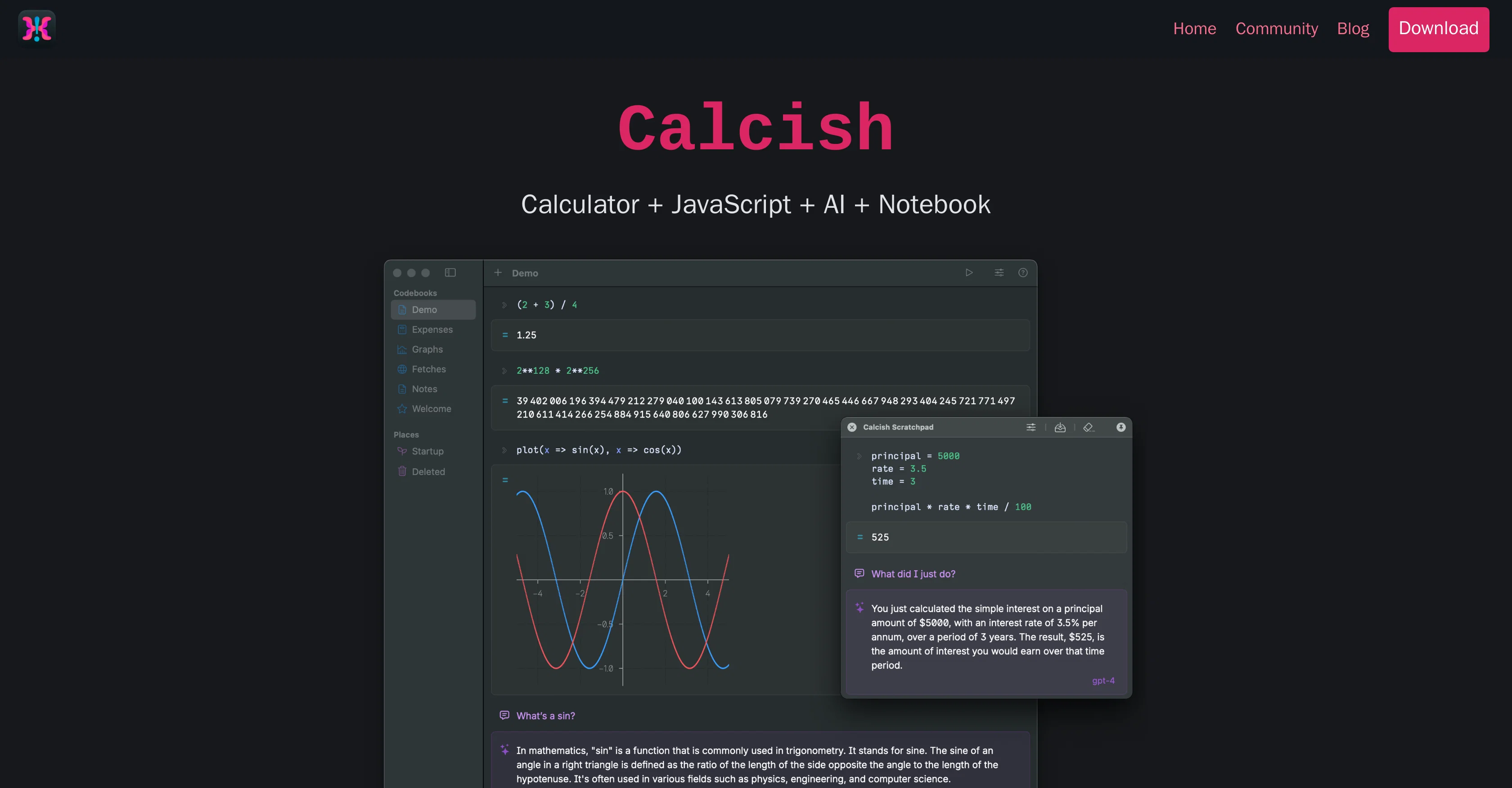
Calcish is an all-in-one tool for macOS users that combines the functionality of a calculator with JavaScript scripting, inbuilt AI features and a notebook-like interface.
It is intended to facilitate quick calculations, execution of scripts, and interaction with local or remote AI models. Designed on QuickJS, it offers enhancements to regular JavaScript, including more accurate calculations with large numbers, fractional calculations, vector and matrix operations for arrays, and decimal number types for exact currency calculations.
Even for beginners in programming or JavaScript, the user-friendly interface and thorough documentation streamline the learning process. Notably, Calcish also contains built-in large language models allowing users to chat with various state-of-the-art AI models or integrate with OpenAI's GPT-4 and GPT-3.5, Cohere, and TextSynth using their respective APIs.
The scratchpad feature in Calcish can be opened over other applications for quick scripting and calculations, with an option to save finished work as a codebook for future reference.
Access & connections
Where you can use Calcish.
Platforms
Capabilities
What this tool accepts, produces, and is strongest at.
Input
- Code
- Text
- Tabular
Output
- Code
- Text
Pros & cons
Pros
- Calculator + JavaScript functions
- macOS tool
- QuickJS enhancements
- Large number precision
- Fractional calculations
- Vector operations on arrays
- Matrix operations on arrays
- Exact currency calculations
Show 18 more
- Beginner-friendly interface
- Comprehensive documentation
- Cohere's API integration
- TextSynth's API integration
- Built-in large language models
- Quick and easy scripting
- Notebook-like interface
- On-top scratchpad feature
- Save work as codebook
- Quick calculations feature
- Visual results representation
- Re-edit and re-run code
- Hotkey for quick access
- Ready for exploratory programming
- Math mode for precision
- Fractions mode for exactness
- Vectors & matrices mode
- Decimal number type and literal
Cons
- macOS exclusive
- Dependent on JavaScript knowledge
- Relies on external API keys
- Unknown handling of large datasets
- No collaboration features
- Features may overwhelm beginners
- Limited precision despite enhancements
- Reliance on QuickJS limitations
Show 1 more
- No clear error reporting functionality
Releases 1
FAQ 12
What is Calcish?
What unique features does Calcish offer as a calculator?
How does Calcish help in execution of JavaScript scripts?
What AI features are inbuilt in Calcish?
How does Calcish interact with local or remote AI models?
How does Calcish ensure accurate calculations with large numbers?
How does Calcish handle fractional calculations?
What facilities does Calcish offer for vector and matrix operations?
How does Calcish facilitate currency calculations?
How beginner-friendly is Calcish in terms of programming or JavaScript?
How does Calcish help users learn using its interface and documentation?
What built-in large language models does Calcish contain?
Related tools
Recommended

Stratup.ai ✓
FreemiumInnovative idea generation for businesses.

Stunning ✓
PaidBuild AI-powered websites in seconds

Automateed ✓
Free TrialCreate eBooks effortlessly with Automateed, the AI-powered writing tool.

Ask Your PDF ✓
FreemiumChat with your PDFs and extract valuable insights

FounderPal ✓
Free TrialGenerate a perfect marketing strategy in 5 minutes

LearnGPT ✓
FreeLearn any topic with AI-powered guidance