Boords - Character Generator ✓
Create AI characters easily, no drawing skills needed.
Trial; then from $12/mo
Verdict
A quick read before you dig into the full page.
- Best if
- You are freelancers and need: Creating storyboards for video production
- Skip if
- Complex character creation
- Pick this when
- Unique character generation
Considering Holoworld instead? Compare side by side
Overview
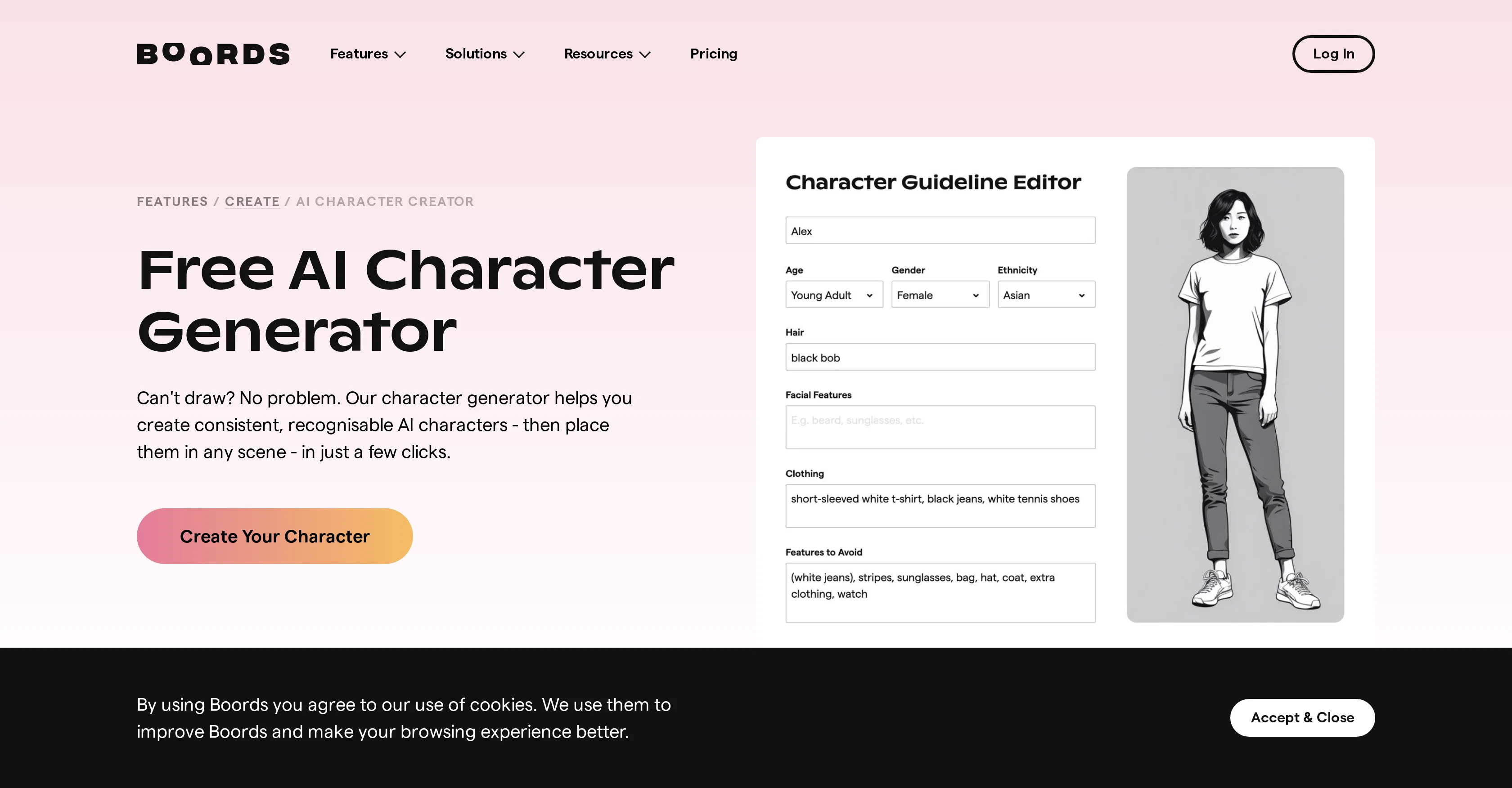
The AI Character Generator by Boords is an intelligent tool capable of creating unique and consistent characters for users who may lack the necessary drawing skills.
This tool allows for the rapid configuration and customization of characters, all available through a user-friendly interface. Users can easily control the appearances of their characters including facial features and attire, ensuring every character fits the required scenario perfectly.
The tool additionally offers an effortless means to alter a character's appearance between scenes. The AI Character Generator also provides a platform to place characters into various AI-generated storyboard scenes.
This functionality bolsters the generation of compelling narratives, makes changes as required, and expedites the expected approval process. Alongside this, the tool permits the creation of simple image sequences where small adjustments can generate multiple frames featuring the same character.
Geared towards professionals, this tool is trusted by leading video teams globally, and it streamlines their pre-production process, significantly enhancing the workflow and creative focus.
Best for
Short scenarios where Boords - Character Generator tends to shine.
-
Creating storyboards for video production
Best for Freelancers
-
Generating consistent AI characters for storyboards
Best for Creative teams
-
Collaborating with creative teams on pre-production
Best for Studios
-
Streamlining the feedback and approval process
Best for Motion designers
-
Building compelling narratives with AI-generated scenes
Best for Storyboard artists
Example outputs 1
Sample generations and before/after results for Boords - Character Generator.
Access & connections
Where you can use Boords - Character Generator.
Platforms
Capabilities
What this tool accepts, produces, and is strongest at.
Supported features
- Companion & Roleplay
Pros & cons
Pros
- Unique character generation
- User-friendly interface
- Detailed character customization
- Alters character appearance seamlessly
- Enhances narrative creation
- Rapid configuration of characters
- Expedites approval process
- Creates simple image sequences
Show 37 more
- Facilitates creation of multiple frames
- Streamlines pre-production
- Enhances workflow and creative focus
- No drawing skills required
- More than 650,000 professionals trust
- User-controlled character appearances
- Easy character attire adjustments
- Produces consistent characters
- Allows small adjustment inputs
- Builds compelling narratives
- Customizable character descriptions
- Flexibly changes character outfits
- Changes facial expressions easily
- Quickly generates several character frames
- Assists rapid iteration changes
- Supports real-time user feedback
- Controls character's appearance refinement
- Generates consistent characters
- Enables creating seed images
- Easy to use and intuitive
- Facilitates collaborative work
- Improves creative focus
- Saves time
- Efficient version tracking
- Easy storyboard sharing with clients
- Enables easy client feedback
- Enables easy change implementation
- Integrates reviewing notes function
- Caters to professional video teams
- Boosts productivity
- Speeds up pre-production
- Helps visualizing projects earlier
- Supports all storyboard stages
- Handles whole storyboard organization
- Enhances storyboard flexibility
- Improves communication with clients
- Availability of a free plan
Cons
- No free version
- Possibly limited styles
- Complex character creation
- Potentially time-consuming customization
- Limited outfit variations
- Possibly limited scene variations
- No mention of mobile support
- No collaboration features advertised
Show 2 more
- Complex User Interface
- Might require frequent manual updates
Compare alternatives
Similar tools in the catalog — with a clear reason to open each one.

Holoworld ✓
FreemiumCreate interactive AI characters that engage 24/7
Free + from $10.47/mo
Full comparison
Meta AI Studio ✓
UnknownCreate and chat with AI characters and extensions
No pricing
Full comparison
Minds ✓
FreemiumCreate AI minds of real people. Talk to anyone.
Why look Typically cheaper
Full comparison
Consistent Character AI ✓
FreemiumOne photo, infinite consistent character poses.
Why look Typically cheaper
Full comparison
pintame ✓
Free TrialIllustrate your stories with consistent AI characters.
Why look Typically cheaper
Full comparison
People also view
Tools that often show up alongside Boords - Character Generator in collections and comparisons.
Meta AI Studio ✓
UnknownCreate and chat with AI characters and extensions
Holoworld ✓
FreemiumCreate interactive AI characters that engage 24/7
Minds ✓
FreemiumCreate AI minds of real people. Talk to anyone.

Vid2vid ✓
PaidRestyle footage, animate stills, and create cinematic clips.

TheirSide ✓
FreemiumChat with fictional AI characters, solo or together.

Talklet ✓
Free TrialVoice-first AI conversation partners for everyday thinking.

Street Interview AI ✓
Free TrialGenerate realistic street interview videos instantly with AI.
pintame ✓
Free TrialIllustrate your stories with consistent AI characters.
Releases 1
Imported reviews 2
Well polished storyboard tool with excellent graphic insert options.
"Free AI Character Generator"
Cons: *No Free version
'Nuff said.
FAQ 12
What features does the Boords Character Generator provide?
How user-friendly is Boords' interface for beginners?
How can I customize a character's attire in Boords?
Can facial features of the characters be customized in Boords?
How consistent and unique are the characters generated by Boords?
Is it possible to change a character's appearance between scenes in Boords?
What is the functionality of the AI-generated storyboard scenes in Boords?
What does the process of creating an image sequence look like in Boords?
In what ways does Boords enhance the pre-production process?
Which leading video teams globally trust Boords AI character generator?
How does Boords streamline the creative focus and workflow?
Is there a way to easily alter clothes and facial expressions in Boords?
Related tools
Recommended

Revid ✓
PaidCreate viral AI videos in minutes

Automateed ✓
Free TrialCreate eBooks effortlessly with Automateed, the AI-powered writing tool.

PrometAI ✓
FreemiumTurn ideas into viable reality with AI business plan generator.

Lingolette ✓
FreemiumBreak through the fluency barrier.

Mindsmith ✓
FreemiumPlatform for building and sharing eLearning content

IllumiChat ✓
FreemiumFrom Ticket Backlog to Instant Answers Powered by AI