

Artificial Studio ✓
Create AI-powered multimedia content in seconds.
Trial; then from $15/mo
Verdict
A quick read before you dig into the full page.
- Best if
- You are content creators and need: Creating marketing materials with AI-generated images and videos
- Skip if
- Limited file format support
- Pick this when
- Multiple category tools
Considering FlowPost instead? Compare side by side
Overview
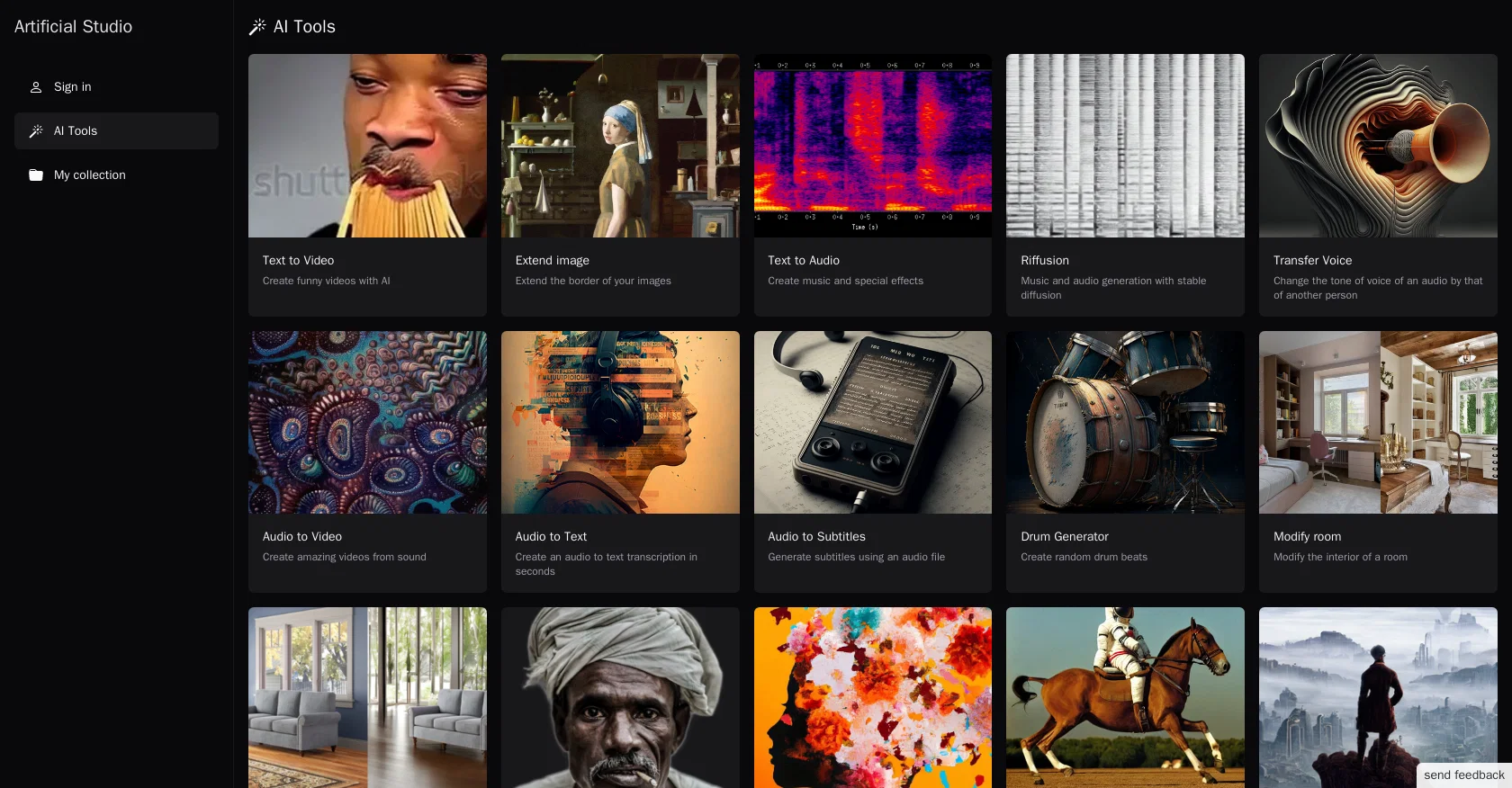
Artificial Studio is a platform that offers a range of AI tools to automate creative projects. The tools cover various categories such as image and video creation, audio manipulation, room modification, and image enhancement.
For image creation, users can use the Dalle 2 tool to generate an image, create an image with stable diffusion v2.1, or create image variations. The colorize tool can be used to add color to black and white images, and the image depth tool generates depth maps from images.
Additionally, users can predict PBR texture maps from albedo texture using texture maps tool.With the video creation tool, users can generate funny videos using text-to-video, extend image border using extend image tool or create imaginative videos from audio files using audio to video.
For audio manipulation, there is an option to transform an audio's tone using transfer voice, generate music and special effects using text to audio, or create random drum beats with drum generator.
Users can also modify the interior of a room using modify room or change the background by removing or adding backgrounds to images. Finally, the platform offers tools for restoring old images, removing image blur, generating subtitles using audio files, and removing the background of an image.
Overall, Artificial Studio provides versatile options for automating creative projects, which can be useful for designers, marketers, and other professionals seeking to enhance their workflow efficiency.
Best for
Short scenarios where Artificial Studio tends to shine.
-
Creating marketing materials with AI-generated images and videos.
Best for Content creators
-
Generating sound effects for video games.
Best for Marketers
-
Designing custom invitations and cards.
Best for Designers
-
Creating social media posts with branded images and text.
Best for Musicians
-
Generating professional album covers.
Best for Video editors
-
Creating logos for businesses.
Best for Social media managers
-
Transforming photos into talking videos.
Best for Game developers
-
Creating memes and stickers for social media.
Best for Small business owners
Example outputs 1
Sample generations and before/after results for Artificial Studio.
Access & connections
Where you can use Artificial Studio.
Platforms
Capabilities
What this tool accepts, produces, and is strongest at.
Input
- Image
- Text
- Audio
Output
- Audio
- Video
- Image
Pros & cons
Pros
- Multiple category tools
- Image creation capabilities
- Video creation features
- Audio manipulation options
- Room modification tools
- Image enhancement tools
- Image generation with Dalle 2
- Image creation with Stable Diffusion v2.1
Show 31 more
- Colorizing black and white images
- Depth map generation from images
- PBR texture map prediction
- Text-to-video capability
- Extend image border feature
- Audio-to-video creation
- Tone transformation of audios
- Text-to-audio features
- Drum beats generation
- Room interior modification
- Background manipulation options
- Old image restoration
- Blur removal from images
- Subtitle generation from audio
- Image background removal
- Image variation creation
- Music and special effects generation
- Automating creative projects
- Versatile options for professionals
- Workflow efficiency enhancement
- Funny videos generation
- Imaginative videos creation from audio
- Random drum beats creation
- Interior change of rooms
- Product ads creation
- Image variation all-in-one tool
- B&W image colorizing
- Blur removal tool
- Old images new life
- Depth map from image
- Albedo to texture maps
Cons
- No collaborative features
- Lacks customization options
- No offline mode
- Cannot import own templates
- Limited text-to-audio options
- Inflexible image modification tools
- Lacks advanced video editing
- No batch processing capabilities
Show 2 more
- Limited file format support
- No automation scripting
Compare alternatives
Similar tools in the catalog — with a clear reason to open each one.

EasyAI – AI Flow - No Code Content (Video/Image) Ge... ✓
Free TrialChain AI tasks with no-code into workflows for chatbots, video, documents, and
Why look Offers a public API
Full comparison
RightBlogger ✓
FreemiumAutomate blogging, SEO, and publishing in one simple platform
Why look Higher community rating
Full comparison
myAIninja ✓
Free TrialAI-powered content creation for social media, 10x faster
Why look Typically cheaper
Full comparisonPeople also view
Tools that often show up alongside Artificial Studio in collections and comparisons.
RightBlogger ✓
FreemiumAutomate blogging, SEO, and publishing in one simple platform
myAIninja ✓
Free TrialAI-powered content creation for social media, 10x faster

Magicley AI ✓
Free TrialAll-In-One AI Hub

FlowPost ✓
Free TrialAI autopilot for social media posting
EasyAI – AI Flow - No Code Content (Video/Image) Ge... ✓
Free TrialChain AI tasks with no-code into workflows for chatbots, video, documents, and

Easy-Peasy.AI ✓
FreemiumAccelerates content creation.

RepurposingBot ✓
Free TrialTurn one article into dozens of posts.

Kinetik ✓
Free TrialAI agent that handles content strategy and monetization for creators.
Releases 1
FAQ 12
What is Artificial Studio?
What different types of AI tools does Artificial Studio provide?
How can I use the Dalle 2 tool?
What is the function of the colorize tool in Artificial Studio?
What is the purpose of the image depth tool?
Can I generate videos from text with Artificial Studio?
What capabilities does the audio manipulation tool offer in Artificial Studio?
What does the modify room tool allow me to do in Artificial Studio?
Can Artificial Studio restore old images?
What is the functionality of Artificial Studio's remove background tool?
How can I create music and special effects with Artificial Studio?
Can I generate subtitles from audio files using Artificial Studio?
Related tools
Recommended

VenturusAI ✓
FreemiumBusiness idea analysis and reporting.

Stratup.ai ✓
FreemiumInnovative idea generation for businesses.

LearningStudioAI ✓
Free TrialAI-powered authoring tool for effortless online course creation.

PostPerfect ✓
FreemiumAutomated social media posts.

Stunning ✓
PaidBuild AI-powered websites in seconds

Stockimg AI ✓
PaidGenerated images and text for design ease.