

AI UGC Video Generator from AIVideoMaker ✓
Turn scripts into creator-style videos instantly.
from $29
Verdict
A quick read before you dig into the full page.
- Best if
- Turn scripts into creator-style videos instantly
- Skip if
- Adds watermark on free version
- Pick this when
- Turns scripts into videos
Considering UGC Maker instead? Compare side by side
Overview
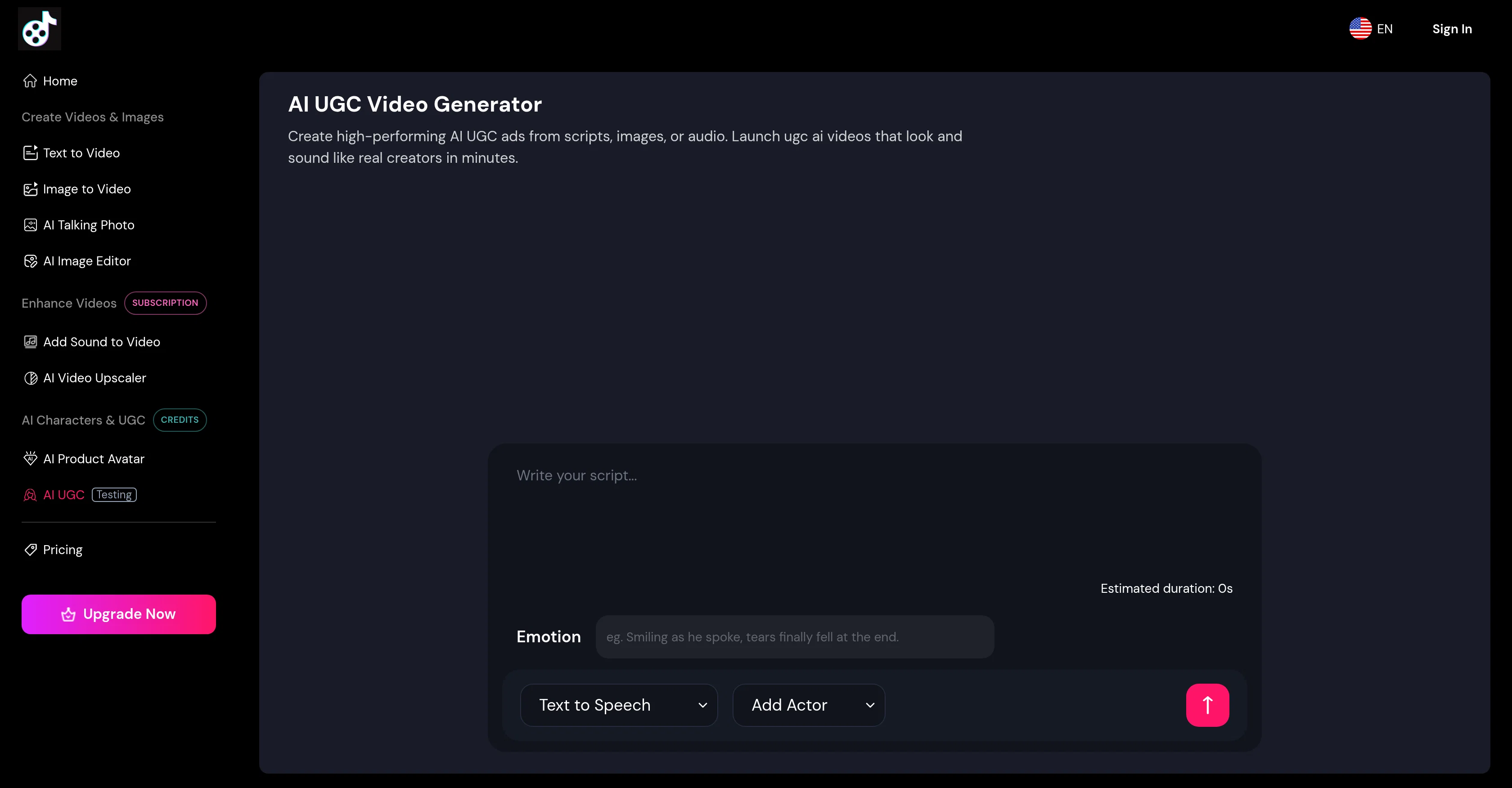
The AI UGC Video Generator is an innovative tool used to create user-generated content (UGC) style videos using artificial intelligence. Primarily designed for marketing purposes, this tool can transform scripts, product images, or voice notes into videos that simulate the feel and aesthetics of a creator-generated content.
Users can easily draft or edit scripts, specifying the mood to enable the AI to deliver persuasive testimonials or explainers in a believable tone. The tool's features allow the selection of AI presenters that span across different industries and language groups, contributing to the creation of a video that reflects the demographic of the intended audience.
It also supports multilingual delivery with lip-syncing capabilities for over 40 languages, ensuring a native feel irrespective of the location. In terms of usability, the AI UGC Video Generator is designed to be straightforward.
With three easy steps selecting an AI presenter and deciding whether to use text-to-video or speech-to-video, inputting your script or audio file, and choosing Generate Video users can create videos for a variety of purposes, such as social media, ads, ecommerce, or onboarding.
Furthermore, the AI UGC Video Generator sets itself apart with usage-based pricing which means users only pay for the seconds of video rendered. This eliminates the need for expensive monthly subscriptions, making the tool cost-effective especially for testing multiple ads.Finally, videos generated from this platform can be personalized with brand logos and custom backgrounds, ensuring the finished product aligns with brand guidelines and can be published across multiple platforms, from social media to email flows and landing pages.
Access & connections
Where you can use AI UGC Video Generator from AIVideoMaker.
Platforms
Capabilities
What this tool accepts, produces, and is strongest at.
Input
- Image
- Text
- Audio
Output
- Video
Supported features
- Video Generation
- Video Avatars
- TTS
- Lip Sync
- Realism
- Styling
Pros & cons
Pros
- Turns scripts into videos
- Transforms voice notes into videos
- Generates up to 3-minute videos
- Multilingual delivery
- Lifelike lip-sync
- User-friendly interface
- Transforms product images into videos
- Usage-based pricing
Show 39 more
- Effective for various content purposes
- Customizable presenter choice
- Suitable for diverse industries
- Easily embeddable on various platforms
- Supports 40+ languages
- Generates captions and gestures
- Option to add brand logos
- Option to add custom backgrounds
- Generation of explainer videos
- Generation of testimonial videos
- Enables tone personalization
- Quick video creation
- Affordable video creation
- Professional-quality video output
- No professional studio needed
- Timing of video is flexible
- Edits and updates scripts easily
- Allows attachment of reference images
- Enables mixing of input methods
- Supports global localization
- Enables internal training video creation
- Edits inline scripts
- Choose text-to-video or speech-to-video
- Upload voice memo for video creation
- Videos for social media campaigns
- Videos for product ads
- Videos for ecommerce use
- Easy onboarding video creation
- Ideal for testing multiple ads
- Supports extensive branding
- Flexible ad publishing
- Runs up to 3 minutes per clip
- Easily republishable across languages
- Easier content testing
- Optimal for enterprise training
- Ideal for product demos
- Suitable for multi-platform publishing
- Add CTAs to videos
- Easier localization of content
Cons
- 3 minutes max video length
- Only 40 languages supported
- No offline version
- Dependent on script quality
- No full HD support
- Limited presenter customization
- Pricing per second rendered
- Requires constant internet access
Show 2 more
- No audio editing features
- Adds watermark on free version
Compare alternatives
Similar tools in the catalog — with a clear reason to open each one.

UGC Maker ✓
FreemiumCreate authentic UGC ads with AI avatars instantly.
Why look Freemium alternative
Full comparison

LooksCraft ✓
Free TrialCreate UGC-Style Ads Without Hiring Actors.
Why look Typically cheaper
Full comparison
GenFlik ✓
FreemiumTurn product descriptions into viral video ads instantly.
Why look Freemium alternative
Full comparison
AI UGC Creator ✓
Free TrialCreate professional UGC ads in 5 minutes without filming.
Why look Typically cheaper
Full comparison
VidMe ✓
PaidScale social content with AI-generated UGC videos.
Why look Typically cheaper
Full comparisonReleases 1
Imported reviews 1
I built this because I had a spare RTX 5090 sitting idle and friends in e-commerce kept telling me UGC videos were too expensive. Most AI UGC tools cost 80 to 110 dollars a month, about 10 dollars per video.
My prototype can already create 3-minute videos, but it takes almost an hour on one GPU, so I limited the public version to 30 seconds while I scale to 4 GPUs.
Would love feedback on the best pricing model and go-to-market.
FAQ 12
What does the AI UGC Video Generator do?
Can I customize the AI presenter in the AI UGC Video Generator?
How much content can be converted into a video using the AI UGC Video Generator?
Does the AI UGC Video Generator support multiple languages?
How accurate is the lip-sync feature in the AI UGC Video Generator?
What are the potential uses for videos created by the AI UGC Video Generator?
How does the pricing work for the AI UGC Video Generator?
How can AI UGC Video Generator contribute to my brand's persona?
Do I need any special equipment to use the AI UGC Video Generator?
Can the AI UGC Video Generator turn product images into videos?
How long does it take to create a video using the AI UGC Video Generator?
Can AI UGC Video Generator convert voice notes into videos?
Related tools
Recommended

Nebius Token Factory ✓
Free TrialEnterprise-grade open-source AI inference at unlimited scale.

AIVideoMaker - Free AI Video Maker ✓
FreemiumTransform static images into animated videos instantly.

HumanText.pro ✓
PaidConvert AI text to human writing instantly.

B12 AI Website Builder ✓
FreemiumAI-powered website builder

GPTinf ✓
PaidBypass AI detectors with one-click rephrasing.

Free Text-To-Speech ✓
FreeText transformed into customizable spoken output.