

AI photo sorter ✓
AI-powered photo sorting for effortless organization.
Verdict
A quick read before you dig into the full page.
- Best if
- AI-powered photo sorting for effortless organization
- Skip if
- Requires manual class creation
- Pick this when
- User friendly interface
Considering Renamer.ai instead? Compare side by side
Overview
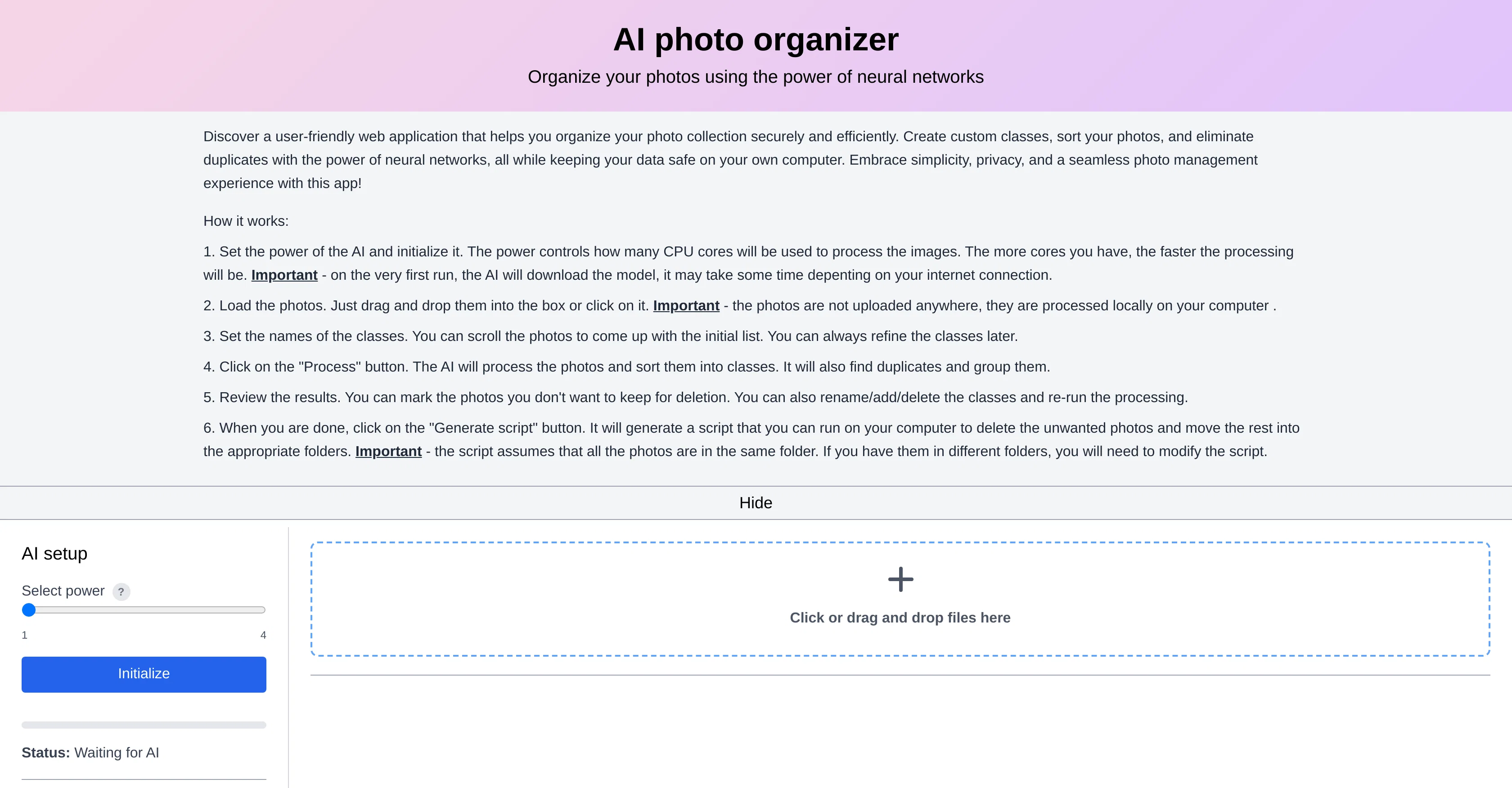
AI Photo Organizer is a tool designed to streamline the organization of your photo collection, leveraging the capabilities of neural networks. This tool makes use of AI technologies to sort out your photos into specified categories, allowing you to manage and locate your images with increased ease.
The setup process involves the initialization of photo classes which allows the tool to identify and sort the images accordingly. The interface offers a convenient drag-and-drop feature, making this tool user-friendly and intuitive to use.
The AI Photo Organizer is powered by WebAI, a recognizable provider of robust AI tools. The AI Photo Organizer can serve as a practical utility for both professional use and personal use.
With continuous updates and improvements, users can expect consistent performance and extended capabilities.
Best for
Short scenarios where AI photo sorter tends to shine.
-
AI-powered photo sorting for effortless organization.
Example outputs 1
Sample generations and before/after results for AI photo sorter.
Access & connections
Where you can use AI photo sorter.
Platforms
Capabilities
What this tool accepts, produces, and is strongest at.
Input
- Image
Output
- Image
Pros & cons
Pros
- User friendly interface
- Secure and private process
- Local image processing
- Efficient CPU cores usage
- Drag-and-drop photos loading
- Dynamic custom classes creation
- Duplicate files detection
- Optimized photos reviewing
Show 11 more
- Easy image categorization
- Script generation for reorganization
- Handles photos in same folder
- Supports professional and personal use
- Continuous updates and improvements
- Neural networks based sorting
- Easy initialization of Photo Classes
- Streamlined photo management
- Smart identification and sorting
- Flexible class renaming, addition and deletion
- User-guided script modification
Cons
- Requires manual class creation
- Runs locally, limits speed
- No cloud storage integration
- Assumes all photos in one folder
- Requires script modifications for multiple folders
- No feature to automatically delete duplicates
- Lack of user support online
- No multi-platform application
Show 1 more
- Drag-and-drop burden for large collections
Compare alternatives
Similar tools in the catalog — with a clear reason to open each one.

Renamer.ai ✓
FreemiumAI-Powered Bulk File Renamer & Organizer
Why look Offers a public API
Full comparisonPeople also view
Tools that often show up alongside AI photo sorter in collections and comparisons.
Renamer.ai ✓
FreemiumAI-Powered Bulk File Renamer & Organizer

GPTGo ✓
FreeCombine Google search with free ChatGPT answers

Eightify
UnknownAI-powered YouTube video summarizer extracting key ideas for quick content assessment.

Donotpay ✓
PaidAI consumer champion fighting for you.

Decisionmentor ✓
FreemiumAI-powered compass for better decision making.

D-ID ✓
FreemiumCreate AI-generated videos with ease

ChatGPT Copywriting Prompts Generator ✓
PaidGenerate unlimited ChatGPT prompts for content creation

Business Idea Generator AI ✓
FreeGenerate innovative business ideas with AI
Releases 1
Imported reviews 3
This is a simple yet powerful tool. I used it to find and remove duplicates in a website image folder with about 5,000 photos. It took a while to figure it out, but it works well. I wish there was a document that explained how to use it properly. Would love to see example "photo classes".
it has a lot of potential but is pretty crappy due to lack of features
where do you run the script ?
FAQ 12
What is the AI photo sorter?
How does AI photo sorter use the power of neural networks?
Is AI photo sorter secure for my images?
What is the image processing method of AI photo sorter?
What are the steps to load photos in the AI photo sorter?
Can I set custom classes for my photos in AI photo sorter?
How does AI photo sorter group duplicate photos?
Can I review and delete photos after AI process in AI photo sorter?
What is the role of script generated by AI photo sorter?
Is it important for all photos to be in the same folder for AI photo organizer?
Can I rename, add or delete classes in AI photo sorter?
Can AI photo sorter optimize photo collections?
Related tools
Recommended

Hyperis ✓
FreemiumOrganized task prioritization.

TutorAI ✓
FreemiumInstant knowledge on any topic
Decisionmentor ✓
FreemiumAI-powered compass for better decision making.

VenturusAI ✓
FreemiumBusiness idea analysis and reporting.

AI Lawyer ✓
Free TrialInstant legal advice and document creation at your fingertips

AI Toolbox for innovators ✓
FreeSupercharge innovation with AI-powered tools