

AI Interview Copilot ✓
AI-powered job interview assistant for real-time support.
Free + from $4.99
Verdict
A quick read before you dig into the full page.
- Best if
- AI-powered job interview assistant for real-time support
- Skip if
- Limited control interfaces (mouse/trackpad only)
- Pick this when
- Real-time answers support
Considering Acedit instead? Compare side by side
Overview
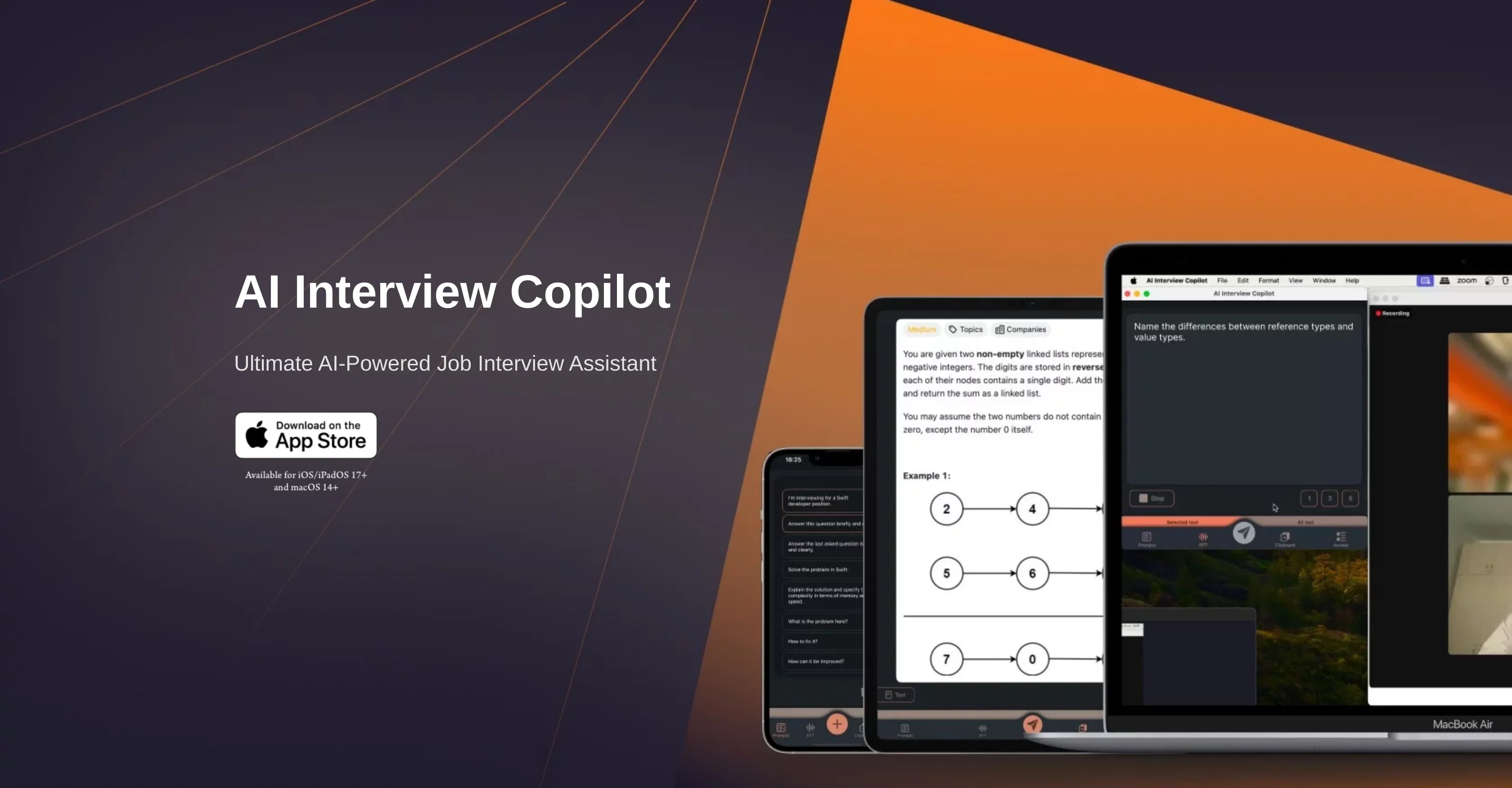
AI Interview Copilot is a comprehensive application that aims to assist users in navigating through job interviews by providing real-time answers and support.
It is particularly helpful for technical interviews, with its ability to solve algorithmic problems and generate code snippets live, enabling users to effectively tackle challenging technical queries.
The tool uses advanced language models, with efficient problem-solving capabilities. Notably, it has a voice transcription feature, providing a text version of your interview during the conversation, supporting various languages.
Also, it features easy image and screenshot recognition, where users can upload an image or screenshot and the tool will generate task-specific responses.
It allows users to switch between prompts seamlessly and provides immediate feedback to requests for quick information retrieval. Furthermore, it offers an effortless user experience with intuitive controls that function without the need for text input.
Lastly, one of its key hallmarks is cross-device clipboard integration, allowing seamless operation even during screen sharing, ensuring continuous support throughout interviews.
Access & connections
Where you can use AI Interview Copilot.
Platforms
Capabilities
What this tool accepts, produces, and is strongest at.
Input
- Text
- Image
Output
- Text
- Code
Pros & cons
Pros
- Real-time answers support
- Effective at technical interviews
- Solves algorithmic problems
- Generates live code snippets
- Voice transcription feature
- Multi-language support
- Image and screenshot recognition
- Seamless prompt switching
Show 19 more
- Immediate feedback to requests
- Ease of use with intuitive controls
- No need for text input
- Cross-device clipboard integration
- Functionality during screen sharing
- Solves problems efficiently and quickly
- Uses advanced language models
- Generates task-specific responses to images
- Supports continuous interview support
- One-button question sending
- Uses GPT-4o for accuracy
- Real-time algorithm problem solving
- Generates useful information from images
- No typing necessary
- Smooth operation on shared clipboard
- Supports 57 languages
- Supports native language usage
- Quick information retrieval
- Accurate LLM utilization
Cons
- Only available for IOS/IPadOS 17+ and MacOS 14+
- Possibly not beneficial for non-technical interviews
- Seamless operation contingent on screen-sharing
- Requires ability to switch prompts quickly
- Unspecified image rendering speed
- Voice transcription may misinterpret accents
- Depends on accurate screenshot capture
- Potential language support inconsistencies
Show 2 more
- Unspecified limitations of GPT-4o
- Limited control interfaces (mouse/trackpad only)
Compare alternatives
Similar tools in the catalog — with a clear reason to open each one.

Acedit ✓
FreemiumAI-powered interview coach for real-time assistance
Free + from $45
Full comparison
MeetAssist ✓
Free TrialGet real-time AI suggestions during interviews.
Free + from $9
Full comparison

Interview Copilot | Interviews Chat ✓
Free TrialYour secret weapon to ace any interview and land the job.
Free + from $19/mo
Full comparison
Acedly AI ✓
Free TrialYour private AI co-pilot for job interviews.
Why look More privacy-focused
Full comparison
Releases 1
FAQ 12
How does AI Interview Copilot help with technical interviews?
Can AI Interview Copilot solve algorithmic problems during an interview?
How does the real-time code generation feature work in AI Interview Copilot?
What languages does the voice transcription feature in AI Interview Copilot support?
How do I use the image and screenshot recognition feature on AI Interview Copilot?
How does AI Interview Copilot generate responses from an uploaded image or screenshot?
What does it mean to switch between prompts seamlessly in AI Interview Copilot?
How does AI Interview Copilot provide immediate feedback to my requests?
Can I operate AI Interview Copilot without typing?
What devices can I use AI Interview Copilot on?
How does the cross-device clipboard integration support my interview process in AI Interview Copilot?
How does the AI Interview Copilot provide support during screen sharing?
Related tools
Recommended
AiApply ✓
Free TrialCustomized job applications for better results.

WorkSync ✓
FreemiumApply to 10x jobs in half the time.

My Resume Hero ✓
FreemiumAI-powered job application management and resume creation

Hyperis ✓
FreemiumOrganized task prioritization.

AI Lawyer ✓
Free TrialInstant legal advice and document creation at your fingertips

Mindsmith ✓
FreemiumPlatform for building and sharing eLearning content