

Repository
UI-Zoomer
UI-Zoomer: Uncertainty-Driven Adaptive Zoom-Infor GUI Grounding Fei Tang1,*, Bofan Chen1,*, Zhengxi Lu1, Tongbo Chen1 Songqin Nong2, Tao Jiang2, Wenhao Xu2 Weiming Lu1, Jun Xiao1, · License unknown · Install via pip · Maintenance unknown
- License
- Unknown
README
UI-Zoomer: Uncertainty-Driven Adaptive Zoom-Infor GUI Grounding
Fei Tang1,*, Bofan Chen1,*, Zhengxi Lu1, Tongbo Chen1 Songqin Nong2, Tao Jiang2, Wenhao Xu2 Weiming Lu1, Jun Xiao1, Yueting Zhuang1, Yongliang Shen1,†
1Zhejiang University   2Ant Group *Equal contributions, †Corresponding authors

🔥 News
- 2026.03: We release our repository.
📖 Overview
GUI grounding aims to localize interface elements in screenshots given natural language instructions. Despite recent progress, modern GUI grounding models still struggle on small icons, dense layouts, and high-resolution interfaces, where a single forward pass often lacks sufficient spatial resolution.
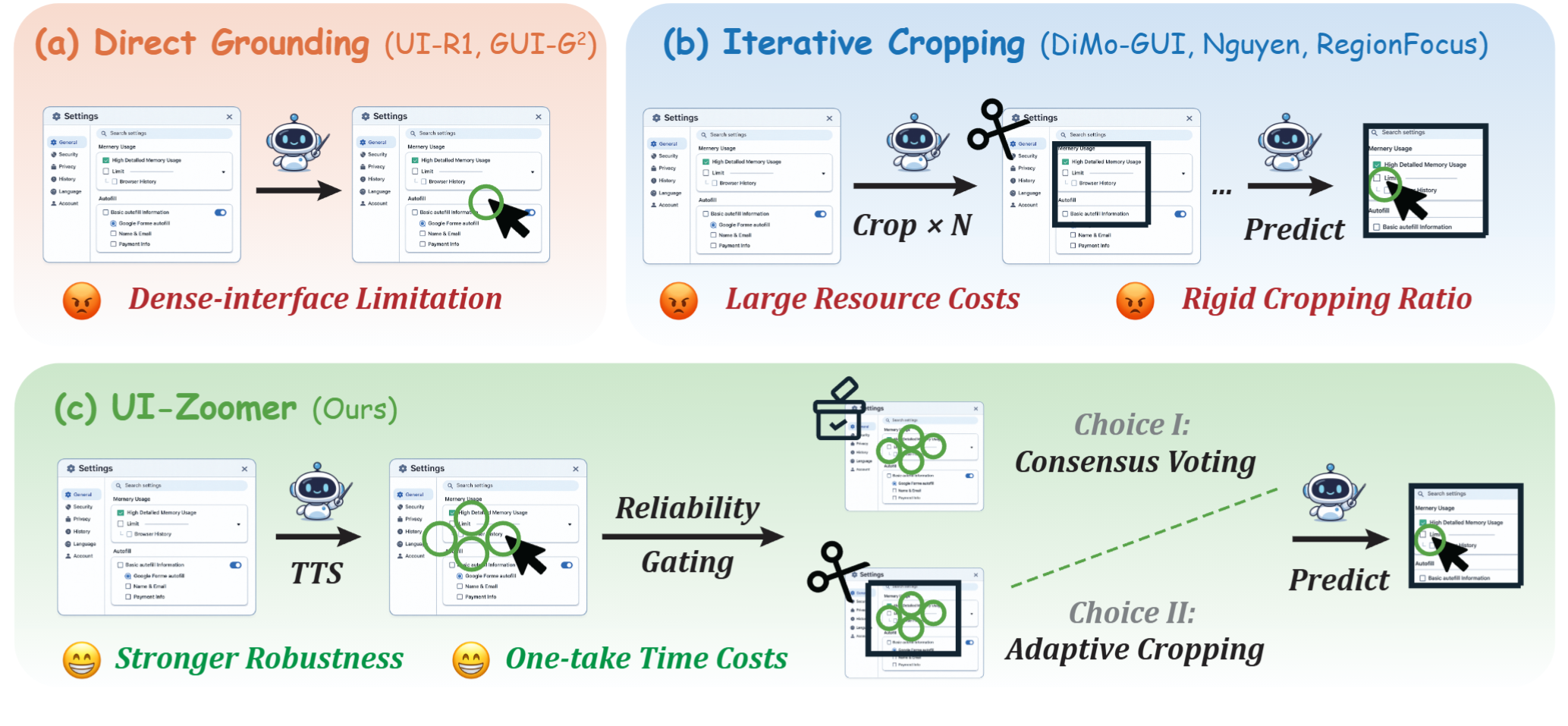
A common solution is test-time zoom-in: crop a region and re-run inference at a higher effective resolution. However, existing zoom-in methods usually:
- apply cropping uniformly to all samples,
- use fixed crop ratios,
- ignore whether the current prediction is actually uncertain.
To address this, we propose UI-Zoomer, a training-free adaptive zoom-in framework for GUI grounding. UI-Zoomer treats both the trigger and the scale of zoom-in as an uncertainty quantification problem.
Specifically, UI-Zoomer:
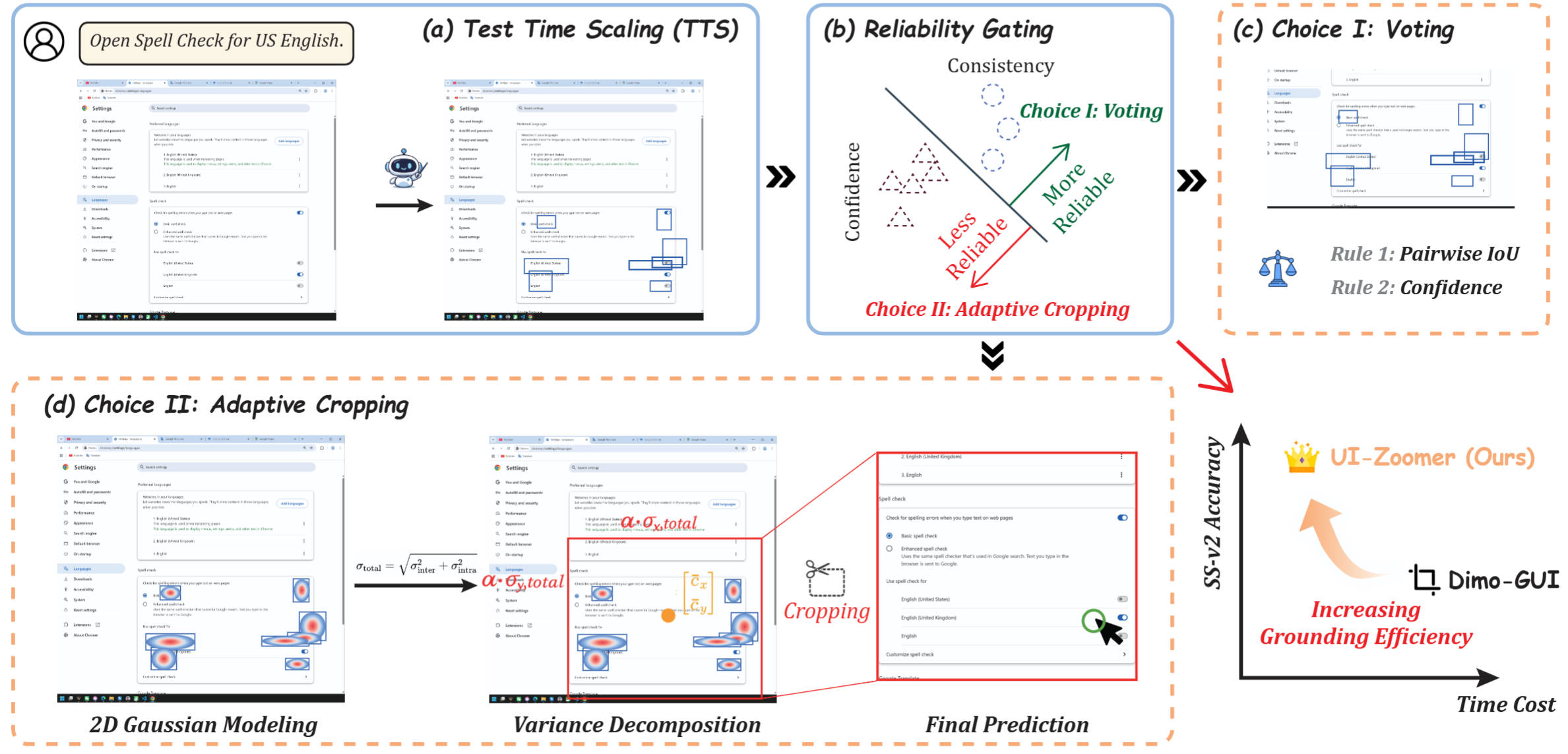
- samples multiple candidate predictions from the base model,
- estimates prediction reliability using spatial consensus and token-level confidence,
- directly resolves reliable cases by consensus voting,
- routes only uncertain cases to an adaptive zoom-in refinement stage,
- determines crop size from prediction variance decomposition.
📝 Key Idea
UI-Zoomer follows a simple principle:
Zoom only when uncertain, and zoom by how much the predictions disagree.
This is achieved through two core design choices:
1. Reliability Gating
A gating score combines:
- spatial consensus across stochastic predictions,
- token-level generation confidence.
This avoids unnecessary zoom-in for already reliable predictions.
2. Adaptive Crop Sizing
For uncertain cases, UI-Zoomer computes crop size from:
- inter-sample variance: disagreement among predictions,
- intra-sample variance: extent of individual predicted boxes.
This yields a per-instance crop region instead of a hand-designed fixed crop ratio.
<br>
🚀 QuickStart
Installation
conda create -n ui-zoomer python=3.10 -y
conda activate ui-zoomer
pip install -r requirements.txt
Runnning
🚨 Remember to change all paths (eg. model path, image path, annotation path, log path) based on your own need before running the scripts!
bash UI-Zoomer/scripts/UI-Zoomer_on_ScreenSpotPro/run_uizoomer_sspro.sh
bash UI-Zoomer/scripts/UI-Zoomer_on_ScreenSpot/run_uizoomer_ssv2.sh
bash UI-Zoomer/scripts/UI-Zoomer_on_UIVision/run_uizoomer_uivision.sh
📈 Main results
UI-Zoomer consistently improves strong GUI grounding backbones across three challenging benchmarks: ScreenSpot-Pro, ScreenSpot-v2, and UI-Vision. In the paper, the method achieves average gains of up to +13.4%, +4.2%, and +10.3% on these three benchmarks, respectively. These results show that uncertainty-driven zoom-in is broadly effective across both general-purpose and GUI-specialized VLMs.
ScreenSpot-Pro
ScreenSpot-Pro is the most challenging benchmark in our evaluation suite, featuring 4K professional desktop environments, very small targets, and dense UI layouts. UI-Zoomer improves all four evaluated backbones by a large margin, with the strongest gain reaching +13.4 points on Qwen2.5-VL-7B.
| Model | Text | Icon | Avg | + UI-Zoomer (Text) | + UI-Zoomer (Icon) | + UI-Zoomer (Avg) | Gain |
|---|---|---|---|---|---|---|---|
| Qwen2.5-VL-7B | 40.6 | 6.6 | 27.6 | 54.0 | 19.9 | 41.0 | +13.4 |
| GUI-G²-7B | 64.1 | 23.3 | 48.7 | 76.7 | 36.8 | 61.4 | +12.7 |
| UI-Venus-7B | 66.7 | 22.9 | 50.0 | 78.1 | 35.4 | 61.8 | +11.8 |
| UI-Venus-72B | 74.0 | 35.3 | 59.2 | 81.3 | 46.0 | 67.8 | +8.6 |
More detailed category-wise results on ScreenSpot-Pro further show that the improvements are especially strong on icon grounding and difficult professional applications such as Office and OS-style environments.
ScreenSpot-v2
ScreenSpot-v2 covers mobile, desktop, and web interfaces. Although the benchmark is easier than ScreenSpot-Pro overall, UI-Zoomer still brings consistent gains, with the largest average improvement of +4.2 points on Qwen2.5-VL-7B.
| Model | Overall Text | Overall Icon | Overall Avg | + UI-Zoomer (Text) | + UI-Zoomer (Icon) | + UI-Zoomer (Avg) | Gain |
|---|---|---|---|---|---|---|---|
| UI-Venus-7B | 97.4 | 89.7 | 94.0 | 97.8 | 91.2 | 94.9 | +0.9 |
| Qwen2.5-VL-7B | 92.3 | 80.5 | 87.2 | 95.7 | 85.9 | 91.4 | +4.2 |
| GUI-G²-7B | 97.1 | 89.2 | 93.6 | 96.5 | 90.3 | 93.8 | +0.2 |
A finer-grained breakdown shows that gains on ScreenSpot-v2 mainly come from Desktop and Web, while Mobile improvements are smaller, suggesting that zoom-in is most helpful when layouts are denser and targets are visually smaller.
UI-Vision
UI-Vision focuses on fine-grained desktop grounding across Basic, Functional, and Spatial categories. UI-Zoomer consistently improves all four backbones, with the largest average gain reaching +10.3 points on Qwen2.5-VL-7B.
| Model | Overall Text | Overall Icon | Overall Avg | + UI-Zoomer (Text) | + UI-Zoomer (Icon) | + UI-Zoomer (Avg) | Gain |
|---|---|---|---|---|---|---|---|
| Qwen2.5-VL-7B | 38.2 | 7.9 | 13.3 | 57.0 | 16.3 | 23.6 | +10.3 |
| GUI-G²-7B | 59.5 | 17.1 | 24.7 | 69.3 | 25.0 | 32.9 | +8.2 |
| UI-Venus-7B | 60.6 | 16.5 | 24.4 | 72.7 | 25.2 | 33.7 | +9.3 |
| UI-Venus-72B | 64.3 | 23.6 | 30.9 | 77.6 | 32.3 | 40.4 | +9.5 |
On UI-Vision, the largest gains are observed in the Spatial category, indicating that adaptive zoom-in is particularly helpful when fine-grained spatial reasoning is required.
Star History
<a href="https://www.star-history.com/?repos=ZJU-REAL%2FUI-Zoomer&type=date&logscale=&legend=top-left">
<picture>
<source media="(prefers-color-scheme: dark)" srcset="https://api.star-history.com/image?repos=ZJU-REAL/UI-Zoomer&type=date&theme=dark&logscale&legend=top-left" />
<source media="(prefers-color-scheme: light)" srcset="https://api.star-history.com/image?repos=ZJU-REAL/UI-Zoomer&type=date&logscale&legend=top-left" />
<img alt="Star History Chart" src="https://api.star-history.com/image?repos=ZJU-REAL/UI-Zoomer&type=date&logscale&legend=top-left" />
</picture>
</a>
📄 Citation
If you find our work helpful, feel free to give us a cite.
To be added
📨 Contact Us
If you have any questions, please contact us by email:
[email protected]
<a href="https://github.com/ZJU-REAL/UI-Zoomer/graphs/contributors">
<img src="https://contrib.rocks/image?repo=ZJU-REAL/UI-Zoomer" />
</a>
(Made with contrib.rocks.)