<h1 align="center">ZeroClaw 🦀</h1> Zero overhead. Zero compromise. 100% Rust. 100% Agnostic. Runs on $10 hardware with Built by students and members of the Harvard, MIT, and Sundai · License MIT · Install via pip · Maintenance unknown
Fast, small, and fully autonomous AI assistant infrastructure
Deploy anywhere. Swap anything.
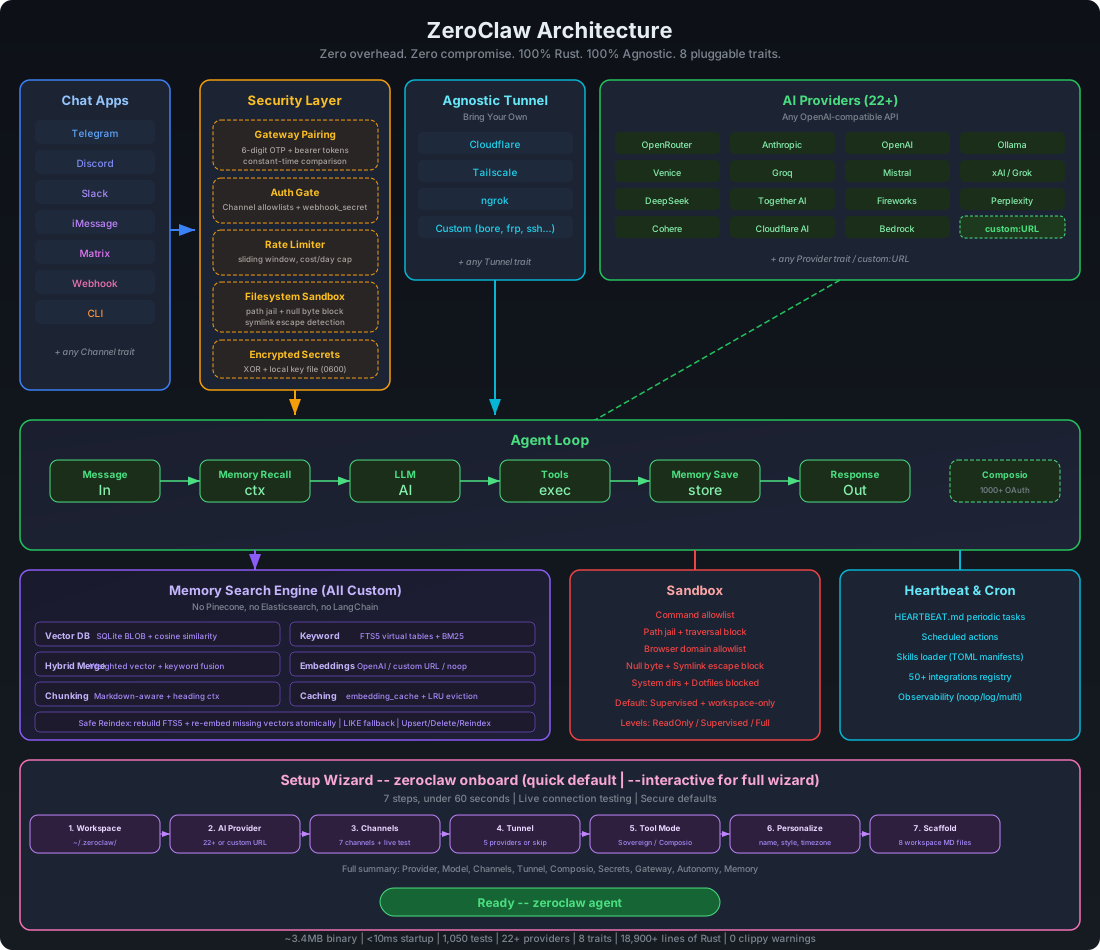
ZeroClaw is the runtime operating system for agentic workflows — infrastructure that abstracts models, tools, memory, and execution so agents can be built once and run anywhere.
Use this board for important notices (breaking changes, security advisories, maintenance windows, and release blockers).
Date (UTC)
Level
Notice
Action
2026-02-19
Critical
We are not affiliated with openagen/zeroclaw, zeroclaw.org or zeroclaw.net. The zeroclaw.org and zeroclaw.net domains currently points to the openagen/zeroclaw fork, and that domain/repository are impersonating our official website/project.
Do not trust information, binaries, fundraising, or announcements from those sources. Use only this repository and our verified social accounts.
2026-02-21
Important
Our official website is now live: zeroclawlabs.ai. Thanks for your patience while we prepared the launch. We are still seeing impersonation attempts, so do not join any investment or fundraising activity claiming the ZeroClaw name unless it is published through our official channels.
Anthropic updated the Authentication and Credential Use terms on 2026-02-19. Claude Code OAuth tokens (Free, Pro, Max) are intended exclusively for Claude Code and Claude.ai; using OAuth tokens from Claude Free/Pro/Max in any other product, tool, or service (including Agent SDK) is not permitted and may violate the Consumer Terms of Service.
Please temporarily avoid Claude Code OAuth integrations to prevent potential loss. Original clause: Authentication and Credential Use.
✨ Features
🏎️ Lean Runtime by Default: Common CLI and status workflows run in a few-megabyte memory envelope on release builds.
💰 Cost-Efficient Deployment: Designed for low-cost boards and small cloud instances without heavyweight runtime dependencies.
⚡ Fast Cold Starts: Single-binary Rust runtime keeps command and daemon startup near-instant for daily operations.
🌍 Portable Architecture: One binary-first workflow across ARM, x86, and RISC-V with swappable providers/channels/tools.
Why teams pick ZeroClaw
Lean by default: small Rust binary, fast startup, low memory footprint.
Secure by design: pairing, strict sandboxing, explicit allowlists, workspace scoping.
Fully swappable: core systems are traits (providers, channels, tools, memory, tunnels).
No lock-in: OpenAI-compatible provider support + pluggable custom endpoints.
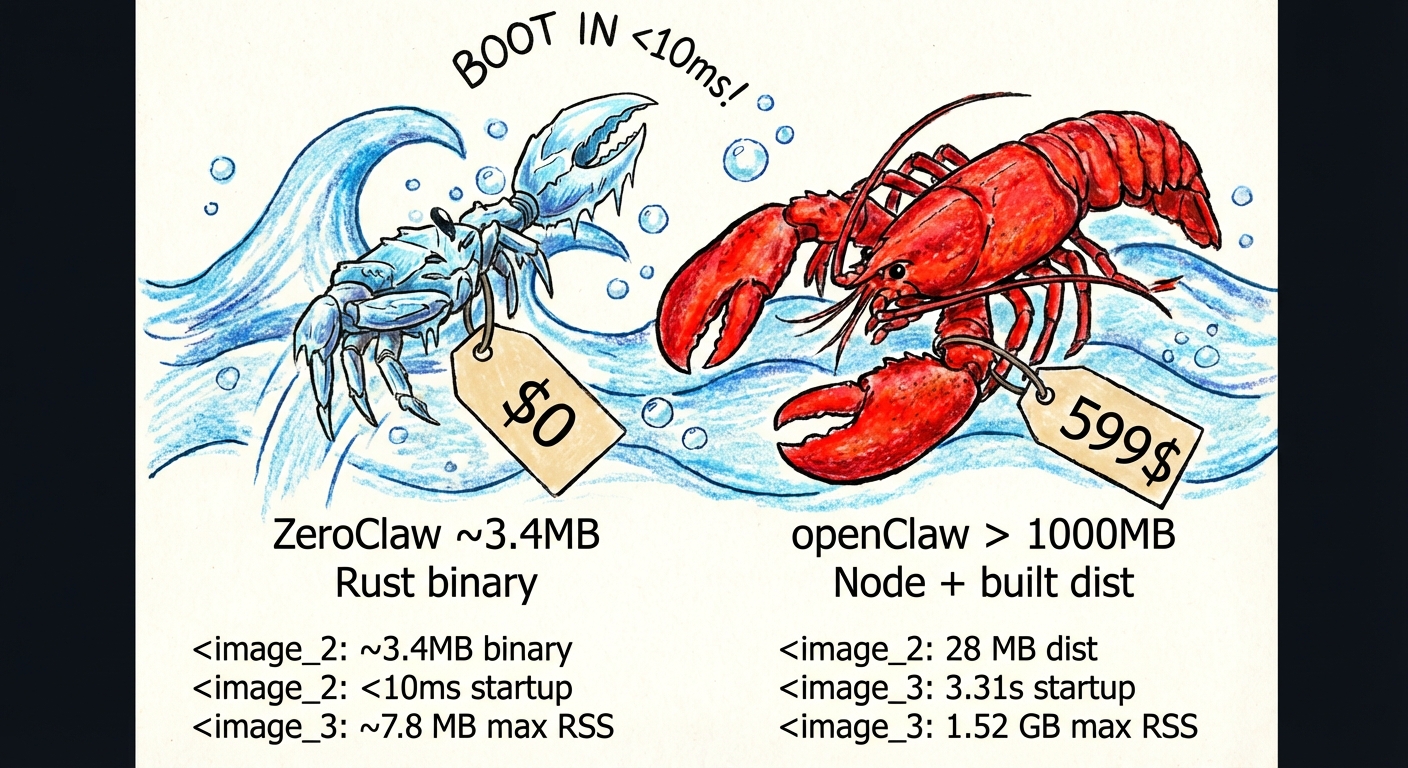
Benchmark Snapshot (ZeroClaw vs OpenClaw, Reproducible)
Local machine quick benchmark (macOS arm64, Feb 2026) normalized for 0.8GHz edge hardware.
OpenClaw
NanoBot
PicoClaw
ZeroClaw 🦀
Language
TypeScript
Python
Go
Rust
RAM
> 1GB
> 100MB
< 10MB
< 5MB
Startup (0.8GHz core)
> 500s
> 30s
< 1s
< 10ms
Binary Size
~28MB (dist)
N/A (Scripts)
~8MB
~8.8 MB
Cost
Mac Mini $599
Linux SBC ~$50
Linux Board $10
Any hardware $10
Notes: ZeroClaw results are measured on release builds using /usr/bin/time -l. OpenClaw requires Node.js runtime (typically ~390MB additional memory overhead), while NanoBot requires Python runtime. PicoClaw and ZeroClaw are static binaries. The RAM figures above are runtime memory; build-time compilation requirements are higher.
Reproducible local measurement
Benchmark claims can drift as code and toolchains evolve, so always measure your current build locally:
cargo build --release
ls -lh target/release/zeroclaw

/usr/bin/time -l target/release/zeroclaw --help
/usr/bin/time -l target/release/zeroclaw status
Example sample (macOS arm64, measured on February 18, 2026):
Release binary size: 8.8MB
zeroclaw --help: about 0.02s real time, ~3.9MB peak memory footprint
zeroclaw status: about 0.01s real time, ~4.1MB peak memory footprint
Note: The default cargo build --release uses codegen-units=1 to lower peak compile pressure. For faster builds on powerful machines, use cargo build --profile release-fast.
</details>
Quick Start
Homebrew (macOS/Linuxbrew)
brew install zeroclaw
One-click bootstrap
# Recommended: clone then run local bootstrap script
git clone https://github.com/zeroclaw-labs/zeroclaw.git
cd zeroclaw
./bootstrap.sh

# Optional: bootstrap dependencies + Rust on fresh machines
./bootstrap.sh --install-system-deps --install-rust

# Optional: pre-built binary first (recommended on low-RAM/low-disk hosts)
./bootstrap.sh --prefer-prebuilt

# Optional: binary-only install (no source build fallback)
./bootstrap.sh --prebuilt-only

# Optional: run onboarding in the same flow
./bootstrap.sh --onboard --api-key "sk-..." --provider openrouter [--model "openrouter/auto"]

# Optional: run bootstrap + onboarding fully in Docker-compatible mode
./bootstrap.sh --docker

# Optional: force Podman as container CLI
ZEROCLAW_CONTAINER_CLI=podman ./bootstrap.sh --docker

# Optional: in --docker mode, skip local image build and use local tag or pull fallback image
./bootstrap.sh --docker --skip-build
Remote one-liner (review first in security-sensitive environments):
Telegram: allowlist your own @username (without @) and/or your numeric Telegram user ID.
Discord: allowlist your own Discord user ID.
Slack: allowlist your own Slack member ID (usually starts with U).
Mattermost: uses standard API v4. Allowlists use Mattermost user IDs.
Nostr: allowlist sender public keys (hex or npub). Supports NIP-04 and NIP-17 DMs.
Use "*" only for temporary open testing.
Telegram operator-approval flow:
Keep [channels_config.telegram].allowed_users = [] for deny-by-default startup.
Unauthorized users receive a hint with a copyable operator command: zeroclaw channel bind-telegram <IDENTITY>.
Operator runs that command locally, then user retries sending a message.
If you need a one-shot manual approval, run:
zeroclaw channel bind-telegram 123456789
If you're not sure which identity to use:
Start channels and send one message to your bot.
Read the warning log to see the exact sender identity.
Add that value to the allowlist and rerun channels-only setup.
If you hit authorization warnings in logs (for example: ignoring message from unauthorized user),
rerun channel setup only:
zeroclaw onboard --channels-only
Telegram media replies
Telegram routing now replies to the source chat ID from incoming updates (instead of usernames),
which avoids Bad Request: chat not found failures.
For non-text replies, ZeroClaw can send Telegram attachments when the assistant includes markers:
[IMAGE:<path-or-url>]
[DOCUMENT:<path-or-url>]
[VIDEO:<path-or-url>]
[AUDIO:<path-or-url>]
[VOICE:<path-or-url>]
Paths can be local files (for example /tmp/screenshot.png) or HTTPS URLs.
WhatsApp Setup
ZeroClaw supports two WhatsApp backends:
WhatsApp Web mode (QR / pair code, no Meta Business API required)
WhatsApp Business Cloud API mode (official Meta webhook flow)
WhatsApp Web mode (recommended for personal/self-hosted use)
Build with WhatsApp Web support:
cargo build --features whatsapp-web
Configure ZeroClaw:
 [channels_config.whatsapp]
 session_path = "~/.zeroclaw/state/whatsapp-web/session.db"
 pair_phone = "+15551234567"   # optional; omit to use QR flow
 pair_code = ""               # optional custom pair code
 allowed_numbers = ["+1234567890"]  # E.164 format, or ["*"] for all
Start channels/daemon and link device:
Run zeroclaw channel start (or zeroclaw daemon).
Follow terminal pairing output (QR or pair code).
In WhatsApp on phone: Settings → Linked Devices.
Test: Send a message from an allowed number and verify the agent replies.
WhatsApp Business Cloud API mode
WhatsApp uses Meta's Cloud API with webhooks (push-based, not polling):
Access Token: From WhatsApp → API Setup → Generate token (or create a System User for permanent tokens)
Phone Number ID: From WhatsApp → API Setup → Phone number ID
Verify Token: You define this (any random string) — Meta will send it back during webhook verification
Configure ZeroClaw:
 [channels_config.whatsapp]
 access_token = "EAABx..."
 phone_number_id = "123456789012345"
 verify_token = "my-secret-verify-token"
 allowed_numbers = ["+1234567890"]  # E.164 format, or ["*"] for all
Start the gateway with a tunnel:
zeroclaw gateway --port 42617
WhatsApp requires HTTPS, so use a tunnel (ngrok, Cloudflare, Tailscale Funnel).
Configure Meta webhook:
In Meta Developer Console → WhatsApp → Configuration → Webhook
Callback URL:https://your-tunnel-url/whatsapp
Verify Token: Same as your verify_token in config
Subscribe to messages field
Test: Send a message to your WhatsApp Business number — ZeroClaw will respond via the LLM.
Configuration
Config: ~/.zeroclaw/config.toml (created by onboard)
When zeroclaw channel start is already running, changes to default_provider, default_model, default_temperature, api_key, api_url, and reliability.*
are hot-applied on the next inbound channel message.
ZeroClaw supports Osaurus as a first-class local provider — a unified AI edge runtime for macOS that combines local MLX inference with cloud provider proxying and MCP support through a single endpoint:
For detailed configuration of custom OpenAI-compatible and Anthropic-compatible endpoints, see docs/custom-providers.md.
Python Companion Package (zeroclaw-tools)
For LLM providers with inconsistent native tool calling (e.g., GLM-5/Zhipu), ZeroClaw ships a Python companion package with LangGraph-based tool calling for guaranteed consistency:
pip install zeroclaw-tools
from zeroclaw_tools import create_agent, shell, file_read
from langchain_core.messages import HumanMessage

# Works with any OpenAI-compatible provider
agent = create_agent(
    tools=[shell, file_read],
    model="glm-5",
    api_key="your-key",
    base_url="https://api.z.ai/api/coding/paas/v4"
)

result = await agent.ainvoke({
    "messages": [HumanMessage(content="List files in /tmp")]
})
print(result["messages"][-1].content)
Why use it:
Consistent tool calling across all providers (even those with poor native support)
Automatic tool loop — keeps calling tools until the task is complete
Easy extensibility — add custom tools with @tool decorator
Discord bot integration included (Telegram planned)
Community open-skills sync is disabled by default. Enable it explicitly in config.toml:
[skills]
open_skills_enabled = true
# open_skills_dir = "/path/to/open-skills"  # optional
# prompt_injection_mode = "compact"          # optional: use for low-context local models
You can also override at runtime with ZEROCLAW_OPEN_SKILLS_ENABLED, ZEROCLAW_OPEN_SKILLS_DIR, and ZEROCLAW_SKILLS_PROMPT_MODE (full or compact).
Skill installs are now gated by a built-in static security audit. zeroclaw skills install <source> blocks symlinks, script-like files, unsafe markdown link patterns, and high-risk shell payload snippets before accepting a skill. You can run zeroclaw skills audit <source_or_name> to validate a local directory or an installed skill manually.
Development
cargo build              # Dev build
cargo build --release    # Release build (codegen-units=1, works on all devices including Raspberry Pi)
cargo build --profile release-fast    # Faster build (codegen-units=8, requires 16GB+ RAM)
cargo test               # Run full test suite
cargo clippy --locked --all-targets -- -D clippy::correctness
cargo fmt                # Format

# Run the SQLite vs Markdown benchmark
cargo test --test memory_comparison -- --nocapture
Pre-push hook
A git hook runs cargo fmt --check, cargo clippy -- -D warnings, and cargo test before every push. Enable it once:
git config core.hooksPath .githooks
Build troubleshooting (Linux OpenSSL errors)
If you see an openssl-sys build error, sync dependencies and rebuild with the repository lockfile:
A heartfelt thank you to the communities and institutions that inspire and fuel this open-source work:
Harvard University — for fostering intellectual curiosity and pushing the boundaries of what's possible.
MIT — for championing open knowledge, open source, and the belief that technology should be accessible to everyone.
Sundai Club — for the community, the energy, and the relentless drive to build things that matter.
The World & Beyond 🌍✨ — to every contributor, dreamer, and builder out there making open source a force for good. This is for you.
We're building in the open because the best ideas come from everywhere. If you're reading this, you're part of it. Welcome. 🦀❤️
⚠️ Official Repository & Impersonation Warning
This is the only official ZeroClaw repository:
https://github.com/zeroclaw-labs/zeroclaw
Any other repository, organization, domain, or package claiming to be "ZeroClaw" or implying affiliation with ZeroClaw Labs is unauthorized and not affiliated with this project. Known unauthorized forks will be listed in TRADEMARK.md.
If you encounter impersonation or trademark misuse, please open an issue.
License
ZeroClaw is dual-licensed for maximum openness and contributor protection:
You may choose either license. Contributors automatically grant rights under both — see CLA.md for the full contributor agreement.
Trademark
The ZeroClaw name and logo are trademarks of ZeroClaw Labs. This license does not grant permission to use them to imply endorsement or affiliation. See TRADEMARK.md for permitted and prohibited uses.
Contributor Protections
You retain copyright of your contributions
Patent grant (Apache 2.0) shields you from patent claims by other contributors
Your contributions are permanently attributed in commit history and NOTICE
No trademark rights are transferred by contributing
ZeroClaw — Zero overhead. Zero compromise. Deploy anywhere. Swap anything. 🦀
Star History
Python Companion Package ( zeroclaw-tools )
1
For LLM providers with inconsistent native tool calling (e.g., GLM-5/Zhipu), ZeroClaw ships a Python companion package with LangGraph-based tool calling for guaranteed consistency: