

Repository
OmniAssistBench
[](#) [](https://huggingface.co/datasets/JontiSun/Om · License MIT · Maintenance unknown
- License
- MIT
- Score
- Criteria Summary
- 5
- 5
- 4
- 4
Specs
- ScoreCriteria Summary
- 55
- 44
- 33
- 22
- 11
- 00
README
💡 Introduction
Recent advances in Omni-LLMs are paving the way for real-time video assistant applications, where models constantly perceive the environment and guide users to achieve certain goals through multi-turn conversations. However, evaluations under these assistant-style interaction scenarios are still challenging. OmniAssistBench aims at addressing this challenge by proposing an annotation pipeline which allows annotators to build test samples from existing Internet videos.
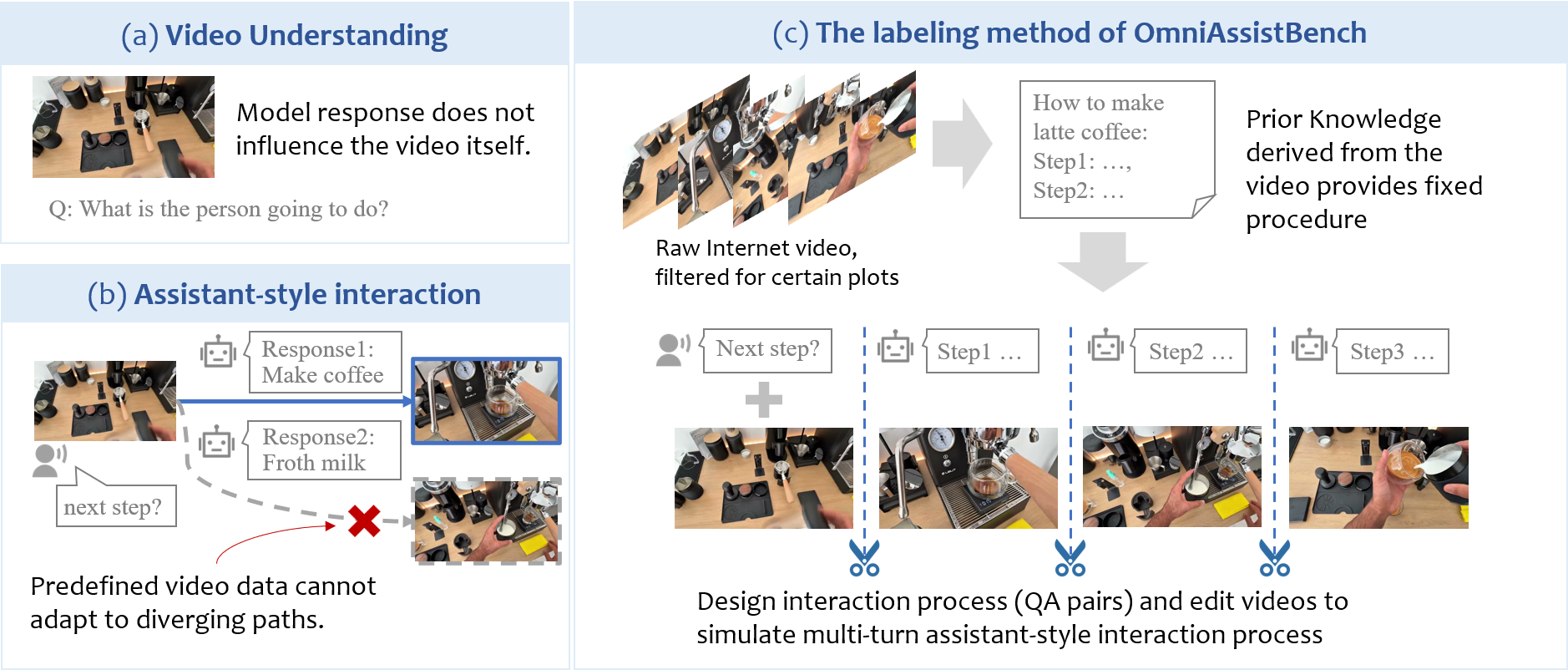
OmniAssistBench proposes an annotation pipeline which allows annotators to build test samples from existing Internet videos.
The main evaluation challenge lies in dataset construction: In multi-turn interaction with the assistant, user will do what the model suggests. This means that the model's unpredictable response dynamically changes the subsequent video contents, which static offline datasets cannot accommodate. As shown in Fig. (b) above, when the user asks for instructions on making latte coffee, the model may suggest extracting espresso first then frothing the milk, or vice versa. Although both suggestions are valid, static dataset may only contain subsequential videos of extracting espresso before frothing milk.
To address this challenge, OmniAssistBench proposes an annotation pipeline which provides the model with prior knowledges to enforce a fixed interaction path. As shown in Fig. (c) above, annotators first summarize the scource video into a list of steps to achieve the user goal. Then, multi-turn user questions and ground truth answers are designed. Scource videos are cut into clips based on the designed intercation process, whith prior knowledges embedded as on-screen subtitles and user questions embedded as audios. This pipeline allows annotators build evaluation data from raw Internet videos.
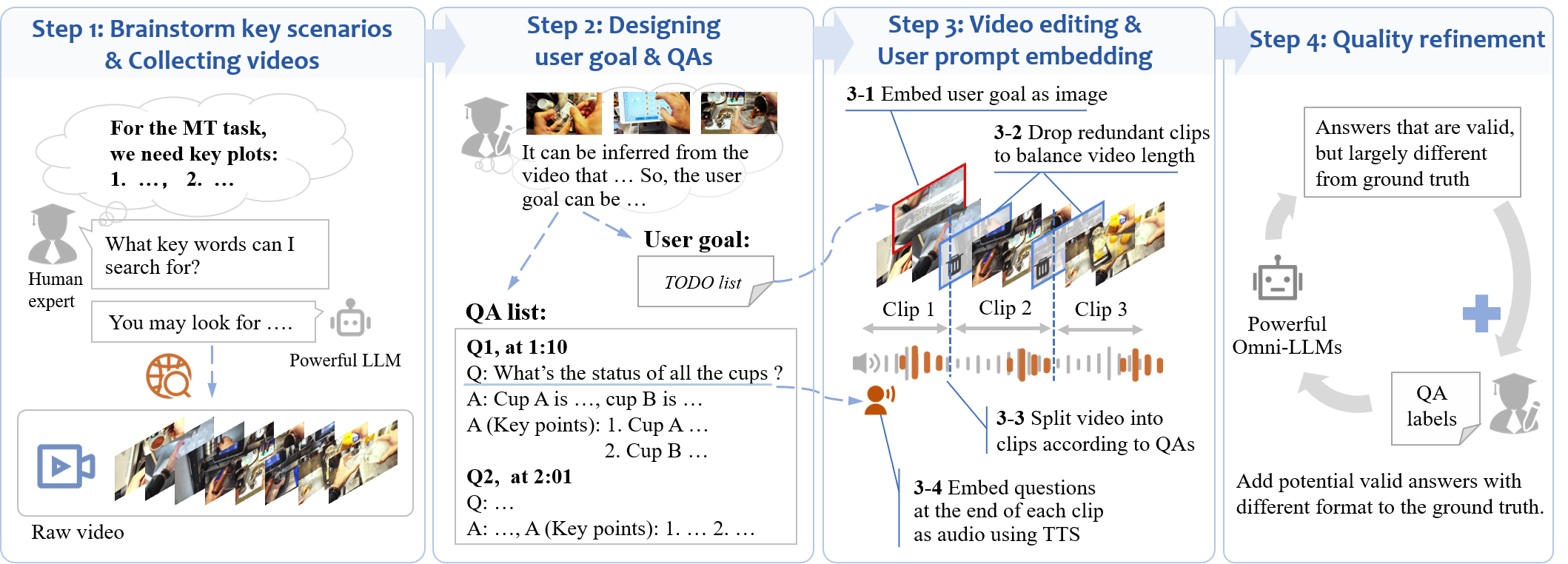
The data construction process of OmniAssistBench.
🧠 Benchmark Constructions
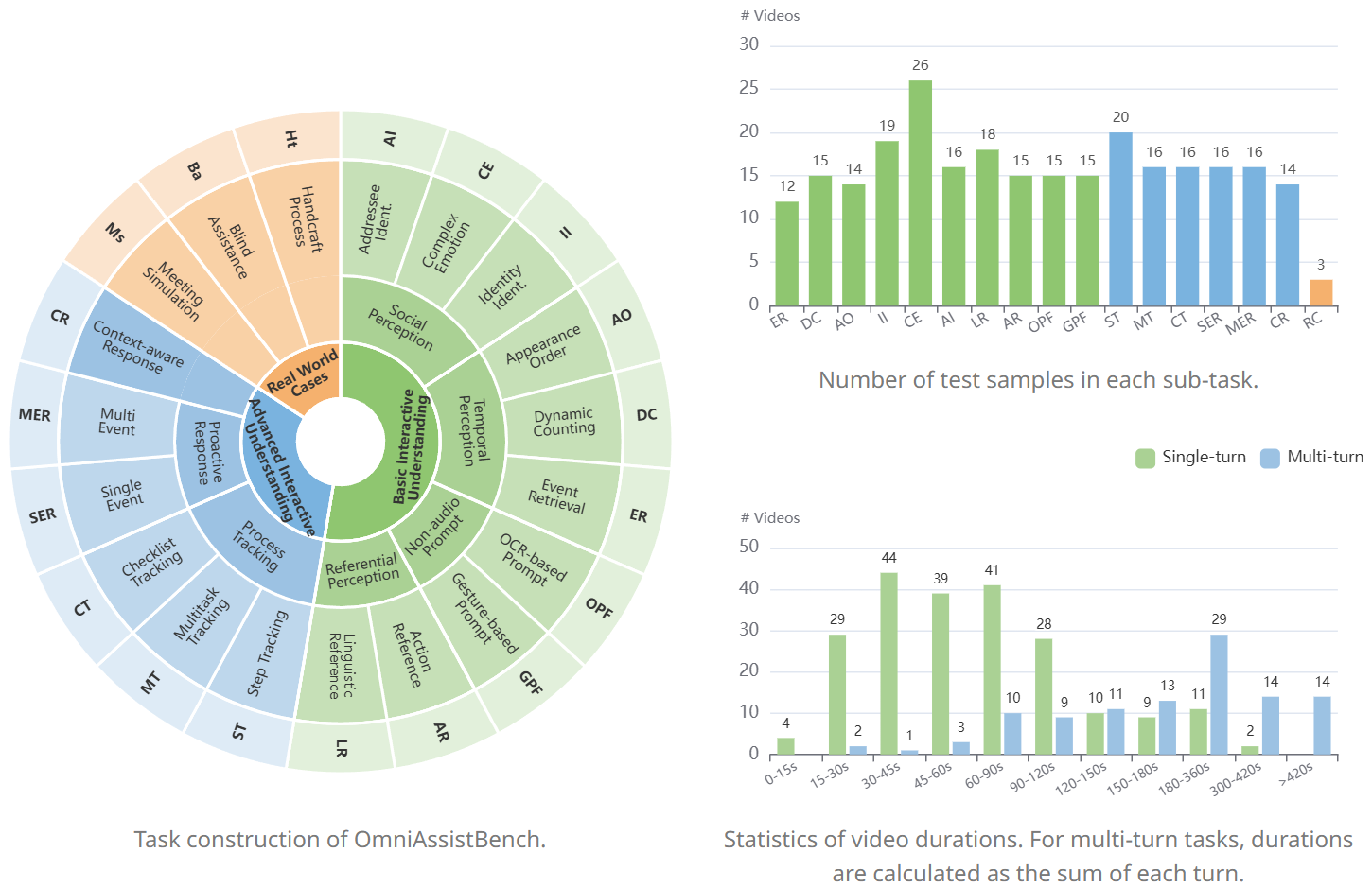
Task construction and statistics of OmniAssistBench.
-
🟢 Basic Tier: Core perception ablities that are necessary especially in interactive situations (e.g., social understanding, temporal perception, and gesture-based prompts).
-
🔵 Advanced Tier: Higher-level, user goal-driven interactive tasks derived from common applications (e.g., procedural guidance and proactive response).
<details>
<summary>
Click here for the examples of typical tasks in OmniAssistBench.</summary>
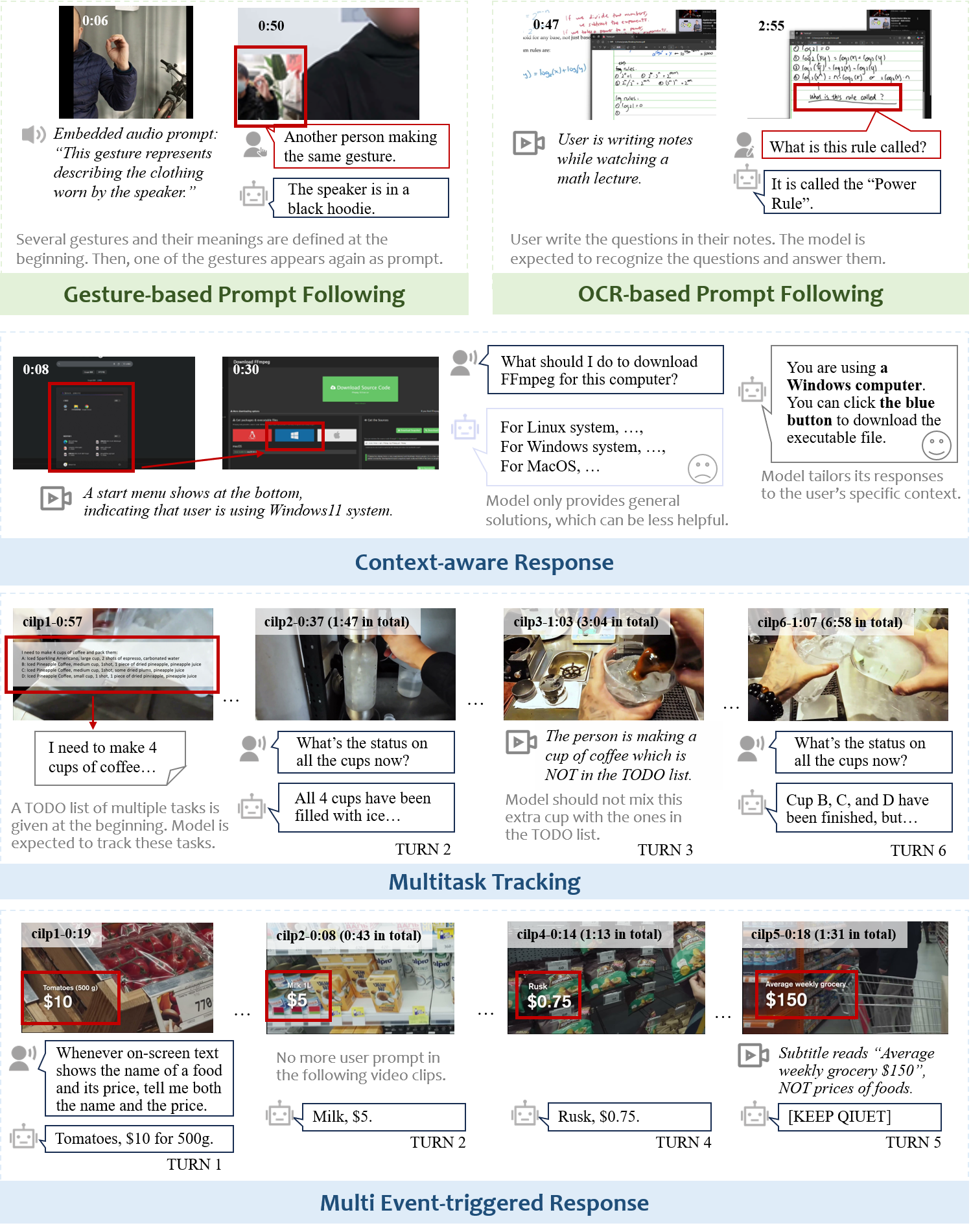
Examples of typical tasks in OmniAssistBench.
</details>
<details>
<summary>
Click here for the key plots of the real world cases filmed by our team. Each case is sepcially designed to cover a set of ablities evaluated in the benchmark.</summary>
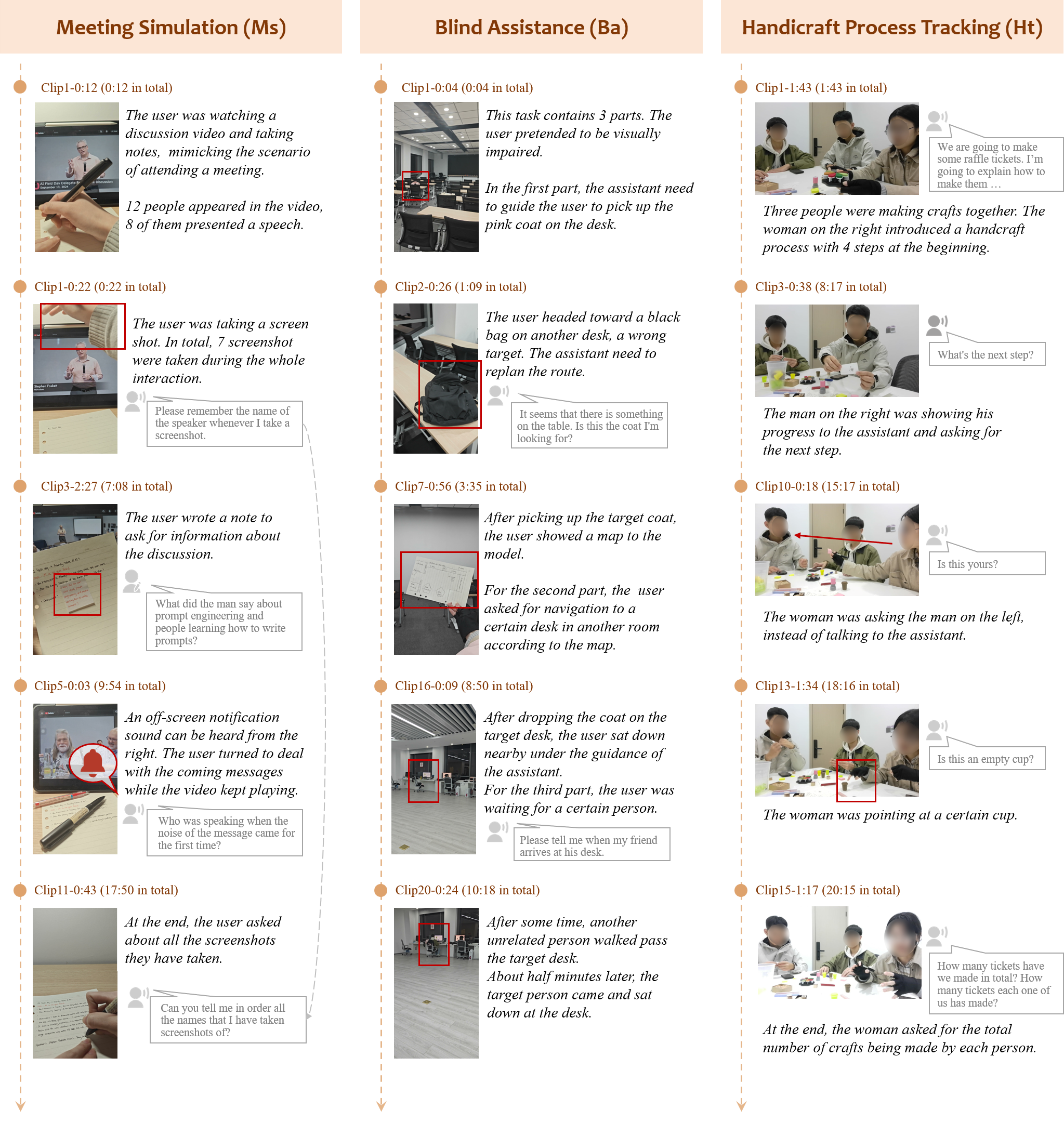
Examples of key plots and questions from the three Real World Cases.
</details>
📊 Dataset Highlights
- 📈 Scale: 685 open-ended question-answer pairs covering 7 major task types and 16 fine-grained tasks. Video domains cover common daily topics such as sports, cooking, lectures, DIYs, and talk shows.
- 🎥 Custom-Filmed Real-World Cases: We design and film 3 cases with an average of over 15 interaction turns. Each case specifically targets the combinations of a group of the abilities evaluated in our benchmark to reflect genuine assistant usage.
- 🔊 Naturally Embedded Prompts: Unlike traditional benchmarks with text-only prompts, all user questions are embedded directly into the videos as realistic audio or typing/handwriting.
- ⏳ High Quality & Effort: Creating the dataset required careful choices of source videos and heavy video editing to balance video length and to embed the user prompts. Every sample was rigorously annotated by human experts. It takes 1000+ expert-hours to build the benchmark.
🏆 Leaderboard
OmniAssistBench requires candidate models to be capable of processing videos along with the corresponding audios. All models are graded using our LLM-as-a-Judge pipeline on a 0 - 5 scale. Reported scores have been normalized to 0-100.
| # | Model | Size | Frames | Basic Tier | Advanced Tier | Real Cases | Overall (/100) |
|---|---|---|---|---|---|---|---|
| 1 | Gemini-3-Pro 🥇 | - | - | 63.6 | 68.2 | 68.0 | 66.4 |
| 2 | Gemini-2.5-Pro 🥈 | - | - | 65.4 | 66.4 | 44.8 | 64.6 |
| 3 | Doubao-Seed-2.0-lite 🥉 | - | 1fps | 53.2 | 62.1 | 35.5 | 57.3 |
| 4 | MiMo-V2-Omni | - | 1fps | 53.6 | 55.2 | 41.0 | 53.8 |
| 5 | Qwen3.5-Omni-Plus | - | 1fps | 41.6 | 57.8 | 50.6 | 51.6 |
| 6 | Qwen3-Omni-Instruct | 30B-A3B | 1fps | 46.4 | 53.8 | 53.8 | 51.2 |
| 7 | MiniCPM-o-4.5 | 9B | 1fps | 44.6 | 47.8 | 37.8 | 46.0 |
| 8 | Baichuan-Omni-1.5 | 7B | 32 | 45.0 | 41.8 | 44.8 | 43.2 |
| 9 | Qwen2.5-Omni | 7B | 1fps | 37.0 | 46.6 | 45.2 | 43.2 |
| 10 | MiniCPM-o-2.6 | 8B | 1fps | 41.8 | 40.2 | 31.2 | 40.2 |
| 11 | VITA-1.5 | 7B | 4 | 24.6 | 25.8 | 14.6 | 24.6 |
OmniAssistBench is highly challenging. Current evaluations show that although most models can understand what to do, they struggle to provide correct and comprehensive responses.
📍Evaluation Pipeline
Our evaluation process is standardized into three steps:
1. Get Model Response: Because inference processes vary across different model, the exact evaluation code depends on the model. The result should be saved as a CSV file including two columns: video_name and output_text.
Key point is to include the following system prompt:
You are a helpful video assistant. For the above input video(s), if you decide to output, organize your output as if you are directly talking
to the user. Otherwise, if you decide to keep quiet, output exactly "[KEEP QUIET]".
We provide two example scripts of evaluating Gemini3 Pro via API and evaluating Qwen3-Omni via local inference. Please refer to the comments for handling multi-turn test samples:
2. LLM-as-a-Judge Scoring: We utilize an advanced LLM as a judge to grade the model's output_text from 0 to 5. The output of this step is a CSV file containing the video_name, video_class, and score.
Here is a brief summary of what each score represents. Please refer to score_rubric.txt for the detailed scoring criteria.
| Score | Criteria Summary |
|---|---|
| 5 | Excellent: Semantically correct and comprehensive. |
| 4 | Good: Mostly correct and comprehensive, but with minor errors. |
| 3 | Partial: Mostly correct but missing key points. |
| 2 | Hallucinated: Comprehends the user's intent, but gives incorrect answer. |
| 1 | Related: Fails to comprehend the user's intent, and gives responses loosely related to the video. |
| 0 | Failure: Fails to comprehend the user's intent, and gives unrelated responses. |
An example judgment script using GPT-5 is provided in/score.py.
3. Calculate Task Averages: Once the grading is complete, you can aggregate the results to see how the model performs across different tasks. We provide a script (/score_cont.py) that reads the judgment CSV and automatically calculates the average scores at sub-task level, major-task level and tier-level.
Citation
If you find this work helpful, please consider citing our paper:
BibTeX:
@misc{sun2026omniassistbench,
      title={OmniAssistBench: Assistant-style Interaction Benchmark for Omni-LLMs},
      author={Xianyun Sun and Chaoyou Fu and Zhengye Zhang and Feiyang Duan and Qingyuan Cao and Yonghui Niu and Sihang Yuan and Ge Zhang and Caifeng Shan},
      year={2026},
      eprint={2608.21360},
      archivePrefix={arXiv},
      primaryClass={cs.CV},
      url={https://arxiv.org/abs/2608.21360},
}