

Repository
ZoFiles
Connect Claude (or other AI agents) to your Zotero library. ZoFiles turns your Zotero library into an agent-readable filesystem — mirroring your collection hierarchy as real direct · License MIT · Install via npm · Maintenance unknown
- License
- MIT
- Setting
- Description
- Export Root
- Directory where the paper tree is created
- Folder Format
- Paper folder naming template
Specs
- SettingDescription
- Export RootDirectory where the paper tree is created
- Folder FormatPaper folder naming template
- PDF ModeSymlink (saves space) or Copy (standalone)
- CollectionsChoose which collections to export
- Auto SyncAuto-export on library changes
- Link BackCreate linked attachments in Zotero
- Cache PathCache for downloaded content
- ContentDescription
- PDFSymlink or copy of the PDF attachment
- Paper MarkdownFull-text conversion via arxiv2md.org
- Kimi ReviewAI-generated summary from papers.cool
- BibTeXCitation data from arXiv
- Zotero NotesYour notes, converted to Markdown
- arXiv ID filePlain text arXiv identifier
- TokenExample
- {arxivId}2311.10702
- {title}Attention Is All You Need
- {firstAuthor}Vaswani
- {year}2017
README
ZoFiles



Connect Claude (or other AI agents) to your Zotero library.
ZoFiles turns your Zotero library into an agent-readable filesystem — mirroring your collection hierarchy as real directories, with per-paper folders containing Markdown, BibTeX, AI reviews, and more. Paired with a built-in Claude Code skill, it lets Claude read, summarize, cite, and compare your papers directly.
Quick Start
Requirements: Zotero 7+ • macOS / Linux (symlink mode) or Windows (copy mode) • Papers with arXiv IDs
- Install — Download the latest
.xpifrom Releases. In Zotero: Tools > Add-ons > gear icon > Install Add-on From File. Restart Zotero. - Configure — Go to Zotero > Settings > ZoFiles. Set your Export Root directory and choose which collections/content to export.
- Export — Click Rebuild at the bottom of the settings panel. Your paper tree will appear in the export root.
After the initial export, ZoFiles auto-syncs — any add, modify, move, or delete in Zotero updates the export automatically.
Features
- Collection mirroring — Zotero's collection tree becomes a real directory tree
- Per-paper folders — Each paper gets its own folder (default:
{arxivId} - {title}) - Auto-sync — Event-driven export on any library change
- Rich content per paper:
paper.pdf— Symlink or copy of the PDF attachmentpaper.md— Full-text Markdown via arxiv2md.orgkimi.md— AI-generated review from papers.coolpaper.bib— BibTeX citation from arXivarxiv.id— Plain text arXiv identifiernotes/*.md— Zotero notes converted to Markdown
- Link back — Optionally create linked attachments in Zotero pointing to exported files
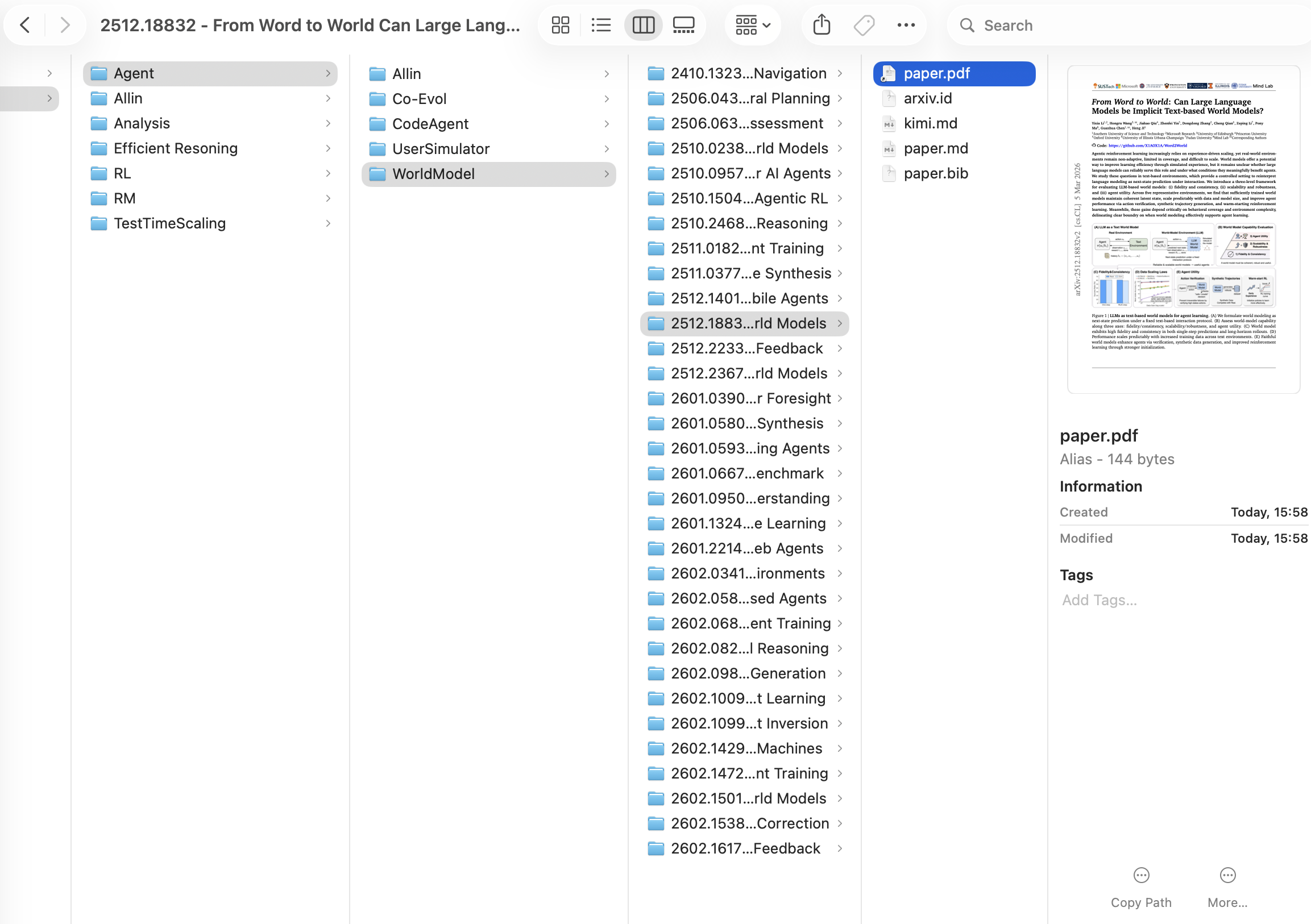
See a real exported paper folder:
docs/example/— Attention Is All You Need with PDF, Markdown, BibTeX, Kimi review, and notes.
Exported File Structure
<export_root>/
├── Machine Learning/
│   ├── Transformers/
│   │   ├── 1706.03762 - Attention Is All You Need/
│   │   │   ├── paper.pdf        → symlink to Zotero storage
│   │   │   ├── paper.md         # full-text Markdown
│   │   │   ├── kimi.md          # AI review
│   │   │   ├── paper.bib        # BibTeX
│   │   │   ├── arxiv.id         # "1706.03762"
│   │   │   └── notes/
│   │   │       └── My Notes.md
│   │   └── 2311.10702 - Another Paper/
│   │       └── ...
│   └── Allin/                   # flat view: ALL papers from this + descendant collections
│       └── ...
└── Computer Vision/
    └── ...
Claude Code Skills
ZoFiles ships with two Claude Code skills (in .claude/skills/) that activate automatically when you talk to Claude about papers.
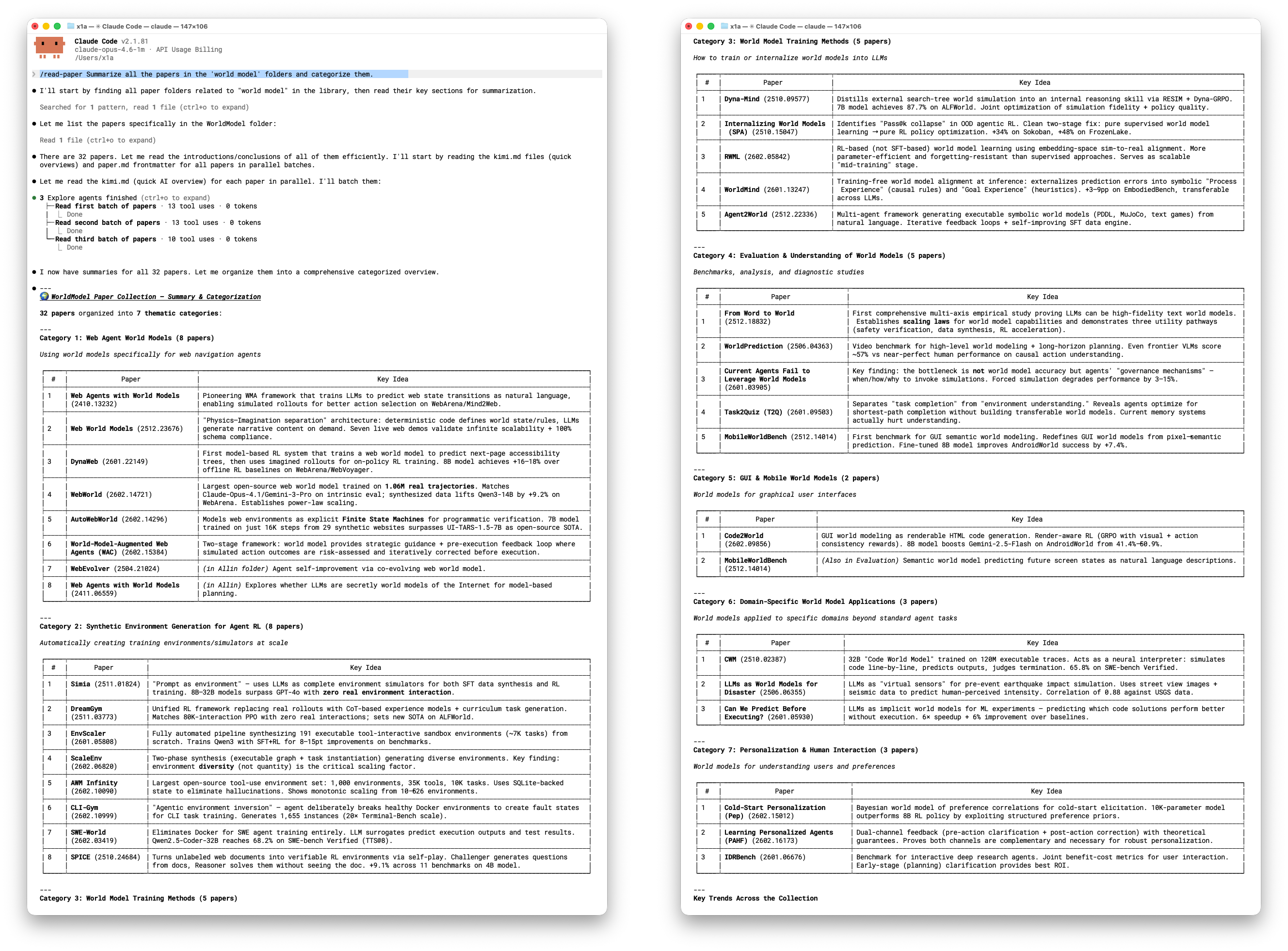
read-paper — Read, Summarize & Cite
First-time setup:
> My ZoFiles library is at /Users/me/Papers/
> Update paper library directory structure
Then just ask:
> Read the paper 2512.18832
> Summarize the papers in Agent/WorldModel/
> Compare 2301.04104 and 2305.14078
> Give me the BibTeX for Attention Is All You Need
zotero-connector — Import arXiv Papers
Requires Zotero running locally and Python 3.8+.
> Import paper 2301.07041 into Zotero
> Batch import 2301.07041 2310.06825 1706.03762
> Import 2301.07041 into my "LLM Papers" collection
Accepts any arXiv ID format: 2301.07041, 2301.07041v2, https://arxiv.org/abs/2301.07041, arXiv:2301.07041.
Configuration
All settings are in Zotero > Settings > ZoFiles.
| Setting | Description | Default |
|---|---|---|
| Export Root | Directory where the paper tree is created | (must be set) |
| Folder Format | Paper folder naming template | {arxivId} - {title} |
| PDF Mode | Symlink (saves space) or Copy (standalone) | Symlink |
| Collections | Choose which collections to export | All |
| Auto Sync | Auto-export on library changes | On |
| Link Back | Create linked attachments in Zotero | Off |
| Cache Path | Cache for downloaded content | ~/.cache/ZoFiles |
<details>
<summary><strong>Content toggles</strong></summary>
| Content | Description | Default |
|---|---|---|
| Symlink or copy of the PDF attachment | On | |
| Paper Markdown | Full-text conversion via arxiv2md.org | On |
| Kimi Review | AI-generated summary from papers.cool | On |
| BibTeX | Citation data from arXiv | On |
| Zotero Notes | Your notes, converted to Markdown | On |
| arXiv ID file | Plain text arXiv identifier | On |
</details>
<details>
<summary><strong>Folder format tokens</strong></summary>
| Token | Example |
|---|---|
{arxivId} |
2311.10702 |
{title} |
Attention Is All You Need |
{firstAuthor} |
Vaswani |
{year} |
2017 |
</details>
<details>
<summary><strong>Rebuild modes</strong></summary>
- Rebuild (default) — Incremental. Only exports new/changed items and removes stale ones. Fast when most items are already exported.
- Force Full Rebuild — Deletes the entire export directory and re-exports everything from scratch. Use if the export gets into a broken state.
Both modes benefit from the download cache (~/.cache/ZoFiles/). Network content is cached on first download, so even a full rebuild is fast the second time.
</details>
Backup Your Data
ZoFiles is read-only with respect to your Zotero library (unless you enable "Link back"). We still recommend backing up your Zotero data directory before first use — find it at Zotero > Settings > Advanced > Files and Folders.
Disclaimer: ZoFiles is provided as-is, without warranty. The authors are not responsible for any data loss. Use at your own risk.
<details>
<summary><strong>FAQ</strong></summary>
Q: What happens to papers without arXiv IDs?
A: They are silently skipped. ZoFiles only exports papers with valid arXiv identifiers.
Q: Can I use this on Windows?
A: Yes, but set PDF mode to "Copy". Symlinks on Windows require elevated permissions.
Q: How do I trigger a full re-export?
A: Settings > ZoFiles > "Rebuild" (incremental) or "Force Full Rebuild" (clean start).
Q: Does this modify my Zotero library?
A: Only if you enable "Link back to Zotero". Otherwise, ZoFiles is read-only.
Q: What if arxiv2md.org is down?
A: Markdown export fails gracefully. Other content (PDF, BibTeX, notes) still exports. Cached content is unaffected.
Q: Does the Claude Code skill work with other AI agents?
A: The exported format is plain Markdown and BibTeX — any agent that can read files can use it. The bundled skill is designed for Claude Code, but the file structure is agent-agnostic.
</details>
<details>
<summary><strong>Development</strong></summary>
Prerequisites
Setup
git clone https://github.com/X1AOX1A/ZoFiles.git
cd ZoFiles
npm install
cp .env.example .env    # edit with your Zotero path
Dev Mode & Build
npm start              # dev server with hot reload
npm run build          # production .xpi → .scaffold/build/
Project Structure
ZoFiles/
├── addon/                          # Static plugin resources
│   ├── manifest.json               # WebExtension manifest
│   ├── bootstrap.js                # Lifecycle entry
│   ├── prefs.js                    # Default preference values
│   ├── locale/                     # Localization (en-US, zh-CN)
│   └── content/
│       └── preferences.xhtml       # Settings panel UI
├── src/                            # TypeScript source
│   ├── index.ts                    # Entry point
│   ├── hooks.ts                    # Lifecycle hooks
│   └── modules/
│       ├── notifier.ts             # Zotero event listener
│       ├── exporter.ts             # Export orchestrator + queue
│       ├── tree-builder.ts         # Collection → directory mapping
│       ├── arxiv-id.ts             # arXiv ID extraction
│       ├── preferences.ts          # Settings panel logic
│       ├── utils.ts                # Filesystem utilities
│       └── content-providers/      # Pluggable content generators
├── .claude/skills/                 # Claude Code skills
│   ├── read-paper/
│   └── zotero-connector/
└── package.json
How It Works
- Event listener — Registers a
Zotero.Notifierobserver for item, collection, and collection-item events - arXiv ID extraction — Extracts arXiv ID from multiple fields (archiveID > DOI > URL > extra)
- Collection tree mapping — Builds the filesystem tree from Zotero's collection hierarchy
- Content providers — Runs each enabled provider (PDF, Markdown, BibTeX, etc.) to populate paper folders
- Caching — Downloaded content is cached to
~/.cache/ZoFiles/to avoid redundant API calls - Index tracking —
.zofiles-index.jsonenables efficient incremental updates
API Rate Limits
- arxiv2md.org: 30 requests/minute (built-in rate limiter)
- papers.cool (Kimi): No strict limit, responses ~2-5s
- arxiv.org (BibTeX): Standard rate limits apply
</details>
Credits
- Built with zotero-plugin-template by windingwind
- Full-text Markdown via arxiv2md.org
- AI reviews via papers.cool (Kimi)