

Repository
MMLVE
Thinking on Shots: Consistent Multi-Shot Video Editing with Agentic Reasoning<sup>*</sup> <sup>2,†</sup>, Binyuan Huang<sup>2</sup>, Xinlong Sun<sup>2,‡</sup>, Xi Chen<sup>2</s · License MIT · Install via pip · Maintenance unknown
- License
- MIT
- Purpose
- Variable
- Text / vision / image
- OPENAI_API_KEY
- Video editing (V2V)
- BYTEPLUS_API_KEY
Specs
- PurposeVariable
- Text / vision / imageOPENAI_API_KEY
- Video editing (V2V)BYTEPLUS_API_KEY
- FlagDefault
- --videorequired
- --promptrequired
- --workspace./workspace
- --dev-modeoff
- --scene-modehybrid
- --scene-threshold27.0
- --scene-min-len8
- --extract-fps8.0
- --max-concurrency2
- --no-resumeoff
- --no-keyframe-edit-qaoff
- --no-mask-visibility-prefilteroff
- --log-filenone
- VariableDefault
- VIDEO_MODELseedance-1-5-pro-251215
- VIDEO_RESOLUTIONauto
- VIDEO_POLL_TIMEOUT1000
- VIDEO_CHUNK_MAX_SEC10
- KEYFRAME_EDIT_QAtrue
- VIDEO_EDIT_QAtrue
- SCENE_DETECT_MODEenhanced
- SCENE_DETECT_THRESHOLD22
- LLM_MAX_VISION_IMAGES8
- SymptomFix
- OPENAI_API_KEY is not setsource env.example.sh after filling in the key
- BYTEPLUS_API_KEY is not setRequired for real video output; or use --dev-mode
- No module named 'scenedetect'pip install -r requirements.txt
- ffprobe not foundInstall ffmpeg and ensure it is on PATH
- Target entity not found in a shotMake the prompt more specific (colour, position, clothing)
- Video task times outRaise VIDEO_POLL_TIMEOUT , or lower VIDEO_CHUNK_MAX_SEC
- Want to redo a runDelete the workspace, or pass --no-resume
README
MMLVE-Agent
Thinking on Shots: Consistent Multi-Shot Video Editing with Agentic Reasoning<sup>*</sup>
Chenyang Wu<sup>1,†</sup>, Fuchen Long<sup>2,†</sup>, Binyuan Huang<sup>2</sup>, Xinlong Sun<sup>2,‡</sup>, Xi Chen<sup>2</sup>, Chun-Le Guo<sup>1</sup>, Chongyi Li<sup>1,§</sup>
<br/><sup>1</sup>VCIP, CS, Nankai University <sup>2</sup>Smart Creation Platform Department, Online Video BU, Tencent
<br/><sup>*</sup>Work done during the Tencent Qingyun Program internship.
<br/><sup>†</sup>These authors contributed equally. <sup>‡</sup>Project Leader. <sup>§</sup>Corresponding Author.




Edit real-world multi-shot long videos with a single natural-language instruction.
The agent understands who and what to change, tracks the target entity across every
shot, and propagates a consistent edit through the whole video — preserving
identity, background, and camera motion.
Example:
"Change the man's red shirt to blue"→ every shot containing that
man is edited, other people and objects stay untouched.
Overview
While generative AI has greatly advanced video editing, existing methods focus on
single-shot or short clips. Editing long videos with multiple instructions
is far harder: naive fixed-duration chunking causes entity fragmentation, severe
editing hallucinations, and broken temporal continuity.
This project introduces the Multi-Instruction Multi-Shot Long-Video Editing
(MMLVE) task, built around three core objectives:
- CSEC — Cross-Shot Editing Consistency: keep the edited entity's identity
consistent across all shots. - MID — Multi-Instruction Decoupling: execute diverse instructions
independently, without mutual interference. - ZDSS — Zero-Destruction on Spatiotemporal Structure: leave un-targeted
regions, backgrounds, and camera motion untouched.
To tackle these, MMLVE-Agent is a heterogeneous multi-agent framework that
combines LLMs and VLMs for shot-level video decoupling and precise
instruction parsing. Two key mechanisms drive its quality:
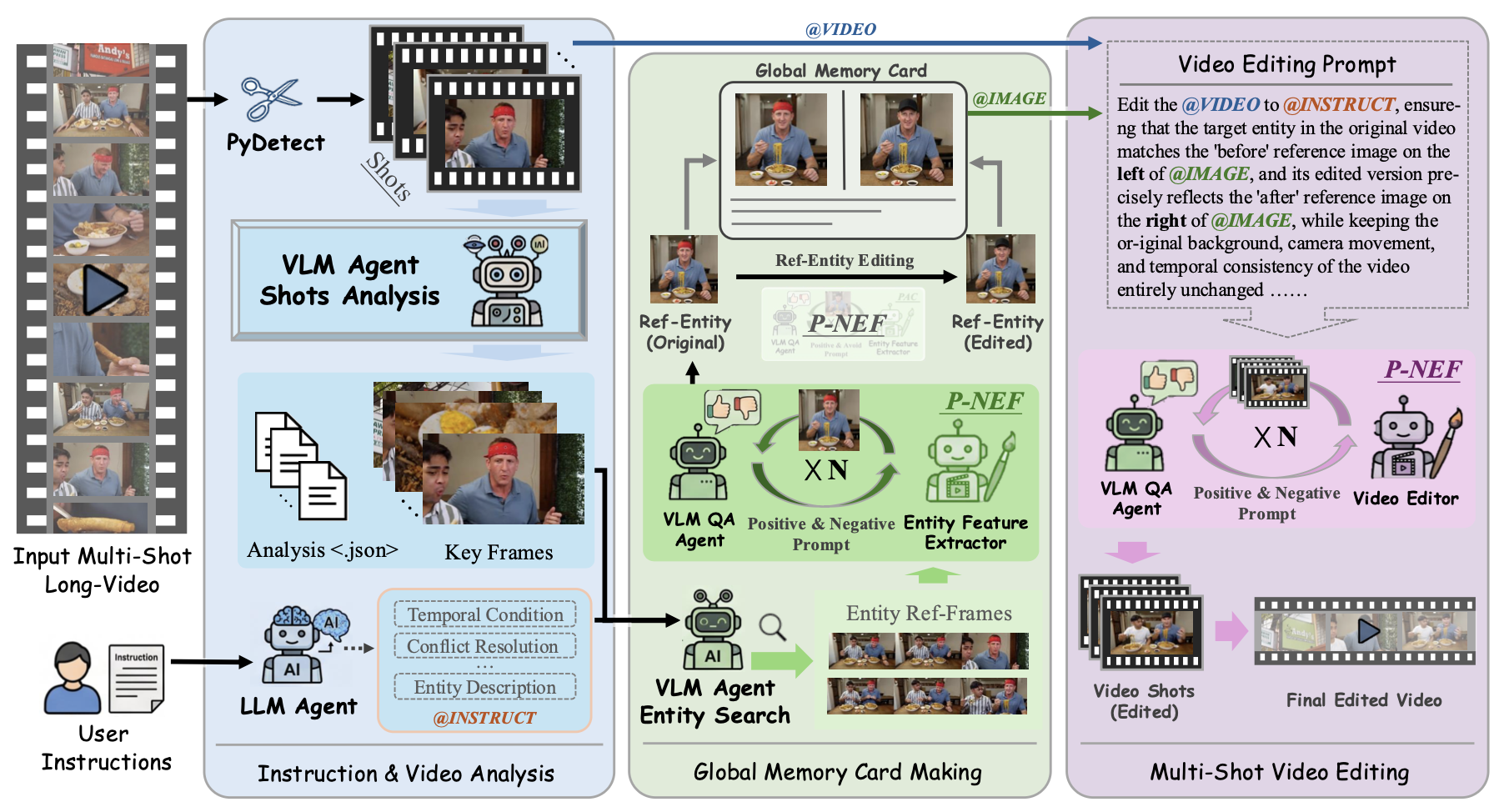
- Global Memory Card — a global visual editing anchor (a top-k keyframe
reference grid synthesized into a canonical reference) that guarantees CSEC & MID
across arbitrary physical shots. - Pos-Neg Editing Feedback (P-NEF) — a VLM evaluator emits both a negative
prompt (to correct errors) and a positive prompt (to balance attention), enabling
autonomous self-correction and monotonic quality improvement.
We further build MMLVE-Bench, a dataset with complex real-world spatiotemporal
dynamics, high-density heterogeneous instructions, and sparse/random entity
distributions, and evaluate with three MMLVE-focused metrics (CSEC / MID / ZDSS).
Extensive experiments show MMLVE-Agent outperforms closed-source SOTA approaches
(e.g., Seedance 2.0), eliminating editing hallucinations while preserving cross-shot
consistency and seamless spatiotemporal transitions.
Framework
The full pipeline: shot boundary detection + LLM instruction parsing → per-shot VLM
analysis → Global Memory Card making (with P-NEF) → reference-guided video editing &
propagation → assembly.
Results
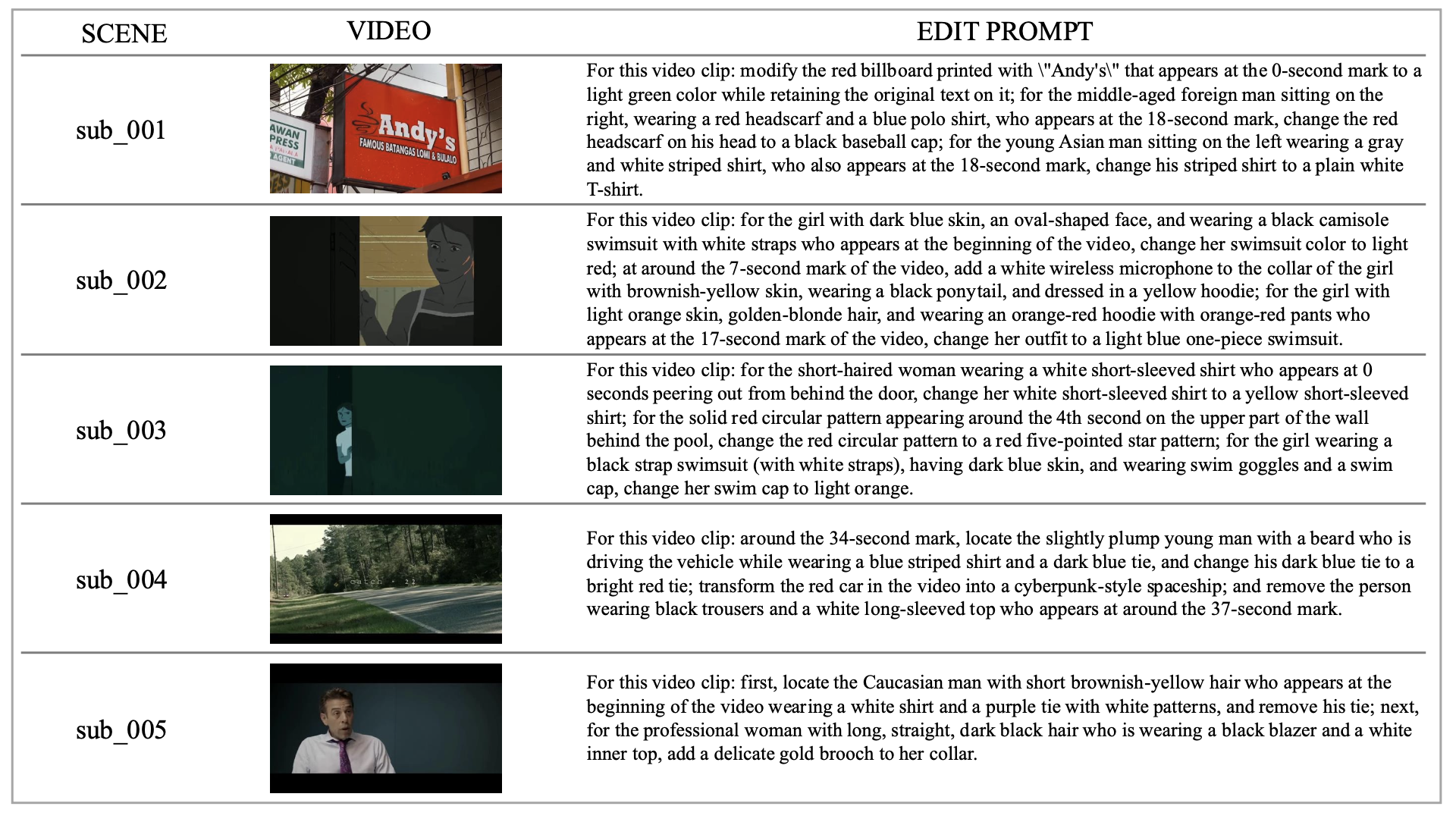
Qualitative editing results of MMLVE-Agent on complex multi-shot long videos:
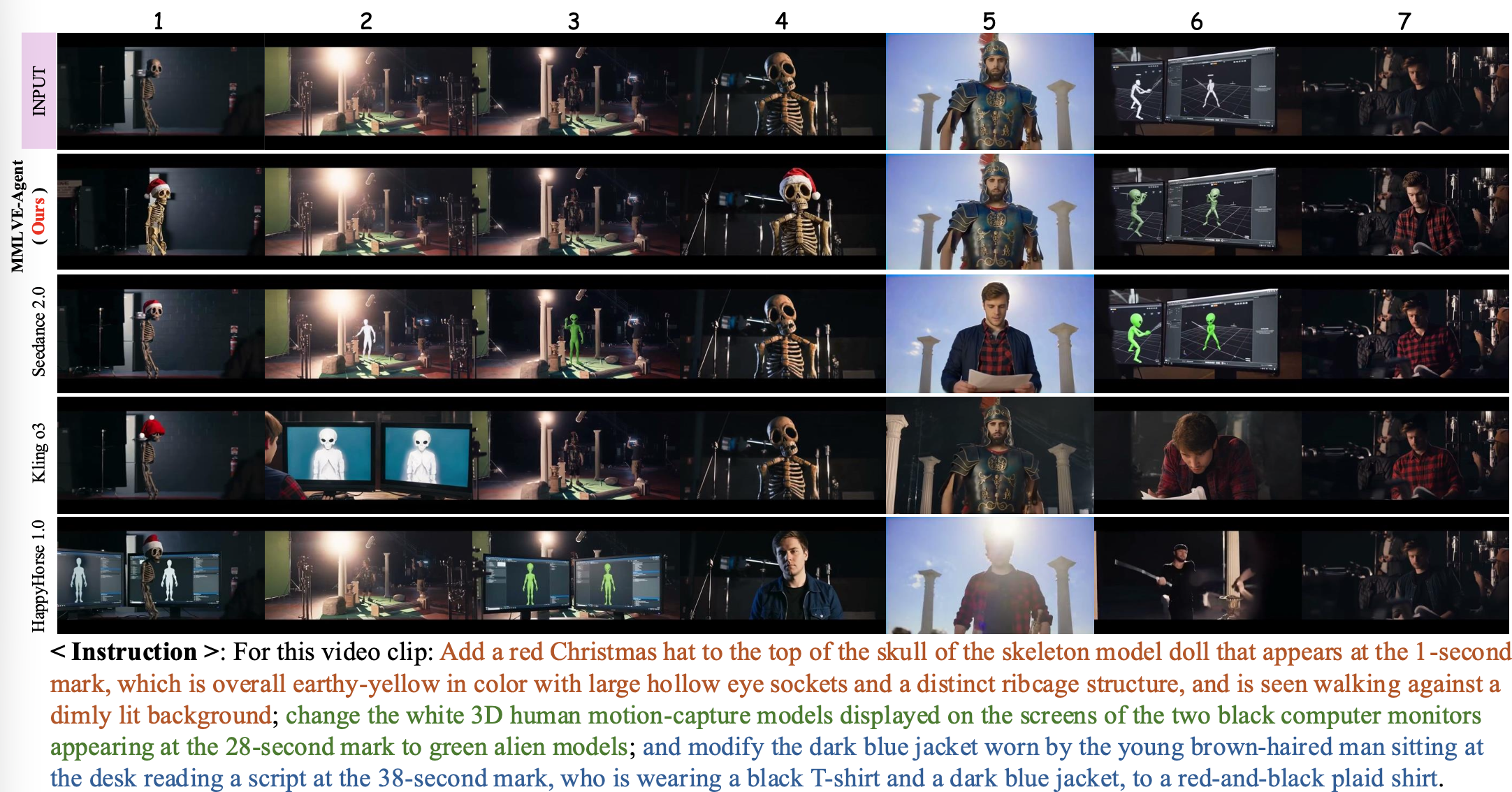
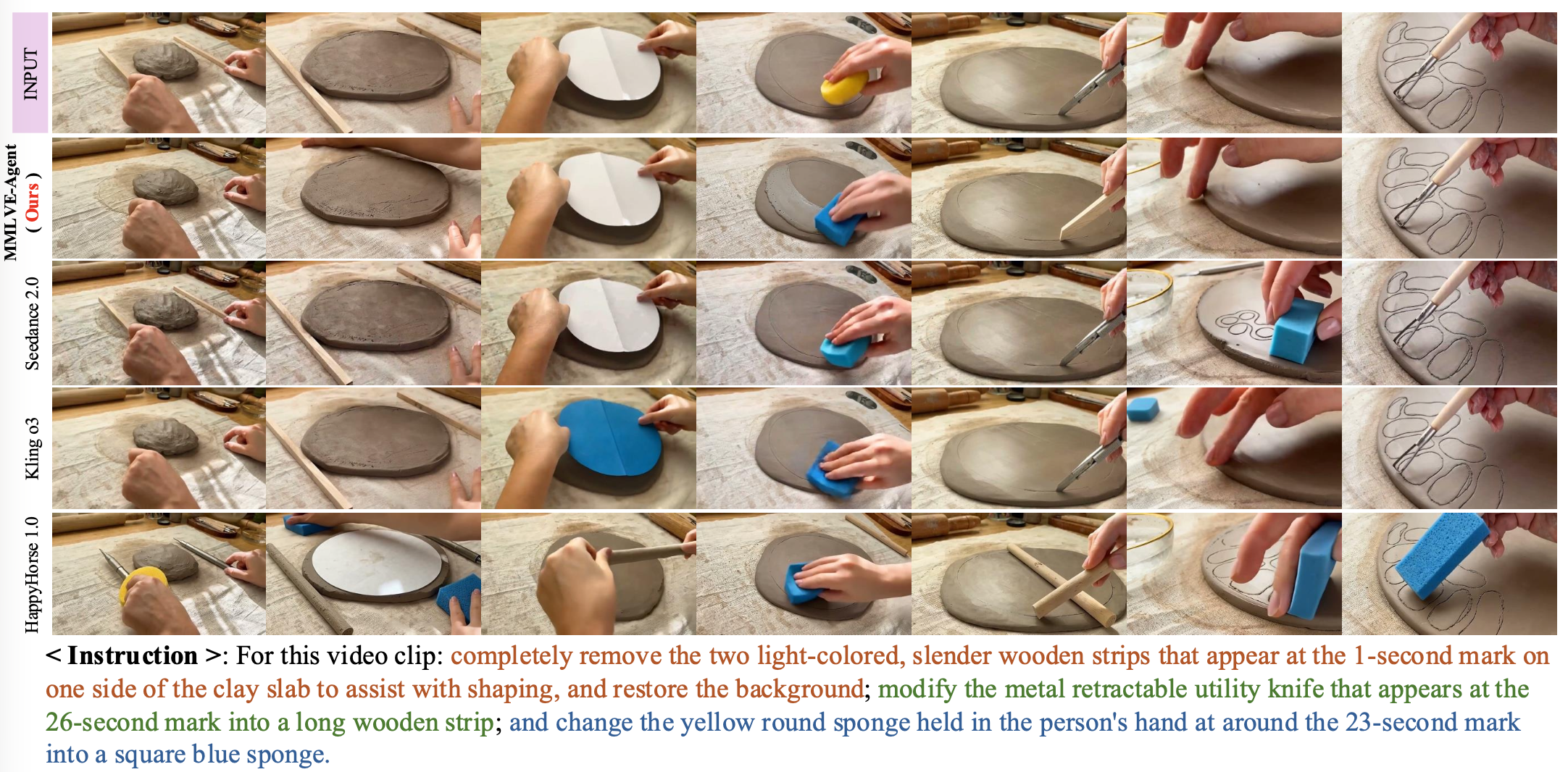
Comparison against baseline models (Seedance 2.0, Kling o3, HappyHorse 1.0). Only
MMLVE-Agent simultaneously achieves CSEC, MID, and ZDSS — baselines suffer from
cross-shot "amnesia", identity morphing, and destruction of un-targeted content:
How It Works
Input video + natural-language prompt
    ↓
Module 1  Instruction parsing
          NL → structured edits (entity, action, time condition)
          → entity_instru.json
    ↓
Module 2  Video grounding
          Shot/scene cut detection (PySceneDetect)
          + per-shot VLM analysis (plot, keyframes, missed sub-cuts)
          + event grounding: which scenes match the time condition
          → time_instru.json, shots_analysis.json
    ↓
Module 3  Entity reference building
          Pick the best keyframe sightings of the target entity
          → synthesize a clean front-view reference
          → apply the edit to that reference (the "canonical" before/after pair)
          → entity_refs/
    ↓
Module 4  Video editing & propagation
          Per scene: derive the edit operation, run reference-guided V2V editing,
          then VLM quality check on keyframe grids (retry on failure)
          → edited_clips/
    ↓
Module 5  Assembly
          ffmpeg stitch + audio mux → final_output.mp4
Every module writes checkpoints to the workspace, so re-running the same command
resumes instead of redoing paid API calls.
Setup
1. Prerequisites
- Python 3.10+
- ffmpeg (
ffmpegandffprobeonPATH)
brew install ffmpeg        # macOS
sudo apt install ffmpeg    # Ubuntu
2. Install dependencies
pip install -r requirements.txt3. Configure API keys
Copy the template and fill in your own keys — all API values ship empty:
cp env.example.sh env.sh # then edit env.shTwo backends are required:
| Purpose | Variable | Where to get it |
|---|---|---|
| Text / vision / image | OPENAI_API_KEY |
Any OpenAI-compatible provider |
| Video editing (V2V) | BYTEPLUS_API_KEY |
BytePlus ModelArk console |
The LLM side speaks the standard OpenAI chat/completions protocol, so you can
point it at whichever provider you prefer:
# OpenAI
export OPENAI_API_KEY="sk-..."
export OPENAI_BASE_URL="https://api.openai.com/v1/chat/completions"
export LLM_TEXT_MODEL="gpt-4o-mini"
export LLM_VISION_MODEL="gpt-4o-mini"
export LLM_IMAGE_MODEL="gpt-image-1"

# Google Gemini (OpenAI-compatible endpoint)
export OPENAI_API_KEY="AIza..."
export OPENAI_BASE_URL="https://generativelanguage.googleapis.com/v1beta/openai/chat/completions"
export LLM_TEXT_MODEL="gemini-2.5-pro"
export LLM_VISION_MODEL="gemini-2.5-pro"
export LLM_IMAGE_MODEL="gemini-2.5-flash-image"
The image model must support image editing / inpainting with reference
images, otherwise keyframe editing quality will degrade.
Quick Start
cd /path/to/MMLVE-Agent
source env.example.sh

python -m video_editing_agent.run_agent \
  --video /path/to/input.mp4 \
  --prompt 'Change the man in the red shirt into a blue shirt' \
  --workspace ./workspace/run_001
Result: ./workspace/run_001/final_output.mp4
Try it without spending API credits
python -m video_editing_agent.run_agent \
  --video input.mp4 --prompt 'test' --workspace ./workspace/dev --dev-mode
--dev-mode skips all paid API calls and uses local placeholders — useful for
validating the pipeline, scene detection, and workspace layout.
CLI Options
| Flag | Default | Description |
|---|---|---|
--video |
required | Input video path |
--prompt |
required | Natural-language edit instruction |
--workspace |
./workspace |
Output directory for artifacts and the final video |
--dev-mode |
off | Skip all paid API calls (local placeholders) |
--scene-mode |
hybrid |
Shot detector: content, adaptive, hybrid |
--scene-threshold |
27.0 |
Lower = more cuts detected |
--scene-min-len |
8 |
Min frames between cuts |
--extract-fps |
8.0 |
Frame extraction FPS |
--max-concurrency |
2 |
Parallel scene edits |
--no-resume |
off | Re-run all modules, ignoring checkpoints |
--no-keyframe-edit-qa |
off | Disable VLM quality check after keyframe editing |
--no-mask-visibility-prefilter |
off | Check every instruction on every frame |
--log-file |
none | Also write logs to a file |
Workspace Layout
workspace/run_001/
├── entity_instru.json          Module 1 — structured edit instructions
├── time_instru.json            Module 2 — scenes matched to the time condition
├── shots_analysis.json         Module 2 — per-shot VLM analysis
├── shots/                      Module 2 — detected shot clips
├── scenes/                     Module 2 — scene frames
├── entity_refs/                Module 3 — entity reference before/after pairs
├── edited_clips/               Module 4 — edited scene clips
└── final_output.mp4            Module 5 — final result
Configuration
All tuning knobs live in env.example.sh. The most useful ones:
| Variable | Default | Description |
|---|---|---|
VIDEO_MODEL |
seedance-1-5-pro-251215 |
Video editing model |
VIDEO_RESOLUTION |
auto | Force 480p / 720p (auto-detected from source) |
VIDEO_POLL_TIMEOUT |
1000 |
Max seconds to wait for one video task |
VIDEO_CHUNK_MAX_SEC |
10 |
Long scenes are edited in chunks of this length |
KEYFRAME_EDIT_QA |
true |
VLM check after keyframe editing |
VIDEO_EDIT_QA |
true |
VLM check after video propagation |
SCENE_DETECT_MODE |
enhanced |
content / adaptive / hybrid / enhanced |
SCENE_DETECT_THRESHOLD |
22 |
Lower = more sensitive cut detection |
LLM_MAX_VISION_IMAGES |
8 |
Max images per vision request |
Troubleshooting
| Symptom | Fix |
|---|---|
OPENAI_API_KEY is not set |
source env.example.sh after filling in the key |
BYTEPLUS_API_KEY is not set |
Required for real video output; or use --dev-mode |
No module named 'scenedetect' |
pip install -r requirements.txt |
ffprobe not found |
Install ffmpeg and ensure it is on PATH |
| Target entity not found in a shot | Make the prompt more specific (colour, position, clothing) |
| Video task times out | Raise VIDEO_POLL_TIMEOUT, or lower VIDEO_CHUNK_MAX_SEC |
| Want to redo a run | Delete the workspace, or pass --no-resume |
Acknowledgements
This project is built on top of the pipeline design of
Soap2Soap — its video analysis,
keyframe consistency, and reference-guided generation ideas laid the foundation
for this agent. Many thanks to the authors for open-sourcing their work.
Citation
If you find this work useful, please consider citing:
@article{wu2026thinking,
  title   = {Thinking on Shots: Consistent Multi-Shot Video Editing with Agentic Reasoning},
  author  = {Wu, Chenyang and Long, Fuchen and Huang, Binyuan and Sun, Xinlong and Chen, Xi and Guo, Chun-Le and Li, Chongyi},
  journal = {arXiv preprint arXiv:2608.26809},
  year    = {2026}
}
License
MIT
Thinking on Shots: Consistent Multi-Shot Video Editing with Agentic Reasoning<sup>*</sup>
1
-
Chenyang Wu <sup>1,†</sup>, Fuchen Long <sup>2,†</sup>, Binyuan Huang<sup>2</sup>, Xinlong Sun<sup>2,‡</sup>, Xi Chen<sup>2</sup>, Chun-Le Guo<sup>1</sup>, Chongyi Li<sup>1,§</sup> <br/><sup>1</sup>VCIP, CS, Nankai University <sup>2</sup>Smart Creation Platform Department, Online Video BU, Tencent <br/><sup>*</sup>Work done during the Tencent Qingyun Program internship. <br/><sup>†</sup>These authors contributed equally. <sup>‡</sup>Project Leader. <sup>§</sup>Corresponding Author.